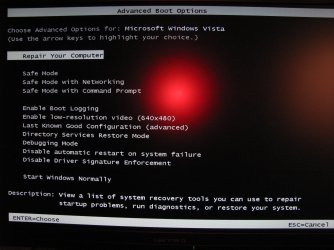
Rafael writes "Today, while in a class, I installed some software in Windows 7. You know, to pass time. A reboot later, I was greeted by a driver-induced bugcheck, making me doubt the whole “Windows Vista applications will work fine on Windows 7” word going around… (but that’s another story)
I already knew what the problem was, so no big deal… I figured I’d just mash F8 a few times and boot up into the Last Known Good Configuration to prevent the culprit driver from loading and be on my way… "
Read on :-
Windows 7 Error Recovery is a punch in the nuts for techies - Within Windows
However Bryant at AeroXperience had a different view of the Recovery process
"got to work today and booted my macbook. Having forgotten that I switched it to boot Windows the night before, I didn’t hold the Option key to boot into Mac OS 10.5 (for work needs. I wouldn’t dare keep it otherwise). I wasn’t paying much attention to what was going on with the screen as I was in the middle of a meeting, but I got back to it after about 5 minutes and came upon the above scene unfolding on my laptop. It was vaguely familiar; Paul Thurrott reminded me later that it’s an offshoot of the Windows Recovery Environment which is now integrated into Windows 7 as opposed to being contained solely on the installation DVD.
The fact that the Windows Recovery Environment (WinRE) would be contained in the Windows 7 installation is nothing new; reviewers covered this after their reviews went live on Windows 7 keynote day at PDC. However, no one has actually seen it work, so here I am.
Yes, it actually works.
In my case, my instance of build 6801 died on an “unknown bugcheck: 12b” which led to WinRE being launched. The recovery mechanism checked for issues, subsequently asked me if I’d like to use system restore to roll back to the last working point, rolled back, and presented me with full details of all of its scans (some of which you’ll see in my quick-n-dirty BlackBerry shots). After all of that, it rebooted and voila, Windows 7!
I didn’t lose Rafael’s BlueBadging either, though Rafael did lose his mind over how irritating this feature might become for techs.
Read on :-
http://www.aeroxp.org/2008/12/windows-7-error-recovery-actually-works/
I already knew what the problem was, so no big deal… I figured I’d just mash F8 a few times and boot up into the Last Known Good Configuration to prevent the culprit driver from loading and be on my way… "
Read on :-
Windows 7 Error Recovery is a punch in the nuts for techies - Within Windows
However Bryant at AeroXperience had a different view of the Recovery process
"got to work today and booted my macbook. Having forgotten that I switched it to boot Windows the night before, I didn’t hold the Option key to boot into Mac OS 10.5 (for work needs. I wouldn’t dare keep it otherwise). I wasn’t paying much attention to what was going on with the screen as I was in the middle of a meeting, but I got back to it after about 5 minutes and came upon the above scene unfolding on my laptop. It was vaguely familiar; Paul Thurrott reminded me later that it’s an offshoot of the Windows Recovery Environment which is now integrated into Windows 7 as opposed to being contained solely on the installation DVD.
The fact that the Windows Recovery Environment (WinRE) would be contained in the Windows 7 installation is nothing new; reviewers covered this after their reviews went live on Windows 7 keynote day at PDC. However, no one has actually seen it work, so here I am.
Yes, it actually works.
In my case, my instance of build 6801 died on an “unknown bugcheck: 12b” which led to WinRE being launched. The recovery mechanism checked for issues, subsequently asked me if I’d like to use system restore to roll back to the last working point, rolled back, and presented me with full details of all of its scans (some of which you’ll see in my quick-n-dirty BlackBerry shots). After all of that, it rebooted and voila, Windows 7!
I didn’t lose Rafael’s BlueBadging either, though Rafael did lose his mind over how irritating this feature might become for techs.
Read on :-
http://www.aeroxp.org/2008/12/windows-7-error-recovery-actually-works/
Last edited:
My Computer
At a glance
Vista X32. Windows 7 32bitIntel Quad Core 66004096 MB Xtreme-Dark 800mhzZotac Amp Edition 8800GT - 512MB DDR3, O/C 70...
- Computer Manufacturer/Model Number
- Self Built
- OS
- Vista X32. Windows 7 32bit
- CPU
- Intel Quad Core 6600
- Motherboard
- Asus P5B
- Memory
- 4096 MB Xtreme-Dark 800mhz
- Graphics Card(s)
- Zotac Amp Edition 8800GT - 512MB DDR3, O/C 700mhz
- Monitor(s) Displays
- Samsung 206BW
- Screen Resolution
- 1680 X 1024
- Hard Drives
- 4 X Samsung 500GB 7200rpm Serial ATA-II HDD w. 16MB Cache .
- PSU
- 550 w
- Case
- Thermaltake
- Cooling
- 3 x octua NF-S12-1200 - 120mm 1200RPM Sound Optimised Fans
- Keyboard
- Microsoft
- Mouse
- Targus
- Internet Speed
- 1500kbs