Windows 7 fallout 3, new game crash. Please help

Strange, the .dll copied should fix that. You sure you copied the .dll?
 

My Computer My Computer

At a glance

Ubuntu 12.10Intel Core i7 720QM4GB RAMNVIDIA GeForce 230M
Computer Manufacturer/Model Number
HP Pavilion dv6-2020ev
OS
Ubuntu 12.10
CPU
Intel Core i7 720QM
Motherboard
Its a HP secret...
Memory
4GB RAM
Graphics Card(s)
NVIDIA GeForce 230M
Sound Card
IDT
Screen Resolution
1366x768
Hard Drives
500 GB
Mouse
HP
Internet Speed
4 Mbps
A crash just before the menu usually means a mod is the culprit, or loading in the wrong order.
What I would do is un-install the game completely. In your --> Documents/My Games/Fallout3 folder, delete the .ini files.

Next, on the disc, or where ever the installer is, set the setup.exe to run in compatability mode for Windows Vista. (Note: This is just to install the game. You will not need to run the game in any compatability modes)
Do not install any unofficial patches, mods, memory tweaks or anything. Just install the vanilla game and launch it.

Test that all works OK. If it does, start adding 1 mod at a time untill you find the culprit.


Also, I would recommend 3 or 4 "must have" utilities for FO3, if you do not have them already:
1- FOSE

And if you have any plans on running mods, even unofficial ones ......
2- Fallout Mod manager
3- BOSS to sort mods correctly
4- FO3 Edit Creates merge patches so that all mods work together well. (only use after load order is correct)

GFWL will not cause any issues with FO3 and Win7 x64. So no need to disable it right now, or at all really.
GFWL doesnt work with Script Extenders, such as FOSE (which I highly recommend using), but .... it bypasses GFWL anyway without any need for extra files.

 

My Computer My Computer

At a glance

Windows 7 Home Premium 64bitIntel Core i7 2700k8GB Mushkin Redline Ridgebacks @1866EVGA GTX570 SC
Computer Manufacturer/Model Number
Custom (Self Build)
OS
Windows 7 Home Premium 64bit
CPU
Intel Core i7 2700k
Motherboard
eVGA P67 SLI
Memory
8GB Mushkin Redline Ridgebacks @1866
Graphics Card(s)
EVGA GTX570 SC
Sound Card
XiFi Titanium HD
Monitor(s) Displays
LG W2453V
Screen Resolution
1920x1080
Hard Drives
Intel 320 80GB -- Intel X25-V 40GB --WD Black 1TB x2 -- WD Blue 640GB
PSU
Seasonic x750
Case
Corsair 600T SE White
Cooling
eVGA Superclocked CPU Cooler
Keyboard
Saitek Cyborg
Antivirus
Kaspersky
Browser
IE
Other Info
LG BD/DVD
A crash just before the menu usually means a mod is the culprit, or loading in the wrong order.
What I would do is un-install the game completely. In your --> Documents/My Games/Fallout3 folder, delete the .ini files.

Next, on the disc, or where ever the installer is, set the setup.exe to run in compatability mode for Windows Vista. (Note: This is just to install the game. You will not need to run the game in any compatability modes)
Do not install any unofficial patches, mods, memory tweaks or anything. Just install the vanilla game and launch it.

Test that all works OK. If it does, start adding 1 mod at a time untill you find the culprit.


Also, I would recommend 3 or 4 "must have" utilities for FO3, if you do not have them already:
1- FOSE

And if you have any plans on running mods, even unofficial ones ......
2- Fallout Mod manager
3- BOSS to sort mods correctly
4- FO3 Edit Creates merge patches so that all mods work together well. (only use after load order is correct)

GFWL will not cause any issues with FO3 and Win7 x64. So no need to disable it right now, or at all really.
GFWL doesnt work with Script Extenders, such as FOSE (which I highly recommend using), but .... it bypasses GFWL anyway without any need for extra files.

Hey wishmaster,

Sorry, but if you had read previous posts you would have seen that he was told to already re-install, using Revo Uninstaller to uninstall, and deleting the Fallout3 save data folder. These mods are to make it work better and don't cause crashes, they solve crashes (I personally use these). Although thank you, your post has reminded me of something very important I forgot, the mod loading order. Thanks!

Btw also, gfwl does cause Fallout 3 to be a bit more prone to crashing, I have personally removed it and it works better than before. And besides, who wants GFWL? :).

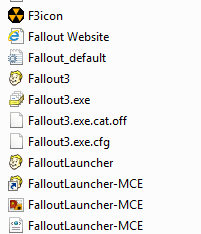
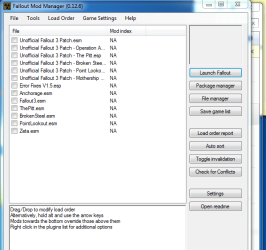
@Zargart - Go to where Fallout 3 is installed (C:/Program Files/Bethesda Softworks/Fallout 3), you should find a folder there called 'fomm'. Inside this folder, you'll find a file called 'fomm.exe'. Run it as an admin. Once it launches, take a screenshot of it, and post it here. Close the window and wait for my response.
 

My Computer My Computer

At a glance

Ubuntu 12.10Intel Core i7 720QM4GB RAMNVIDIA GeForce 230M
Computer Manufacturer/Model Number
HP Pavilion dv6-2020ev
OS
Ubuntu 12.10
CPU
Intel Core i7 720QM
Motherboard
Its a HP secret...
Memory
4GB RAM
Graphics Card(s)
NVIDIA GeForce 230M
Sound Card
IDT
Screen Resolution
1366x768
Hard Drives
500 GB
Mouse
HP
Internet Speed
4 Mbps
OKay, great i will give an update within the day . THank you
 

My Computer My Computer

At a glance

windows 7 home premium 64 bit
OS
windows 7 home premium 64 bit
i tried finding the file fomm, but i do not have it, i didn ot alter the file, with the expection of the patches i installed, i have a screnn shot showing the location of where the file should be.
 

Attachments

  • Fomm.PNG
    Fomm.PNG
    3 KB · Views: 179

My Computer My Computer

At a glance

windows 7 home premium 64 bit
OS
windows 7 home premium 64 bit
Hmm, I thought that one of the mods would have included FOMM. Must have forgotten, sorry. Anyways, download FOMM from here - Fallout mod manager at Fallout 3 Nexus - Fallout 3 Mods and community I suggest you download the file that says 'Old FOMM', thats the one I have experience with, the newer one is for both 3 and New Vegas. Then do as I told you previously once you have FOMM installed.
 

My Computer My Computer

At a glance

Ubuntu 12.10Intel Core i7 720QM4GB RAMNVIDIA GeForce 230M
Computer Manufacturer/Model Number
HP Pavilion dv6-2020ev
OS
Ubuntu 12.10
CPU
Intel Core i7 720QM
Motherboard
Its a HP secret...
Memory
4GB RAM
Graphics Card(s)
NVIDIA GeForce 230M
Sound Card
IDT
Screen Resolution
1366x768
Hard Drives
500 GB
Mouse
HP
Internet Speed
4 Mbps
Very weird

This is strange, i am unable to download this file, and i see nothing that says OLd Fomm, granted it could be my internet connection.
 

My Computer My Computer

At a glance

windows 7 home premium 64 bit
OS
windows 7 home premium 64 bit
In what way are you 'unable'? There is a section with tabs that show comments, pics, videos, ect. including a tab for 'files'. Select that tab, and then you will see the option to download FOMM.
 

My Computer My Computer

At a glance

Ubuntu 12.10Intel Core i7 720QM4GB RAMNVIDIA GeForce 230M
Computer Manufacturer/Model Number
HP Pavilion dv6-2020ev
OS
Ubuntu 12.10
CPU
Intel Core i7 720QM
Motherboard
Its a HP secret...
Memory
4GB RAM
Graphics Card(s)
NVIDIA GeForce 230M
Sound Card
IDT
Screen Resolution
1366x768
Hard Drives
500 GB
Mouse
HP
Internet Speed
4 Mbps
Its strange because i am do anything on the page. I can't select anything, i hit download and nothing happens. as i said it possible a internet problem.
 

My Computer My Computer

At a glance

windows 7 home premium 64 bit
OS
windows 7 home premium 64 bit
You found the link to the Old FOMM at least right?

Try rebooting your router if you thinks its your internet.
 

My Computer My Computer

At a glance

Ubuntu 12.10Intel Core i7 720QM4GB RAMNVIDIA GeForce 230M
Computer Manufacturer/Model Number
HP Pavilion dv6-2020ev
OS
Ubuntu 12.10
CPU
Intel Core i7 720QM
Motherboard
Its a HP secret...
Memory
4GB RAM
Graphics Card(s)
NVIDIA GeForce 230M
Sound Card
IDT
Screen Resolution
1366x768
Hard Drives
500 GB
Mouse
HP
Internet Speed
4 Mbps

My Computer My Computer

At a glance

Windows 7 Home Premium 64bitIntel Core i7 2700k8GB Mushkin Redline Ridgebacks @1866EVGA GTX570 SC
Computer Manufacturer/Model Number
Custom (Self Build)
OS
Windows 7 Home Premium 64bit
CPU
Intel Core i7 2700k
Motherboard
eVGA P67 SLI
Memory
8GB Mushkin Redline Ridgebacks @1866
Graphics Card(s)
EVGA GTX570 SC
Sound Card
XiFi Titanium HD
Monitor(s) Displays
LG W2453V
Screen Resolution
1920x1080
Hard Drives
Intel 320 80GB -- Intel X25-V 40GB --WD Black 1TB x2 -- WD Blue 640GB
PSU
Seasonic x750
Case
Corsair 600T SE White
Cooling
eVGA Superclocked CPU Cooler
Keyboard
Saitek Cyborg
Antivirus
Kaspersky
Browser
IE
Other Info
LG BD/DVD
Alright :D

So i managed to get the file Old Fomm, below is the information you require, i did run as an admin.
 

Attachments

  • Fomm.PNG
    Fomm.PNG
    20.7 KB · Views: 7

My Computer My Computer

At a glance

windows 7 home premium 64 bit
OS
windows 7 home premium 64 bit
ATM, you are loading patches, before the main files. I would also recommend making a merge patch.

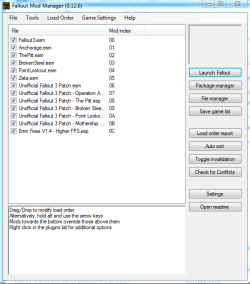
Try this Load Order:
Fallout3.esm
Anchorage.esm
ThePitt.esm
BrokenSteel.esm
PointLookout.esm
Zeta.esm
---------------
UP-Fallout3
UP-Anchorage
UP-ThePitt
UP-BrokenSteel
UP-PointLookout
UP-Zeta
-------------------
Error Fixes V1.5
MergePatch ** <-- Created with FO3 Edit

Set the load order like this and save it.
Run FO3 Edit, and after it loads right click anywhere and choose create merge patch.
Save it and put it last in the load order.

That should work, but keep in mind you'll need to delete and make a new merge patch if you add any more mods to the load list.
 

My Computer My Computer

At a glance

Windows 7 Home Premium 64bitIntel Core i7 2700k8GB Mushkin Redline Ridgebacks @1866EVGA GTX570 SC
Computer Manufacturer/Model Number
Custom (Self Build)
OS
Windows 7 Home Premium 64bit
CPU
Intel Core i7 2700k
Motherboard
eVGA P67 SLI
Memory
8GB Mushkin Redline Ridgebacks @1866
Graphics Card(s)
EVGA GTX570 SC
Sound Card
XiFi Titanium HD
Monitor(s) Displays
LG W2453V
Screen Resolution
1920x1080
Hard Drives
Intel 320 80GB -- Intel X25-V 40GB --WD Black 1TB x2 -- WD Blue 640GB
PSU
Seasonic x750
Case
Corsair 600T SE White
Cooling
eVGA Superclocked CPU Cooler
Keyboard
Saitek Cyborg
Antivirus
Kaspersky
Browser
IE
Other Info
LG BD/DVD
The load order of mods usually has to come before the main fallout 3 files.
 

My Computer My Computer

At a glance

Windows 7 Home Premium 64 bit
OS
Windows 7 Home Premium 64 bit
No, the main files load before any mods or it will crash at the load screen. Files later in the order take priority.
For example, if the first to load makes a hat red, the second to load makes it blue , it will be blue in game.
 

My Computer My Computer

At a glance

Windows 7 Home Premium 64bitIntel Core i7 2700k8GB Mushkin Redline Ridgebacks @1866EVGA GTX570 SC
Computer Manufacturer/Model Number
Custom (Self Build)
OS
Windows 7 Home Premium 64bit
CPU
Intel Core i7 2700k
Motherboard
eVGA P67 SLI
Memory
8GB Mushkin Redline Ridgebacks @1866
Graphics Card(s)
EVGA GTX570 SC
Sound Card
XiFi Titanium HD
Monitor(s) Displays
LG W2453V
Screen Resolution
1920x1080
Hard Drives
Intel 320 80GB -- Intel X25-V 40GB --WD Black 1TB x2 -- WD Blue 640GB
PSU
Seasonic x750
Case
Corsair 600T SE White
Cooling
eVGA Superclocked CPU Cooler
Keyboard
Saitek Cyborg
Antivirus
Kaspersky
Browser
IE
Other Info
LG BD/DVD
Hey wishmaster,

Thanks for helping out while I was gone.

@Zargart - Wishmaster was correct, basically, just set the order of the mods like mine - Capture.PNG and save, it should work. I've used this order for over 200 hours of Fallout 3, so yes, it is definitely correct.
 

My Computer My Computer

At a glance

Ubuntu 12.10Intel Core i7 720QM4GB RAMNVIDIA GeForce 230M
Computer Manufacturer/Model Number
HP Pavilion dv6-2020ev
OS
Ubuntu 12.10
CPU
Intel Core i7 720QM
Motherboard
Its a HP secret...
Memory
4GB RAM
Graphics Card(s)
NVIDIA GeForce 230M
Sound Card
IDT
Screen Resolution
1366x768
Hard Drives
500 GB
Mouse
HP
Internet Speed
4 Mbps
I did the work order and i hit save game list, play the game it crashed at the same spot, when i opened the Fomm it was back to the default setting?
 

My Computer My Computer

At a glance

windows 7 home premium 64 bit
OS
windows 7 home premium 64 bit
Run FOMM as an administrator and make the changes.
 

My Computer My Computer

At a glance

Ubuntu 12.10Intel Core i7 720QM4GB RAMNVIDIA GeForce 230M
Computer Manufacturer/Model Number
HP Pavilion dv6-2020ev
OS
Ubuntu 12.10
CPU
Intel Core i7 720QM
Motherboard
Its a HP secret...
Memory
4GB RAM
Graphics Card(s)
NVIDIA GeForce 230M
Sound Card
IDT
Screen Resolution
1366x768
Hard Drives
500 GB
Mouse
HP
Internet Speed
4 Mbps
Wish master, i don't really understand this "Run FO3 Edit, and after it loads right click anywhere and choose create merge patch.
Save it and put it last in the load order."

how do i create a merge patch
how to i run Fallout 3 edit. sorry i am not the most tech experienced person
 

My Computer My Computer

At a glance

windows 7 home premium 64 bit
OS
windows 7 home premium 64 bit
I have run as an admin, but it just goes back to default
 

My Computer My Computer

At a glance

windows 7 home premium 64 bit
OS
windows 7 home premium 64 bit
Back
Top