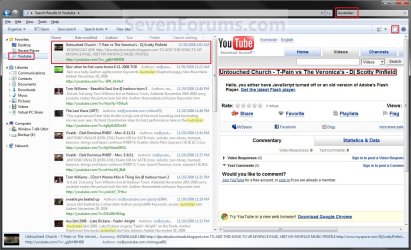
Windows 7 Federated Search Providers

Windows 7 Search Federation Providers

   Information
With the demonstration of Windows 7`s OpenSearch Providers by Long Zheng (Flickr Search Connector for Windows 7 Search Federation)

I have created these providers for Searching Youtube, Google, Google News, GoogleBlogs, MSN and Yahoo.


OPTION ONE

Installation and Usage


1st Step: Click on a icon below to install the Search Provider.
Advanced Search Connectors:
These Search Connectors export Additional properties like Thumbnails, Videos, Documents, Images and other files for use directly from explorer!
Youtube:


Flickr Search: (by Zong Zheng) Flickr Search Connector for Windows 7


ISOHunt.com Search


Deviant Art


Yahoo Image Search


Yahoo Video


TechNet-Edge


Msdn Channel 9

Basic Search Connectors:
These Search connectors only show web page results without additional properties like Thumbnails, Videos, Documents, Images and other files...
Bing:


Yahoo:


MSNSearch:


Google:
Google claim support for RSS based OpenSearch will be Implemented late 2010-2011, I have asked Google for more specific Information but their response was no comment (Recent conversations suggests they never will allow rss based searches)

An Alternate solution has been created by Dan Bugglin, You can read the full story here: OpenSearch Google in Windows 7 (Nicely done, Thanks Dan!)


Google News:


Google Blogs:


SevenForum`s Search:


ebay Search:


Amazon Search:


Digg


Technet


Techrepublic


Wired

2nd Step: Open Windows Explorer. You will see you new Search Provider listed under Favorites or under C:\Users\<username>\Searches


OPTION TWO

Create Your Own Standard Basic Search Provider


   Note
Most websites do not support OpenSearch however a little feature of Microsoft`s Live Search allows you to create your own basic Search Provider for any Website and make it able to search that site directly from Windows 7 :geek:

1st Step: Open Notepad and paste this code:
Code:
<?xml version="1.0" encoding="UTF-8"?>
<OpenSearchDescription xmlns="http://a9.com/-/spec/opensearch/1.1/" xmlns:ms-ose="http://schemas.microsoft.com/opensearchext/2009/">
<ShortName>[B][COLOR=red]Sevenforums[/COLOR][/B]</ShortName>
<Description>[COLOR=red][B]OpenSearch SevenForums via Live Search using Windows 7 Federated Search[/B][/COLOR]</Description>
<Url type="application/rss+xml" template="http://api.bing.com/rss.aspx?source=web&query={searchTerms} site:[COLOR=red][B]sevenforums.com[/B][/COLOR]&web.count=50"/>
<Url type="text/html" template="http://www.bing.com/search?q={searchTerms}+site:[B][COLOR=red]sevenforums.com[/COLOR][/B]"/>
</OpenSearchDescription>

2nd Step: Replace the red text with a Shortname you want to call the Search Provider, A description and then replace sevenforums.com URL with the website URL you would like to use for Searching using Windows 7

3rd Step: Click File> Save As and change the "Save as Type" to all files (important!), then under filename use (filename.osdx) to allow Windows 7 to recognize the Search Provider osdx extension ;)

4th Step: Open your newly created Search provider to begin searching the website you specified using LiveSearch`s webite RSS Search Feature :geek:


Attachments

Last edited by a moderator:
Hi Steven,

I have set everything to enabled in the restricted zone, seven and vistax64 were already in the trusted zone even did a complete reset of IE and then enabled everything in the restricted zone with a reboot. No joy. This is very odd as it was working, at least for sevenforums, before installing the RC. This is the first time I've tried it at sevenforums since installing the RC. The other oddity is that it works fine for technet and bing. Bing is not in the trusted zone and technet is. Since you haven't seen it then it must still be working for you, which makes it even more perplexing.

Gary

Update:I have 7201 installed on another partition with only Avast installed. Added the sevenforums search that you have all done up and it didn't work at all, as in 7100. Added sevenforums with my cut and paste version in 7201 and it works fine.

I wasn't going to set 7201 all up, but I guess I will start doing tweaks and installing programs trying the federated search after each change to see if I can break it there unless you have some other idea.

Gary

Gary,

When you added the Search Connector thats giving the errors, did it say the Server you added was searchsrv.sevenforums.com or search.sevenforums.com?

Steven
 
For seven forums search, I cut and pasted the code in Option two, step one into notepad and saved as instructed with no changes. For Vistax64 I cut and paste the same code and then wherever it said sevenforums I replaced it with vistax64 and saved as instructed. Both seven and vista have the content blocked warning in 7100 and both function as expected in 7201. When I get the error, I get no warning other than that pictured.

Gary
 

My Computer My Computer

At a glance

Vista Ult 64 bit Seven Ult RTM x64Intel Core2 Quad Q6600 2.40 gigahertzCrucial Ballistix 4x2GB PC2 6400NVIDIA GeForce 8600 GTS 256 MB
Computer Manufacturer/Model Number
Dell XPS420
OS
Vista Ult 64 bit Seven Ult RTM x64
CPU
Intel Core2 Quad Q6600 2.40 gigahertz
Memory
Crucial Ballistix 4x2GB PC2 6400
Graphics Card(s)
NVIDIA GeForce 8600 GTS 256 MB
Sound Card
Creative SB X-Fi audio
Monitor(s) Displays
HP w2207 + HPvs15
Screen Resolution
1680x1050 + 1024x768
Hard Drives
2-WD5000AAKS-500 GB
WD5000AAV-500 GB external
Keyboard
Microsoft Comfort Curve
Mouse
MX Revolution
Other Info
Wacom Intuos 2 Graphics Tablet
Experience Index=5.5
For seven forums search, I cut and pasted the code in Option two, step one into notepad and saved as instructed with no changes. For Vistax64 I cut and paste the same code and then wherever it said sevenforums I replaced it with vistax64 and saved as instructed. Both seven and vista have the content blocked warning in 7100 and both function as expected in 7201. When I get the error, I get no warning other than that pictured.

Gary

I will ask Brandon for some details about that error and its causes but I think the domain forwarding from live.com to Bing.com was the cause :confused:

Option two in the Tutorial was using Microsoft's Live Search, I think that when they switched to Bing that their searches where forwarded from the Live.com domain to the Bing.com domain and that caused the Error Message's you've seen, I updated Option two to use Bing instead of Live Search, can you give it a try and let me know if you still have the same Error Messages?

Steven
 
Still have the same problem. :( Have tried a few tweaks in 7201, but still haven't been able to break it. Am busy for the next couple of days, but will work on it some more after that.

Gary
 

My Computer My Computer

At a glance

Vista Ult 64 bit Seven Ult RTM x64Intel Core2 Quad Q6600 2.40 gigahertzCrucial Ballistix 4x2GB PC2 6400NVIDIA GeForce 8600 GTS 256 MB
Computer Manufacturer/Model Number
Dell XPS420
OS
Vista Ult 64 bit Seven Ult RTM x64
CPU
Intel Core2 Quad Q6600 2.40 gigahertz
Memory
Crucial Ballistix 4x2GB PC2 6400
Graphics Card(s)
NVIDIA GeForce 8600 GTS 256 MB
Sound Card
Creative SB X-Fi audio
Monitor(s) Displays
HP w2207 + HPvs15
Screen Resolution
1680x1050 + 1024x768
Hard Drives
2-WD5000AAKS-500 GB
WD5000AAV-500 GB external
Keyboard
Microsoft Comfort Curve
Mouse
MX Revolution
Other Info
Wacom Intuos 2 Graphics Tablet
Experience Index=5.5
Found out what the problem was. I added http//bing.com to my trusted sites. That's all it was. Don't know why it took me so long to think of that. Too much going on, yea that's it. Getting senile has nothing to do with it. ;) ;)

Gary
 

My Computer My Computer

At a glance

Vista Ult 64 bit Seven Ult RTM x64Intel Core2 Quad Q6600 2.40 gigahertzCrucial Ballistix 4x2GB PC2 6400NVIDIA GeForce 8600 GTS 256 MB
Computer Manufacturer/Model Number
Dell XPS420
OS
Vista Ult 64 bit Seven Ult RTM x64
CPU
Intel Core2 Quad Q6600 2.40 gigahertz
Memory
Crucial Ballistix 4x2GB PC2 6400
Graphics Card(s)
NVIDIA GeForce 8600 GTS 256 MB
Sound Card
Creative SB X-Fi audio
Monitor(s) Displays
HP w2207 + HPvs15
Screen Resolution
1680x1050 + 1024x768
Hard Drives
2-WD5000AAKS-500 GB
WD5000AAV-500 GB external
Keyboard
Microsoft Comfort Curve
Mouse
MX Revolution
Other Info
Wacom Intuos 2 Graphics Tablet
Experience Index=5.5
Found out what the problem was. I added http//bing.com to my trusted sites. That's all it was. Don't know why it took me so long to think of that. Too much going on, yea that's it. Getting senile has nothing to do with it. ;) ;)

Gary

LOL Gary :p

Its strange doing that would cause the security warnings though :shock:
 
Very nice feature, would be nice a Open Search for Desktopnexus with thumbmails...
 

My Computer My Computer

At a glance

Windows 7 Ultimate x64Intel Core i7 2600KG.Skill RipJawsX 8GB (2x4GB) DDR3 PC3-12800AMD/ATI XFX Radeon HD 6970
Computer Manufacturer/Model Number
Desktop
OS
Windows 7 Ultimate x64
CPU
Intel Core i7 2600K
Motherboard
ASRock Fatal1ty P67 Professional
Memory
G.Skill RipJawsX 8GB (2x4GB) DDR3 PC3-12800
Graphics Card(s)
AMD/ATI XFX Radeon HD 6970
Screen Resolution
1920x1080
Hard Drives
WD Caviar Black 1TB
WD Caviar Blue 500GB
Crucial C300 64GB (SSD)
PSU
CM Silent Pro Gold 1000W
Case
CM HAF X
Cooling
Corsair A70
Keyboard
Thermaltake Tt eSPORTS Challenger Pro
Mouse
Thermaltake Tt eSPORTS Black

My Computer My Computer

At a glance

Windows 7 Professional 64-bitIntel E8400 3GHzKingston PC3-10700H 4GbXFX Radeon HD 5850 BlackEd.
Computer Manufacturer/Model Number
self built
OS
Windows 7 Professional 64-bit
CPU
Intel E8400 3GHz
Motherboard
Intel DX48BT2
Memory
Kingston PC3-10700H 4Gb
Graphics Card(s)
XFX Radeon HD 5850 BlackEd.
Sound Card
Asus Xonar DG
Monitor(s) Displays
2x Samsung SM-T220HD 22"
Screen Resolution
1680x1050 on two monitors
Hard Drives
OCZ Vertex 2 120gb 3.5" (OS)
Seagate Momentus XT 500gb
Samsung F3 1Tb (games)
2x Samsung F1 1Tb
PSU
Thermaltake ToughPower 850w
Case
Thermaltake Armor
Cooling
Scythe Mugen II
Keyboard
Microsoft Comfort Curve USB
Mouse
Razer Diamondback 3G
Internet Speed
8128/443
Has anyone worked out a way to get images to come up in a feed? I'm trying to make a search connector each of the 'Booru' clones.

Gelbooru.com
Konachan.com: Anime, Manga and Japanese Games Wallpapers Imageboard.
Danbooru
moe.imouto

So far I have the following:
Code:
<?xml version="1.0" encoding="UTF-8"?>
<OpenSearchDescription xmlns="http://a9.com/-/spec/opensearch/1… xmlns:ms-

ose="http://schemas.microsoft.com/open…
<ShortName>danbooru</ShortName>
<Description>Search danbooru.donmai.us for Anime images</Description>
<Url type="application/rss+xml" template="http://api.bing.com/images.asp… 

site:danbooru.donmai.us&web.count=50"/…
<Url type="text/html" template="http://www.bing.com/images/sea…

{searchTerms}+site:danbooru.donmai.us"…
</OpenSearchDescription>

Unfortunately the Bing search engine only returns text feeds which screws me over but most of the Booru clones have atom for rss.

BTW, is it possible to modify the search connectors to search all the 'Booru's at once? Or must they be done individually?

And is there any way to get Bing to return the feed as images? Or is there another way I can get image results to appear in windows explorer?
 

My Computer My Computer

At a glance

Windows xp/sevenamd sempron 3100+DDR1 400mhzATI Radeon 9550
OS
Windows xp/seven
CPU
amd sempron 3100+
Motherboard
k8v-x se
Memory
DDR1 400mhz
Graphics Card(s)
ATI Radeon 9550
O...
M...
G!

this is probably the single best thing i've seen about windows 7. much thanks to all who have shared about this function.

option 2 works flawlessly as i've added a few and the all work perfectly (win7 forums and vista forums included! :D)

thanks again
 

My Computer My Computer

At a glance

Windows 7 Ultimate x64AMD Phenom II X4 940 Black Edition @ 3.4GHz (...Corsair CM2X4096-8500C5 (4 X 2GB)XFX Radeon HD 5770 / Diamond Radeon HD 5770 C...
Computer Manufacturer/Model Number
Rig 1
OS
Windows 7 Ultimate x64
CPU
AMD Phenom II X4 940 Black Edition @ 3.4GHz (AM2+)
Motherboard
Gigabyte GA-MA790X-UD4P (AM2+)
Memory
Corsair CM2X4096-8500C5 (4 X 2GB)
Graphics Card(s)
XFX Radeon HD 5770 / Diamond Radeon HD 5770 CrossFireX
Sound Card
Asus Xonar DS (PCI)
Monitor(s) Displays
Samsung SyncMaster 932bw+ (3)
Screen Resolution
4320x900
Hard Drives
OCZ Vertex 2 80 GB - Windows 7 System --
WD Caviar Black 1TB - Music, Movies, Vids, Pics --
WD Caviar Black 640GB - User Profiles & Games --
WD My Book 320GB external
PSU
Corsair CMPSU-750TX
Case
Cooler Master HAF 932
Cooling
Corsair Hydro Series H50
Keyboard
Logitech Desktop Wave
Mouse
Logitech LX8 Laser
Internet Speed
20 down / 2 up
Other Info
LG GGC-H20L Blu-Ray / HDDVD combo --
Hauppauge HVR-1250 --
Silverstone MFP-51 --
Logitech Webcam C600
Back
Top