Search in Windows 7

How to Search in Windows 7

   Information
This will show you how to do a Search and Advanced Search for files and folders in Windows 7 through the Start Menu and Windows Explorer.

   Note
Before doing a search in Windows 7, you should make sure that you have set your Search Options for the What to search, How to search, and When searching non-indexed locations settings. If you have the index enabled (it is by default), then you should also have any locations and file types added to be indexed so they will be included in the search results when doing a search. If the files have been recently changed, then the index may not have finshed updating yet and you will need to manually rebuild the index to force it to update now.

To be able to search in libraries, the Windows Search service needs to be Started and set to Automatic. Libraries require it's included folders to also be added to the index to be tracked properly even though they will still open properly.


OPTION ONE

Search in the Start Menu


   Note
You can use the search box line in the Start menu to find files, folders, programs, and e‑mail messages stored on your computer. When searching from the Start menu, only files that have been indexed will appear in search results.

You can also adjust these settings below in the Customize Start Menu settings for what is to be included in the search from the Start Menu Search box.
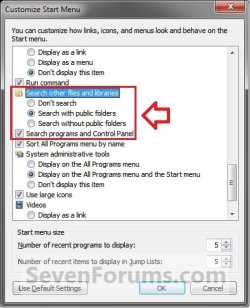
Start_Menu_Customize.jpg

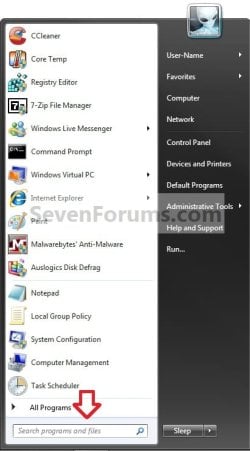
1. Open the Start Menu, and type a word or part of a word for what you want to search for in the Search box. (See screenshot below)
NOTE: As you type, items that match your text will appear on the Start menu. The search is based on text in the file name, text in the file, tags, and other file properties.
Start_Menu.jpg
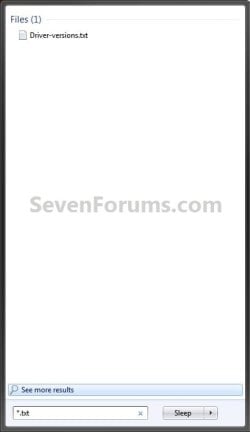
2. You will now see the search results for what you search for. (See screenshot below)
NOTE: You can also click on the See more results link to see more search results in a Windows Explorer window like in OPTION TWO below.
Start_Menu2.jpgStart_Menu3.jpg
3. You can now just click on a search result to open it. (See screenshot above)


OPTION TWO

Search in Windows Explorer


NOTE: This will allow you to do a search for any item from within a selected drive or folder location of your choice in Windows Explorer.
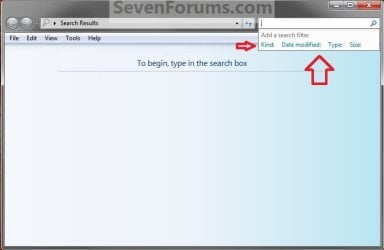
1. Press the F3 key or Windows Key + F keys. (See screenshot below)
NOTE: This Search Results window gives you the same search results as the Start Menu in OPTION ONE.
Search.jpg
A) Go to step 3.
OR

2. Open Windows Explorer, and navigate to where (ex: drive or folder) you want to search in and open it.
NOTE: When searching a drive or folder in Windows Explorer, Windows only searches from within the currently opened drive or folder location and its subfolders. Windows does not search outside this search path.

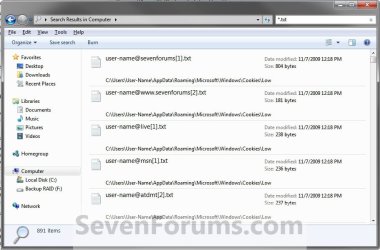
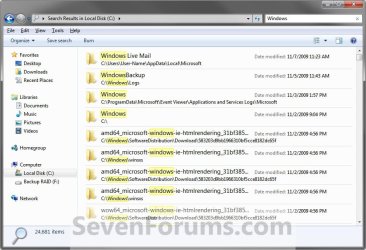
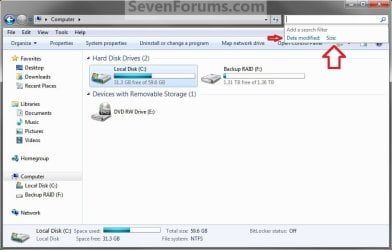
3. Type a word or part of a word for what you want to search for in the Search box at the top right corner in Windows Explorer. (See screenshots below)
NOTE: As you type, the contents of the folder or library are filtered to reflect each successive character you type. When you see the file that you want, stop typing. You will also see the word you type in highlighted in the search results.
Windows_Explorer.jpg

Windows_Explorer_B.jpg

Windows_Explorer2.jpg

Windows_Explorer3.jpg

   Tip

Using Search Filters


NOTE: If you're searching for a file based on one or more of its properties (such as a tag or the date the file was last modified), you can use search filters to specify the property in your search.
  • Click in the Search box, and select a listed search filter that you want to add to narrow the search results with.
  • Depending on the search filter selected, choose a value to be used for this search filter.
    Search_Filter.jpg
  • You can repeat these steps to add more search filters to build complex searches on multiple properties. Each time that you click a search filter or value, the search filter terms are automatically added to the search box.
Using Search Again In


NOTE: If you can't find what you're looking for in the search results from this current Windows Explorer location, then you can expand the search to include different locations.
  • After doing a search, scroll to the bottom of the search results list. Under Search again in, do one of the following:
    • Click Libraries to search across every library.
    • Click Computer to search across your entire computer. This is the way to search for files that aren't indexed (such as system or program files). However, be aware that the search will be slower.
    • Click Custom to search specific locations.
    • Click Internet to search online, using your default web browser and your default search provider.
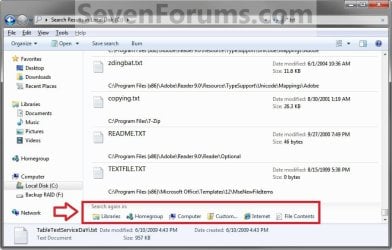
Search_Again.jpg


That's it,
Shawn


Related Tutorials

 
Last edited:
Shawn, Troubleshooting doesn't show anything - the search pane in search options under Folder options are also at default. sfc /scannow did find something, and requested me to restart - and I did. After restart I tried searching "Computer" again, it's still not searching... If I search in a volume or a folder, the search will execute normally. Does this has to do with I'm mounting a volume in a folder?

zzz2496
 

My Computer

Computer Manufacturer/Model Number
Self Built
OS
Windows7 Ultimate 64bit
CPU
Intel Core 2 Quad Q6600
Motherboard
Abit IN9-32X-MMAX
Memory
DDR2 Adata 4GB
Graphics Card(s)
Nvidia GeForce GTX 285 1024 and Nvidia GeForce 8800GT 512
Sound Card
Asus Xonar HDAV 1.3
Monitor(s) Displays
Dell 2407WFP and BenQ 2400v and Philips 150v3
Screen Resolution
3840x1200 and 1024x768
Hard Drives
2 WDC 1TB
1 WDC 1.5TB
1 WDC 640GB
1 WDC 320GB
1 Seagate 200GB
PSU
Corsair TX 850W
Case
Cooler Master HAF932
Cooling
Arctic Cooling Freezer Extreme and plenty of fans...
Keyboard
MicrosoftNaturalKeyboard 4000/Apple Alu keyboard/Dinovo mini
Mouse
Logitech G5/MarbleMouseTrackball/PerformanceMX/SpacePilotPRO
Internet Speed
1.5Mbps down/384Kbps up
Other Info
APC SURT 1000XL
Logitech Z-560
Wiimote
Mikrotik Router
Linksys (now Cisco) SD2008 8 port Gigabit switch
Linksys WRT54G (acting as AP)
Apple wireless Aluminium keyboard
Apple Magic Mouse
Xbox360 wired controller
I just tested search with a drive mounted as a folder on my system and didn't have a issue with search on it from any location.

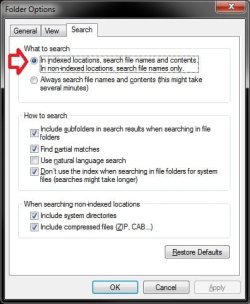
Try the search again with your search options set like this to see if it may help.

search.jpg
 

My Computer

Computer type
PC/Desktop
Computer Manufacturer/Model Number
Self built custom
OS
64-bit Windows 11 Pro for Workstations
CPU
Intel i7-8700K OC'd to 5 GHz
Motherboard
ASUS ROG Maximus XI Formula Z390
Memory
64 GB (4x16GB) G.SKILL TridentZ RGB DDR4 3600 MHz
Graphics Card(s)
ASUS ROG-STRIX-GTX1080TI-O11G-GAMING
Sound Card
Integrated
Monitor(s) Displays
2 x Samsung Odyssey G7 27"
Screen Resolution
2560x1440
Hard Drives
1TB Samsung 990 PRO M.2,
4TB Samsung 990 PRO PRO M.2,
TerraMaster F8 SSD Plus NAS
PSU
Seasonic Prime Titanium 850W
Case
Thermaltake Core P3
Cooling
Corsair Hydro H115i
Keyboard
Logitech wireless K800
Mouse
Logitech MX Master 4
Internet Speed
2 Gb/s Download and 100 Mb/s Upload
Antivirus
Malwarebyte Anti-Malware Premium
Browser
Google Chrome
Other Info
Logitech Z625 speaker system,
Logitech BRIO 4K Pro webcam,
HP Color LaserJet Pro MFP M477fdn,
APC SMART-UPS RT 1000 XL - SURT1000XLI,
Galaxy S23 Plus phone
Rebuilding the index did the task. I have found what I was looking for.

How do we can login in as admin in cmd. Even though I'm the only user of this pc but when I type

"sfc /scannow" in cmd it says login as admin
 

My Computer

Computer Manufacturer/Model Number
Dell Inspiron 6000
OS
Windows 7 Ultimate x32bit
Memory
1Gb
Hard Drives
60Gb Internal
Mouse
Dell

My Computer

Computer type
PC/Desktop
Computer Manufacturer/Model Number
Self built custom
OS
64-bit Windows 11 Pro for Workstations
CPU
Intel i7-8700K OC'd to 5 GHz
Motherboard
ASUS ROG Maximus XI Formula Z390
Memory
64 GB (4x16GB) G.SKILL TridentZ RGB DDR4 3600 MHz
Graphics Card(s)
ASUS ROG-STRIX-GTX1080TI-O11G-GAMING
Sound Card
Integrated
Monitor(s) Displays
2 x Samsung Odyssey G7 27"
Screen Resolution
2560x1440
Hard Drives
1TB Samsung 990 PRO M.2,
4TB Samsung 990 PRO PRO M.2,
TerraMaster F8 SSD Plus NAS
PSU
Seasonic Prime Titanium 850W
Case
Thermaltake Core P3
Cooling
Corsair Hydro H115i
Keyboard
Logitech wireless K800
Mouse
Logitech MX Master 4
Internet Speed
2 Gb/s Download and 100 Mb/s Upload
Antivirus
Malwarebyte Anti-Malware Premium
Browser
Google Chrome
Other Info
Logitech Z625 speaker system,
Logitech BRIO 4K Pro webcam,
HP Color LaserJet Pro MFP M477fdn,
APC SMART-UPS RT 1000 XL - SURT1000XLI,
Galaxy S23 Plus phone
Hmm... still not searching, Shawn.

I already reindex everything (took me almost 2 days to reindex). I'll reindex everything again...
Thanks for the help though :) I'll keep you posted...

zzz2496
 

My Computer

Computer Manufacturer/Model Number
Self Built
OS
Windows7 Ultimate 64bit
CPU
Intel Core 2 Quad Q6600
Motherboard
Abit IN9-32X-MMAX
Memory
DDR2 Adata 4GB
Graphics Card(s)
Nvidia GeForce GTX 285 1024 and Nvidia GeForce 8800GT 512
Sound Card
Asus Xonar HDAV 1.3
Monitor(s) Displays
Dell 2407WFP and BenQ 2400v and Philips 150v3
Screen Resolution
3840x1200 and 1024x768
Hard Drives
2 WDC 1TB
1 WDC 1.5TB
1 WDC 640GB
1 WDC 320GB
1 Seagate 200GB
PSU
Corsair TX 850W
Case
Cooler Master HAF932
Cooling
Arctic Cooling Freezer Extreme and plenty of fans...
Keyboard
MicrosoftNaturalKeyboard 4000/Apple Alu keyboard/Dinovo mini
Mouse
Logitech G5/MarbleMouseTrackball/PerformanceMX/SpacePilotPRO
Internet Speed
1.5Mbps down/384Kbps up
Other Info
APC SURT 1000XL
Logitech Z-560
Wiimote
Mikrotik Router
Linksys (now Cisco) SD2008 8 port Gigabit switch
Linksys WRT54G (acting as AP)
Apple wireless Aluminium keyboard
Apple Magic Mouse
Xbox360 wired controller
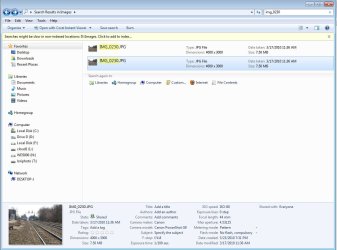
Why is it when I do my search, and my results are shown, the locations the files are in are not shown? In the attached example I was looking for a duplicate file, which search found, but it doesn't show where the files are. I had to right click each one and go to properties to find their location.

On your example searches, the file path is shown. Why isn't mine? I can't find any settings to control this (or don't know where they are).

Thanks
 

Attachments

  • img_0230_search.jpg
    img_0230_search.jpg
    352.9 KB · Views: 272

My Computer

Computer Manufacturer/Model Number
DYI
OS
Win 7 x64 Professional
CPU
Intel Core i5-750 2.67Ghz
Motherboard
Gigabyte P55M-UD4
Memory
4gb
Graphics Card(s)
Nvidia GeForce 9500GT 512mb
Sound Card
On MB
Monitor(s) Displays
Lg Flatron
Screen Resolution
1280 x 1024
Hard Drives
C: 200mb Maxtor SATA 3
D: 500gb WD SATA 3
Why is it when I do my search, and my results are shown, the locations the files are in are not shown? In the attached example I was looking for a duplicate file, which search found, but it doesn't show where the files are. I had to right click each one and go to properties to find their location.

On your example searches, the file path is shown. Why isn't mine? I can't find any settings to control this (or don't know where they are).

Thanks
Change the View mode, Jeffs... Use "Details" mode.

http://www.sevenforums.com/tutorial...rangement-change-windows-explorer-window.html

zz2496
 
Last edited by a moderator:

My Computer

Computer Manufacturer/Model Number
Self Built
OS
Windows7 Ultimate 64bit
CPU
Intel Core 2 Quad Q6600
Motherboard
Abit IN9-32X-MMAX
Memory
DDR2 Adata 4GB
Graphics Card(s)
Nvidia GeForce GTX 285 1024 and Nvidia GeForce 8800GT 512
Sound Card
Asus Xonar HDAV 1.3
Monitor(s) Displays
Dell 2407WFP and BenQ 2400v and Philips 150v3
Screen Resolution
3840x1200 and 1024x768
Hard Drives
2 WDC 1TB
1 WDC 1.5TB
1 WDC 640GB
1 WDC 320GB
1 Seagate 200GB
PSU
Corsair TX 850W
Case
Cooler Master HAF932
Cooling
Arctic Cooling Freezer Extreme and plenty of fans...
Keyboard
MicrosoftNaturalKeyboard 4000/Apple Alu keyboard/Dinovo mini
Mouse
Logitech G5/MarbleMouseTrackball/PerformanceMX/SpacePilotPRO
Internet Speed
1.5Mbps down/384Kbps up
Other Info
APC SURT 1000XL
Logitech Z-560
Wiimote
Mikrotik Router
Linksys (now Cisco) SD2008 8 port Gigabit switch
Linksys WRT54G (acting as AP)
Apple wireless Aluminium keyboard
Apple Magic Mouse
Xbox360 wired controller
OK! That works. That was simple enough, yet it's still not the same as the example shown in this thread when in "Content" view. Does Content view only selectively display paths?

Thanks,

J
 

My Computer

Computer Manufacturer/Model Number
DYI
OS
Win 7 x64 Professional
CPU
Intel Core i5-750 2.67Ghz
Motherboard
Gigabyte P55M-UD4
Memory
4gb
Graphics Card(s)
Nvidia GeForce 9500GT 512mb
Sound Card
On MB
Monitor(s) Displays
Lg Flatron
Screen Resolution
1280 x 1024
Hard Drives
C: 200mb Maxtor SATA 3
D: 500gb WD SATA 3
How do I search a key word AND date range AND file type all together in windows 7, i.e. like was doable in XP?

I find I can do date ranges, and file types or key word and file type simultaneously without problem but have not been able to add the key word to the string t and get it to work
 

My Computer

Computer Manufacturer/Model Number
sony
OS
windows 7
Hello Erc,

You should be able to enter the keyword that you want to search for first, then click on a search filter (es: Date modifies) and set it, click in the search box to see the available search filters again, and repeat with any other search filters (ex: Size) you wish to be used. The links in the yellow TIP box at the top of the tutorial can help show you some advanced search techniques that you can use to help you more with this as well.


Hope this helps,
Shawn
 

My Computer

Computer type
PC/Desktop
Computer Manufacturer/Model Number
Self built custom
OS
64-bit Windows 11 Pro for Workstations
CPU
Intel i7-8700K OC'd to 5 GHz
Motherboard
ASUS ROG Maximus XI Formula Z390
Memory
64 GB (4x16GB) G.SKILL TridentZ RGB DDR4 3600 MHz
Graphics Card(s)
ASUS ROG-STRIX-GTX1080TI-O11G-GAMING
Sound Card
Integrated
Monitor(s) Displays
2 x Samsung Odyssey G7 27"
Screen Resolution
2560x1440
Hard Drives
1TB Samsung 990 PRO M.2,
4TB Samsung 990 PRO PRO M.2,
TerraMaster F8 SSD Plus NAS
PSU
Seasonic Prime Titanium 850W
Case
Thermaltake Core P3
Cooling
Corsair Hydro H115i
Keyboard
Logitech wireless K800
Mouse
Logitech MX Master 4
Internet Speed
2 Gb/s Download and 100 Mb/s Upload
Antivirus
Malwarebyte Anti-Malware Premium
Browser
Google Chrome
Other Info
Logitech Z625 speaker system,
Logitech BRIO 4K Pro webcam,
HP Color LaserJet Pro MFP M477fdn,
APC SMART-UPS RT 1000 XL - SURT1000XLI,
Galaxy S23 Plus phone
XP had a search option to find all files of a paticular type, eg all video (avi, wmv, etc), how can one do this in Windows 7?
 

My Computer

Computer type
PC/Desktop
Computer Manufacturer/Model Number
Home Build
OS
Microsoft Windows 7 Professional 64-bit 7601 Multiprocessor Free Service Pack 1
CPU
Intel(R) Core(TM) i5-3470 CPU @ 3.20GHz
Motherboard
ASUSTeK COMPUTER INC. H61M-K
Memory
8 GB DDR3 1600MHZ
Graphics Card(s)
AMD Radeon HD 6570
Sound Card
(1) AMD High Definition Audio Device (2) Realtek High Defi
Monitor(s) Displays
Dell 2407 WFP
Screen Resolution
1920x1080
Hard Drives
SAMSUNG HD103SJ ATA Device 1TB
ST31000524AS ATA Device 1TB
Keyboard
Logitech
Mouse
Logitech
Hello HairyScot, welcome to the Seven Forums.

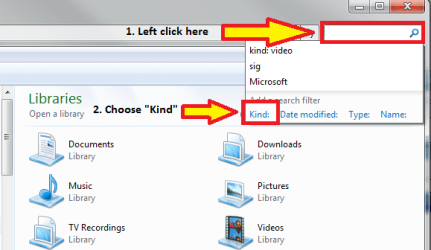
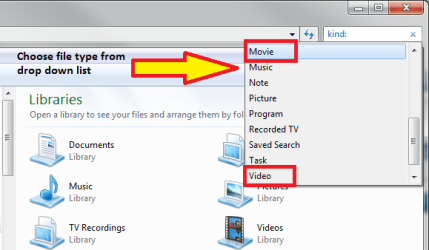
In Windows Explorer, click an empty search field. It gives a mini menu, showing your three last searches and some search filters:

Search_01.png

Click Kind and choose the file type you want to search, for instance Video or Movie to search all videos:

Search_02.png

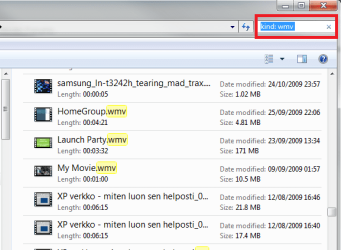
You can also type the file type, if you want to. Typing Kind: txt finds all files with .txt extension, Kind: doc all .doc extensions, Kind: wmv all wmv videos etc:

Search_03.png

Please notice: if you type just the extension or string, without Kind:, Windows Search finds not only the files with that extension, but also the files that contain that string and files with filename beginning with that string. An example: typing just for instance avi to search field instead of Kind: avi would show you all these files:
  • All files with extension .avi
  • All files with filename beginning with avi, for instance Aviation.exe, Avi_versus_wmv.doc etc
  • All files which contain the string avi, for instance a Notepad .txt file where the content, the text contains the word Aviation

Hope this helps.

Kari
 
Last edited:

My Computer

Computer type
Laptop
Computer Manufacturer/Model Number
HP ENVY 17-1150eg
OS
Windows 10 Pro x64 EN-GB
CPU
1.6 GHz Intel Core i7-720QM Processor
Memory
6 GB
Graphics Card(s)
ATI Mobility Radeon HD 5850 Graphics
Sound Card
Beats sound system with integrated subwoofer
Monitor(s) Displays
17" laptop display, 22" LED and 32" Full HD TV through HDMI
Screen Resolution
1600*900 (1), 1920*1080 (2&3)
Hard Drives
Internal: 2 x 500 GB SATA Hard Disk Drive 7200 rpm
External: 2TB for backups, 3TB USB3 network drive for media
Cooling
As Envy runs a bit warm, I have it on a Cooler Master pad
Keyboard
Logitech diNovo Media Desktop Laser (bluetooth)
Mouse
Logitech Performance Mouse MX
Internet Speed
50/10 Mbps VDSL
Antivirus
Windows Defender 4.3.9431.0
Browser
Maxthon 3.5.2., IE11
Thanks Kari
 

My Computer

Computer type
PC/Desktop
Computer Manufacturer/Model Number
Home Build
OS
Microsoft Windows 7 Professional 64-bit 7601 Multiprocessor Free Service Pack 1
CPU
Intel(R) Core(TM) i5-3470 CPU @ 3.20GHz
Motherboard
ASUSTeK COMPUTER INC. H61M-K
Memory
8 GB DDR3 1600MHZ
Graphics Card(s)
AMD Radeon HD 6570
Sound Card
(1) AMD High Definition Audio Device (2) Realtek High Defi
Monitor(s) Displays
Dell 2407 WFP
Screen Resolution
1920x1080
Hard Drives
SAMSUNG HD103SJ ATA Device 1TB
ST31000524AS ATA Device 1TB
Keyboard
Logitech
Mouse
Logitech
You are welcome. Don't know about you, but in my opinion Windows 7 Search is much more than XP Search ever was. You can combine search criteria in so many ways there's nothing the search does not find.

I like it.

Kari
 

My Computer

Computer type
Laptop
Computer Manufacturer/Model Number
HP ENVY 17-1150eg
OS
Windows 10 Pro x64 EN-GB
CPU
1.6 GHz Intel Core i7-720QM Processor
Memory
6 GB
Graphics Card(s)
ATI Mobility Radeon HD 5850 Graphics
Sound Card
Beats sound system with integrated subwoofer
Monitor(s) Displays
17" laptop display, 22" LED and 32" Full HD TV through HDMI
Screen Resolution
1600*900 (1), 1920*1080 (2&3)
Hard Drives
Internal: 2 x 500 GB SATA Hard Disk Drive 7200 rpm
External: 2TB for backups, 3TB USB3 network drive for media
Cooling
As Envy runs a bit warm, I have it on a Cooler Master pad
Keyboard
Logitech diNovo Media Desktop Laser (bluetooth)
Mouse
Logitech Performance Mouse MX
Internet Speed
50/10 Mbps VDSL
Antivirus
Windows Defender 4.3.9431.0
Browser
Maxthon 3.5.2., IE11
Only recently upgraded from Vista but I like what I see so far.
I am sure I will find lots more to appreciate.

:D
 

My Computer

Computer type
PC/Desktop
Computer Manufacturer/Model Number
Home Build
OS
Microsoft Windows 7 Professional 64-bit 7601 Multiprocessor Free Service Pack 1
CPU
Intel(R) Core(TM) i5-3470 CPU @ 3.20GHz
Motherboard
ASUSTeK COMPUTER INC. H61M-K
Memory
8 GB DDR3 1600MHZ
Graphics Card(s)
AMD Radeon HD 6570
Sound Card
(1) AMD High Definition Audio Device (2) Realtek High Defi
Monitor(s) Displays
Dell 2407 WFP
Screen Resolution
1920x1080
Hard Drives
SAMSUNG HD103SJ ATA Device 1TB
ST31000524AS ATA Device 1TB
Keyboard
Logitech
Mouse
Logitech
How do I make Windoes 7 search work the same as Windows Xp search.
I hate how when I do a search that Windoes 7 also searches the content
of files as well. I only want search to find file names ONLY
any help!!!!!!!!!!!!!!!!!
 

My Computer

Computer Manufacturer/Model Number
Gigabyte
OS
Windows 7
CPU
Intel
Motherboard
Gigabyte
Memory
8Gb
Graphics Card(s)
Nvidia 512
Sound Card
realtek
Monitor(s) Displays
2 X 22"
Hard Drives
2 X terrabyte
Hello Techno, and welcome to Seven Forums.

To have searches like this, you can set your search options like this below, then you will also need to disable the search index by disabling the Windows Search service.

Search_Settings.jpg

Hope this helps,
Shawn
 

My Computer

Computer type
PC/Desktop
Computer Manufacturer/Model Number
Self built custom
OS
64-bit Windows 11 Pro for Workstations
CPU
Intel i7-8700K OC'd to 5 GHz
Motherboard
ASUS ROG Maximus XI Formula Z390
Memory
64 GB (4x16GB) G.SKILL TridentZ RGB DDR4 3600 MHz
Graphics Card(s)
ASUS ROG-STRIX-GTX1080TI-O11G-GAMING
Sound Card
Integrated
Monitor(s) Displays
2 x Samsung Odyssey G7 27"
Screen Resolution
2560x1440
Hard Drives
1TB Samsung 990 PRO M.2,
4TB Samsung 990 PRO PRO M.2,
TerraMaster F8 SSD Plus NAS
PSU
Seasonic Prime Titanium 850W
Case
Thermaltake Core P3
Cooling
Corsair Hydro H115i
Keyboard
Logitech wireless K800
Mouse
Logitech MX Master 4
Internet Speed
2 Gb/s Download and 100 Mb/s Upload
Antivirus
Malwarebyte Anti-Malware Premium
Browser
Google Chrome
Other Info
Logitech Z625 speaker system,
Logitech BRIO 4K Pro webcam,
HP Color LaserJet Pro MFP M477fdn,
APC SMART-UPS RT 1000 XL - SURT1000XLI,
Galaxy S23 Plus phone
Now we are talking

Now thats how I like to search.
none of this crap of showing every files that has something to do with
the word "the" and only show files & folders with the word "the"
as part of the file or folder name.

easy fix when you know how.

I miss the Start>Search option Windows XP has.

Thanks heaps for your help.

Sorry about the late reply, Only just got around to doing it...
 

My Computer

Computer Manufacturer/Model Number
Gigabyte
OS
Windows 7
CPU
Intel
Motherboard
Gigabyte
Memory
8Gb
Graphics Card(s)
Nvidia 512
Sound Card
realtek
Monitor(s) Displays
2 X 22"
Hard Drives
2 X terrabyte
You're most welcome Techno. I'm happy to hear that is what you were wanting. :)
 

My Computer

Computer type
PC/Desktop
Computer Manufacturer/Model Number
Self built custom
OS
64-bit Windows 11 Pro for Workstations
CPU
Intel i7-8700K OC'd to 5 GHz
Motherboard
ASUS ROG Maximus XI Formula Z390
Memory
64 GB (4x16GB) G.SKILL TridentZ RGB DDR4 3600 MHz
Graphics Card(s)
ASUS ROG-STRIX-GTX1080TI-O11G-GAMING
Sound Card
Integrated
Monitor(s) Displays
2 x Samsung Odyssey G7 27"
Screen Resolution
2560x1440
Hard Drives
1TB Samsung 990 PRO M.2,
4TB Samsung 990 PRO PRO M.2,
TerraMaster F8 SSD Plus NAS
PSU
Seasonic Prime Titanium 850W
Case
Thermaltake Core P3
Cooling
Corsair Hydro H115i
Keyboard
Logitech wireless K800
Mouse
Logitech MX Master 4
Internet Speed
2 Gb/s Download and 100 Mb/s Upload
Antivirus
Malwarebyte Anti-Malware Premium
Browser
Google Chrome
Other Info
Logitech Z625 speaker system,
Logitech BRIO 4K Pro webcam,
HP Color LaserJet Pro MFP M477fdn,
APC SMART-UPS RT 1000 XL - SURT1000XLI,
Galaxy S23 Plus phone
I need help

My search doesn't work at all. I could go to a folder and looking at a file type the same of that file in the search and I get the no results notification. I've searched all over for a solution, maybe someone here can help
 

My Computer

OS
windows 7 home premium 64bit
Back
Top