
Windows 7 Full Image Backup - VHD file

churin

New member
Power User
Local time
3:36 AM
Messages
341
Location
California
I have done restoring the vhd file to a partition where the original os resides. It appears also possible to restore the backup to a brand new hard drive instead. Is it correct?
 

My Computer

Computer type
PC/Desktop
OS
W7 Ult x64, W8 Pro x64 and W10 Pro x64
CPU
Phenom FX6300
Motherboard
Gigabyte GA-970A-UD3 rev. 1.2
Memory
16GB DDR3 1866 G.Skill F3-1866C9D-16GWM x2
Graphics Card(s)
Radeon R7 360
Sound Card
Asus Xonar DS
Monitor(s) Displays
27" x2, Dell P2715Q
Screen Resolution
3840 x 2160
Hard Drives
Samsung 850Pro 1TB SSD - system
Samsung 4TB SSD - Data
PSU
Corsair CX450M
Case
Corsair 200R
Cooling
Zalman CNPS5X Performa
Internet Speed
400Mbps/12Mbps
Other Info
2nd machine: Same as above
3rd machine: Apple MacAir with W7 Ult installed
It should be as long as the new drive is of equal or larger size.
 

My Computer

OS
Win 7
Thanks for your response.
 

My Computer

Computer type
PC/Desktop
OS
W7 Ult x64, W8 Pro x64 and W10 Pro x64
CPU
Phenom FX6300
Motherboard
Gigabyte GA-970A-UD3 rev. 1.2
Memory
16GB DDR3 1866 G.Skill F3-1866C9D-16GWM x2
Graphics Card(s)
Radeon R7 360
Sound Card
Asus Xonar DS
Monitor(s) Displays
27" x2, Dell P2715Q
Screen Resolution
3840 x 2160
Hard Drives
Samsung 850Pro 1TB SSD - system
Samsung 4TB SSD - Data
PSU
Corsair CX450M
Case
Corsair 200R
Cooling
Zalman CNPS5X Performa
Internet Speed
400Mbps/12Mbps
Other Info
2nd machine: Same as above
3rd machine: Apple MacAir with W7 Ult installed
It most certainly does!
I've had cause to use this twice now, and it's faultless in it's execution.

Just make a system retore disc, and recover the disc image from there.

works like a charm.
 

My Computer

Computer type
Laptop
Computer Manufacturer/Model Number
Lenovo
OS
Windows 7 Professional 64bit
CPU
Intel Core Quad 9550
Motherboard
Mobile Intel QM87 Express Chipset
Memory
16GB factory installed
Graphics Card(s)
NVIDIA Quadro K2100M
Sound Card
Onboard
Monitor(s) Displays
Apple iMac 27" display
Screen Resolution
2560 x 1440
Hard Drives
160gb factory fitted ssd
512gb pcie m2 2242 ssd
Just make a system retore disc, and recover the disc image from there.
Did you first save the VHD file on hard drive and then copied it to a removable disc, or save the VHD file directly onto a removable drive, or what else?
 

My Computer

Computer type
PC/Desktop
OS
W7 Ult x64, W8 Pro x64 and W10 Pro x64
CPU
Phenom FX6300
Motherboard
Gigabyte GA-970A-UD3 rev. 1.2
Memory
16GB DDR3 1866 G.Skill F3-1866C9D-16GWM x2
Graphics Card(s)
Radeon R7 360
Sound Card
Asus Xonar DS
Monitor(s) Displays
27" x2, Dell P2715Q
Screen Resolution
3840 x 2160
Hard Drives
Samsung 850Pro 1TB SSD - system
Samsung 4TB SSD - Data
PSU
Corsair CX450M
Case
Corsair 200R
Cooling
Zalman CNPS5X Performa
Internet Speed
400Mbps/12Mbps
Other Info
2nd machine: Same as above
3rd machine: Apple MacAir with W7 Ult installed
sorry for the delay in replying!

In the backup control panel settings, you create a system image onto a separate volume (mines on the removable drive), or across multiple dvd's.

I had three discs on a raid controller, with only two being a raid 1 and the thrid being just a dump and file disc, but the system would only see it as a raid set, so best to save it to a revovable HDD.

Then from the same control panel create a system restore disc, and this will allow you to boot from, and restore from your disc image.
 

My Computer

Computer type
Laptop
Computer Manufacturer/Model Number
Lenovo
OS
Windows 7 Professional 64bit
CPU
Intel Core Quad 9550
Motherboard
Mobile Intel QM87 Express Chipset
Memory
16GB factory installed
Graphics Card(s)
NVIDIA Quadro K2100M
Sound Card
Onboard
Monitor(s) Displays
Apple iMac 27" display
Screen Resolution
2560 x 1440
Hard Drives
160gb factory fitted ssd
512gb pcie m2 2242 ssd
Then from the same control panel create a system restore disc, and this will allow you to boot from, and restore from your disc image.
I assume that the "system restore disc" is a bootable disc and thus a W7 install DVD can be used instead. Is this correct?
 

My Computer

Computer type
PC/Desktop
OS
W7 Ult x64, W8 Pro x64 and W10 Pro x64
CPU
Phenom FX6300
Motherboard
Gigabyte GA-970A-UD3 rev. 1.2
Memory
16GB DDR3 1866 G.Skill F3-1866C9D-16GWM x2
Graphics Card(s)
Radeon R7 360
Sound Card
Asus Xonar DS
Monitor(s) Displays
27" x2, Dell P2715Q
Screen Resolution
3840 x 2160
Hard Drives
Samsung 850Pro 1TB SSD - system
Samsung 4TB SSD - Data
PSU
Corsair CX450M
Case
Corsair 200R
Cooling
Zalman CNPS5X Performa
Internet Speed
400Mbps/12Mbps
Other Info
2nd machine: Same as above
3rd machine: Apple MacAir with W7 Ult installed
I assume that the "system restore disc" is a bootable disc and thus a W7 install DVD can be used instead. Is this correct?

the system restore disc is a bootable disc, it just presents you with options such as command line, repair or restore right from the off.

I've never tried with the W7 disc itself, so I wouldn't want to missinform you on this.
 

My Computer

Computer type
Laptop
Computer Manufacturer/Model Number
Lenovo
OS
Windows 7 Professional 64bit
CPU
Intel Core Quad 9550
Motherboard
Mobile Intel QM87 Express Chipset
Memory
16GB factory installed
Graphics Card(s)
NVIDIA Quadro K2100M
Sound Card
Onboard
Monitor(s) Displays
Apple iMac 27" display
Screen Resolution
2560 x 1440
Hard Drives
160gb factory fitted ssd
512gb pcie m2 2242 ssd
Is it(System restore disc) a disc which can be created by using "Create a System Repair Disc" in the "Maintenance" of the start up program folders? Another word I am asking how to create the bootable disc as referred to as "System restore disc" in your post.
 

My Computer

Computer type
PC/Desktop
OS
W7 Ult x64, W8 Pro x64 and W10 Pro x64
CPU
Phenom FX6300
Motherboard
Gigabyte GA-970A-UD3 rev. 1.2
Memory
16GB DDR3 1866 G.Skill F3-1866C9D-16GWM x2
Graphics Card(s)
Radeon R7 360
Sound Card
Asus Xonar DS
Monitor(s) Displays
27" x2, Dell P2715Q
Screen Resolution
3840 x 2160
Hard Drives
Samsung 850Pro 1TB SSD - system
Samsung 4TB SSD - Data
PSU
Corsair CX450M
Case
Corsair 200R
Cooling
Zalman CNPS5X Performa
Internet Speed
400Mbps/12Mbps
Other Info
2nd machine: Same as above
3rd machine: Apple MacAir with W7 Ult installed
Windows menu > Control Panels.
> System and Security > Backup and restore.

In backup and restore select from the left hand side:

Create a system recovery disc.

follow on screen instructions.

Then to a removable device or other drive (not the same drive with the system on it or on the same RAID array), from the left hand side:

Create an Image backup.
 

My Computer

Computer type
Laptop
Computer Manufacturer/Model Number
Lenovo
OS
Windows 7 Professional 64bit
CPU
Intel Core Quad 9550
Motherboard
Mobile Intel QM87 Express Chipset
Memory
16GB factory installed
Graphics Card(s)
NVIDIA Quadro K2100M
Sound Card
Onboard
Monitor(s) Displays
Apple iMac 27" display
Screen Resolution
2560 x 1440
Hard Drives
160gb factory fitted ssd
512gb pcie m2 2242 ssd
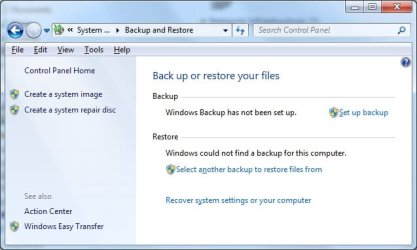
I do not see "Create a system recovery disc" on the left hand side. I assume you mean "Create a system image", but the image itself so created is not in a bootable format. Can you make a bootable DVD out of this image?
 

My Computer

Computer type
PC/Desktop
OS
W7 Ult x64, W8 Pro x64 and W10 Pro x64
CPU
Phenom FX6300
Motherboard
Gigabyte GA-970A-UD3 rev. 1.2
Memory
16GB DDR3 1866 G.Skill F3-1866C9D-16GWM x2
Graphics Card(s)
Radeon R7 360
Sound Card
Asus Xonar DS
Monitor(s) Displays
27" x2, Dell P2715Q
Screen Resolution
3840 x 2160
Hard Drives
Samsung 850Pro 1TB SSD - system
Samsung 4TB SSD - Data
PSU
Corsair CX450M
Case
Corsair 200R
Cooling
Zalman CNPS5X Performa
Internet Speed
400Mbps/12Mbps
Other Info
2nd machine: Same as above
3rd machine: Apple MacAir with W7 Ult installed
I do not see "Create a system recovery disc" on the left hand side. I assume you mean "Create a system image", but the image itself so created is not in a bootable format. Can you make a bootable DVD out of this image?


Capture.png


Perhaps you need to create the system image first befere the recovery image option comes up.

Which build of 7 are you using?
 

My Computer

Computer type
Laptop
Computer Manufacturer/Model Number
Lenovo
OS
Windows 7 Professional 64bit
CPU
Intel Core Quad 9550
Motherboard
Mobile Intel QM87 Express Chipset
Memory
16GB factory installed
Graphics Card(s)
NVIDIA Quadro K2100M
Sound Card
Onboard
Monitor(s) Displays
Apple iMac 27" display
Screen Resolution
2560 x 1440
Hard Drives
160gb factory fitted ssd
512gb pcie m2 2242 ssd

My Computer

Computer type
PC/Desktop
OS
W7 Ult x64, W8 Pro x64 and W10 Pro x64
CPU
Phenom FX6300
Motherboard
Gigabyte GA-970A-UD3 rev. 1.2
Memory
16GB DDR3 1866 G.Skill F3-1866C9D-16GWM x2
Graphics Card(s)
Radeon R7 360
Sound Card
Asus Xonar DS
Monitor(s) Displays
27" x2, Dell P2715Q
Screen Resolution
3840 x 2160
Hard Drives
Samsung 850Pro 1TB SSD - system
Samsung 4TB SSD - Data
PSU
Corsair CX450M
Case
Corsair 200R
Cooling
Zalman CNPS5X Performa
Internet Speed
400Mbps/12Mbps
Other Info
2nd machine: Same as above
3rd machine: Apple MacAir with W7 Ult installed
I have the same as Churin... in 7057.

Create a system repair disc
but it does the same thing, AFAIK
 

My Computer

Computer Manufacturer/Model Number
Gateway FX-510X
OS
Windows 7 Ultimate x64 RTM
CPU
Intel(R) Pentium(R) D CPU 3.00GHz
Motherboard
Intel OEMD975XW2G1
Memory
6 GB dual channel DDR2 333 MHz
Graphics Card(s)
NVIDIA GeForce 7800 GTX 256 MB
Sound Card
Creative X-Fi Fatal1ty Extreme Gamer
Monitor(s) Displays
15" Planar PL170 LCD, 17" Gateway FPD1965 LCD
Screen Resolution
1280 x 1024
Hard Drives
64 GB SSD Crucial
2000 GB internal WDC
500 GB internal WDC
Ahh, now everything is clear!

Yes infact in 7000, when you've saved the image backup it asks if you want to create a system repair disc (just done a backup you see!), so yes churin and dnorris, they've standardised the naming convention but the function must be the same.
 

My Computer

Computer type
Laptop
Computer Manufacturer/Model Number
Lenovo
OS
Windows 7 Professional 64bit
CPU
Intel Core Quad 9550
Motherboard
Mobile Intel QM87 Express Chipset
Memory
16GB factory installed
Graphics Card(s)
NVIDIA Quadro K2100M
Sound Card
Onboard
Monitor(s) Displays
Apple iMac 27" display
Screen Resolution
2560 x 1440
Hard Drives
160gb factory fitted ssd
512gb pcie m2 2242 ssd

Attachments

  • recimage.jpg
    recimage.jpg
    28.7 KB · Views: 145

My Computer

Computer type
PC/Desktop
OS
W7 Ult x64, W8 Pro x64 and W10 Pro x64
CPU
Phenom FX6300
Motherboard
Gigabyte GA-970A-UD3 rev. 1.2
Memory
16GB DDR3 1866 G.Skill F3-1866C9D-16GWM x2
Graphics Card(s)
Radeon R7 360
Sound Card
Asus Xonar DS
Monitor(s) Displays
27" x2, Dell P2715Q
Screen Resolution
3840 x 2160
Hard Drives
Samsung 850Pro 1TB SSD - system
Samsung 4TB SSD - Data
PSU
Corsair CX450M
Case
Corsair 200R
Cooling
Zalman CNPS5X Performa
Internet Speed
400Mbps/12Mbps
Other Info
2nd machine: Same as above
3rd machine: Apple MacAir with W7 Ult installed
Back
Top