Solved Windows 7 hanging at "please wait" during boot

LC14199

New member
Member
Local time
11:19 PM
Messages
20
Hey guys, I wasn't sure where to put this so I just put it here :P

So the issue I have is that when I boot my computer after say, 12 hours of it being off, it'll hang at "please wait" for around 2-3 minutes which is dramatically slowing down my computers boot time. I've been trying to figure out what is causing this to no avail for the last 2 months.

I'm running AutoRuns right now to see if it pops anything, I'll post the logfile here when I'm done with it. Also, I've seen others that have run TFC by OldTimer and that has fixed their issue, so I'll run that too.

If neither of these work I'll post back with more information :)
 

My Computer My Computer

Computer type
Laptop
Computer Manufacturer/Model Number
HP
OS
Windows 7 home Premium 64 bit
CPU
AMD A6
Memory
8 GB DDR3
Antivirus
MSE
Browser
Firefox/Chrome

My Computer My Computer

Computer type
PC/Desktop
Computer Manufacturer/Model Number
Golden Mk. I.4
OS
Windows 10 Pro x64 ; Xubuntu x64
CPU
Intel i7 860 @ 2.80 GHz O/C'ed to 4.0GHz
Motherboard
Gigabyte P55A-UD3R Rev.1. Award BIOS F13
Memory
16GB Corsair Vengance DDR3 @ 661 MHz Dual Channel (9-9-9-24)
Graphics Card(s)
EVGA NVidia GTX 560 1024MB
Sound Card
Realtek Integrated
Monitor(s) Displays
Dual Samsung SyncMaster 2494HS
Screen Resolution
1920*1080 and 1920*1080
Hard Drives
1*Samsung 840 EVO 120GB SSD;
1*OCZ Vertex 2 60GB SSD;
2*Samsung F3 SpinPoint 1TB in RAID0;
1*Samsung F1 SpinPoint 1TB;
2*Western Digital 1TB External USB 3.0
1*Western Digital 500GB External USB 3.0
1*Seagate 500GB External USB 2.0
PSU
Thermaltake ToughPower QFan 750W
Case
Thermaltake Element S VK60001W2Z
Cooling
Corsair H60 Water Cooling, 2*230mm and 2*80mm case fans
Keyboard
Logitech G110
Mouse
Logitech MX518
Auto Runs lists everything from startup entries, services, scheduled tasks, etc. I'm uploading the log file now.
 

My Computer My Computer

Computer type
Laptop
Computer Manufacturer/Model Number
HP
OS
Windows 7 home Premium 64 bit
CPU
AMD A6
Memory
8 GB DDR3
Antivirus
MSE
Browser
Firefox/Chrome
Run a few Startup Repairs
to see what they find.

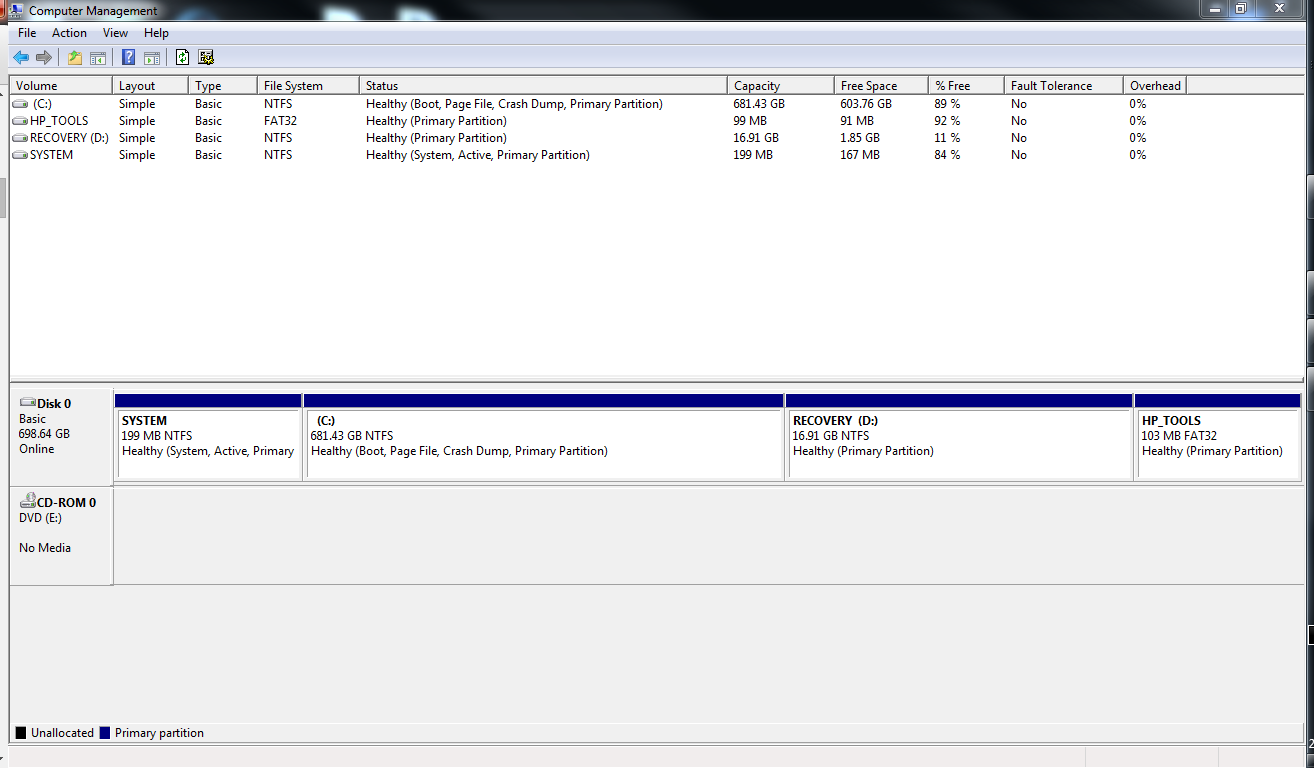
Please post back a screenshot of Disk Management - Post a Screen Capture Image
so we can look over your configuration to make sure it is correct.

Then start working through the steps for Troubleshooting Steps for Windows 7 which will uncover vital clues and often the problem itself. You'll want to establish a Clean Boot right away, test your hardware, then cull the logs and System Resources for clues to resolve as shown.
 
I'll run some startup repairs, but I've seen posts about it being caused by a network related thing... some process that has to time out before the computer can boot. It's strange

Here's my partitions:

8c4jgyv.png


This is the text file output from the program AutoRuns:
http://pastebin.com/VR6MXxqt

If you guys can read that, then go ahead. But personally, I cannot. I've seen some bad formatting, but holy mother that program can't output text for the life of me XD

I may also run a system file check to make sure that there's no corruption, etc etc.
 
Last edited:

My Computer My Computer

Computer type
Laptop
Computer Manufacturer/Model Number
HP
OS
Windows 7 home Premium 64 bit
CPU
AMD A6
Memory
8 GB DDR3
Antivirus
MSE
Browser
Firefox/Chrome
Startup Repairs won't help you - your system is crippled by bad software and manufacturer bloatware.

Uninstall IoBit - its worthless garbage. They have an extremely poor reputation for inferior software.

Code:
+ "SmartDefragExtension"        [COLOR="Red"]"IObit Smart Defrag Extension"[/COLOR]  "IObit" "c:\windows\system32\iobitsmartdefragextension.dll"     "8/01/2014 5:54 PM"
X "\Driver Booster Scan"        [COLOR="red"]"Driver Booster Scheduler"[/COLOR]      "IObit" "c:\program files (x86)\iobit\driver booster\scheduler.exe"     "5/03/2014 3:09 PM"
X "\Driver Booster SkipUAC (Luke)"      [COLOR="red"]"Driver Booster"[/COLOR]        "IObit" "c:\program files (x86)\iobit\driver booster\driverbooster.exe" "9/05/2014 12:47 PM"
X "\Driver Booster Update"      [COLOR="red"]"Driver Booster Updater"[/COLOR]        "IObit" "c:\program files (x86)\iobit\driver booster\autoupdate.exe"    "9/05/2014 4:19 PM"

Turn off all the Hewlett Packard bloatware services and startup items - that will definitely cause a slow-down in your system.

See if that improves things - it should make quite a difference, and should meet your needs.

Longer term you can consider performing a fresh installation using this technique:
1. Download a Windows 7 ISO from here only - pick the version you are currently running
2. Write it to a 4GB USB flash-drive using this tool
3. Backup all your user data.
4. Make sure you have all the HP specific drivers handy.
5. Install Windows from the 4GB USB drive.
6. Run Windows Update to pick up most of the required drivers.
7. Install the HP specific drivers and your programs and data
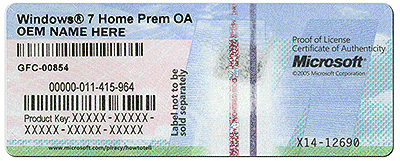
8. Activate the installation using the product key on the COA

coa-stickers.gif

There is more detail here: http://www.sevenforums.com/tutorials/219487-clean-reinstall-factory-oem-windows-7-a.html
 

My Computer My Computer

Computer type
PC/Desktop
Computer Manufacturer/Model Number
Golden Mk. I.4
OS
Windows 10 Pro x64 ; Xubuntu x64
CPU
Intel i7 860 @ 2.80 GHz O/C'ed to 4.0GHz
Motherboard
Gigabyte P55A-UD3R Rev.1. Award BIOS F13
Memory
16GB Corsair Vengance DDR3 @ 661 MHz Dual Channel (9-9-9-24)
Graphics Card(s)
EVGA NVidia GTX 560 1024MB
Sound Card
Realtek Integrated
Monitor(s) Displays
Dual Samsung SyncMaster 2494HS
Screen Resolution
1920*1080 and 1920*1080
Hard Drives
1*Samsung 840 EVO 120GB SSD;
1*OCZ Vertex 2 60GB SSD;
2*Samsung F3 SpinPoint 1TB in RAID0;
1*Samsung F1 SpinPoint 1TB;
2*Western Digital 1TB External USB 3.0
1*Western Digital 500GB External USB 3.0
1*Seagate 500GB External USB 2.0
PSU
Thermaltake ToughPower QFan 750W
Case
Thermaltake Element S VK60001W2Z
Cooling
Corsair H60 Water Cooling, 2*230mm and 2*80mm case fans
Keyboard
Logitech G110
Mouse
Logitech MX518
I always did wonder if the HP programs that most laptops come with these days were actually required. Should I uninstall the programs as well or just disable them for startup?
 

My Computer My Computer

Computer type
Laptop
Computer Manufacturer/Model Number
HP
OS
Windows 7 home Premium 64 bit
CPU
AMD A6
Memory
8 GB DDR3
Antivirus
MSE
Browser
Firefox/Chrome
Just disable them for now, and any related services. Don't forget to get rid of IOBit - its complete trash.
 

My Computer My Computer

Computer type
PC/Desktop
Computer Manufacturer/Model Number
Golden Mk. I.4
OS
Windows 10 Pro x64 ; Xubuntu x64
CPU
Intel i7 860 @ 2.80 GHz O/C'ed to 4.0GHz
Motherboard
Gigabyte P55A-UD3R Rev.1. Award BIOS F13
Memory
16GB Corsair Vengance DDR3 @ 661 MHz Dual Channel (9-9-9-24)
Graphics Card(s)
EVGA NVidia GTX 560 1024MB
Sound Card
Realtek Integrated
Monitor(s) Displays
Dual Samsung SyncMaster 2494HS
Screen Resolution
1920*1080 and 1920*1080
Hard Drives
1*Samsung 840 EVO 120GB SSD;
1*OCZ Vertex 2 60GB SSD;
2*Samsung F3 SpinPoint 1TB in RAID0;
1*Samsung F1 SpinPoint 1TB;
2*Western Digital 1TB External USB 3.0
1*Western Digital 500GB External USB 3.0
1*Seagate 500GB External USB 2.0
PSU
Thermaltake ToughPower QFan 750W
Case
Thermaltake Element S VK60001W2Z
Cooling
Corsair H60 Water Cooling, 2*230mm and 2*80mm case fans
Keyboard
Logitech G110
Mouse
Logitech MX518
So services as well.. on it. I've disabled the programs in startup, services may take a bit longer :P

IOBit has been completely removed. Including SmartDefrag 3.
 

My Computer My Computer

Computer type
Laptop
Computer Manufacturer/Model Number
HP
OS
Windows 7 home Premium 64 bit
CPU
AMD A6
Memory
8 GB DDR3
Antivirus
MSE
Browser
Firefox/Chrome
In addition to Colin's excellent advice here are further steps to Clean Up Factory Bloatware.

With HP you are getting the worst load of bloatware and duplicate utilties which interfere with better versions built into Win7. Only by turning them off does Win7 have the chance to not be smothered. But if you really want to see it soar then do a Clean Reinstall - Factory OEM Windows 7. The difference is between the worst install one can have and the very best.

Be sure to read the Special Note for HP Owners at the end because many late model HP's have a Minimal Recovery built in which is comparable to a clean reinstall. You only need to uninstall the HP Wireless manager which adds 30 seconds to boot time, use Win7's superior wireless manager in System tray.
 
I'll run an SFC just to make sure no files are damaged, and then I'm heading off to bed lol. Thanks for your help guys, and I'll post back if the problem still exists :)
 

My Computer My Computer

Computer type
Laptop
Computer Manufacturer/Model Number
HP
OS
Windows 7 home Premium 64 bit
CPU
AMD A6
Memory
8 GB DDR3
Antivirus
MSE
Browser
Firefox/Chrome
Ok so after waiting 12 hours and testing again, it hangs again. I'm wondering if the cold climate of where I live could be affecting my hardware components? because once the pc has been turned on and used for a bit, it restarts and reboots fine, with no hanging whatsoever.

I'll run TFC by Old Timer and see what that does.

Ok, TFC removed 903 MB of temp files from all profiles, including the system. Most of the temp files were in my user directory however.

Anyway, so that's done and I'm out of ideas. I've disabled all HP related things in my startup, so perhaps it's something else affecting it. But unfortunately due to the time constraints of this annoying bug, I cannot do a clean boot now because the computer only does it after not being used for a while or rarely, just after I've started using it.

Logins also take a while too. I've run an SFC /verifyonly and everything is fine in that department, I'll run a chkdsk when I get home to see if it's hard drive related.
 

My Computer My Computer

Computer type
Laptop
Computer Manufacturer/Model Number
HP
OS
Windows 7 home Premium 64 bit
CPU
AMD A6
Memory
8 GB DDR3
Antivirus
MSE
Browser
Firefox/Chrome
Post your Startup items only...not the whole registry please
 

My Computer My Computer

Computer type
PC/Desktop
Computer Manufacturer/Model Number
Golden Mk. I.4
OS
Windows 10 Pro x64 ; Xubuntu x64
CPU
Intel i7 860 @ 2.80 GHz O/C'ed to 4.0GHz
Motherboard
Gigabyte P55A-UD3R Rev.1. Award BIOS F13
Memory
16GB Corsair Vengance DDR3 @ 661 MHz Dual Channel (9-9-9-24)
Graphics Card(s)
EVGA NVidia GTX 560 1024MB
Sound Card
Realtek Integrated
Monitor(s) Displays
Dual Samsung SyncMaster 2494HS
Screen Resolution
1920*1080 and 1920*1080
Hard Drives
1*Samsung 840 EVO 120GB SSD;
1*OCZ Vertex 2 60GB SSD;
2*Samsung F3 SpinPoint 1TB in RAID0;
1*Samsung F1 SpinPoint 1TB;
2*Western Digital 1TB External USB 3.0
1*Western Digital 500GB External USB 3.0
1*Seagate 500GB External USB 2.0
PSU
Thermaltake ToughPower QFan 750W
Case
Thermaltake Element S VK60001W2Z
Cooling
Corsair H60 Water Cooling, 2*230mm and 2*80mm case fans
Keyboard
Logitech G110
Mouse
Logitech MX518
I like to make a small suggestion.

In msconfig check your NON Microsoft Services and see if IObits anything is checked for auto updates. Let us know about this.

I do agree with Golden. After you have installed and or used anything from IObit a clean install is a very good option. When you remove IObit their are still things hiding and the damage it has already caused will not be repaired just by uninstalling IObit.

I highly recommend changing ALL passwords. Their is a good chance they have been compromised.

I will go back to watching.
 

My Computer My Computer

Computer type
PC/Desktop
Computer Manufacturer/Model Number
Home made Desktop
OS
Windows 10 Pro. 64/ version 1709 Windows 7 Pro/64
CPU
Intel i7-6800K @ 4.3
Motherboard
ASUS X-99 Deluxe II
Memory
Corsair Platinum 16 gig @2400
Graphics Card(s)
EVGA GTX 1070 OC
Monitor(s) Displays
Asus 27" LED LCD/VE278Q
Screen Resolution
1920-1080 or 1280-720 HDMI
Hard Drives
INTEL SSD 730-240 Gb Sata 3.0/
PSU
EVGA Platium 1200W
Case
Phanteks Luxe Tempered Glass 8 fans/ one radiator
Cooling
XSPC/ Water Cooled CPU
Keyboard
Das 4 Professional
Mouse
Logitech M705/MX Anywhere 2-S
Internet Speed
100 mbits
Antivirus
Microsoft Security Essentials/ Malwarebytes Premium 3.0/ SAS
Browser
I.E. 11 default/Firefox/ ISP Time Warner Cable/Spectrum
Other Info
LG BluRay Burner/
Sound system-KLipsch-THX/
Icy Dock ssd Hot Swap bays.
There are no IOBit services on the machine. I'm posting the startup items that are active here:

Catalyst Control Centre
IDT PC Audio
Synaptics pointing device driver
microsoft security client (This is microsoft security essentials)
AMD USB 3.0 device detector
f.lux (Program that changes the screens hue during night time. I've seen plenty of recommends for this program)
OpenVPN Client (I use VPNs to access sites anonymously. It also helps mask where I am from)

All other entries are disabled.

If you're wondering, I do not use a VPN to access this site.
 

My Computer My Computer

Computer type
Laptop
Computer Manufacturer/Model Number
HP
OS
Windows 7 home Premium 64 bit
CPU
AMD A6
Memory
8 GB DDR3
Antivirus
MSE
Browser
Firefox/Chrome
As it says in Clean Up Factory Bloatware I would disable anything other than AV and any sync in msconfig>Startup and Services (after Hiding all MS Services) for best performance. You simply don't need those items starting up on Window's back since you already have their driiver and anything else is only needed for special settings (in the case of audio and touchpad) or spies on you.
 
I'm totally bumping a VERY old thread, but one that I created nonetheless, I found the source of the problem. The spotflux connection manager service takes FOREVER to boot, and was causing the system to hang. Stopping this service from running fixed the issue :)
 

My Computer My Computer

Computer type
Laptop
Computer Manufacturer/Model Number
HP
OS
Windows 7 home Premium 64 bit
CPU
AMD A6
Memory
8 GB DDR3
Antivirus
MSE
Browser
Firefox/Chrome
What kind of program is Spotflux and where does it come from??

Was the Service under Microsoft Services or Non Microsoft Services??
 

My Computer My Computer

Computer type
PC/Desktop
Computer Manufacturer/Model Number
Home made Desktop
OS
Windows 10 Pro. 64/ version 1709 Windows 7 Pro/64
CPU
Intel i7-6800K @ 4.3
Motherboard
ASUS X-99 Deluxe II
Memory
Corsair Platinum 16 gig @2400
Graphics Card(s)
EVGA GTX 1070 OC
Monitor(s) Displays
Asus 27" LED LCD/VE278Q
Screen Resolution
1920-1080 or 1280-720 HDMI
Hard Drives
INTEL SSD 730-240 Gb Sata 3.0/
PSU
EVGA Platium 1200W
Case
Phanteks Luxe Tempered Glass 8 fans/ one radiator
Cooling
XSPC/ Water Cooled CPU
Keyboard
Das 4 Professional
Mouse
Logitech M705/MX Anywhere 2-S
Internet Speed
100 mbits
Antivirus
Microsoft Security Essentials/ Malwarebytes Premium 3.0/ SAS
Browser
I.E. 11 default/Firefox/ ISP Time Warner Cable/Spectrum
Other Info
LG BluRay Burner/
Sound system-KLipsch-THX/
Icy Dock ssd Hot Swap bays.
A connection manager is never needed and often causes problems. For example, the HP Wireless manager adds 30 seconds to boot time. Win7 is perfectly capable without interference of managing connections from the System Tray icon.
 
Thanks Greg.
That is my point. If LC14199 would of followed the suggestion and requests by members this problem would of been found back in July 2014.
 

My Computer My Computer

Computer type
PC/Desktop
Computer Manufacturer/Model Number
Home made Desktop
OS
Windows 10 Pro. 64/ version 1709 Windows 7 Pro/64
CPU
Intel i7-6800K @ 4.3
Motherboard
ASUS X-99 Deluxe II
Memory
Corsair Platinum 16 gig @2400
Graphics Card(s)
EVGA GTX 1070 OC
Monitor(s) Displays
Asus 27" LED LCD/VE278Q
Screen Resolution
1920-1080 or 1280-720 HDMI
Hard Drives
INTEL SSD 730-240 Gb Sata 3.0/
PSU
EVGA Platium 1200W
Case
Phanteks Luxe Tempered Glass 8 fans/ one radiator
Cooling
XSPC/ Water Cooled CPU
Keyboard
Das 4 Professional
Mouse
Logitech M705/MX Anywhere 2-S
Internet Speed
100 mbits
Antivirus
Microsoft Security Essentials/ Malwarebytes Premium 3.0/ SAS
Browser
I.E. 11 default/Firefox/ ISP Time Warner Cable/Spectrum
Other Info
LG BluRay Burner/
Sound system-KLipsch-THX/
Icy Dock ssd Hot Swap bays.
Back
Top