WINDOWS 7 hangs

upiter77

New member
Member
Local time
8:26 PM
Messages
86
Hi

My desktop ThinkCentre Edge 71 (1578E1G) time to time hangs completely and nothing helps.
I can press only the power-off button.
I have done full hardware test using Lenovo ThinkVantage Tool and hardware is OK.
Before my PC hangs I have these entries in Event Log:

Log Name: System
Source: Service Control Manager
Date: 24.08.2013 13:27:04
Event ID: 7036
Task Category: None
Level: Information
Keywords: Classic
User: N/A
Computer: think
Description:
The Diagnostic System Host service entered the stopped state.
Event Xml:
<Event xmlns="http://schemas.microsoft.com/win/2004/08/events/event">
<System>
<Provider Name="Service Control Manager" Guid="{555908d1-a6d7-4695-8e1e-26931d2012f4}" EventSourceName="Service Control Manager" />
<EventID Qualifiers="16384">7036</EventID>
<Version>0</Version>
<Level>4</Level>
<Task>0</Task>
<Opcode>0</Opcode>
<Keywords>0x8080000000000000</Keywords>
<TimeCreated SystemTime="2013-08-24T11:27:04.508385700Z" />
<EventRecordID>150806</EventRecordID>
<Correlation />
<Execution ProcessID="680" ThreadID="6648" />
<Channel>System</Channel>
<Computer>think</Computer>
<Security />
</System>
<EventData>
<Data Name="param1">Diagnostic System Host</Data>
<Data Name="param2">stopped</Data>
<Binary>570064006900530079007300740065006D0048006F 00730074002F0031000000</Binary>
</EventData>
</Event>


Log Name: System
Source: Service Control Manager
Date: 24.08.2013 13:12:27
Event ID: 7036
Task Category: None
Level: Information
Keywords: Classic
User: N/A
Computer: think
Description:
The Application Experience service entered the stopped state.
Event Xml:
<Event xmlns="http://schemas.microsoft.com/win/2004/08/events/event">
<System>
<Provider Name="Service Control Manager" Guid="{555908d1-a6d7-4695-8e1e-26931d2012f4}" EventSourceName="Service Control Manager" />
<EventID Qualifiers="16384">7036</EventID>
<Version>0</Version>
<Level>4</Level>
<Task>0</Task>
<Opcode>0</Opcode>
<Keywords>0x8080000000000000</Keywords>
<TimeCreated SystemTime="2013-08-24T11:12:27.175205100Z" />
<EventRecordID>150805</EventRecordID>
<Correlation />
<Execution ProcessID="680" ThreadID="6364" />
<Channel>System</Channel>
<Computer>think</Computer>
<Security />
</System>
<EventData>
<Data Name="param1">Application Experience</Data>
<Data Name="param2">stopped</Data>
<Binary>410065004C006F006F006B00750070005300760063 002F0031000000</Binary>
</EventData>
</Event>

Should I try to this?
Windows 7 System Hang – Application Experience in Eventlog - The Real (and Virtual) Adventures of Nathan the IT Guy
 

My Computer My Computer

Computer type
PC/Desktop
Computer Manufacturer/Model Number
ThinkCentre Edge 71 (1578E1G)
OS
Windows7 64bit
CPU
Intel(R) Core(TM) i7-2600S CPU @ 2.80GHz
Motherboard
LENOVO To be filled by O.E.M.
Memory
8.00 GB
Graphics Card(s)
Intel HD Graphics 2000 (Sandy Bridge GT1) 2172 MBytes
Sound Card
RealTek ALC662
Monitor(s) Displays
DELL E197FP
Screen Resolution
1280 x 1024 x 32 bits (4294967296 colors) @ 75 Hz
Hard Drives
WDC WD5003ABYX-01WER SCSI Disk Device
PSU
PC9059, 180W
Case
Desktop
Cooling
Noiseblocker BlackSilent XLP Rev. 3.00
Keyboard
DELL SK-8125 Keyboard
Mouse
Logitech USB Optical Mouse
Internet Speed
cable 75Mbps
Antivirus
McAfee VSE 8.8 SP2
Browser
SeaMonkey 2.24

My Computer My Computer

Computer type
PC/Desktop
Computer Manufacturer/Model Number
Custom assembled by me :}
OS
Win-7-Pro64bit 7-H-Prem-64bit
CPU
i7-5930K 2nd i9-9940x both water blocked VRM's too
Motherboard
ASUS SABERTOOTH X99 2nd ASUS x299 Apex
Memory
Trident-z 3200C14 2nd Trident-z 3600C16
Graphics Card(s)
EVGA 1080ti ftw3 2nd Titan Xp both water blocked
Sound Card
Built-in Realtek
Monitor(s) Displays
1-AOC G2460PG 24"G-Sync 144Hz/ 2nd 1-ASUS VG248QE 24" 144Hz
Screen Resolution
1920 x 1080 144Hz
Hard Drives
2-Samsung M.2 Evo & Evo Plus
2-Samsung 850 EVO 500GB SSD's/ 3-2.5 W.D. Black 1tb-&3-1tb/3-3.5 WD Black 1tb hdd's
PSU
EVGA SuperNOVA 1000-P2 2nd 1200-P2
Case
2-Corsair Obsidian Series 450D Black ATX Mid Tower
Cooling
Custom water loops
Keyboard
Logitech G710+/ 2nd Logitech G910
Mouse
2-RedDragon M901 Perdition 16400 dpi Gaming mouse = wired
Internet Speed
Comcast Ping 19ms 89.31mbps download speed 6.12mbps upload
Antivirus
Malwarebytes Pro/ Superantispyware Pro
Browser
FireFox & Pale moon
Other Info
2nd ASUS X299 Apex/Intel i9-9940x with Custom water loop/7H-Prem-x64/Corsair 450D case/Ram Trident-z 3600C16 4x8gb / Samsung970Evo plus 500gb SSD/Dual ssd EZ swap evo/PSU EVGA SuperNova 1200w-P2 80+Platinum/GPU Titan Xp /8-ML-140 on push-pull on 2-280GTX rads

My Computer My Computer

Computer type
PC/Desktop
Computer Manufacturer/Model Number
ThinkCentre Edge 71 (1578E1G)
OS
Windows7 64bit
CPU
Intel(R) Core(TM) i7-2600S CPU @ 2.80GHz
Motherboard
LENOVO To be filled by O.E.M.
Memory
8.00 GB
Graphics Card(s)
Intel HD Graphics 2000 (Sandy Bridge GT1) 2172 MBytes
Sound Card
RealTek ALC662
Monitor(s) Displays
DELL E197FP
Screen Resolution
1280 x 1024 x 32 bits (4294967296 colors) @ 75 Hz
Hard Drives
WDC WD5003ABYX-01WER SCSI Disk Device
PSU
PC9059, 180W
Case
Desktop
Cooling
Noiseblocker BlackSilent XLP Rev. 3.00
Keyboard
DELL SK-8125 Keyboard
Mouse
Logitech USB Optical Mouse
Internet Speed
cable 75Mbps
Antivirus
McAfee VSE 8.8 SP2
Browser
SeaMonkey 2.24
I've tried and this problem still occurs.
Has anyone any idea how to solve this problem?
 

My Computer My Computer

Computer type
PC/Desktop
Computer Manufacturer/Model Number
ThinkCentre Edge 71 (1578E1G)
OS
Windows7 64bit
CPU
Intel(R) Core(TM) i7-2600S CPU @ 2.80GHz
Motherboard
LENOVO To be filled by O.E.M.
Memory
8.00 GB
Graphics Card(s)
Intel HD Graphics 2000 (Sandy Bridge GT1) 2172 MBytes
Sound Card
RealTek ALC662
Monitor(s) Displays
DELL E197FP
Screen Resolution
1280 x 1024 x 32 bits (4294967296 colors) @ 75 Hz
Hard Drives
WDC WD5003ABYX-01WER SCSI Disk Device
PSU
PC9059, 180W
Case
Desktop
Cooling
Noiseblocker BlackSilent XLP Rev. 3.00
Keyboard
DELL SK-8125 Keyboard
Mouse
Logitech USB Optical Mouse
Internet Speed
cable 75Mbps
Antivirus
McAfee VSE 8.8 SP2
Browser
SeaMonkey 2.24
I posted this in a different thread but it's applicable to your situation as well.

Can you please upload the MSINFO32 file?

  1. Start> RUN> "MSINFO32" without the quotes then hit [Enter].
  2. In "MSINFO32" go to, File> Save> name it your user-name and upload.
  • Are experiencing this problem all around your system or is it completely unusable?
  • Did you try to scan for malware?

Download | Process Explorer.

Immediately after a Cold Boot launch Process Explorer (if you have a short list,
click "Show Processes From All Users" the right most option in the top bar):

  • Arrange "Working Set" (by clicking on the top of that column) Take a screenshot.
  • Arrange "Private Bytes" (by clicking on the top of that column) Take a screenshot.
  • Arrange "CPU" (by clicking on the top of that column) Take a screenshot.

After 30 minutes (or the maximum amount the system hold its self together):

  • Arrange "Working Set" (by clicking on the top of that column) Take a screenshot.
  • Arrange "Private Bytes" (by clicking on the top of that column) Take a screenshot.
  • Arrange "CPU" (by clicking on the top of that column) Take a screenshot.
Upload the screenshots in a .zip file arranged in folders please.
 

My Computer My Computer

Computer type
PC/Desktop
OS
Windows 10
CPU
Intel Core i5 3570K
Motherboard
Asus P8Z77V-PRO
Memory
16GB 1600Mhz G.Skill
Graphics Card(s)
Gigabyte GTX 970 G1-Gaming
PSU
Seasonic 1000W Platinum
Case
Fractal Design Define R4
Cooling
Noctua NH-D14

My Computer My Computer

Computer type
PC/Desktop
Computer Manufacturer/Model Number
Custom assembled by me :}
OS
Win-7-Pro64bit 7-H-Prem-64bit
CPU
i7-5930K 2nd i9-9940x both water blocked VRM's too
Motherboard
ASUS SABERTOOTH X99 2nd ASUS x299 Apex
Memory
Trident-z 3200C14 2nd Trident-z 3600C16
Graphics Card(s)
EVGA 1080ti ftw3 2nd Titan Xp both water blocked
Sound Card
Built-in Realtek
Monitor(s) Displays
1-AOC G2460PG 24"G-Sync 144Hz/ 2nd 1-ASUS VG248QE 24" 144Hz
Screen Resolution
1920 x 1080 144Hz
Hard Drives
2-Samsung M.2 Evo & Evo Plus
2-Samsung 850 EVO 500GB SSD's/ 3-2.5 W.D. Black 1tb-&3-1tb/3-3.5 WD Black 1tb hdd's
PSU
EVGA SuperNOVA 1000-P2 2nd 1200-P2
Case
2-Corsair Obsidian Series 450D Black ATX Mid Tower
Cooling
Custom water loops
Keyboard
Logitech G710+/ 2nd Logitech G910
Mouse
2-RedDragon M901 Perdition 16400 dpi Gaming mouse = wired
Internet Speed
Comcast Ping 19ms 89.31mbps download speed 6.12mbps upload
Antivirus
Malwarebytes Pro/ Superantispyware Pro
Browser
FireFox & Pale moon
Other Info
2nd ASUS X299 Apex/Intel i9-9940x with Custom water loop/7H-Prem-x64/Corsair 450D case/Ram Trident-z 3600C16 4x8gb / Samsung970Evo plus 500gb SSD/Dual ssd EZ swap evo/PSU EVGA SuperNova 1200w-P2 80+Platinum/GPU Titan Xp /8-ML-140 on push-pull on 2-280GTX rads
I posted this in a different thread but it's applicable to your situation as well.

Can you please upload the MSINFO32 file?

  1. Start> RUN> "MSINFO32" without the quotes then hit [Enter].
  2. In "MSINFO32" go to, File> Save> name it your user-name and upload.
  • Are experiencing this problem all around your system or is it completely unusable?
  • Did you try to scan for malware?

Download | Process Explorer.

Immediately after a Cold Boot launch Process Explorer (if you have a short list,
click "Show Processes From All Users" the right most option in the top bar):

  • Arrange "Working Set" (by clicking on the top of that column) Take a screenshot.
  • Arrange "Private Bytes" (by clicking on the top of that column) Take a screenshot.
  • Arrange "CPU" (by clicking on the top of that column) Take a screenshot.

After 30 minutes (or the maximum amount the system hold its self together):

  • Arrange "Working Set" (by clicking on the top of that column) Take a screenshot.
  • Arrange "Private Bytes" (by clicking on the top of that column) Take a screenshot.
  • Arrange "CPU" (by clicking on the top of that column) Take a screenshot.
Upload the screenshots in a .zip file arranged in folders please.

Thx for your time and help.
Today, after crash I have done what needed and uploaded files.
BTW It crahes mostly while I'm browsing, or by playing musik from youtube.
 

Attachments

My Computer My Computer

Computer type
PC/Desktop
Computer Manufacturer/Model Number
ThinkCentre Edge 71 (1578E1G)
OS
Windows7 64bit
CPU
Intel(R) Core(TM) i7-2600S CPU @ 2.80GHz
Motherboard
LENOVO To be filled by O.E.M.
Memory
8.00 GB
Graphics Card(s)
Intel HD Graphics 2000 (Sandy Bridge GT1) 2172 MBytes
Sound Card
RealTek ALC662
Monitor(s) Displays
DELL E197FP
Screen Resolution
1280 x 1024 x 32 bits (4294967296 colors) @ 75 Hz
Hard Drives
WDC WD5003ABYX-01WER SCSI Disk Device
PSU
PC9059, 180W
Case
Desktop
Cooling
Noiseblocker BlackSilent XLP Rev. 3.00
Keyboard
DELL SK-8125 Keyboard
Mouse
Logitech USB Optical Mouse
Internet Speed
cable 75Mbps
Antivirus
McAfee VSE 8.8 SP2
Browser
SeaMonkey 2.24
I don't see something out of the ordinary, seamonkey is consuming the most RAM but not nearly enough
to hang your system.
Did you scan for infections (malware / viruse)?
Did you try using a different browser with no extensions or add-on and see if it still happens?

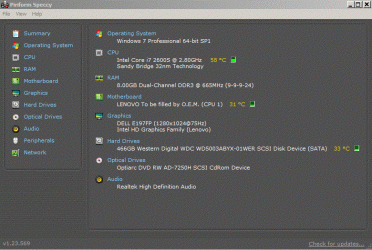
  • Download Speccy and post a Screenshot of the summary window, one at idle and another while putting load on the PC using Prime95 for the CPU.
 

My Computer My Computer

Computer type
PC/Desktop
OS
Windows 10
CPU
Intel Core i5 3570K
Motherboard
Asus P8Z77V-PRO
Memory
16GB 1600Mhz G.Skill
Graphics Card(s)
Gigabyte GTX 970 G1-Gaming
PSU
Seasonic 1000W Platinum
Case
Fractal Design Define R4
Cooling
Noctua NH-D14
Win7 should never hang when it has a perfectly maintained perfect install on adequate tested hardware. So start by comparing your install to the perfect install in http://www.sevenforums.com/tutorials/219487-clean-reinstall-factory-oem-windows-7-a.html#post1839164 which is compiled based on what works best in tens of thousands of installs we've helped with here since before Win7 was even released.

If you want to see if a grossly-inferior factory install can be cleaned up enough to do less damage to the best OS ever, try http://www.sevenforums.com/tutorials/219576-clean-up-factory-bloatware.html.

But there's no comparing the performance of native Win7 with a perfect install. I hope you get to experience it some day.:geek:
 
I don't see something out of the ordinary, seamonkey is consuming the most RAM but not nearly enough
to hang your system.
Did you scan for infections (malware / viruse)?
Did you try using a different browser with no extensions or add-on and see if it still happens?

  • Download Speccy and post a Screenshot of the summary window, one at idle and another while putting load on the PC using Prime95 for the CPU.

Yes, I have scanned for infections using McAfee VSE 8.8 SP2, Kaspersky Rescue Disk 10, Malwarebytes and they didn't find any malware or viruses.
And here is speccy output after half an hour stress testing with Prime95:
 

Attachments

  • speccy.GIF
    speccy.GIF
    116.3 KB · Views: 1

My Computer My Computer

Computer type
PC/Desktop
Computer Manufacturer/Model Number
ThinkCentre Edge 71 (1578E1G)
OS
Windows7 64bit
CPU
Intel(R) Core(TM) i7-2600S CPU @ 2.80GHz
Motherboard
LENOVO To be filled by O.E.M.
Memory
8.00 GB
Graphics Card(s)
Intel HD Graphics 2000 (Sandy Bridge GT1) 2172 MBytes
Sound Card
RealTek ALC662
Monitor(s) Displays
DELL E197FP
Screen Resolution
1280 x 1024 x 32 bits (4294967296 colors) @ 75 Hz
Hard Drives
WDC WD5003ABYX-01WER SCSI Disk Device
PSU
PC9059, 180W
Case
Desktop
Cooling
Noiseblocker BlackSilent XLP Rev. 3.00
Keyboard
DELL SK-8125 Keyboard
Mouse
Logitech USB Optical Mouse
Internet Speed
cable 75Mbps
Antivirus
McAfee VSE 8.8 SP2
Browser
SeaMonkey 2.24
Are you running MucAfee, because that could cause the problem itself? I would uninstall the worst bloatware AV out there and install Microsoft Security Essentials.

Like the worst infections MucAfee requires a special removal tool to get it all out: Uninstallers (removal tools) for common antivirus software - ESET Knowledgebase

This was specified in the Troubleshooting Steps for Windows 7 so you must have missed it. Did you do the RAM and HD tests yet?

I have removed McAfee, installed Microsoft Security Essentials, but this problem still exists.
RAM and HD tests are OK.
 

My Computer My Computer

Computer type
PC/Desktop
Computer Manufacturer/Model Number
ThinkCentre Edge 71 (1578E1G)
OS
Windows7 64bit
CPU
Intel(R) Core(TM) i7-2600S CPU @ 2.80GHz
Motherboard
LENOVO To be filled by O.E.M.
Memory
8.00 GB
Graphics Card(s)
Intel HD Graphics 2000 (Sandy Bridge GT1) 2172 MBytes
Sound Card
RealTek ALC662
Monitor(s) Displays
DELL E197FP
Screen Resolution
1280 x 1024 x 32 bits (4294967296 colors) @ 75 Hz
Hard Drives
WDC WD5003ABYX-01WER SCSI Disk Device
PSU
PC9059, 180W
Case
Desktop
Cooling
Noiseblocker BlackSilent XLP Rev. 3.00
Keyboard
DELL SK-8125 Keyboard
Mouse
Logitech USB Optical Mouse
Internet Speed
cable 75Mbps
Antivirus
McAfee VSE 8.8 SP2
Browser
SeaMonkey 2.24

My Computer My Computer

Computer type
PC/Desktop
Computer Manufacturer/Model Number
ThinkCentre Edge 71 (1578E1G)
OS
Windows7 64bit
CPU
Intel(R) Core(TM) i7-2600S CPU @ 2.80GHz
Motherboard
LENOVO To be filled by O.E.M.
Memory
8.00 GB
Graphics Card(s)
Intel HD Graphics 2000 (Sandy Bridge GT1) 2172 MBytes
Sound Card
RealTek ALC662
Monitor(s) Displays
DELL E197FP
Screen Resolution
1280 x 1024 x 32 bits (4294967296 colors) @ 75 Hz
Hard Drives
WDC WD5003ABYX-01WER SCSI Disk Device
PSU
PC9059, 180W
Case
Desktop
Cooling
Noiseblocker BlackSilent XLP Rev. 3.00
Keyboard
DELL SK-8125 Keyboard
Mouse
Logitech USB Optical Mouse
Internet Speed
cable 75Mbps
Antivirus
McAfee VSE 8.8 SP2
Browser
SeaMonkey 2.24
Back
Top