Windows 7 harddisk index score

BeeTz

New member
Local time
4:30 PM
Messages
10
Location
Zierikzee, Netherlands
Hello all,
I just installed Windows 7 (build 7022) and my friend told me about this forum. So i had a look and this forum became quite handy, but lets get to the point

Windows 7 has a kind of benchmark of your system just like Vista. Of course I was wondering about what score my system would have on Windows 7. So I benchmarked and all scores were quite the same, except for my harddisk. on vista i had a score of 5.7 and on Windows 7 a score of 3.0, which I think is strange. Does someone know what the problem is.

-- BeeTz
 

My Computer

Computer Manufacturer/Model Number
Acer
OS
Vista/ Windows 7
CPU
AMD Athlon 64 x2 4000+ @2,1GHz
Motherboard
-
Memory
3GB DDR2 @ 667Mhz
Graphics Card(s)
MSI nVidia 8600GT | PCI-e x16 (1.0)
Sound Card
-
Monitor(s) Displays
Acer x223w
Screen Resolution
1680x1050
Hard Drives
One, IDE, 250GB
PSU
Standard 250 watt
Case
Acer Aspire T180.
Cooling
Boxed CPU cooler
Keyboard
Stock
Mouse
Microsoft wireless
Internet Speed
12Mb/s | 2MB/s
I have the same :'). Is the problem that i dont have drivers for my maxtor? I have a second usb hard drive, is that the problem?
 

My Computer

Computer Manufacturer/Model Number
Real Ultimate
OS
Dualboot (Vista Home Premium 32b + Windows 7 Ultimate 32b)
CPU
Intel Core2Duo E6300 (1,86 Ghz)
Motherboard
Asus P5L-VM 1394
Memory
4 gb DDR2 @ 600 MHz - Kingston SDram
Graphics Card(s)
PCI-e EN7600GS 512mb Silencer | nVidia 7600GS
Sound Card
5.1 channel audio
Monitor(s) Displays
Hannstar G - 17 inch
Screen Resolution
1280x1024
Hard Drives
SATA II 250Gb 7200RPM 8MB Maxtor
PSU
400watt Silent
Keyboard
Logitech Wireless
Mouse
Logitech Wireless Rechargable
Internet Speed
Very fast
Other Info
Luxe cardreader with FireWire
DVD Brander +/- Writer/Rewriter Dual Layer Lightscribe
I dont know, I dont have a maxtor though. Maybe is it because there was nothing on my drive. After all, I 'benchmarked' on Vista when I pretty much on my harddrives. I'll benchmark again when my drives are some filled up;)
 

My Computer

Computer Manufacturer/Model Number
Acer
OS
Vista/ Windows 7
CPU
AMD Athlon 64 x2 4000+ @2,1GHz
Motherboard
-
Memory
3GB DDR2 @ 667Mhz
Graphics Card(s)
MSI nVidia 8600GT | PCI-e x16 (1.0)
Sound Card
-
Monitor(s) Displays
Acer x223w
Screen Resolution
1680x1050
Hard Drives
One, IDE, 250GB
PSU
Standard 250 watt
Case
Acer Aspire T180.
Cooling
Boxed CPU cooler
Keyboard
Stock
Mouse
Microsoft wireless
Internet Speed
12Mb/s | 2MB/s
I think it has something to do with disabling the cache writing on the primary HDD, give a try to see if it helps, some people have gone from a score of 3 to a score of 6.
 

My Computer

Computer Manufacturer/Model Number
Home Brew
OS
Windows 7 Ultimate Vista Ultimate x64
CPU
Core 2 Duo E8500 3.16Ghz @ 3.8Ghz
Motherboard
eVGA 750i FTW
Memory
2x2Gigs Patriot PC2-6400 LL
Graphics Card(s)
Inno3D GeForce GTX260 216 SP
Monitor(s) Displays
ASUS VW222U 22" 2ms Response time
Screen Resolution
1680x1050
Hard Drives
SATA 150GB
SATA II 250GB
USB IDE 750GB Ext.
PSU
HYTEC 600W & Thermaltake 650W Toughpower Power Exp
Case
Thermaltake Armor LCS (Liquid Cooling System)
Cooling
Liquid Cooling System
Keyboard
Logitech G15 Gaming Keyboard
Mouse
Logitech G9 Gaming Mouse
I think it has something to do with disabling the cache writing on the primary HDD, give a try to see if it helps, some people have gone from a score of 3 to a score of 6.

Thanks! But i cant test it now. I'm now on school ;).

So it can't be the fault of the drivers? Or you give one option? And there more?
 

My Computer

Computer Manufacturer/Model Number
Real Ultimate
OS
Dualboot (Vista Home Premium 32b + Windows 7 Ultimate 32b)
CPU
Intel Core2Duo E6300 (1,86 Ghz)
Motherboard
Asus P5L-VM 1394
Memory
4 gb DDR2 @ 600 MHz - Kingston SDram
Graphics Card(s)
PCI-e EN7600GS 512mb Silencer | nVidia 7600GS
Sound Card
5.1 channel audio
Monitor(s) Displays
Hannstar G - 17 inch
Screen Resolution
1280x1024
Hard Drives
SATA II 250Gb 7200RPM 8MB Maxtor
PSU
400watt Silent
Keyboard
Logitech Wireless
Mouse
Logitech Wireless Rechargable
Internet Speed
Very fast
Other Info
Luxe cardreader with FireWire
DVD Brander +/- Writer/Rewriter Dual Layer Lightscribe
I think it has something to do with disabling the cache writing on the primary HDD, give a try to see if it helps, some people have gone from a score of 3 to a score of 6.

Oh thanks. But I can't test it eiter. Im sitting next to royalnoob3. Could you make a easy discription how to enable cache?
 

My Computer

Computer Manufacturer/Model Number
Acer
OS
Vista/ Windows 7
CPU
AMD Athlon 64 x2 4000+ @2,1GHz
Motherboard
-
Memory
3GB DDR2 @ 667Mhz
Graphics Card(s)
MSI nVidia 8600GT | PCI-e x16 (1.0)
Sound Card
-
Monitor(s) Displays
Acer x223w
Screen Resolution
1680x1050
Hard Drives
One, IDE, 250GB
PSU
Standard 250 watt
Case
Acer Aspire T180.
Cooling
Boxed CPU cooler
Keyboard
Stock
Mouse
Microsoft wireless
Internet Speed
12Mb/s | 2MB/s
I think it is in Device manager you need to look, under IDE ATA/ATAPI controllers, go to properties and you want to disable it not enable it. I am not sure that this is the right location to do this as I have an SLI board and it doesn't give me that particular option but I don't need to worry about it either as my score is the same as in Vista :)
 

My Computer

Computer Manufacturer/Model Number
Home Brew
OS
Windows 7 Ultimate Vista Ultimate x64
CPU
Core 2 Duo E8500 3.16Ghz @ 3.8Ghz
Motherboard
eVGA 750i FTW
Memory
2x2Gigs Patriot PC2-6400 LL
Graphics Card(s)
Inno3D GeForce GTX260 216 SP
Monitor(s) Displays
ASUS VW222U 22" 2ms Response time
Screen Resolution
1680x1050
Hard Drives
SATA 150GB
SATA II 250GB
USB IDE 750GB Ext.
PSU
HYTEC 600W & Thermaltake 650W Toughpower Power Exp
Case
Thermaltake Armor LCS (Liquid Cooling System)
Cooling
Liquid Cooling System
Keyboard
Logitech G15 Gaming Keyboard
Mouse
Logitech G9 Gaming Mouse
My score is not the same as in Vista xD. I have in Vista 5.8 and in Windows 7 3.0. Thats bad! :sarc:

I think you can on the My computer page, right click on a drive. And choose dont Cach or Indexering orso.
 

My Computer

Computer Manufacturer/Model Number
Real Ultimate
OS
Dualboot (Vista Home Premium 32b + Windows 7 Ultimate 32b)
CPU
Intel Core2Duo E6300 (1,86 Ghz)
Motherboard
Asus P5L-VM 1394
Memory
4 gb DDR2 @ 600 MHz - Kingston SDram
Graphics Card(s)
PCI-e EN7600GS 512mb Silencer | nVidia 7600GS
Sound Card
5.1 channel audio
Monitor(s) Displays
Hannstar G - 17 inch
Screen Resolution
1280x1024
Hard Drives
SATA II 250Gb 7200RPM 8MB Maxtor
PSU
400watt Silent
Keyboard
Logitech Wireless
Mouse
Logitech Wireless Rechargable
Internet Speed
Very fast
Other Info
Luxe cardreader with FireWire
DVD Brander +/- Writer/Rewriter Dual Layer Lightscribe
I think it is in Device manager you need to look, under IDE ATA/ATAPI controllers, go to properties and you want to disable it not enable it. I am not sure that this is the right location to do this as I have an SLI board and it doesn't give me that particular option but I don't need to worry about it either as my score is the same as in Vista :)

Hehe, but mine isnt the same. But thanks, I'll try to do that. But I'm upgrading my pc pretty soon (I hope), because my birthday is pretty close to get some new parts. Price was around €500-520, and this was with a new harddrive;) .

Oh well,
You will hear more if I get the new parts.
 

My Computer

Computer Manufacturer/Model Number
Acer
OS
Vista/ Windows 7
CPU
AMD Athlon 64 x2 4000+ @2,1GHz
Motherboard
-
Memory
3GB DDR2 @ 667Mhz
Graphics Card(s)
MSI nVidia 8600GT | PCI-e x16 (1.0)
Sound Card
-
Monitor(s) Displays
Acer x223w
Screen Resolution
1680x1050
Hard Drives
One, IDE, 250GB
PSU
Standard 250 watt
Case
Acer Aspire T180.
Cooling
Boxed CPU cooler
Keyboard
Stock
Mouse
Microsoft wireless
Internet Speed
12Mb/s | 2MB/s
Whats the make, model, capacity, cache size of your hard drive?
 

My Computer

Computer Manufacturer/Model Number
self built
OS
Windows 7 Professional 64-bit
CPU
Intel E8400 3GHz
Motherboard
Intel DX48BT2
Memory
Kingston PC3-10700H 4Gb
Graphics Card(s)
XFX Radeon HD 5850 BlackEd.
Sound Card
Asus Xonar DG
Monitor(s) Displays
2x Samsung SM-T220HD 22"
Screen Resolution
1680x1050 on two monitors
Hard Drives
OCZ Vertex 2 120gb 3.5" (OS)
Seagate Momentus XT 500gb
Samsung F3 1Tb (games)
2x Samsung F1 1Tb
PSU
Thermaltake ToughPower 850w
Case
Thermaltake Armor
Cooling
Scythe Mugen II
Keyboard
Microsoft Comfort Curve USB
Mouse
Razer Diamondback 3G
Internet Speed
8128/443
Whats the make, model, capacity, cache size of your hard drive?

If i'm at home, i search it. I'm now on school, so i cant check it. I know only that i have a Maxtor. :huh:

Where can i find the cache size? If i google om my model, can i find it! Thanks for all our help.
 

My Computer

Computer Manufacturer/Model Number
Real Ultimate
OS
Dualboot (Vista Home Premium 32b + Windows 7 Ultimate 32b)
CPU
Intel Core2Duo E6300 (1,86 Ghz)
Motherboard
Asus P5L-VM 1394
Memory
4 gb DDR2 @ 600 MHz - Kingston SDram
Graphics Card(s)
PCI-e EN7600GS 512mb Silencer | nVidia 7600GS
Sound Card
5.1 channel audio
Monitor(s) Displays
Hannstar G - 17 inch
Screen Resolution
1280x1024
Hard Drives
SATA II 250Gb 7200RPM 8MB Maxtor
PSU
400watt Silent
Keyboard
Logitech Wireless
Mouse
Logitech Wireless Rechargable
Internet Speed
Very fast
Other Info
Luxe cardreader with FireWire
DVD Brander +/- Writer/Rewriter Dual Layer Lightscribe
Whats the make, model, capacity, cache size of your hard drive?

I'll have to search that at home, because I'm at school now.;)
 

My Computer

Computer Manufacturer/Model Number
Acer
OS
Vista/ Windows 7
CPU
AMD Athlon 64 x2 4000+ @2,1GHz
Motherboard
-
Memory
3GB DDR2 @ 667Mhz
Graphics Card(s)
MSI nVidia 8600GT | PCI-e x16 (1.0)
Sound Card
-
Monitor(s) Displays
Acer x223w
Screen Resolution
1680x1050
Hard Drives
One, IDE, 250GB
PSU
Standard 250 watt
Case
Acer Aspire T180.
Cooling
Boxed CPU cooler
Keyboard
Stock
Mouse
Microsoft wireless
Internet Speed
12Mb/s | 2MB/s
Yeah, this I think is a problem, as I have RAID 0 and have a score of 3. something... How do I go from having a 5.9 in vista, to a 3 in W7?
 

My Computer

Computer Manufacturer/Model Number
Alienware Area-51
OS
Windows 7 Ultimate x64
CPU
Core 2 Quad Q6600 2.4GHz 8MB Cache 1066MHz
Motherboard
nVidia nForce 680i SLI
Memory
4GB Dual Channel DDR2 SDRAM at 800MHz
Graphics Card(s)
nVidia 512mb GeForce 8800 GT
Sound Card
Creative Sound Blaster X-Fi XtremeGamer
Monitor(s) Displays
Samsung T220 ToC 22"
Screen Resolution
1680 x 1050
Hard Drives
RAID 0 - 250GB SATA X 2
WD 500gb External
PSU
750 Watt
Case
Alienware® P2 Chassis w/Video Cooling
Cooling
CPU liquid
Keyboard
logitech G15
Mouse
logitech G9
Internet Speed
Verizon Fios
Had the same problem, it's something wrong with the testing routines in the System Rating. Having Write Cacheing turned on stuffs the scores. Your disk is just as fast, it's just someone at MS can't add up or something.

To Fix:
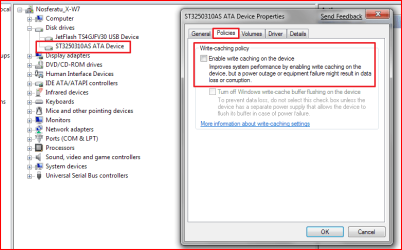
Go to Control Panel, Hardware and Sound, Device Manager. Expand the Disk Drives section, right click on your drive, select properties then the policies tab. Uncheck 'Enable Write Cacheing..'.

Run the System Rating again and it should show you your 'real score'. You can then turn on the Write Cacheing again using the same procedure.

While you're there if you could check the 'Turn off the write cache buffer' option for a little extra speed.. (very good for laptops, READ THE WARNING!)..

Hope this helps..
 

My Computer

Computer Manufacturer/Model Number
Toshiba P200-144 Laptop
OS
Windows 7 x64
CPU
Intel Core2 T7200
Memory
4GB
Graphics Card(s)
Nvidia GForce Go 7600
Sound Card
HDA
Monitor(s) Displays
Laptop LCD
Screen Resolution
1440x900
Hard Drives
2x200Gb
Case
Laptop
Keyboard
Full Size
Mouse
Kensington Si670m BT
Thanks :)

Thanks, this option works :). I have now a 5.9.
 

My Computer

Computer Manufacturer/Model Number
Real Ultimate
OS
Dualboot (Vista Home Premium 32b + Windows 7 Ultimate 32b)
CPU
Intel Core2Duo E6300 (1,86 Ghz)
Motherboard
Asus P5L-VM 1394
Memory
4 gb DDR2 @ 600 MHz - Kingston SDram
Graphics Card(s)
PCI-e EN7600GS 512mb Silencer | nVidia 7600GS
Sound Card
5.1 channel audio
Monitor(s) Displays
Hannstar G - 17 inch
Screen Resolution
1280x1024
Hard Drives
SATA II 250Gb 7200RPM 8MB Maxtor
PSU
400watt Silent
Keyboard
Logitech Wireless
Mouse
Logitech Wireless Rechargable
Internet Speed
Very fast
Other Info
Luxe cardreader with FireWire
DVD Brander +/- Writer/Rewriter Dual Layer Lightscribe
Glad it worked out for yah :)

Windows 7 HD performance scores has been attributed to be affected by how you installed Windows 7. People that let Windows 7 create a partition on unallocated space during install are not affected by the low scoring and would yield the normal results similar to Vista.

FYI. My score before the fix was 2.0. Now it's 5.9 ;)
 

My Computer

Computer Manufacturer/Model Number
Custom Build
OS
Windows 7 Build 7048 x64
CPU
Athlon 64 X2 Dual Core 4600+
Motherboard
EMX-AMD750G-PRO
Memory
4 x 1GB Kingston 400MHz 6-6-6-18 (800MHz)
Graphics Card(s)
ATI Radeon 3650
Sound Card
Realtek HD Audio
Monitor(s) Displays
22" AOC 2216Vw
Screen Resolution
1680x1050
Cooling
Arctic Cooling Freezer 64 Pro PWM
Keyboard
Generic Enhanced Natural Keyboard
Mouse
Logitech VX Nano
Other Info
Edifier M1550
Is it recommed to turn it on?
 

My Computer

Computer Manufacturer/Model Number
Real Ultimate
OS
Dualboot (Vista Home Premium 32b + Windows 7 Ultimate 32b)
CPU
Intel Core2Duo E6300 (1,86 Ghz)
Motherboard
Asus P5L-VM 1394
Memory
4 gb DDR2 @ 600 MHz - Kingston SDram
Graphics Card(s)
PCI-e EN7600GS 512mb Silencer | nVidia 7600GS
Sound Card
5.1 channel audio
Monitor(s) Displays
Hannstar G - 17 inch
Screen Resolution
1280x1024
Hard Drives
SATA II 250Gb 7200RPM 8MB Maxtor
PSU
400watt Silent
Keyboard
Logitech Wireless
Mouse
Logitech Wireless Rechargable
Internet Speed
Very fast
Other Info
Luxe cardreader with FireWire
DVD Brander +/- Writer/Rewriter Dual Layer Lightscribe
When running in dual boot mode, "using a partition" Windows 7 doesn't make that 200mb seperate partition. Still I had the same HD score either way and disabling write cache made no difference for me. I get a 5.9 either way....strange.
 

My Computer

Computer type
PC/Desktop
Computer Manufacturer/Model Number
Home built
OS
Windows 7 Ult, Windows 8.1 Pro,
CPU
Q9650-4.275GHz, E8600 4.5GHz, E6750-3.8GHz
Motherboard
Evga 780i FTW
Memory
G.Skill PC2 9600 1200Mhz 5 5 5 15 2T
Graphics Card(s)
GTX480
Sound Card
Asus Xonar D2
Monitor(s) Displays
HannsG
Screen Resolution
1680X1050
Hard Drives
GSkill Phoenix Pro 120GB SSD
PSU
ThermalTake Toughpower 1000Watt modular
Case
ThermalTake XaserV
Cooling
Xigmatek S1283
Keyboard
Logitech G15
Mouse
Logitech G9
Internet Speed
T1
Is it recommed to turn it on?

If you have a UPS or other means to protect your system from fluctuations or power outages, yes. Please refer to the description.
 

Attachments

  • Capture.PNG
    Capture.PNG
    23.2 KB · Views: 195

My Computer

Computer Manufacturer/Model Number
Custom Build
OS
Windows 7 Build 7048 x64
CPU
Athlon 64 X2 Dual Core 4600+
Motherboard
EMX-AMD750G-PRO
Memory
4 x 1GB Kingston 400MHz 6-6-6-18 (800MHz)
Graphics Card(s)
ATI Radeon 3650
Sound Card
Realtek HD Audio
Monitor(s) Displays
22" AOC 2216Vw
Screen Resolution
1680x1050
Cooling
Arctic Cooling Freezer 64 Pro PWM
Keyboard
Generic Enhanced Natural Keyboard
Mouse
Logitech VX Nano
Other Info
Edifier M1550
Thank you all for your help. I turned cache off and went from a 3.0 to a nice 5.8 thats even higher then in Vista:) But when i took it off, i rebooted my pc to switch back to Vista. I had selected Vista and got a BSOD:|, kinda strange. Rebooted, recovery start-up and everything was fine again, had this something to do with the Cache turning off.

I couldnt make a picture or so, because it was only visible for like half a second.

BeeTz
 

My Computer

Computer Manufacturer/Model Number
Acer
OS
Vista/ Windows 7
CPU
AMD Athlon 64 x2 4000+ @2,1GHz
Motherboard
-
Memory
3GB DDR2 @ 667Mhz
Graphics Card(s)
MSI nVidia 8600GT | PCI-e x16 (1.0)
Sound Card
-
Monitor(s) Displays
Acer x223w
Screen Resolution
1680x1050
Hard Drives
One, IDE, 250GB
PSU
Standard 250 watt
Case
Acer Aspire T180.
Cooling
Boxed CPU cooler
Keyboard
Stock
Mouse
Microsoft wireless
Internet Speed
12Mb/s | 2MB/s
Back
Top