Solved Windows 7 has swapped my drive paths with my boot drive and sec. drive

MacMasterP

New member
Local time
1:25 PM
Messages
9
I have just finished a pc build with a SSD to be used as the boot/OS drive and a secondary 2 HDD setup in raid 0 for storage.

First I started with the SSD only and installed win7, applied all the updates etc. At this point the system has rebooted at least half a dozen times with no issue.
Next I set up the 2 HDD in raid 0, initialized it with disk manager and everything is looking good. But as soon as I reboot the system, upon startup the system can't find a os. Using the windows install disc, I go into the recovery console and discover that the boot drive which was C:\ is now E:\ and the storage drive which was E:\ is now C:\.
The os files on the boot drive seem to be all there. It's just in the wrong drive path. Using the recovery console I switched back the drives to their proper places, but then on startup I got the error 'bootmgr is missing' at this point I gave up, nuked the drives and started from scratch only to get thing again once I initialized the HDD and rebooted.
I am sure I have overlooked some stupid detail somewhere. Can anyone help me figure out where I went wrong?
 

My Computer My Computer

At a glance

windows 7 pro x64intel Pentium G3258Corsair 6GB DDR3Intel
Computer type
PC/Desktop
Computer Manufacturer/Model Number
custom build
OS
windows 7 pro x64
CPU
intel Pentium G3258
Motherboard
MSI Z97m Gaming
Memory
Corsair 6GB DDR3
Graphics Card(s)
Intel
Hard Drives
128GB Crucial SSD sataM.2
(2x) 500GB WD blue HDD
Antivirus
Avast free
Browser
Chrome
My first thought with a new build is settings in the BIOS, many times something has to be changed.
 

My Computer My Computer

At a glance

Windows 7 Ultimate 64-bit, Windows 8.1 64-bit...
Computer type
PC/Desktop
Computer Manufacturer/Model Number
Customs, Dell, Gateway, HP, Toshiba, Acer, ASUS
OS
Windows 7 Ultimate 64-bit, Windows 8.1 64-bit, Mac OS X 10.10, Linux Mint 17, Windows 10 Pro TP
Keyboard
Microsoft
Mouse
Microsoft
I have checked the bios settings over and over and I confidant that the bios setting are good. The drives don't disappear, they just change pecking order. I noticed on my last loadup that in disk manager the HDD array is marked as volume 0, and the SSD is marked as volume 1. Is it possible that once I initialize the HDD array it takes priority due to it being volume 0, thus becoming C:\ and bumping the SSD marked as volume 1 to E:\. Maybe I need to have the HDD array physically disconnected from the motherboard, and not just connected but in a unformatted state. Opinions?
 

My Computer My Computer

At a glance

windows 7 pro x64intel Pentium G3258Corsair 6GB DDR3Intel
Computer type
PC/Desktop
Computer Manufacturer/Model Number
custom build
OS
windows 7 pro x64
CPU
intel Pentium G3258
Motherboard
MSI Z97m Gaming
Memory
Corsair 6GB DDR3
Graphics Card(s)
Intel
Hard Drives
128GB Crucial SSD sataM.2
(2x) 500GB WD blue HDD
Antivirus
Avast free
Browser
Chrome
Were all drives disconnected except the new ssd when you installed windows?
 

My Computer My Computer

At a glance

Windows 10 Pro. 64/ version 1709 Windows 7 Pr...Intel i7-6800K @ 4.3Corsair Platinum 16 gig @2400EVGA GTX 1070 OC
Computer type
PC/Desktop
Computer Manufacturer/Model Number
Home made Desktop
OS
Windows 10 Pro. 64/ version 1709 Windows 7 Pro/64
CPU
Intel i7-6800K @ 4.3
Motherboard
ASUS X-99 Deluxe II
Memory
Corsair Platinum 16 gig @2400
Graphics Card(s)
EVGA GTX 1070 OC
Monitor(s) Displays
Asus 27" LED LCD/VE278Q
Screen Resolution
1920-1080 or 1280-720 HDMI
Hard Drives
INTEL SSD 730-240 Gb Sata 3.0/
PSU
EVGA Platium 1200W
Case
Phanteks Luxe Tempered Glass 8 fans/ one radiator
Cooling
XSPC/ Water Cooled CPU
Keyboard
Das 4 Professional
Mouse
Logitech M705/MX Anywhere 2-S
Internet Speed
100 mbits
Antivirus
Microsoft Security Essentials/ Malwarebytes Premium 3.0/ SAS
Browser
I.E. 11 default/Firefox/ ISP Time Warner Cable/Spectrum
Other Info
LG BluRay Burner/
Sound system-KLipsch-THX/
Icy Dock ssd Hot Swap bays.
SSD connected to SATA 0?

Try putting the SSD on the lowest number SATA port. Mine starts at 0, I have two drives in my box and had to connect the SSD to SATA 0 for things to work right.

I could be wrong and someone please correct me if I am but I think the boot drive is supposed to be on the lowest SATA port.
 

My Computer My Computer

At a glance

Windows 11 Home x64AMD Ryzen 5 5600GG.SKILL Ripjaws Gaming Series (2x8G) DDR4None (AMD Radeon Graphics on MB and CPU)
Computer type
PC/Desktop
Computer Manufacturer/Model Number
Self built
OS
Windows 11 Home x64
CPU
AMD Ryzen 5 5600G
Motherboard
ASUSTeK Prime B450M-A II
Memory
G.SKILL Ripjaws Gaming Series (2x8G) DDR4
Graphics Card(s)
None (AMD Radeon Graphics on MB and CPU)
Sound Card
None (integrated on MB)
Monitor(s) Displays
Acer S200HLAbd Black 20"
Screen Resolution
1600 x 900
Hard Drives
Samsung SSD 840 EVO 120GB (W10)
WD Blue 500G SATA 6G WDBAAX5000ENC-NRSN (Backup/Storage)
PSU
Corsair CX500 500W ATX12V v2.3 80 Plus Bronze Active PFC
Case
Unknown
Cooling
CPU-stock cooling fan, 1 extra 80mm case fan
Keyboard
Azio KB505U Large Print Tri-Color Illuminated USB Keyboard
Mouse
MS Optical Wheel Mouse (USB)
Internet Speed
ATT Fiber 5000/VOIP 5G down/5G up
Antivirus
Win Defender, SAS, Spyware Blaster all free editions
Browser
Firefox, Waterfox, sometimes Edge
Aparently there is an active partition on the HDDs. Further the SSD does not seem to be first in the BIOS boot sequence.

Change the BIOS boot order and deactivate any active partition that might be on the HDDs.
 

My Computer My Computer

At a glance

Vista, Windows7, Mint Mate, Zorin, Windows 8from 1.6GHz Duo to i7
Computer Manufacturer/Model Number
HP, Dell, Gateway, Toshiba - 4 laptops and 2 desktops
OS
Vista, Windows7, Mint Mate, Zorin, Windows 8
CPU
from 1.6GHz Duo to i7
Monitor(s) Displays
2x HP w2207
Hard Drives
5x HDD, 7x SSD, 12x Externals
Keyboard
with trackball - no mices
Mouse
Trackball mice
Internet Speed
DSL 6000
First no the all the drives were connected when I did the install. The HDD were in a fresh unformatted state. Second I can't change the sata port of the SSD, it's a Crucial 128gb sata m.2 attached directly to the motherboard.None of the drives had a partition of any sort except the 100mb made by the windows install on the SSD. And third I made sure over and over again that the boot sequence was only the SSD, I even erased the raid array but it made no difference. The more I think of it, I think the error I made was having all the drives connected, instead of only the SSD physically connected loading windows then physically connect the HDD array.
 

My Computer My Computer

At a glance

windows 7 pro x64intel Pentium G3258Corsair 6GB DDR3Intel
Computer type
PC/Desktop
Computer Manufacturer/Model Number
custom build
OS
windows 7 pro x64
CPU
intel Pentium G3258
Motherboard
MSI Z97m Gaming
Memory
Corsair 6GB DDR3
Graphics Card(s)
Intel
Hard Drives
128GB Crucial SSD sataM.2
(2x) 500GB WD blue HDD
Antivirus
Avast free
Browser
Chrome
The more I think of it, I think the error I made was having all the drives
connected, instead of only the SSD physically connected loading windows then
physically connect the HDD array.
I think you are on the correct track. If there are multiple drives connected durung a Windows installation, the installer can play all kinds of acts on you.

Have a look whether it created a small 100MB active partition on one of the HDDs.
 

My Computer My Computer

At a glance

Vista, Windows7, Mint Mate, Zorin, Windows 8from 1.6GHz Duo to i7
Computer Manufacturer/Model Number
HP, Dell, Gateway, Toshiba - 4 laptops and 2 desktops
OS
Vista, Windows7, Mint Mate, Zorin, Windows 8
CPU
from 1.6GHz Duo to i7
Monitor(s) Displays
2x HP w2207
Hard Drives
5x HDD, 7x SSD, 12x Externals
Keyboard
with trackball - no mices
Mouse
Trackball mice
Internet Speed
DSL 6000
No there was no 100mb partition on the HDD array.
I am going to disconnect the HDD array and reinstall windows, then connect the HDD and see what happens. Hopefully this will do the trick. I let you guys know how it goes later on tonight.
Thanks a lot to everyone for the helping hand :)
 

My Computer My Computer

At a glance

windows 7 pro x64intel Pentium G3258Corsair 6GB DDR3Intel
Computer type
PC/Desktop
Computer Manufacturer/Model Number
custom build
OS
windows 7 pro x64
CPU
intel Pentium G3258
Motherboard
MSI Z97m Gaming
Memory
Corsair 6GB DDR3
Graphics Card(s)
Intel
Hard Drives
128GB Crucial SSD sataM.2
(2x) 500GB WD blue HDD
Antivirus
Avast free
Browser
Chrome
The machine is running perfectly. I needed to have the HDD drives disconnected when performing the windows install. I had one snafu. I had the bios set to AHCI when I did the install, I figured that since only the SSD was connected RAID mode should be deactivated. After everything was loaded up, I powered down, connected the HDDs, powered up and changed the bios to RAID, and booted up to a BSOD. Sure I let loose a couple cuss words, but I didn't panic. A quick search on google and 15 minutes later everything was running perfect. All I needed to do was a switch back to AHCI in bios and tweek the registry.

Here's the change you need to make while in windows under ahci.

run regedit and go to HKEY_LOCAL_MACHINE\SYSTEM\CurrentControlSet\Servic es\iaStorV

Change the Start REG_DWORD from 3 to 0

Restart into bios, change to raid and it should not bsod when booting up.

Credit is given to Medo145 from the Overclockers.com forum for this fix. It worked A1 on the first go.
Big thanks to everyone who has taken the time to help me out with this. Thanks :)
 

My Computer My Computer

At a glance

windows 7 pro x64intel Pentium G3258Corsair 6GB DDR3Intel
Computer type
PC/Desktop
Computer Manufacturer/Model Number
custom build
OS
windows 7 pro x64
CPU
intel Pentium G3258
Motherboard
MSI Z97m Gaming
Memory
Corsair 6GB DDR3
Graphics Card(s)
Intel
Hard Drives
128GB Crucial SSD sataM.2
(2x) 500GB WD blue HDD
Antivirus
Avast free
Browser
Chrome
You mean AHCI : Enable in Windows 7 / Vista - Windows 7 Forums ?

May I ask why you want RAID for your data drives? File size? You do know that you'll most likely lose all data if one drive fails? Much better in most cases to have separate HD's.

Be sure to back up.

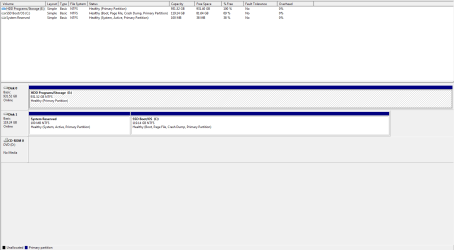
You can still post the Disk Mgmt screenshot if you want. We spot problems in about half of the tens of thousands of times we've asked for one.
 
My machine is mainly a gaming rig. It's my hot rod, and I like to tinker with my hot rod. I don't really do anything of great importance with it, any pictures or music I have is backed up on a ext. HDD. So if a drive were to fail it's no big deal. I enjoy fixing it, just as much as I like to play on it.
I know the risks of RAID 0, in my own opinion the key is to really take your time and research that drives you buy to use in this setup. My last system which this new one has replaced was built back in 2005, and it had 2 WD Caviar SE16 250gb drives in a RAID 0 setup. Never had a failure, data loss, or anything bad. They are still working 100% and are now being used as external hard drives. They're old and I don't doubt them one bit.
If I had something worth not losing, then yeah RAID 0 is risky. But it's my hot rod, and hot rods are built to go fast :)

Sure I'll post a screen shot.
 

My Computer My Computer

At a glance

windows 7 pro x64intel Pentium G3258Corsair 6GB DDR3Intel
Computer type
PC/Desktop
Computer Manufacturer/Model Number
custom build
OS
windows 7 pro x64
CPU
intel Pentium G3258
Motherboard
MSI Z97m Gaming
Memory
Corsair 6GB DDR3
Graphics Card(s)
Intel
Hard Drives
128GB Crucial SSD sataM.2
(2x) 500GB WD blue HDD
Antivirus
Avast free
Browser
Chrome
How is Win7 faster when its data drives are in a RAID0?

Isn't it the SSD that makes it faster, not RAID0?
 
Well with my new machine, no raid doesn't help windows because the os is on a SSD. The SSD is only going to contain windows only. Programs, games, music etc. will be on the HDDs so it will help how fast games and programs load up. In gaming it will make maps load up much faster, load screens very short, etc. On my old machine the os was on the raid setup, and my boot up times were almost as fast as my SSD.
Look at it this way, RAID 0 is meant to share the workload among x amount of hard drives. So if a SATA3 drive works at 6GB/sec, then 2 drives in RAID 0 will work at a pseudo 12gb/sec.
 

Attachments

  • diskmgrsnip.PNG
    diskmgrsnip.PNG
    14.8 KB · Views: 3

My Computer My Computer

At a glance

windows 7 pro x64intel Pentium G3258Corsair 6GB DDR3Intel
Computer type
PC/Desktop
Computer Manufacturer/Model Number
custom build
OS
windows 7 pro x64
CPU
intel Pentium G3258
Motherboard
MSI Z97m Gaming
Memory
Corsair 6GB DDR3
Graphics Card(s)
Intel
Hard Drives
128GB Crucial SSD sataM.2
(2x) 500GB WD blue HDD
Antivirus
Avast free
Browser
Chrome
Any programs installed to a HD will run slower than if they were installed on the SSD. I'd only offload User files for best performance.

Any repair or reinstall run while the OS drive is in a lower position than Disk0 risks derailing the boot files onto the first-in-order Primary partition. The solution to this is to have the OS in DISK0 position or any preceding drive's partitions be formatted Logical which cannot accept boot files.
 
Before I added on the HDDs, the SSD was marked as disk 0. When I added on the drives before raid they were marked as disc 1 and disc 2. After raid activation windows bumped the HDDs to disc 0 and the SSD to disc 1, why? Does windows favor the larger drive? Is it possible to bump the SSD back into disc 0 position? Just for clairity, what do you mean by "user files"?

For best performance what is your recommendation?
 

My Computer My Computer

At a glance

windows 7 pro x64intel Pentium G3258Corsair 6GB DDR3Intel
Computer type
PC/Desktop
Computer Manufacturer/Model Number
custom build
OS
windows 7 pro x64
CPU
intel Pentium G3258
Motherboard
MSI Z97m Gaming
Memory
Corsair 6GB DDR3
Graphics Card(s)
Intel
Hard Drives
128GB Crucial SSD sataM.2
(2x) 500GB WD blue HDD
Antivirus
Avast free
Browser
Chrome
Thank you GregRocker for your time and expertise. I used partiton wizard to turn the raid setup in to logical drives. But after reviewing our conversation regarding the pros and cons of raid. I have come to the conclusion that with the benefit of the SSD, which in all honesty is my first time experience using, that having a raid setup just isn't worth the trouble nor will I really benefit from it. So I have returned back to a AHCI setup with a single HDD in a logical format to be used as storage and I'll concentrate on tuning windows for max performance with the SSD.
Thanks again!
 

My Computer My Computer

At a glance

windows 7 pro x64intel Pentium G3258Corsair 6GB DDR3Intel
Computer type
PC/Desktop
Computer Manufacturer/Model Number
custom build
OS
windows 7 pro x64
CPU
intel Pentium G3258
Motherboard
MSI Z97m Gaming
Memory
Corsair 6GB DDR3
Graphics Card(s)
Intel
Hard Drives
128GB Crucial SSD sataM.2
(2x) 500GB WD blue HDD
Antivirus
Avast free
Browser
Chrome
Back
Top