Windows 7 high CPU and RAM usage.

Ekayrouz

New member
Local time
12:19 PM
Messages
37
Hey I am new to these forums so if I have made any mistakes please forgive me.

Ever since this morning my CPU and RAM usage have been very high. ( 70 - 80 percent)
While not running anything in the background. I have ended most processes, and also
ran an virus scan, bullguard) but nothing came up. Please help me my games have been lagging terribly
And I have very good specs.

Task manager.
 

Attachments

  • image.jpg
    image.jpg
    656.8 KB · Views: 12

My Computer

Computer type
PC/Desktop
Computer Manufacturer/Model Number
Custom built computer
OS
Windows 7 64 bit
I would first go through the task manager and end any programs and or items that you know you dont need running; by ending process or end process tree. If it still is high; I would just totally restart the computer if you have not already done so. If after restarting windows it still does not help; then there is a program and or process still running in the background that is eating up your processor usage. I would try and take some time to seek out what it may be and either end process it or uninstall it if truly not needed long term. Short of that you also might need to upgrade your amount of ram if you can expand it further as unfortunately windows in my opinion has a habit of developing memory leaks via poorly coded and poorly written programs. See if anything here helps ya and if not post back and we can go from there.
 

My Computer

Computer type
PC/Desktop
Computer Manufacturer/Model Number
custom built
OS
Windows 7 ultimate 64-bit
CPU
Intel I7 2600K 3.4ghz
Motherboard
Asus Evo P8P67
Memory
Corsair 16gb ddr3 1600mhz
Graphics Card(s)
Nvidia Geforce gt 430
Sound Card
Sound Blaster Titanium x-fi pci express
Monitor(s) Displays
Dell E198WFP
Hard Drives
1 western digital 2TB drive.
PSU
Antec 1200 watt
Case
Inwin Dragon Rider
Cooling
6 case supplied cooling fans
Keyboard
logitech mk700
Mouse
logitech m705
Internet Speed
25-50mbps download; 10mbps upload(i think)
Antivirus
avg free 2014
Browser
mozilla firefox
Other Info
Also have a pretty bad speaker setup which is a klipsch promedia 5.1 surround speaker setup with huge subwoofer and lg blu ray player/writer. Also a hp officejet pro 8600 plus wireless all in one and a logitech s7500 webcam.
All the programs in my task manager are closed, I have 8 gb of ram on my custom built pc. I thought that's enough? I restarted my pc and the problem was gone for a few minutes just before coming back. My pc does take a few minutes to boot up so that may be related maybe, but this is still a problem for me and I really need help. Btw I'm new to these forums so thanks for taking the time to reply.
 

My Computer

Computer type
PC/Desktop
Computer Manufacturer/Model Number
Custom built computer
OS
Windows 7 64 bit
All the programs in my task manager are closed, I have 8 gb of ram on my custom built pc. I thought that's enough? I restarted my pc and the problem was gone for a few minutes just before coming back. My pc does take a few minutes to boot up so that may be related maybe, but this is still a problem for me and I really need help. Btw I'm new to these forums so thanks for taking the time to reply.

It is quite possible that the slow boot time
And the high processor usage are related. Since
You said it takes a few minutes to boot I would try running a defrag on the disk and see if that does anything for ya. Also do a check disk to see if any abnormalities come
Up. I don't recall the exact command but you can
Open the command prompt and type chkdsk /? And it should tell you what commands
Are what. Try this and see what happens.
 

My Computer

Computer type
PC/Desktop
Computer Manufacturer/Model Number
custom built
OS
Windows 7 ultimate 64-bit
CPU
Intel I7 2600K 3.4ghz
Motherboard
Asus Evo P8P67
Memory
Corsair 16gb ddr3 1600mhz
Graphics Card(s)
Nvidia Geforce gt 430
Sound Card
Sound Blaster Titanium x-fi pci express
Monitor(s) Displays
Dell E198WFP
Hard Drives
1 western digital 2TB drive.
PSU
Antec 1200 watt
Case
Inwin Dragon Rider
Cooling
6 case supplied cooling fans
Keyboard
logitech mk700
Mouse
logitech m705
Internet Speed
25-50mbps download; 10mbps upload(i think)
Antivirus
avg free 2014
Browser
mozilla firefox
Other Info
Also have a pretty bad speaker setup which is a klipsch promedia 5.1 surround speaker setup with huge subwoofer and lg blu ray player/writer. Also a hp officejet pro 8600 plus wireless all in one and a logitech s7500 webcam.
Also what type of processor do you have and how much ram?
 

My Computer

Computer type
PC/Desktop
Computer Manufacturer/Model Number
custom built
OS
Windows 7 ultimate 64-bit
CPU
Intel I7 2600K 3.4ghz
Motherboard
Asus Evo P8P67
Memory
Corsair 16gb ddr3 1600mhz
Graphics Card(s)
Nvidia Geforce gt 430
Sound Card
Sound Blaster Titanium x-fi pci express
Monitor(s) Displays
Dell E198WFP
Hard Drives
1 western digital 2TB drive.
PSU
Antec 1200 watt
Case
Inwin Dragon Rider
Cooling
6 case supplied cooling fans
Keyboard
logitech mk700
Mouse
logitech m705
Internet Speed
25-50mbps download; 10mbps upload(i think)
Antivirus
avg free 2014
Browser
mozilla firefox
Other Info
Also have a pretty bad speaker setup which is a klipsch promedia 5.1 surround speaker setup with huge subwoofer and lg blu ray player/writer. Also a hp officejet pro 8600 plus wireless all in one and a logitech s7500 webcam.
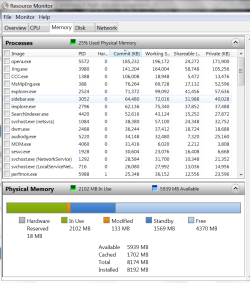
Have a look into Resource Monitor - the CPU tab and the Memory tab. See which processes are eating your resources.

If you can make a snip of it, post it here and we'll have a look. Something like this for both the CPU tab and the Memory tab:
 

Attachments

  • 2013-12-20_2021.png
    2013-12-20_2021.png
    47.5 KB · Views: 0

My Computer

Computer Manufacturer/Model Number
HP, Dell, Gateway, Toshiba - 4 laptops and 2 desktops
OS
Vista, Windows7, Mint Mate, Zorin, Windows 8
CPU
from 1.6GHz Duo to i7
Monitor(s) Displays
2x HP w2207
Hard Drives
5x HDD, 7x SSD, 12x Externals
Keyboard
with trackball - no mices
Mouse
Trackball mice
Internet Speed
DSL 6000
Also what type of processor do you have and how much ram?
8 GB of ram with an i5 1500k 3.30 GHz CPU, and a GTX 560 ti GPU. I use my rig mainly for gaming
 

My Computer

Computer type
PC/Desktop
Computer Manufacturer/Model Number
Custom built computer
OS
Windows 7 64 bit
Thanks for the replies guys! I'm in bed now and about to go to sleep, I'll check those things tomorrow first
Thing morning. And I'll let you know what's going on, because there has to be something wrong right?
 

My Computer

Computer type
PC/Desktop
Computer Manufacturer/Model Number
Custom built computer
OS
Windows 7 64 bit
Have a look into Resource Monitor - the CPU tab and the Memory tab. See which processes are eating your resources.

If you can make a snip of it, post it here and we'll have a look. Something like this for both the CPU tab and the Memory tab:
There doesn't seem to be anything eating up my ram or CPU usage. a few days ago I saw a few things using
Up my CPU usage but I cannot remember the name of the program. And btw my computer boots up quite quick
But the problem is it takes FOREVER to load up all the files, any idea??
 

My Computer

Computer type
PC/Desktop
Computer Manufacturer/Model Number
Custom built computer
OS
Windows 7 64 bit
On your initial posting you showed a picture of Task Manager with an extremely high CPU and RAM usage. What happened to that.

Btw: Next time you post a picture, take a snip rather than a photo of the screen and post it upside down and not sideways. Would be a lot easier to read.
 

My Computer

Computer Manufacturer/Model Number
HP, Dell, Gateway, Toshiba - 4 laptops and 2 desktops
OS
Vista, Windows7, Mint Mate, Zorin, Windows 8
CPU
from 1.6GHz Duo to i7
Monitor(s) Displays
2x HP w2207
Hard Drives
5x HDD, 7x SSD, 12x Externals
Keyboard
with trackball - no mices
Mouse
Trackball mice
Internet Speed
DSL 6000

My Computer

Computer type
PC/Desktop
Computer Manufacturer/Model Number
Home made Desktop
OS
Windows 10 Pro. 64/ version 1709 Windows 7 Pro/64
CPU
Intel i7-6800K @ 4.3
Motherboard
ASUS X-99 Deluxe II
Memory
Corsair Platinum 16 gig @2400
Graphics Card(s)
EVGA GTX 1070 OC
Monitor(s) Displays
Asus 27" LED LCD/VE278Q
Screen Resolution
1920-1080 or 1280-720 HDMI
Hard Drives
INTEL SSD 730-240 Gb Sata 3.0/
PSU
EVGA Platium 1200W
Case
Phanteks Luxe Tempered Glass 8 fans/ one radiator
Cooling
XSPC/ Water Cooled CPU
Keyboard
Das 4 Professional
Mouse
Logitech M705/MX Anywhere 2-S
Internet Speed
100 mbits
Antivirus
Microsoft Security Essentials/ Malwarebytes Premium 3.0/ SAS
Browser
I.E. 11 default/Firefox/ ISP Time Warner Cable/Spectrum
Other Info
LG BluRay Burner/
Sound system-KLipsch-THX/
Icy Dock ssd Hot Swap bays.
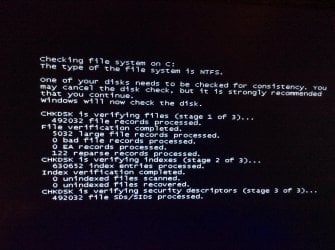
I just turned on my computer and found this, what's going on guys?? Sorry I wasn't able to take a screenshot!
 

Attachments

  • image.jpg
    image.jpg
    466.9 KB · Views: 3

My Computer

Computer type
PC/Desktop
Computer Manufacturer/Model Number
Custom built computer
OS
Windows 7 64 bit
That happens when there are problems on the disk. After your last post I suspected that anyhow. It may fix your timing problem.

Maybe you want to run an additional chkdsk /F
 

My Computer

Computer Manufacturer/Model Number
HP, Dell, Gateway, Toshiba - 4 laptops and 2 desktops
OS
Vista, Windows7, Mint Mate, Zorin, Windows 8
CPU
from 1.6GHz Duo to i7
Monitor(s) Displays
2x HP w2207
Hard Drives
5x HDD, 7x SSD, 12x Externals
Keyboard
with trackball - no mices
Mouse
Trackball mice
Internet Speed
DSL 6000
That happens when there are problems on the disk. After your last post I suspected that anyhow. It may fix your timing problem.

Maybe you want to run an additional chkdsk /F
I'll try that right now, thanks for the reply mate ;)
 

My Computer

Computer type
PC/Desktop
Computer Manufacturer/Model Number
Custom built computer
OS
Windows 7 64 bit
That happens when there are problems on the disk. After your last post I suspected that anyhow. It may fix your timing problem.

Maybe you want to run an additional chkdsk /F
I just did that right now, it opens commands for half a second and then closes it back up
Nothing really happening after that. Any ideas?
 

My Computer

Computer type
PC/Desktop
Computer Manufacturer/Model Number
Custom built computer
OS
Windows 7 64 bit
Would you say my specs are abut outdated, since I did build this pc around 2-3 years ago?
 

My Computer

Computer type
PC/Desktop
Computer Manufacturer/Model Number
Custom built computer
OS
Windows 7 64 bit
Did you open command prompt in elevated mode (as admin). You have to do that specifically else it won't work. I don't think you are out of date. Most of my systems are a lot older and run perfectly.

Try this: chkdsk C: /F
 

My Computer

Computer Manufacturer/Model Number
HP, Dell, Gateway, Toshiba - 4 laptops and 2 desktops
OS
Vista, Windows7, Mint Mate, Zorin, Windows 8
CPU
from 1.6GHz Duo to i7
Monitor(s) Displays
2x HP w2207
Hard Drives
5x HDD, 7x SSD, 12x Externals
Keyboard
with trackball - no mices
Mouse
Trackball mice
Internet Speed
DSL 6000
Also what type of processor do you have and how much ram?
8 GB of ram with an i5 1500k 3.30 GHz CPU, and a GTX 560 ti GPU. I use my rig mainly for gaming

If you do a lot of gaming i would highly suggest getting at least 12 or 16gb of ram in there as 8gb probably is not gonna cut it especially if you play games that are extremely processor and ram intensive. Those can quickly eat up processor and ram availabiltiy.
 

My Computer

Computer type
PC/Desktop
Computer Manufacturer/Model Number
custom built
OS
Windows 7 ultimate 64-bit
CPU
Intel I7 2600K 3.4ghz
Motherboard
Asus Evo P8P67
Memory
Corsair 16gb ddr3 1600mhz
Graphics Card(s)
Nvidia Geforce gt 430
Sound Card
Sound Blaster Titanium x-fi pci express
Monitor(s) Displays
Dell E198WFP
Hard Drives
1 western digital 2TB drive.
PSU
Antec 1200 watt
Case
Inwin Dragon Rider
Cooling
6 case supplied cooling fans
Keyboard
logitech mk700
Mouse
logitech m705
Internet Speed
25-50mbps download; 10mbps upload(i think)
Antivirus
avg free 2014
Browser
mozilla firefox
Other Info
Also have a pretty bad speaker setup which is a klipsch promedia 5.1 surround speaker setup with huge subwoofer and lg blu ray player/writer. Also a hp officejet pro 8600 plus wireless all in one and a logitech s7500 webcam.
Also what type of processor do you have and how much ram?
8 GB of ram with an i5 1500k 3.30 GHz CPU, and a GTX 560 ti GPU. I use my rig mainly for gaming

If you do a lot of gaming i would highly suggest getting at least 12 or 16gb of ram in there as 8gb probably is not gonna cut it especially if you play games that are extremely processor and ram intensive. Those can quickly eat up processor and ram availabiltiy.
This is a lot of motherhood and probably does not help the OP. We don't even know what games the OP is playing. Before suggesting that the OP spend more money, I suggest you ask him for more detailed information and base your recommendations on that.
 

My Computer

Computer Manufacturer/Model Number
HP, Dell, Gateway, Toshiba - 4 laptops and 2 desktops
OS
Vista, Windows7, Mint Mate, Zorin, Windows 8
CPU
from 1.6GHz Duo to i7
Monitor(s) Displays
2x HP w2207
Hard Drives
5x HDD, 7x SSD, 12x Externals
Keyboard
with trackball - no mices
Mouse
Trackball mice
Internet Speed
DSL 6000
Did you open command prompt in elevated mode (as admin). You have to do that specifically else it won't work. I don't think you are out of date. Most of my systems are a lot older and run perfectly.

Try this: chkdsk C: /F
I'm the only user on the computer.
 

My Computer

Computer type
PC/Desktop
Computer Manufacturer/Model Number
Custom built computer
OS
Windows 7 64 bit
Back
Top