Windows 7 high CPU and RAM usage.

8 GB of ram with an i5 1500k 3.30 GHz CPU, and a GTX 560 ti GPU. I use my rig mainly for gaming

If you do a lot of gaming i would highly suggest getting at least 12 or 16gb of ram in there as 8gb probably is not gonna cut it especially if you play games that are extremely processor and ram intensive. Those can quickly eat up processor and ram availabiltiy.
This is a lot of motherhood and probably does not help the OP. We don't even know what games the OP is playing. Before suggesting that the OP spend more money, I suggest you ask him for more detailed information and base your recommendations on that.
I play games such as: WoW, far cry 3, assassins Creed 3, borderlands 2, LA NOIRE and a lot more.
I think 8 GB Isn't too bad, the problem is mainly of windows 7 not the pc it's self. Do you think restoring windows ( delete and download windows 7) would maybe solve this problem?
 

My Computer

Computer type
PC/Desktop
Computer Manufacturer/Model Number
Custom built computer
OS
Windows 7 64 bit
Just saying, 8gb of ram is adequate to run even the most intensive games at ultra.
 

My Computer

Computer type
Laptop
Computer Manufacturer/Model Number
Packard Bell
OS
Windows 7 Home Premium 64Bit
CPU
AMD A6-3420M 1.5GHZ OC - 2.0GHZ
Memory
4GB DDR3 1600MHZ
Graphics Card(s)
AMD RADEON 6520G+AMD RADEON HD7470M 1GB DDR3
Screen Resolution
1366x768
Hard Drives
500GB SATA
Internet Speed
18Mb Unlimited
Antivirus
AVAST!
Browser
MOZILLA FIREFOX
So what?, you have to go to Start > All Programs > Accessories > right click on Command Prompt > Open as admin - else it won't work.
 

My Computer

Computer Manufacturer/Model Number
HP, Dell, Gateway, Toshiba - 4 laptops and 2 desktops
OS
Vista, Windows7, Mint Mate, Zorin, Windows 8
CPU
from 1.6GHz Duo to i7
Monitor(s) Displays
2x HP w2207
Hard Drives
5x HDD, 7x SSD, 12x Externals
Keyboard
with trackball - no mices
Mouse
Trackball mice
Internet Speed
DSL 6000
So what?, you have to go to Start > All Programs > Accessories > right click on Command Prompt > Open as admin - else it won't work.
Thanks, I'll try it and get back to you. Do you really think that 8 GB of ram Is not enough?
 

My Computer

Computer type
PC/Desktop
Computer Manufacturer/Model Number
Custom built computer
OS
Windows 7 64 bit
Do you really think that 8 GB of ram Is not enough?
I don't think so. I think somebody else made that suggestion, but I think it is far fetched.
 

My Computer

Computer Manufacturer/Model Number
HP, Dell, Gateway, Toshiba - 4 laptops and 2 desktops
OS
Vista, Windows7, Mint Mate, Zorin, Windows 8
CPU
from 1.6GHz Duo to i7
Monitor(s) Displays
2x HP w2207
Hard Drives
5x HDD, 7x SSD, 12x Externals
Keyboard
with trackball - no mices
Mouse
Trackball mice
Internet Speed
DSL 6000
Please just follow whs instruction in post #6 and #23.

Your 8 gigs of ram is not your problem. Forget about your ram at this time unless you have been doing some tweaks that you haven't mentioned.
If you have been tweaking let us know.
Have you been in Boot Advance Options?

After following whs instructions this would be helpful.

http://www.sevenforums.com/tutorials/180324-system-info-see-your-system-specs.html
 

My Computer

Computer type
PC/Desktop
Computer Manufacturer/Model Number
Home made Desktop
OS
Windows 10 Pro. 64/ version 1709 Windows 7 Pro/64
CPU
Intel i7-6800K @ 4.3
Motherboard
ASUS X-99 Deluxe II
Memory
Corsair Platinum 16 gig @2400
Graphics Card(s)
EVGA GTX 1070 OC
Monitor(s) Displays
Asus 27" LED LCD/VE278Q
Screen Resolution
1920-1080 or 1280-720 HDMI
Hard Drives
INTEL SSD 730-240 Gb Sata 3.0/
PSU
EVGA Platium 1200W
Case
Phanteks Luxe Tempered Glass 8 fans/ one radiator
Cooling
XSPC/ Water Cooled CPU
Keyboard
Das 4 Professional
Mouse
Logitech M705/MX Anywhere 2-S
Internet Speed
100 mbits
Antivirus
Microsoft Security Essentials/ Malwarebytes Premium 3.0/ SAS
Browser
I.E. 11 default/Firefox/ ISP Time Warner Cable/Spectrum
Other Info
LG BluRay Burner/
Sound system-KLipsch-THX/
Icy Dock ssd Hot Swap bays.
Please just follow whs instruction in post #6 and #23.

Your 8 gigs of ram is not your problem. Forget about your ram at this time unless you have been doing some tweaks that you haven't mentioned.
If you have been tweaking let us know.
Have you been in Boot Advance Options?

After following whs instructions this would be helpful.

http://www.sevenforums.com/tutorials/180324-system-info-see-your-system-specs.html
I am running an chkdsk now, I just looked into my system and it turns out my i5-2500k CPU @ 3.30 GHZ
Is an 3.60 GHZ does that mean my CPU is overclocked?
 

My Computer

Computer type
PC/Desktop
Computer Manufacturer/Model Number
Custom built computer
OS
Windows 7 64 bit
Sorry I don't know how to find my screenshots...;(
 

My Computer

Computer type
PC/Desktop
Computer Manufacturer/Model Number
Custom built computer
OS
Windows 7 64 bit
Here
 

Attachments

  • image.jpg
    image.jpg
    554.3 KB · Views: 0

My Computer

Computer type
PC/Desktop
Computer Manufacturer/Model Number
Custom built computer
OS
Windows 7 64 bit
This
 

Attachments

  • image.jpg
    image.jpg
    814.3 KB · Views: 5

My Computer

Computer type
PC/Desktop
Computer Manufacturer/Model Number
Custom built computer
OS
Windows 7 64 bit
Did you read and try the Tutorial in my post # 11?

You need to read about your hardware to understand things better. Your chip (cpu) has a built in turbo boost.
 

My Computer

Computer type
PC/Desktop
Computer Manufacturer/Model Number
Home made Desktop
OS
Windows 10 Pro. 64/ version 1709 Windows 7 Pro/64
CPU
Intel i7-6800K @ 4.3
Motherboard
ASUS X-99 Deluxe II
Memory
Corsair Platinum 16 gig @2400
Graphics Card(s)
EVGA GTX 1070 OC
Monitor(s) Displays
Asus 27" LED LCD/VE278Q
Screen Resolution
1920-1080 or 1280-720 HDMI
Hard Drives
INTEL SSD 730-240 Gb Sata 3.0/
PSU
EVGA Platium 1200W
Case
Phanteks Luxe Tempered Glass 8 fans/ one radiator
Cooling
XSPC/ Water Cooled CPU
Keyboard
Das 4 Professional
Mouse
Logitech M705/MX Anywhere 2-S
Internet Speed
100 mbits
Antivirus
Microsoft Security Essentials/ Malwarebytes Premium 3.0/ SAS
Browser
I.E. 11 default/Firefox/ ISP Time Warner Cable/Spectrum
Other Info
LG BluRay Burner/
Sound system-KLipsch-THX/
Icy Dock ssd Hot Swap bays.
Sorry for the late reply guys, but here you go...
 

Attachments

  • forums.png
    forums.png
    476.9 KB · Views: 22

My Computer

Computer type
PC/Desktop
Computer Manufacturer/Model Number
Custom built computer
OS
Windows 7 64 bit
Seems like your computer is infected, get a real antivirus/antispyware and give it a full scan.
 

My Computer

Computer type
PC/Desktop
OS
Microsoft Windows 10 Professional / Windows 7 Professional
CPU
Intel i5-3570
Motherboard
Lenovo Mahobay
Memory
16GB DDR3
Graphics Card(s)
AMD Radeon HD 7850 2GB
Sound Card
(1) Realtek HD Audio (2) AMD HD Audio
Monitor(s) Displays
LG LS192WS
Screen Resolution
1440 x 900 @ 32bit color
Hard Drives
(1) SUV300S37A/120G (2) ST3500413AS SATA Disk Device AHCI mode enabled.
PSU
Corsair HX620
Case
Thermaltake V4 Black Edition
Cooling
Cooler Master Hyper 212 + Artic Silver 5 on CPU/GPU
Keyboard
Dell SK-8115
Mouse
Razer Copperhead with MAPED mat (awesome!)
Internet Speed
100 Mbps up/down
Browser
Chrome
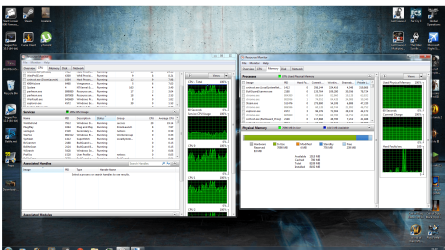
From what is shown in your post you have.
Bull Guard
Bull Guare proxy
Steaming
Lots of chrome open and active all at the same time.
Plus lot of things we can't see in the picture.

By chance would you also be running Utorrent?

Your cpu is at 29% and you are using a lot of ram.
It appears to me you just have to many things running at the same time.
 

My Computer

Computer type
PC/Desktop
Computer Manufacturer/Model Number
Home made Desktop
OS
Windows 10 Pro. 64/ version 1709 Windows 7 Pro/64
CPU
Intel i7-6800K @ 4.3
Motherboard
ASUS X-99 Deluxe II
Memory
Corsair Platinum 16 gig @2400
Graphics Card(s)
EVGA GTX 1070 OC
Monitor(s) Displays
Asus 27" LED LCD/VE278Q
Screen Resolution
1920-1080 or 1280-720 HDMI
Hard Drives
INTEL SSD 730-240 Gb Sata 3.0/
PSU
EVGA Platium 1200W
Case
Phanteks Luxe Tempered Glass 8 fans/ one radiator
Cooling
XSPC/ Water Cooled CPU
Keyboard
Das 4 Professional
Mouse
Logitech M705/MX Anywhere 2-S
Internet Speed
100 mbits
Antivirus
Microsoft Security Essentials/ Malwarebytes Premium 3.0/ SAS
Browser
I.E. 11 default/Firefox/ ISP Time Warner Cable/Spectrum
Other Info
LG BluRay Burner/
Sound system-KLipsch-THX/
Icy Dock ssd Hot Swap bays.
From what is shown in your post you have.
Bull Guard
Bull Guare proxy
Steaming
Lots of chrome open and active all at the same time.
Plus lot of things we can't see in the picture.

By chance would you also be running Utorrent?

Your cpu is at 29% and you are using a lot of ram.
It appears to me you just have to many things running at the same time.
Hey there, sorry for the late reply but I always end all programs and tasks that are not needed and I always get high cpu and ran usage. Maybe restoring windows 7 could fix the problem? I mean delete everything on the computer and download windows 7 again?
 

My Computer

Computer type
PC/Desktop
Computer Manufacturer/Model Number
Custom built computer
OS
Windows 7 64 bit
Back
Top