Windows 7 High Ping Fix

Sleepy

New member
Local time
4:21 AM
Messages
4
I found it after remembering back when I was on vista

netsh interface tcp set global autotuning=disabled

Go into the command prompt under administrator (Right click, run as Administrator) and right click and paste. Finaly I dont need to go BACK to vista or XP :)

Sticky of you wish.
 

My Computer

OS
Windows 7 Ultimate
For me, disabling the Nagle's algorithm like I did in WinXP seemed to work - lowered my latency in WoW from >200ms to ~60ms: http://wowacker.uuuq.com/
 

My Computer

Computer Manufacturer/Model Number
Dell XPS M1730
OS
Windows 7 RC1 (7100) / Windows XP SP3 dual-boot
CPU
Intel Core 2 Duo (~2.5GHz)
Memory
4 GB
Graphics Card(s)
nVidia GeForce 8700M GT 256 MB
Sound Card
On-board Sigmatel chip
Screen Resolution
1920x1200x32
Keyboard
Logitech G15
Mouse
Razer DeathAdder
Anybody tested this? Is it safe to do? (i mean in the OP)

HunterZ ill give that a try. Although i did follow another guide which looks to be the same as what you posted (except it was all manual - which maybe i messed up on) and it hasnt helped too much.


EDIT: It worked! At least i think it did...
 
Last edited:

My Computer

OS
Windows 7 x64
CPU
Core 2 Duo E4500
Motherboard
Gigabyte P35-DS3R Rev 2.0
Memory
Mushkin Redline 1000MHz (5-5-5-12)
Graphics Card(s)
eVGA 8800GT 512mb
Sound Card
Onboard
Monitor(s) Displays
Viewsonic VX2260WM
Screen Resolution
1920x1080
Hard Drives
500GB Western Digital 32mb Cache
250GB Western Digital 16mb Cache
PSU
Corsair 550VX
Case
Cooler Master 690
Cooling
2x Enermax Exhaust / 1x CM Exhaust / 2x Intake
Keyboard
Logitech Multimedia
Mouse
Logitech G5
Internet Speed
2.5mpbs
Anybody tested this? Is it safe to do? (i mean in the OP)

HunterZ ill give that a try. Although i did follow another guide which looks to be the same as what you posted (except it was all manual - which maybe i messed up on) and it hasnt helped too much.


EDIT: It worked! At least i think it did...

whats your ping times now?
have you rum a tracerote on the game server?

Ken
 

My Computer

Computer Manufacturer/Model Number
HP Pavillion dv-7 1005 Tx
OS
Win 8 Release candidate 8400
CPU
[email protected]
Memory
4 gigs
Graphics Card(s)
Nvidia 9600M
Sound Card
HD built-in
Monitor(s) Displays
17" Wxga
Screen Resolution
1440x900
Cooling
none
Internet Speed
45Mb down 5Mb up
whats your ping times now?
have you rum a tracerote on the game server?

Ken
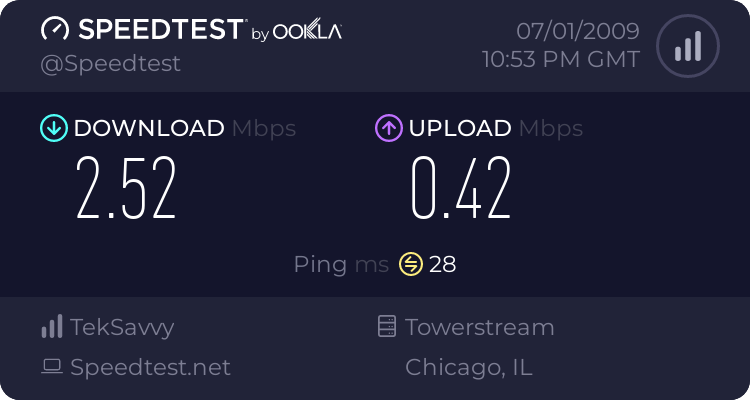
Here's the speedtest results to a chicago server. (i live in around Toronto)


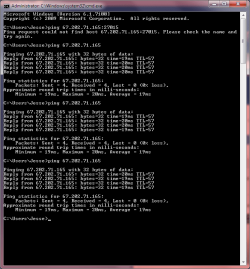
But even when i ping the server i usually play on i get decent ping. This is what a traceroute is right?

Hell, i can even spec people and then get a good ping and no stuttery movements. It's once i actually start playing that my ping goes nuts.

Ill try turning off the 1 other computer in the house.
 

Attachments

  • ping.png
    ping.png
    20 KB · Views: 7,868

My Computer

OS
Windows 7 x64
CPU
Core 2 Duo E4500
Motherboard
Gigabyte P35-DS3R Rev 2.0
Memory
Mushkin Redline 1000MHz (5-5-5-12)
Graphics Card(s)
eVGA 8800GT 512mb
Sound Card
Onboard
Monitor(s) Displays
Viewsonic VX2260WM
Screen Resolution
1920x1080
Hard Drives
500GB Western Digital 32mb Cache
250GB Western Digital 16mb Cache
PSU
Corsair 550VX
Case
Cooler Master 690
Cooling
2x Enermax Exhaust / 1x CM Exhaust / 2x Intake
Keyboard
Logitech Multimedia
Mouse
Logitech G5
Internet Speed
2.5mpbs
Here's the speedtest results to a chicago server. (i live in around Toronto)


But even when i ping the server i usually play on i get decent ping. This is what a traceroute is right?


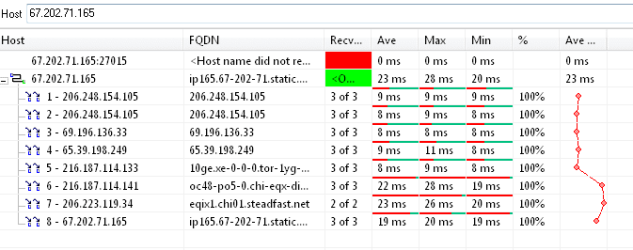
A trace route is different. there is a free app called ping probe that will trace the actual route from your computer to the game server. It looks like this

Hell, i can even spec people and then get a good ping and no stuttery movements. It's once i actually start playing that my ping goes nuts.

you can tell from the spike which computer is slowing you down.

hope this helps

Ken
 
Last edited:

My Computer

Computer Manufacturer/Model Number
HP Pavillion dv-7 1005 Tx
OS
Win 8 Release candidate 8400
CPU
[email protected]
Memory
4 gigs
Graphics Card(s)
Nvidia 9600M
Sound Card
HD built-in
Monitor(s) Displays
17" Wxga
Screen Resolution
1440x900
Cooling
none
Internet Speed
45Mb down 5Mb up
you can tell from the spike which computer is slowing you down.

Ken
What do you mean by this? The other person in the server? :sarc:

Anyways here's mine. Does it looks OK?
 

Attachments

  • tracert.PNG
    tracert.PNG
    8 KB · Views: 4,956

My Computer

OS
Windows 7 x64
CPU
Core 2 Duo E4500
Motherboard
Gigabyte P35-DS3R Rev 2.0
Memory
Mushkin Redline 1000MHz (5-5-5-12)
Graphics Card(s)
eVGA 8800GT 512mb
Sound Card
Onboard
Monitor(s) Displays
Viewsonic VX2260WM
Screen Resolution
1920x1080
Hard Drives
500GB Western Digital 32mb Cache
250GB Western Digital 16mb Cache
PSU
Corsair 550VX
Case
Cooler Master 690
Cooling
2x Enermax Exhaust / 1x CM Exhaust / 2x Intake
Keyboard
Logitech Multimedia
Mouse
Logitech G5
Internet Speed
2.5mpbs
What do you mean by this? The other person in the server? :sarc:

Anyways here's mine. Does it looks OK?
bottleneck is.

you see the line on the right side. at one point the response time goes way up (128ms) thats where my bottleneck is. that can help you because you can influence the path your route takes.


Hope this helps and feel fre to ask more if you need it


Ken
 

My Computer

Computer Manufacturer/Model Number
HP Pavillion dv-7 1005 Tx
OS
Win 8 Release candidate 8400
CPU
[email protected]
Memory
4 gigs
Graphics Card(s)
Nvidia 9600M
Sound Card
HD built-in
Monitor(s) Displays
17" Wxga
Screen Resolution
1440x900
Cooling
none
Internet Speed
45Mb down 5Mb up

Ok so Im assuming you ran traceroute and found a node whose ping time is huge (more than 250 ms). Get the name for that node. then go to the games support and ask if there is another server you can use becuase of the high ping. If that doesn't work you can ask your ISP, If that doesn't work you could proxy to the game servers country. there are a ton of tricks. these are the easiest to do .

Ken
 

My Computer

Computer Manufacturer/Model Number
HP Pavillion dv-7 1005 Tx
OS
Win 8 Release candidate 8400
CPU
[email protected]
Memory
4 gigs
Graphics Card(s)
Nvidia 9600M
Sound Card
HD built-in
Monitor(s) Displays
17" Wxga
Screen Resolution
1440x900
Cooling
none
Internet Speed
45Mb down 5Mb up
from a ping of 400/500+ in BF2 to 43-50.. cant argue with that thanks alot *****
 
Finally a fix that works! :o!

"Multimedia Class Scheduller" service is what caused me my lag.

Just disable the service.
windows sound is dependent on this service so you will then need to;
run regedit,
then find HKEY_LOCAL_MACHINE\SYSTEM\CurrentControlSet\Services\Audiosrv\DependOnService
double click on it and remove MMCSS from the list

reboot and play lagfree.

I searched for HOURS and HOURS and HOURS to fix my lag issues;

This fixed it for me and dropped my ping in fear combat from 180 to a solid 50 :D
 

My Computer

OS
Win7
What about opening up "Services" and then just disabling "Multimedia Class Scheduler"?
 

My Computer

OS
Windows 7 x64
CPU
Core 2 Duo E4500
Motherboard
Gigabyte P35-DS3R Rev 2.0
Memory
Mushkin Redline 1000MHz (5-5-5-12)
Graphics Card(s)
eVGA 8800GT 512mb
Sound Card
Onboard
Monitor(s) Displays
Viewsonic VX2260WM
Screen Resolution
1920x1080
Hard Drives
500GB Western Digital 32mb Cache
250GB Western Digital 16mb Cache
PSU
Corsair 550VX
Case
Cooler Master 690
Cooling
2x Enermax Exhaust / 1x CM Exhaust / 2x Intake
Keyboard
Logitech Multimedia
Mouse
Logitech G5
Internet Speed
2.5mpbs
then your sound will not work, since it "depends" on the other service it will be shut down as well.
 

My Computer

Computer Manufacturer/Model Number
Black_Box (homebuilt)
OS
windows 7 RTM x64
CPU
Phenom II 965 Quad Core 3.4Ghz
Motherboard
Asus M4A79T Deluxe
Memory
Mushkin Blackline 8GB (4x2gb)
Graphics Card(s)
XFX Radeon 5970 Black Edition
Sound Card
onboard
Monitor(s) Displays
Dell 2408WPF-main Dell E248WFP-secondary
Screen Resolution
1920x1200-main 1920x1200-secondary
Hard Drives
OCZ Vertex Limited Edition 100GB (OS)
x1 WD Black Edition 500GB drive (Storage)
PSU
XFX 850w Black Edition (Modular)
Case
Mountian Mods H2go
Cooling
CoolITSystems ECO A.L.C.
Keyboard
Logitech MX 5500 wireless keyboard
Mouse
Razor Copperhead
Internet Speed
16Mb down/2Mb up Wowway Cable Internet
Oh okay ill leave it enabled then LOL.
 

My Computer

OS
Windows 7 x64
CPU
Core 2 Duo E4500
Motherboard
Gigabyte P35-DS3R Rev 2.0
Memory
Mushkin Redline 1000MHz (5-5-5-12)
Graphics Card(s)
eVGA 8800GT 512mb
Sound Card
Onboard
Monitor(s) Displays
Viewsonic VX2260WM
Screen Resolution
1920x1080
Hard Drives
500GB Western Digital 32mb Cache
250GB Western Digital 16mb Cache
PSU
Corsair 550VX
Case
Cooler Master 690
Cooling
2x Enermax Exhaust / 1x CM Exhaust / 2x Intake
Keyboard
Logitech Multimedia
Mouse
Logitech G5
Internet Speed
2.5mpbs
Hello, anyone get this fixed yet? I get this problem on all games and servers. Does anyone have a success story and fix?
 

My Computer

Computer Manufacturer/Model Number
Gateway T6815
OS
Windows 7
CPU
1.5 Core2duo
Motherboard
Intel
Memory
Corsair 2 gigs
Graphics Card(s)
x3100
Sound Card
sigmatel
Monitor(s) Displays
lappy
Hard Drives
Fujitsu 250 gig
PSU
lappy
Case
lappy
Cooling
lappy
"Multimedia Class Scheduller" service is what caused me my lag.

Just disable the service.
windows sound is dependent on this service so you will then need to;
run regedit,
then find HKEY_LOCAL_MACHINE\SYSTEM\CurrentControlSet\Services\Audiosrv\DependOnService
double click on it and remove MMCSS from the list

reboot and play lagfree.

I searched for HOURS and HOURS and HOURS to fix my lag issues;

This fixed it for me and dropped my ping in fear combat from 180 to a solid 50 :D


Well I tried it and it didnt fix it completely. I still get the flexing pings and low FPS in Multiplayer and I'm playing Call of duty 1. lol
 

My Computer

Computer Manufacturer/Model Number
Gateway T6815
OS
Windows 7
CPU
1.5 Core2duo
Motherboard
Intel
Memory
Corsair 2 gigs
Graphics Card(s)
x3100
Sound Card
sigmatel
Monitor(s) Displays
lappy
Hard Drives
Fujitsu 250 gig
PSU
lappy
Case
lappy
Cooling
lappy
Check windows update for some drivers or the Realtek website for the most recent ones. I dont remember which ones i went with but one of them fixed it.
 

My Computer

OS
Windows 7 x64
CPU
Core 2 Duo E4500
Motherboard
Gigabyte P35-DS3R Rev 2.0
Memory
Mushkin Redline 1000MHz (5-5-5-12)
Graphics Card(s)
eVGA 8800GT 512mb
Sound Card
Onboard
Monitor(s) Displays
Viewsonic VX2260WM
Screen Resolution
1920x1080
Hard Drives
500GB Western Digital 32mb Cache
250GB Western Digital 16mb Cache
PSU
Corsair 550VX
Case
Cooler Master 690
Cooling
2x Enermax Exhaust / 1x CM Exhaust / 2x Intake
Keyboard
Logitech Multimedia
Mouse
Logitech G5
Internet Speed
2.5mpbs
I heard I should not use the realtek driver from windows update and to use the realek website one. LOL man this is so crazy. The realtek is my lan driver but my WIFI is Intel ABG driver and it does the same thing. So much for the intel microsoft partnership. So we all think its driver related huh? Well I've tried lots and I dont have hours to fix an issue that Microsoft hasnt fixed yet. I'm going to wait and hope for window update to fix things. So sad. I said it already..DONT buy the oct 22 release of 7 expecting a fix to this because it wont. My copy is the official release i was told, I recieved it at the Microsoft IT event.
 

My Computer

Computer Manufacturer/Model Number
Gateway T6815
OS
Windows 7
CPU
1.5 Core2duo
Motherboard
Intel
Memory
Corsair 2 gigs
Graphics Card(s)
x3100
Sound Card
sigmatel
Monitor(s) Displays
lappy
Hard Drives
Fujitsu 250 gig
PSU
lappy
Case
lappy
Cooling
lappy
I installed the little program I didnt notice any change
 

My Computer

Computer Manufacturer/Model Number
Gigabyte Asus
OS
,Windows 7-64.7600.16385 Ultimate
CPU
AMD Athlon(tm) 64 X2 Dual Core Processor 4800+, 2500
Motherboard
GA-MA78G-DS3H
Memory
Geil 4 Gig DDR2 800 PC2-6400 (400 MHz)
Graphics Card(s)
ATI Onboard 3200
Sound Card
ATI High Definition Audio Device
Monitor(s) Displays
Acer 22"
Screen Resolution
1680x1050
Hard Drives
1 x120 Gig
1 X 80 Gig
PSU
550 watt
Case
Cooler Master
Keyboard
Wireless Microsoft
Mouse
Wireless Microsoft
Internet Speed
3 Meg down .5 up
Other Info
BIOS Version/Date Award Software International, Inc. F8, 12/08/2009
Back
Top