
Solved Windows 7 Home Premium 64bit takes forever to boot with SSD?

TheCratcher

New member
Local time
2:24 AM
Messages
17
Hello!

As the title says, my Windows 7 takes forever to boot (3 - 5 minutes) to boot with an SSD. From the motherboard splash screen it goes directly to the Windows bootscreen and sits there for maybe 2 - 3 minutes, then the computer goes into "hibernation" and my screens goes into power saving mode. It sits there for another 2 - 3 minutes before it finally shows the desktop.
However, it's only the boot time that's been increased, games and programs on the SSD run with the same speed as usual.

I have tried to boot up in safe mode but it stops at "CLASSPNP.SYS" and wont move for maybe 5 minutes.
I tried using the Startup Repair Tool but it can't fix the problem.

ACHI is activated and the drivers are up to date, for both the SSD and Windows.

I have attached the bootlog to this thread(It's extremely long).

I appreciate any help on this matter, it's been like this for almost two months and it's driving me crazy.

EDIT: I should probably add that rebooting does not take long at all. It takes around 20 seconds.
 

Attachments

My Computer My Computer

At a glance

Microsoft Windows 7 Home Premium 64-bitIntel(R) Core(TM) i5-3570K CPU @ 3.40GHzNVIDIA GeForce GTX 5
OS
Microsoft Windows 7 Home Premium 64-bit
CPU
Intel(R) Core(TM) i5-3570K CPU @ 3.40GHz
Motherboard
MSI Z77A-S01 (MS-7752)
Graphics Card(s)
NVIDIA GeForce GTX 5
Hard Drives
(1) ADATA SP900 ATA Device
(2) ST1000DM005 HD103SJ ATA Device

My Computer My Computer

At a glance

Windows 10 Home x64INTEL Core i5-750 Quad-Core 3.37GHzHyperX Fury Black Series 8GB (2 x 4GB) 1866MhzEVGA GeForce GTX 750 Superclocked 1GB 128-Bit...
Computer type
PC/Desktop
OS
Windows 10 Home x64
CPU
INTEL Core i5-750 Quad-Core 3.37GHz
Motherboard
ASUS P7P55D
Memory
HyperX Fury Black Series 8GB (2 x 4GB) 1866Mhz
Graphics Card(s)
EVGA GeForce GTX 750 Superclocked 1GB 128-Bit GDDR5
Monitor(s) Displays
LG 32MA68HY 32" IPS
Screen Resolution
1920 x 1080
Hard Drives
Samsung 840 Evo 120GB, SEAGATE 500GB Barracuda® 7200.12, SATA 3 Gb/s, 7200 RPM, 16MB cache
PSU
ANTEC TruePower New TP-550, 80 PLUS, 550W
Case
ANTEC Three Hundred Illusion
Cooling
COOLER MASTER Hyper 212 Plus, 4 x 120mm 1 x 140mm Noctua's
Internet Speed
85 + Mbps
Antivirus
Avast
Browser
Vivaldi

Attachments

My Computer My Computer

At a glance

Microsoft Windows 7 Home Premium 64-bitIntel(R) Core(TM) i5-3570K CPU @ 3.40GHzNVIDIA GeForce GTX 5
OS
Microsoft Windows 7 Home Premium 64-bit
CPU
Intel(R) Core(TM) i5-3570K CPU @ 3.40GHz
Motherboard
MSI Z77A-S01 (MS-7752)
Graphics Card(s)
NVIDIA GeForce GTX 5
Hard Drives
(1) ADATA SP900 ATA Device
(2) ST1000DM005 HD103SJ ATA Device
Hmmm, that's quite a log! So many corrupted files. It says the files are on F:\ is F:\ you OS drive letter? Have you somehow migrated from C:\? Was this a normal install that has developed this problem, or have tyou moved it, or altered it somehow? The log seems to say all the problems were corrected. When you run SFC, it still says you have corrupted files?

I wouldn't usually, but in your case, I'd be tempted to go straight to a Repair Install.

http://www.sevenforums.com/tutorials/3413-repair-install.html

A Guy

EDIT:

OK, I see them now:

Code:
CSI    0000068b [SR] Could not reproject corrupted file [ml:520{260},l:46{23}]"\??\C:\Windows\System32"\[l:22{11}]"apphelp.dll"; source file in store is also corrupted

CSI    000006d8 [SR] Could not reproject corrupted file [ml:520{260},l:46{23}]"\??\C:\Windows\System32"\[l:14{7}]"wer.dll"; source file in store is also corrupted

These are listed as C:\ ...still wondering about this installation...F:\...C:\ ?
 
Last edited:

My Computer My Computer

At a glance

Windows 10 Home x64INTEL Core i5-750 Quad-Core 3.37GHzHyperX Fury Black Series 8GB (2 x 4GB) 1866MhzEVGA GeForce GTX 750 Superclocked 1GB 128-Bit...
Computer type
PC/Desktop
OS
Windows 10 Home x64
CPU
INTEL Core i5-750 Quad-Core 3.37GHz
Motherboard
ASUS P7P55D
Memory
HyperX Fury Black Series 8GB (2 x 4GB) 1866Mhz
Graphics Card(s)
EVGA GeForce GTX 750 Superclocked 1GB 128-Bit GDDR5
Monitor(s) Displays
LG 32MA68HY 32" IPS
Screen Resolution
1920 x 1080
Hard Drives
Samsung 840 Evo 120GB, SEAGATE 500GB Barracuda® 7200.12, SATA 3 Gb/s, 7200 RPM, 16MB cache
PSU
ANTEC TruePower New TP-550, 80 PLUS, 550W
Case
ANTEC Three Hundred Illusion
Cooling
COOLER MASTER Hyper 212 Plus, 4 x 120mm 1 x 140mm Noctua's
Internet Speed
85 + Mbps
Antivirus
Avast
Browser
Vivaldi
Hmmm, that's quite a log! So many corrupted files. It says the files are on F:\ is F:\ you OS drive letter? Have you somehow migrated from C:\? Was this a normal install that has developed this problem, or have tyou moved it, or altered it somehow? The log seems to say all the problems were corrected. When you run SFC, it still says you have corrupted files?

I wouldn't usually, but in your case, I'd be tempted to go straight to a Repair Install.

http://www.sevenforums.com/tutorials/3413-repair-install.html

A Guy

EDIT:

OK, I see them now:

Code:
CSI    0000068b [SR] Could not reproject corrupted file [ml:520{260},l:46{23}]"\??\C:\Windows\System32"\[l:22{11}]"apphelp.dll"; source file in store is also corrupted

CSI    000006d8 [SR] Could not reproject corrupted file [ml:520{260},l:46{23}]"\??\C:\Windows\System32"\[l:14{7}]"wer.dll"; source file in store is also corrupted

These are listed as C:\ ...still wondering about this installation...F:\...C:\ ?

I have my default installation path set to F:\ but my OS is still on C:\. I use my SSD (C:\) for the OS and a couple of performance heavy programs and a HDD (F:\) for games and storage.

I'll replace the corrupted files and see if that fixes it.
 

My Computer My Computer

At a glance

Microsoft Windows 7 Home Premium 64-bitIntel(R) Core(TM) i5-3570K CPU @ 3.40GHzNVIDIA GeForce GTX 5
OS
Microsoft Windows 7 Home Premium 64-bit
CPU
Intel(R) Core(TM) i5-3570K CPU @ 3.40GHz
Motherboard
MSI Z77A-S01 (MS-7752)
Graphics Card(s)
NVIDIA GeForce GTX 5
Hard Drives
(1) ADATA SP900 ATA Device
(2) ST1000DM005 HD103SJ ATA Device
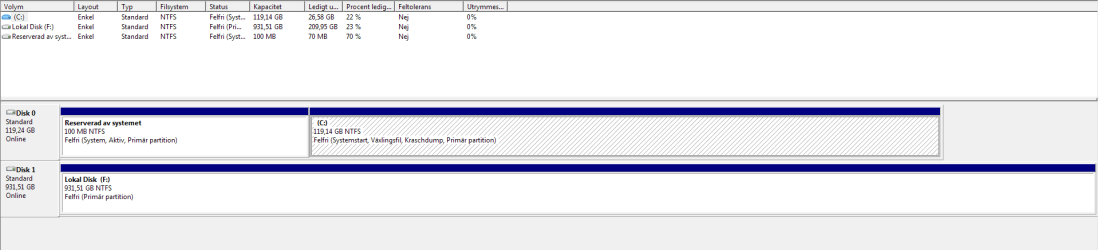
Please post back a screenshot of your maximized Disk Management drive map and listings with all drives:

1. Type Disk Management in Start Search box.
2. Open Disk Mgmt. window and maximize it.
3. Type Snipping Tool in Start Search box.
4. Open Snipping Tool, choose Rectangular Snip, draw a box around full map and all listings.
5, Save Snip, attach using paper clip in Reply Box.

Tell us what is on each partition.

Did you correctly unplug the HD during install to SSD?

Did you follow the Best Practices for Win7 install which are the same for retail?

Establish a Clean Boot, check the logs and System Resources from Troubleshooting Steps for Windows 7
 
Please post back a screenshot of your maximized Disk Management drive map and listings with all drives:

1. Type Disk Management in Start Search box.
2. Open Disk Mgmt. window and maximize it.
3. Type Snipping Tool in Start Search box.
4. Open Snipping Tool, choose Rectangular Snip, draw a box around full map and all listings.
5, Save Snip, attach using paper clip in Reply Box.

Tell us what is on each partition.

Did you correctly unplug the HD during install to SSD?

Did you follow the Best Practices for Win7 install which are the same for retail?

Establish a Clean Boot, check the logs and System Resources from Troubleshooting Steps for Windows 7

I apologize for the screenshot being in Swedish.

As I said before; C: is mainly for the OS and a few performance heavy programs (Photoshop etc.), F: is for games and storage(Movies, music, pictures etc.)
If you need me to translate the screenshot just tell me and I'll do my best.

If by "correctly unplug the HDD" you mean didn't have it plugged in as I installed the OS then yes.
 

Attachments

  • Snipp.PNG
    Snipp.PNG
    11.9 KB · Views: 34

My Computer My Computer

At a glance

Microsoft Windows 7 Home Premium 64-bitIntel(R) Core(TM) i5-3570K CPU @ 3.40GHzNVIDIA GeForce GTX 5
OS
Microsoft Windows 7 Home Premium 64-bit
CPU
Intel(R) Core(TM) i5-3570K CPU @ 3.40GHz
Motherboard
MSI Z77A-S01 (MS-7752)
Graphics Card(s)
NVIDIA GeForce GTX 5
Hard Drives
(1) ADATA SP900 ATA Device
(2) ST1000DM005 HD103SJ ATA Device
From an installation point of view, it looks correct and if the secondary HD was unplugged it shouldn't be able to interfere anyway.

But I would want to overwrite with Diskpart Clean Command boot code which interferes enough to solve half of all installation problems by wiping the HD.

Then follow the steps closely for Clean Reinstall - Factory OEM Windows 7.

You can also try the Clean Boot suggested, make sure all Important and Optional Updates are installed, comb the logs and use System Resources to check for solutions from Troubleshooting Steps for Windows 7
 
From an installation point of view, it looks correct and if the secondary HD was unplugged it shouldn't be able to interfere anyway.

But I would want to overwrite with Diskpart Clean Command boot code which interferes enough to solve half of all installation problems by wiping the HD.

Then follow the steps closely for Clean Reinstall - Factory OEM Windows 7.

You can also try the Clean Boot suggested, make sure all Important and Optional Updates are installed, comb the logs and use System Resources to check for solutions from Troubleshooting Steps for Windows 7

Just so I have understood you correctly, you want me to reinstall Windows?
 

My Computer My Computer

At a glance

Microsoft Windows 7 Home Premium 64-bitIntel(R) Core(TM) i5-3570K CPU @ 3.40GHzNVIDIA GeForce GTX 5
OS
Microsoft Windows 7 Home Premium 64-bit
CPU
Intel(R) Core(TM) i5-3570K CPU @ 3.40GHz
Motherboard
MSI Z77A-S01 (MS-7752)
Graphics Card(s)
NVIDIA GeForce GTX 5
Hard Drives
(1) ADATA SP900 ATA Device
(2) ST1000DM005 HD103SJ ATA Device
HAve you Tried loading the DVD and try a repair windows.
 

My Computer My Computer

At a glance

Windows 7 Home PreQ8200 Intell 2.333DDR3 1333 4gigAti HD4870
Computer Manufacturer/Model Number
Home Build.
OS
Windows 7 Home Pre
CPU
Q8200 Intell 2.333
Motherboard
Asus P5Q3 Delux
Memory
DDR3 1333 4gig
Graphics Card(s)
Ati HD4870
Sound Card
Onboard Soundmax. 7.1
Monitor(s) Displays
1, 20" Samsung
Screen Resolution
1600/900
PSU
Good enough
Case
Le Shark
Cooling
FAN FAN FAN FAN, Thermaltake Minitype 90 with speed fan 4.
Keyboard
Standard, Gaming Wolfking
Mouse
Cm-storm-inferno-wired-gaming-mouse
Internet Speed
Sky Crappy upto 20meg I get a whapping 5.8mbs.
Before doing anything else, I would reboot, and run another SFC /SCANNOW - it would tell us if the problems in the first scan have been properly fixed, or if they have returned (which can happen).

I can probably repair the two remaining errors - but there's no point, if the rest of the system is unstable
 

My Computer My Computer

At a glance

Win 7 x64 Home Premium (and x86 VirtualBox VM...i3 370M/i7 6500U8GB - finally :)/8GBit's an i3, dude!/dual Intel&nVidia
Computer type
Laptop
Computer Manufacturer/Model Number
Asus K52F or Lenovo B51-80
OS
Win 7 x64 Home Premium (and x86 VirtualBox VM)/Win10
CPU
i3 370M/i7 6500U
Motherboard
Asus/Lenovo
Memory
8GB - finally :)/8GB
Graphics Card(s)
it's an i3, dude!/dual Intel&nVidia
Sound Card
onboard
Monitor(s) Displays
15.6" built-in
Screen Resolution
1366x768/1920x1080
Hard Drives
750GB Seagate internal
Sundry external drives attached to other computers on the local network
1TB SSD on the Lenovo
PSU
n/a
Internet Speed
as much as I can get - usually on a dongle/phone, so <1MB/s
Antivirus
MSE/Defender
Browser
IE11/12/Edge/Chrome/FF(if I must)
Before doing anything else, I would reboot, and run another SFC /SCANNOW - it would tell us if the problems in the first scan have been properly fixed, or if they have returned (which can happen).

I can probably repair the two remaining errors - but there's no point, if the rest of the system is unstable

I just ran the SFC and it says the corrupted files have been fixed.
 

My Computer My Computer

At a glance

Microsoft Windows 7 Home Premium 64-bitIntel(R) Core(TM) i5-3570K CPU @ 3.40GHzNVIDIA GeForce GTX 5
OS
Microsoft Windows 7 Home Premium 64-bit
CPU
Intel(R) Core(TM) i5-3570K CPU @ 3.40GHz
Motherboard
MSI Z77A-S01 (MS-7752)
Graphics Card(s)
NVIDIA GeForce GTX 5
Hard Drives
(1) ADATA SP900 ATA Device
(2) ST1000DM005 HD103SJ ATA Device
Please post the FULL CBS.log file - you'll need to copy it to the desktop and compress the copy before uploading it.
 

My Computer My Computer

At a glance

Win 7 x64 Home Premium (and x86 VirtualBox VM...i3 370M/i7 6500U8GB - finally :)/8GBit's an i3, dude!/dual Intel&nVidia
Computer type
Laptop
Computer Manufacturer/Model Number
Asus K52F or Lenovo B51-80
OS
Win 7 x64 Home Premium (and x86 VirtualBox VM)/Win10
CPU
i3 370M/i7 6500U
Motherboard
Asus/Lenovo
Memory
8GB - finally :)/8GB
Graphics Card(s)
it's an i3, dude!/dual Intel&nVidia
Sound Card
onboard
Monitor(s) Displays
15.6" built-in
Screen Resolution
1366x768/1920x1080
Hard Drives
750GB Seagate internal
Sundry external drives attached to other computers on the local network
1TB SSD on the Lenovo
PSU
n/a
Internet Speed
as much as I can get - usually on a dongle/phone, so <1MB/s
Antivirus
MSE/Defender
Browser
IE11/12/Edge/Chrome/FF(if I must)
Please post the FULL CBS.log file - you'll need to copy it to the desktop and compress the copy before uploading it.

Here you go.
 

My Computer My Computer

At a glance

Microsoft Windows 7 Home Premium 64-bitIntel(R) Core(TM) i5-3570K CPU @ 3.40GHzNVIDIA GeForce GTX 5
OS
Microsoft Windows 7 Home Premium 64-bit
CPU
Intel(R) Core(TM) i5-3570K CPU @ 3.40GHz
Motherboard
MSI Z77A-S01 (MS-7752)
Graphics Card(s)
NVIDIA GeForce GTX 5
Hard Drives
(1) ADATA SP900 ATA Device
(2) ST1000DM005 HD103SJ ATA Device
The two files are not present in the latest report - although it still did a fair amount of work in process.
It seems that the breakages may have been part of a PhotoViewer install - you may find that it will need a reinstall.

How is the system behaivng now?
 

My Computer My Computer

At a glance

Win 7 x64 Home Premium (and x86 VirtualBox VM...i3 370M/i7 6500U8GB - finally :)/8GBit's an i3, dude!/dual Intel&nVidia
Computer type
Laptop
Computer Manufacturer/Model Number
Asus K52F or Lenovo B51-80
OS
Win 7 x64 Home Premium (and x86 VirtualBox VM)/Win10
CPU
i3 370M/i7 6500U
Motherboard
Asus/Lenovo
Memory
8GB - finally :)/8GB
Graphics Card(s)
it's an i3, dude!/dual Intel&nVidia
Sound Card
onboard
Monitor(s) Displays
15.6" built-in
Screen Resolution
1366x768/1920x1080
Hard Drives
750GB Seagate internal
Sundry external drives attached to other computers on the local network
1TB SSD on the Lenovo
PSU
n/a
Internet Speed
as much as I can get - usually on a dongle/phone, so <1MB/s
Antivirus
MSE/Defender
Browser
IE11/12/Edge/Chrome/FF(if I must)
The two files are not present in the latest report - although it still did a fair amount of work in process.
It seems that the breakages may have been part of a PhotoViewer install - you may find that it will need a reinstall.

How is the system behaivng now?

The system is behaving fine except for the boot time problem.
 

My Computer My Computer

At a glance

Microsoft Windows 7 Home Premium 64-bitIntel(R) Core(TM) i5-3570K CPU @ 3.40GHzNVIDIA GeForce GTX 5
OS
Microsoft Windows 7 Home Premium 64-bit
CPU
Intel(R) Core(TM) i5-3570K CPU @ 3.40GHz
Motherboard
MSI Z77A-S01 (MS-7752)
Graphics Card(s)
NVIDIA GeForce GTX 5
Hard Drives
(1) ADATA SP900 ATA Device
(2) ST1000DM005 HD103SJ ATA Device
The question then becomes what the difference is between a cold boot and a restart.

What happens if you Pause the boot in the BIOS for a few seconds after a cold boot?

Is the BIOS properly optimised for SSD usage? (I have no idea what such would be - I've never had my hands on an SSD system :cry: )
 

My Computer My Computer

At a glance

Win 7 x64 Home Premium (and x86 VirtualBox VM...i3 370M/i7 6500U8GB - finally :)/8GBit's an i3, dude!/dual Intel&nVidia
Computer type
Laptop
Computer Manufacturer/Model Number
Asus K52F or Lenovo B51-80
OS
Win 7 x64 Home Premium (and x86 VirtualBox VM)/Win10
CPU
i3 370M/i7 6500U
Motherboard
Asus/Lenovo
Memory
8GB - finally :)/8GB
Graphics Card(s)
it's an i3, dude!/dual Intel&nVidia
Sound Card
onboard
Monitor(s) Displays
15.6" built-in
Screen Resolution
1366x768/1920x1080
Hard Drives
750GB Seagate internal
Sundry external drives attached to other computers on the local network
1TB SSD on the Lenovo
PSU
n/a
Internet Speed
as much as I can get - usually on a dongle/phone, so <1MB/s
Antivirus
MSE/Defender
Browser
IE11/12/Edge/Chrome/FF(if I must)
The question then becomes what the difference is between a cold boot and a restart.

What happens if you Pause the boot in the BIOS for a few seconds after a cold boot?

Is the BIOS properly optimised for SSD usage? (I have no idea what such would be - I've never had my hands on an SSD system :cry: )

There's no noticeable difference between a normal boot and a boot where I pause in BIOS.

Yes the BIOS is properly optimized, at least as far as I know.
 

My Computer My Computer

At a glance

Microsoft Windows 7 Home Premium 64-bitIntel(R) Core(TM) i5-3570K CPU @ 3.40GHzNVIDIA GeForce GTX 5
OS
Microsoft Windows 7 Home Premium 64-bit
CPU
Intel(R) Core(TM) i5-3570K CPU @ 3.40GHz
Motherboard
MSI Z77A-S01 (MS-7752)
Graphics Card(s)
NVIDIA GeForce GTX 5
Hard Drives
(1) ADATA SP900 ATA Device
(2) ST1000DM005 HD103SJ ATA Device
I'm out of my depth then :(
I'll leave it to others.
 

My Computer My Computer

At a glance

Win 7 x64 Home Premium (and x86 VirtualBox VM...i3 370M/i7 6500U8GB - finally :)/8GBit's an i3, dude!/dual Intel&nVidia
Computer type
Laptop
Computer Manufacturer/Model Number
Asus K52F or Lenovo B51-80
OS
Win 7 x64 Home Premium (and x86 VirtualBox VM)/Win10
CPU
i3 370M/i7 6500U
Motherboard
Asus/Lenovo
Memory
8GB - finally :)/8GB
Graphics Card(s)
it's an i3, dude!/dual Intel&nVidia
Sound Card
onboard
Monitor(s) Displays
15.6" built-in
Screen Resolution
1366x768/1920x1080
Hard Drives
750GB Seagate internal
Sundry external drives attached to other computers on the local network
1TB SSD on the Lenovo
PSU
n/a
Internet Speed
as much as I can get - usually on a dongle/phone, so <1MB/s
Antivirus
MSE/Defender
Browser
IE11/12/Edge/Chrome/FF(if I must)
Back
Top