Solved Windows 7 HP x64 fails to boot into safe mode or repair menu

PWilson93

New member
Local time
2:04 AM
Messages
6
Yesterday my computer was running slowly so I attempted to restart it. This resulted in the computer booting into automatic startup repair which did nothing after running for ~3 hours. Tried running in safe mode which booted fine 2 times, but after I tried removing updates in an attempt to repair the damage my computer stopped loading safe mode. So I put in my windows install disk, tried to repair the mbr using bootrec.exe and that didn't work either. Now, I can't boot into safe mode or automatic repair, and running off the install disk doesn't fix anything. I tried to reinstall windows 7 HP x64 as well but it never gets passed the setup is preparing screen. I'm using a Dell Inspiron laptop with Windows 7 HP x64.
 

My Computer My Computer

At a glance

Windows 7 Home Premium x64
Computer type
PC/Desktop
Computer Manufacturer/Model Number
Dell
OS
Windows 7 Home Premium x64
Antivirus
AVG
Browser
Chrome
It my be a disk failure.
Boot a Linux USB flash disk and save your data to an external disk.

Run check disk
Boot from the installation disk - Repair - CMD - and type chkdsk c: /f
 

My Computers My Computers

  • At a glance

    Windows 7 HP 64i5 6600K - 800MHz to 4200MHz4+4G GSkill DDR4 3000IG - Intel 530
    Computer type
    PC/Desktop
    Computer Manufacturer/Model Number
    custom build
    OS
    Windows 7 HP 64
    CPU
    i5 6600K - 800MHz to 4200MHz
    Motherboard
    GA-Z170-HD3P
    Memory
    4+4G GSkill DDR4 3000
    Graphics Card(s)
    IG - Intel 530
    Monitor(s) Displays
    Samsung 226BW
    Screen Resolution
    1680x1050
    Hard Drives
    (1) -1 SM951 – 128GB M.2 AHCI PCIe SSD drive for Windows 7 and Lubuntu
    (2) -1 WD SATA 3 - 1T for Data
    (3) -1 WD SATA 3 - 1T for backup
    PSU
    Thermaltake 450W TR2 gold
    Keyboard
    Old and good Chicony mechanical keyboard
    Mouse
    Logitech mX performance - 9 buttons (had to disable some)
    Internet Speed
    500Mb/s
    Browser
    Firefox 64
    Other Info
    TinyWall firewall
  • At a glance

    Windows 7 Proi7-4500U 800MHz to 3.0GHz(4+4)G DDR3 1600IG intel 4400 + NVIDIA GeForce GT 745M
    Computer type
    Laptop
    System Manufacturer/Model Number
    Asus Q550LF
    OS
    Windows 7 Pro
    CPU
    i7-4500U 800MHz to 3.0GHz
    Motherboard
    Asus Q550LF
    Memory
    (4+4)G DDR3 1600
    Graphics Card(s)
    IG intel 4400 + NVIDIA GeForce GT 745M
    Sound Card
    Realtek
    Monitor(s) Displays
    LG Display LP156WF4-SPH1
    Screen Resolution
    1920 x 1080
    Hard Drives
    BX500 120G SSD for Windows and programs +
    1T HDD for data
    Internet Speed
    500 Mb/s
    Browser
    Firefox
    Other Info
    TinyWall firewall
It my be a disk failure.
Boot a Linux USB flash disk and save your data to an external disk.

Run check disk
Boot from the installation disk - Repair - CMD - and type chkdsk c: /f

Hey Megahertz,

Thanks for the reply! Unfortunately, running from the installation disk allows me to get past choosing a language, and then at the screen where it gives me the options to install, what you need to know before installing windows, and repair computer it never loads the next set of options no matter what I choose. It sits at a blue screen (not BSOD) with my mouse cursor. Running check disk earlier gave me a response like "file segment ##### unreadable" and once it finished it restarted my computer but looped check disk (run check disk, finishes, restarts, runs check disk, etc...) I made a bootable flash drive with ubuntu 16.04 and tried installing it but it never loads anything past "Preparing to install". I have been using it as a live USB to work around that. I can't seem to find any files from my windows installation while using Ubuntu but I think that's user error haha. I've just tried using Boot Repair from a different bootable USB and will now test if it actually repaired the MBR. Here's the pastebin from Boot Repair if you, or anyone else, is interested. Update: Boot Repair said it was fixed, but now I can't get passed "A disk read error has occurred. Press Ctrl+Alt+Del to restart."

Ubuntu Pastebin
 

My Computer My Computer

At a glance

Windows 7 Home Premium x64
Computer type
PC/Desktop
Computer Manufacturer/Model Number
Dell
OS
Windows 7 Home Premium x64
Antivirus
AVG
Browser
Chrome
I don't think it's a boot failure. I think it's a disk failure.
I'll will ask Jumanji to help you. He is the disk guru.
Don't try to fix or install any thing on your disk.
Wait for Jumanji help.
 

My Computers My Computers

  • At a glance

    Windows 7 HP 64i5 6600K - 800MHz to 4200MHz4+4G GSkill DDR4 3000IG - Intel 530
    Computer type
    PC/Desktop
    Computer Manufacturer/Model Number
    custom build
    OS
    Windows 7 HP 64
    CPU
    i5 6600K - 800MHz to 4200MHz
    Motherboard
    GA-Z170-HD3P
    Memory
    4+4G GSkill DDR4 3000
    Graphics Card(s)
    IG - Intel 530
    Monitor(s) Displays
    Samsung 226BW
    Screen Resolution
    1680x1050
    Hard Drives
    (1) -1 SM951 – 128GB M.2 AHCI PCIe SSD drive for Windows 7 and Lubuntu
    (2) -1 WD SATA 3 - 1T for Data
    (3) -1 WD SATA 3 - 1T for backup
    PSU
    Thermaltake 450W TR2 gold
    Keyboard
    Old and good Chicony mechanical keyboard
    Mouse
    Logitech mX performance - 9 buttons (had to disable some)
    Internet Speed
    500Mb/s
    Browser
    Firefox 64
    Other Info
    TinyWall firewall
  • At a glance

    Windows 7 Proi7-4500U 800MHz to 3.0GHz(4+4)G DDR3 1600IG intel 4400 + NVIDIA GeForce GT 745M
    Computer type
    Laptop
    System Manufacturer/Model Number
    Asus Q550LF
    OS
    Windows 7 Pro
    CPU
    i7-4500U 800MHz to 3.0GHz
    Motherboard
    Asus Q550LF
    Memory
    (4+4)G DDR3 1600
    Graphics Card(s)
    IG intel 4400 + NVIDIA GeForce GT 745M
    Sound Card
    Realtek
    Monitor(s) Displays
    LG Display LP156WF4-SPH1
    Screen Resolution
    1920 x 1080
    Hard Drives
    BX500 120G SSD for Windows and programs +
    1T HDD for data
    Internet Speed
    500 Mb/s
    Browser
    Firefox
    Other Info
    TinyWall firewall
Awesome, thanks for your help!
 

My Computer My Computer

At a glance

Windows 7 Home Premium x64
Computer type
PC/Desktop
Computer Manufacturer/Model Number
Dell
OS
Windows 7 Home Premium x64
Antivirus
AVG
Browser
Chrome
What exactly do you want to do now? From your posts I understand that you do not mind reinstalling Windows if that is possible. Am I right? Do you have the DELL installation media or Recovery Disks?

Dell usually uses Seagate drives . Check your drive's health with Seatools for DOS SeaTools for DOS |
Seagate

If it passes the tests, you can create a bootable Partition Wizard CD/ pendrive and try to format the drive before installing Windows.

If the tests fail, you have no other go except replacing the drive. ( No DIY data recovery is possible on a failed hardware.)

For a good measure, I would advise that you contact Dell Tech support with all details of your laptop. IMO, their Tech Support has always been good.
 
Last edited:

My Computer My Computer

At a glance

Windows 7 Home Premium 32 bit
OS
Windows 7 Home Premium 32 bit
Hi jumanji,

I don't have the ones that came with my computer but I have a Windows 7 x64 HP disc. I'll try your suggestions today and update my post with the result. Should my HD fail the tests would it be possible to install Windows on an external HD and run my computer from there? Last thing, is there anyway I could find out the product key that was used for my laptop? There is usually a sticker or something on the bottom but mine doesn't have one. Thanks for your help and suggestions!
 

My Computer My Computer

At a glance

Windows 7 Home Premium x64
Computer type
PC/Desktop
Computer Manufacturer/Model Number
Dell
OS
Windows 7 Home Premium x64
Antivirus
AVG
Browser
Chrome
Your system spec.

Computer type PC/Desktop
System Manufacturer/Model Number Dell
OS Windows 7 Home Premium x64
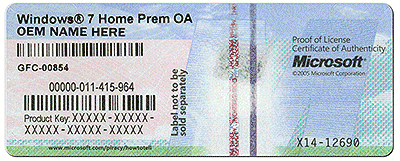
Your desktop should have a Windows 7 Sticker some where if the desktop came with Windows 7. It looks something like this.


coa-stickers.gif
 

My Computer My Computer

At a glance

Windows 10 Pro. 64/ version 1709 Windows 7 Pr...Intel i7-6800K @ 4.3Corsair Platinum 16 gig @2400EVGA GTX 1070 OC
Computer type
PC/Desktop
Computer Manufacturer/Model Number
Home made Desktop
OS
Windows 10 Pro. 64/ version 1709 Windows 7 Pro/64
CPU
Intel i7-6800K @ 4.3
Motherboard
ASUS X-99 Deluxe II
Memory
Corsair Platinum 16 gig @2400
Graphics Card(s)
EVGA GTX 1070 OC
Monitor(s) Displays
Asus 27" LED LCD/VE278Q
Screen Resolution
1920-1080 or 1280-720 HDMI
Hard Drives
INTEL SSD 730-240 Gb Sata 3.0/
PSU
EVGA Platium 1200W
Case
Phanteks Luxe Tempered Glass 8 fans/ one radiator
Cooling
XSPC/ Water Cooled CPU
Keyboard
Das 4 Professional
Mouse
Logitech M705/MX Anywhere 2-S
Internet Speed
100 mbits
Antivirus
Microsoft Security Essentials/ Malwarebytes Premium 3.0/ SAS
Browser
I.E. 11 default/Firefox/ ISP Time Warner Cable/Spectrum
Other Info
LG BluRay Burner/
Sound system-KLipsch-THX/
Icy Dock ssd Hot Swap bays.
Checked over my laptop and unfortunately it doesn't have a sticker. I ran Seatools off a bootable USB and it couldn't detect my hard drive so I'm assuming it's failed completely. Fortunately, I have another laptop I can use in the mean time. Would it be possible to use the product key from my old laptop in order to install windows on my newer one?
 

My Computer My Computer

At a glance

Windows 7 Home Premium x64
Computer type
PC/Desktop
Computer Manufacturer/Model Number
Dell
OS
Windows 7 Home Premium x64
Antivirus
AVG
Browser
Chrome
1. If you have a Windows 7 64bit Home Premium with a valid and legal product key, it is OK.

2. You cannot install Windows on an external HDD.

3. All royalty OEMs use a generic key assigned to them for a specific Windows edition and this in conjunction with an OEM certificate and a SLIC embedded into the bios autoactivates Windows 7 without reference to Microsoft activation servers. This generic key cannot be used to install Windows other than OEM Windows. If you had created Dell Recovery CDs or have Dell supplied OEM Installation media this generic Key and the MS OEM certificate are in it and when installed with this media your DELL inspiron will get auto activated.

4. All OEM Windows also have a specific Product key assigned which is on the sticker. If due to some corruption of the SLIC table in the bios the OEM auto activation does not go through, then the user can use the product key on the sticker and activate the Windows. This activation goes through Microsoft activation servers and may require a phone activation. ( I am not sure about phone activation but definitely it is not going to be a problem.)

5. Your Dell Inspiron also should have the sticker with the Microsoft assigned Product Key.. It is most probably inside the battery compartment. Please remove the battery and check inside the compartment.

Edit: By the time I composd this and posted, two posts have preceded it. Shows how slow I am :D)
 

My Computer My Computer

At a glance

Windows 7 Home Premium 32 bit
OS
Windows 7 Home Premium 32 bit
Woah! Solid call, it's inside the battery compartment. So basically my option now is to replace the hard drive? That's a bummer. Thanks for all your assistance guys!
 

My Computer My Computer

At a glance

Windows 7 Home Premium x64
Computer type
PC/Desktop
Computer Manufacturer/Model Number
Dell
OS
Windows 7 Home Premium x64
Antivirus
AVG
Browser
Chrome
Remember that the key found on your laptop sticker will only legally work on that laptop.
It is tied to laptop. With a clean install on a new drive installed internally in that laptop. The Windows sticker key should work to get a proper activation.

Here is a good read to help you understand.

Windows License Types Explained
 

My Computer My Computer

At a glance

Windows 10 Pro. 64/ version 1709 Windows 7 Pr...Intel i7-6800K @ 4.3Corsair Platinum 16 gig @2400EVGA GTX 1070 OC
Computer type
PC/Desktop
Computer Manufacturer/Model Number
Home made Desktop
OS
Windows 10 Pro. 64/ version 1709 Windows 7 Pro/64
CPU
Intel i7-6800K @ 4.3
Motherboard
ASUS X-99 Deluxe II
Memory
Corsair Platinum 16 gig @2400
Graphics Card(s)
EVGA GTX 1070 OC
Monitor(s) Displays
Asus 27" LED LCD/VE278Q
Screen Resolution
1920-1080 or 1280-720 HDMI
Hard Drives
INTEL SSD 730-240 Gb Sata 3.0/
PSU
EVGA Platium 1200W
Case
Phanteks Luxe Tempered Glass 8 fans/ one radiator
Cooling
XSPC/ Water Cooled CPU
Keyboard
Das 4 Professional
Mouse
Logitech M705/MX Anywhere 2-S
Internet Speed
100 mbits
Antivirus
Microsoft Security Essentials/ Malwarebytes Premium 3.0/ SAS
Browser
I.E. 11 default/Firefox/ ISP Time Warner Cable/Spectrum
Other Info
LG BluRay Burner/
Sound system-KLipsch-THX/
Icy Dock ssd Hot Swap bays.

My Computers My Computers

  • At a glance

    Windows 7 HP 64i5 6600K - 800MHz to 4200MHz4+4G GSkill DDR4 3000IG - Intel 530
    Computer type
    PC/Desktop
    Computer Manufacturer/Model Number
    custom build
    OS
    Windows 7 HP 64
    CPU
    i5 6600K - 800MHz to 4200MHz
    Motherboard
    GA-Z170-HD3P
    Memory
    4+4G GSkill DDR4 3000
    Graphics Card(s)
    IG - Intel 530
    Monitor(s) Displays
    Samsung 226BW
    Screen Resolution
    1680x1050
    Hard Drives
    (1) -1 SM951 – 128GB M.2 AHCI PCIe SSD drive for Windows 7 and Lubuntu
    (2) -1 WD SATA 3 - 1T for Data
    (3) -1 WD SATA 3 - 1T for backup
    PSU
    Thermaltake 450W TR2 gold
    Keyboard
    Old and good Chicony mechanical keyboard
    Mouse
    Logitech mX performance - 9 buttons (had to disable some)
    Internet Speed
    500Mb/s
    Browser
    Firefox 64
    Other Info
    TinyWall firewall
  • At a glance

    Windows 7 Proi7-4500U 800MHz to 3.0GHz(4+4)G DDR3 1600IG intel 4400 + NVIDIA GeForce GT 745M
    Computer type
    Laptop
    System Manufacturer/Model Number
    Asus Q550LF
    OS
    Windows 7 Pro
    CPU
    i7-4500U 800MHz to 3.0GHz
    Motherboard
    Asus Q550LF
    Memory
    (4+4)G DDR3 1600
    Graphics Card(s)
    IG intel 4400 + NVIDIA GeForce GT 745M
    Sound Card
    Realtek
    Monitor(s) Displays
    LG Display LP156WF4-SPH1
    Screen Resolution
    1920 x 1080
    Hard Drives
    BX500 120G SSD for Windows and programs +
    1T HDD for data
    Internet Speed
    500 Mb/s
    Browser
    Firefox
    Other Info
    TinyWall firewall
Back
Top