Windows 7 Instalation CD error

What is fried?? The HD? As of your last posts you have mobo function, power and are booting disks. This is fried?
 
The people we took It to said it was fried I dont know but I am going to take it to geek squad to see what they have to say about it
 

My Computer

Computer type
PC/Desktop
Computer Manufacturer/Model Number
Custom Build
OS
Microsoft Windows 7 Ultimate 64-bit 7601 Multiprocessor Free Service Pack 1
CPU
Intel(R) Core(TM) i5-2400 CPU @ 3.10GHz
Motherboard
ASUSTeK COMPUTER INC. P8H61-M LE/CSM
Memory
16.00 GB
Graphics Card(s)
NVIDIA GeForce GTX 660 Ti SC 3GB
Sound Card
(1) NVIDIA High Definition Audio (2) Realtek High Definiti
Monitor(s) Displays
21.5" HP
Screen Resolution
1600 x 900 x 32 bits (4294967296 colors) @ 60 Hz
Hard Drives
ST31000524AS ATA Device 7200
PSU
OCZ 650W Bronze Plus
Case
Zalman Z9 Plus
Mouse
Razer naga molten edition
Antivirus
Microsoft Security Essentials along with Malwarbytes
Browser
Chrome
Other Info
Love computers but wanting to learn more about troubleshooting and wanting to contribute to this community!
The hd is fine but aperrently the motherboard is gone
 

My Computer

Computer type
PC/Desktop
Computer Manufacturer/Model Number
Custom Build
OS
Microsoft Windows 7 Ultimate 64-bit 7601 Multiprocessor Free Service Pack 1
CPU
Intel(R) Core(TM) i5-2400 CPU @ 3.10GHz
Motherboard
ASUSTeK COMPUTER INC. P8H61-M LE/CSM
Memory
16.00 GB
Graphics Card(s)
NVIDIA GeForce GTX 660 Ti SC 3GB
Sound Card
(1) NVIDIA High Definition Audio (2) Realtek High Definiti
Monitor(s) Displays
21.5" HP
Screen Resolution
1600 x 900 x 32 bits (4294967296 colors) @ 60 Hz
Hard Drives
ST31000524AS ATA Device 7200
PSU
OCZ 650W Bronze Plus
Case
Zalman Z9 Plus
Mouse
Razer naga molten edition
Antivirus
Microsoft Security Essentials along with Malwarbytes
Browser
Chrome
Other Info
Love computers but wanting to learn more about troubleshooting and wanting to contribute to this community!

I got my computer back after a while and I loaded it up it said windows had an unexpected shutdown so I loaded normaly and It said windows is loading but the logo didn't show up and 1 minuet of it loading it shut down and now it's stuck at the main screen with the f9 f11 etc options
 

My Computer

Computer type
PC/Desktop
Computer Manufacturer/Model Number
Custom Build
OS
Microsoft Windows 7 Ultimate 64-bit 7601 Multiprocessor Free Service Pack 1
CPU
Intel(R) Core(TM) i5-2400 CPU @ 3.10GHz
Motherboard
ASUSTeK COMPUTER INC. P8H61-M LE/CSM
Memory
16.00 GB
Graphics Card(s)
NVIDIA GeForce GTX 660 Ti SC 3GB
Sound Card
(1) NVIDIA High Definition Audio (2) Realtek High Definiti
Monitor(s) Displays
21.5" HP
Screen Resolution
1600 x 900 x 32 bits (4294967296 colors) @ 60 Hz
Hard Drives
ST31000524AS ATA Device 7200
PSU
OCZ 650W Bronze Plus
Case
Zalman Z9 Plus
Mouse
Razer naga molten edition
Antivirus
Microsoft Security Essentials along with Malwarbytes
Browser
Chrome
Other Info
Love computers but wanting to learn more about troubleshooting and wanting to contribute to this community!
Didn't you just take it to a shop? Did they charge you to fix it? What did they find?

If you paid to fix it I would take it back and tell them they need to fix it correctly which is what you paid for.
 
We did take it to them we paid for a diagnostic and then they claimed that our motherboard was fried and Said they would fix it and that never came around so we decided to take it back I don't know if he's right cause he was wrong quite a few times
 

My Computer

Computer type
PC/Desktop
Computer Manufacturer/Model Number
Custom Build
OS
Microsoft Windows 7 Ultimate 64-bit 7601 Multiprocessor Free Service Pack 1
CPU
Intel(R) Core(TM) i5-2400 CPU @ 3.10GHz
Motherboard
ASUSTeK COMPUTER INC. P8H61-M LE/CSM
Memory
16.00 GB
Graphics Card(s)
NVIDIA GeForce GTX 660 Ti SC 3GB
Sound Card
(1) NVIDIA High Definition Audio (2) Realtek High Definiti
Monitor(s) Displays
21.5" HP
Screen Resolution
1600 x 900 x 32 bits (4294967296 colors) @ 60 Hz
Hard Drives
ST31000524AS ATA Device 7200
PSU
OCZ 650W Bronze Plus
Case
Zalman Z9 Plus
Mouse
Razer naga molten edition
Antivirus
Microsoft Security Essentials along with Malwarbytes
Browser
Chrome
Other Info
Love computers but wanting to learn more about troubleshooting and wanting to contribute to this community!
Reinstall the new HD you first wrote about. Make sure it is installed securely and then look in BIOS setup to see if it shows up.

If so, boot the Win7 installer and see if it detects the HD for install. Install WIn7 following these steps: Clean Install Windows 7

What is the make and model of your computer? Fill in more of your System Specs in bottom left corner of your post if possible.

You repeatedly refer to more than one Hard Drive. Do you have another HD to try installing alone. Does it show in BIOS.

If you can enter BIOS setup then the mobo may be OK. But you need to get the HD to show up in BIOS so we can proceed..
 
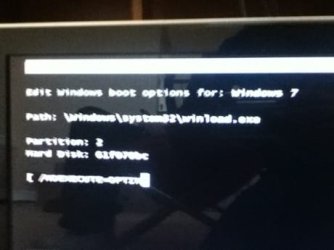
I pressed f10 to go into set up and it gave me this
 

Attachments

  • ImageUploadedBySevenForums1331164076.147076.jpg
    ImageUploadedBySevenForums1331164076.147076.jpg
    14.2 KB · Views: 4

My Computer

Computer type
PC/Desktop
Computer Manufacturer/Model Number
Custom Build
OS
Microsoft Windows 7 Ultimate 64-bit 7601 Multiprocessor Free Service Pack 1
CPU
Intel(R) Core(TM) i5-2400 CPU @ 3.10GHz
Motherboard
ASUSTeK COMPUTER INC. P8H61-M LE/CSM
Memory
16.00 GB
Graphics Card(s)
NVIDIA GeForce GTX 660 Ti SC 3GB
Sound Card
(1) NVIDIA High Definition Audio (2) Realtek High Definiti
Monitor(s) Displays
21.5" HP
Screen Resolution
1600 x 900 x 32 bits (4294967296 colors) @ 60 Hz
Hard Drives
ST31000524AS ATA Device 7200
PSU
OCZ 650W Bronze Plus
Case
Zalman Z9 Plus
Mouse
Razer naga molten edition
Antivirus
Microsoft Security Essentials along with Malwarbytes
Browser
Chrome
Other Info
Love computers but wanting to learn more about troubleshooting and wanting to contribute to this community!
F10 goes to my setup no I am not loading from a disk just started up my comp and went to setup and this came up also wht do I do now?
 

My Computer

Computer type
PC/Desktop
Computer Manufacturer/Model Number
Custom Build
OS
Microsoft Windows 7 Ultimate 64-bit 7601 Multiprocessor Free Service Pack 1
CPU
Intel(R) Core(TM) i5-2400 CPU @ 3.10GHz
Motherboard
ASUSTeK COMPUTER INC. P8H61-M LE/CSM
Memory
16.00 GB
Graphics Card(s)
NVIDIA GeForce GTX 660 Ti SC 3GB
Sound Card
(1) NVIDIA High Definition Audio (2) Realtek High Definiti
Monitor(s) Displays
21.5" HP
Screen Resolution
1600 x 900 x 32 bits (4294967296 colors) @ 60 Hz
Hard Drives
ST31000524AS ATA Device 7200
PSU
OCZ 650W Bronze Plus
Case
Zalman Z9 Plus
Mouse
Razer naga molten edition
Antivirus
Microsoft Security Essentials along with Malwarbytes
Browser
Chrome
Other Info
Love computers but wanting to learn more about troubleshooting and wanting to contribute to this community!
F10 to go into like startup setup spin can see my bios and hardrives etc
 

My Computer

Computer type
PC/Desktop
Computer Manufacturer/Model Number
Custom Build
OS
Microsoft Windows 7 Ultimate 64-bit 7601 Multiprocessor Free Service Pack 1
CPU
Intel(R) Core(TM) i5-2400 CPU @ 3.10GHz
Motherboard
ASUSTeK COMPUTER INC. P8H61-M LE/CSM
Memory
16.00 GB
Graphics Card(s)
NVIDIA GeForce GTX 660 Ti SC 3GB
Sound Card
(1) NVIDIA High Definition Audio (2) Realtek High Definiti
Monitor(s) Displays
21.5" HP
Screen Resolution
1600 x 900 x 32 bits (4294967296 colors) @ 60 Hz
Hard Drives
ST31000524AS ATA Device 7200
PSU
OCZ 650W Bronze Plus
Case
Zalman Z9 Plus
Mouse
Razer naga molten edition
Antivirus
Microsoft Security Essentials along with Malwarbytes
Browser
Chrome
Other Info
Love computers but wanting to learn more about troubleshooting and wanting to contribute to this community!
You referring to BIOS setup, where the settings for your BIOS reside? I've never heard of them being on F10.

What is your mobo make/model?
 
I have a HP pavilion p6310f pc I don't really know the motherboard to well but when I tired to get into bios of gave. Me That picture and now I don't know what I should do
 

My Computer

Computer type
PC/Desktop
Computer Manufacturer/Model Number
Custom Build
OS
Microsoft Windows 7 Ultimate 64-bit 7601 Multiprocessor Free Service Pack 1
CPU
Intel(R) Core(TM) i5-2400 CPU @ 3.10GHz
Motherboard
ASUSTeK COMPUTER INC. P8H61-M LE/CSM
Memory
16.00 GB
Graphics Card(s)
NVIDIA GeForce GTX 660 Ti SC 3GB
Sound Card
(1) NVIDIA High Definition Audio (2) Realtek High Definiti
Monitor(s) Displays
21.5" HP
Screen Resolution
1600 x 900 x 32 bits (4294967296 colors) @ 60 Hz
Hard Drives
ST31000524AS ATA Device 7200
PSU
OCZ 650W Bronze Plus
Case
Zalman Z9 Plus
Mouse
Razer naga molten edition
Antivirus
Microsoft Security Essentials along with Malwarbytes
Browser
Chrome
Other Info
Love computers but wanting to learn more about troubleshooting and wanting to contribute to this community!
Pavilions use different keys F1, F2, F10, F12. Have you used F10 before so you know it is the correct key?

If so it appears to have lost it's hotkey to the BIOS.
 
Yes everytime you asked me to go into bios I would press f10
 

My Computer

Computer type
PC/Desktop
Computer Manufacturer/Model Number
Custom Build
OS
Microsoft Windows 7 Ultimate 64-bit 7601 Multiprocessor Free Service Pack 1
CPU
Intel(R) Core(TM) i5-2400 CPU @ 3.10GHz
Motherboard
ASUSTeK COMPUTER INC. P8H61-M LE/CSM
Memory
16.00 GB
Graphics Card(s)
NVIDIA GeForce GTX 660 Ti SC 3GB
Sound Card
(1) NVIDIA High Definition Audio (2) Realtek High Definiti
Monitor(s) Displays
21.5" HP
Screen Resolution
1600 x 900 x 32 bits (4294967296 colors) @ 60 Hz
Hard Drives
ST31000524AS ATA Device 7200
PSU
OCZ 650W Bronze Plus
Case
Zalman Z9 Plus
Mouse
Razer naga molten edition
Antivirus
Microsoft Security Essentials along with Malwarbytes
Browser
Chrome
Other Info
Love computers but wanting to learn more about troubleshooting and wanting to contribute to this community!
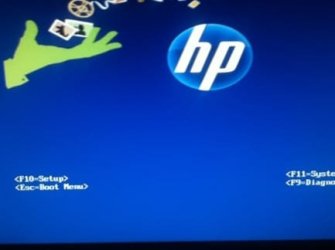
Now it is not doing anything it
Is just sitting and the boot up screen as I cant get into f10 setup, boot menus or anything
 

Attachments

  • ImageUploadedBySevenForums1331166140.248164.jpg
    ImageUploadedBySevenForums1331166140.248164.jpg
    10.4 KB · Views: 3

My Computer

Computer type
PC/Desktop
Computer Manufacturer/Model Number
Custom Build
OS
Microsoft Windows 7 Ultimate 64-bit 7601 Multiprocessor Free Service Pack 1
CPU
Intel(R) Core(TM) i5-2400 CPU @ 3.10GHz
Motherboard
ASUSTeK COMPUTER INC. P8H61-M LE/CSM
Memory
16.00 GB
Graphics Card(s)
NVIDIA GeForce GTX 660 Ti SC 3GB
Sound Card
(1) NVIDIA High Definition Audio (2) Realtek High Definiti
Monitor(s) Displays
21.5" HP
Screen Resolution
1600 x 900 x 32 bits (4294967296 colors) @ 60 Hz
Hard Drives
ST31000524AS ATA Device 7200
PSU
OCZ 650W Bronze Plus
Case
Zalman Z9 Plus
Mouse
Razer naga molten edition
Antivirus
Microsoft Security Essentials along with Malwarbytes
Browser
Chrome
Other Info
Love computers but wanting to learn more about troubleshooting and wanting to contribute to this community!
Turn it off for awhile then see if you can access BIOS.

When you installed the HD do you think you might have messed up something with the mobo, cables, etc which is shorting the mobo? Can you go over it closely? Did the shop look over this?
 
The shop basically did nothing they don't know anything and what do you mean by install the HD is their a disk I can use or somthing was one supposed to come with it?
 

My Computer

Computer type
PC/Desktop
Computer Manufacturer/Model Number
Custom Build
OS
Microsoft Windows 7 Ultimate 64-bit 7601 Multiprocessor Free Service Pack 1
CPU
Intel(R) Core(TM) i5-2400 CPU @ 3.10GHz
Motherboard
ASUSTeK COMPUTER INC. P8H61-M LE/CSM
Memory
16.00 GB
Graphics Card(s)
NVIDIA GeForce GTX 660 Ti SC 3GB
Sound Card
(1) NVIDIA High Definition Audio (2) Realtek High Definiti
Monitor(s) Displays
21.5" HP
Screen Resolution
1600 x 900 x 32 bits (4294967296 colors) @ 60 Hz
Hard Drives
ST31000524AS ATA Device 7200
PSU
OCZ 650W Bronze Plus
Case
Zalman Z9 Plus
Mouse
Razer naga molten edition
Antivirus
Microsoft Security Essentials along with Malwarbytes
Browser
Chrome
Other Info
Love computers but wanting to learn more about troubleshooting and wanting to contribute to this community!
Back
Top