Windows 7 install errors

no, I burnt the dvd on this laptop.
and about the HDD test, it fails to test it because of a bad command. am I using the wrong program?
I've got a Harddisks 3,5 inch SATA
Samsung HD103SJ (1TB) and I used estool from this site:
Hard Drive Diagnostics Tools and Utilities (Storage) - TACKtech Corp.
this is what the exact error says:
can't open CD driver CD001 SHSUCDX can't install
your ram drive is loaded at C:
Out of memory error.
Bad command or filename
xxxxxxxxxxxxxxxxxxxxxxxxxxxxxxxxxxxxxxxxxxxxxxxxxxxxxxxxxxxxxxxxxxxxxxxxxxxxxxxxx
Samsung HD utility
xxxxxxxxxxxxxxxxxxxxxxxxxxxxxxxxxxxxxxxxxxxxxxxxxxxxxxxxxxxxxxxxxxxxxxxxxxxxxxxxx
C:\>

I also did the memory test and the results were positive, no errors were found.

What PC did you use to burn that CD of the hard drive diagnostic program.
From your post above of the error message it look like either the CD/DVD drive could be bad or your RAM.
Try the zip file attached. burn it to a new CD disk.
View attachment estool_CDROM.zip
 

My Computer

Computer Manufacturer/Model Number
Built be Me
OS
Windows 7 Pro x64
CPU
i5 760
Motherboard
Asus P7P55D-E Pro
Memory
16GB
Graphics Card(s)
Nvidia GTS450
Sound Card
On board
Monitor(s) Displays
Dell 2007WFP Dell 1800FP
Screen Resolution
1680x1050 1280x1024
Hard Drives
Seagate 250GB & 750GB
WD 1TB
PSU
Antec 750
Case
In Win
Cooling
Cooler Master Hyper 212+
Keyboard
IBM
Mouse
MS
I used this laptop to burn the diagnostic. the cd/dvd drive is okay.. so it's either my ram or my HDD. I'm gonna return them both then. and I've already tried that one you've posted there(the estool). I already removed them from my pc, I'm gonna return them both and get new ones.

but keep in mind, I've done the MEMTEST and there were no errors. so I don't think it's really my ram tbh.

I've also tried spinrite, but spinrite couldn't run the test because of some overflow. I've searched the web and more people have that problem.
 

My Computer

Computer Manufacturer/Model Number
Me
OS
Windows 7
CPU
Intel® Core™ i5-2400 (4x3.1Ghz)
Motherboard
ASUS P8H61 -=Rev.3.0=-
Memory
Corsair 4 GB DDR3-1600
Graphics Card(s)
MSI R6850 Cyclone 1GD5 Power Edition/OC
Sound Card
mobo soundcard
Monitor(s) Displays
Samsung Syncmaster 2333T 23"
Screen Resolution
1920x1080
Hard Drives
Harddisks 3,5 inch SATA
Samsung HD103SJ
1TB
PSU
OCZ ModXStream Pro 500W
Case
Sharkoon Venga Economy
Cooling
Be Quiet!
Keyboard
some logitech keyboard
Mouse
logitech m100
Internet Speed
20 mbps
can someone please give me this last advice?
should I return both RAM and HDD or should I return even more parts?
 

My Computer

Computer Manufacturer/Model Number
Me
OS
Windows 7
CPU
Intel® Core™ i5-2400 (4x3.1Ghz)
Motherboard
ASUS P8H61 -=Rev.3.0=-
Memory
Corsair 4 GB DDR3-1600
Graphics Card(s)
MSI R6850 Cyclone 1GD5 Power Edition/OC
Sound Card
mobo soundcard
Monitor(s) Displays
Samsung Syncmaster 2333T 23"
Screen Resolution
1920x1080
Hard Drives
Harddisks 3,5 inch SATA
Samsung HD103SJ
1TB
PSU
OCZ ModXStream Pro 500W
Case
Sharkoon Venga Economy
Cooling
Be Quiet!
Keyboard
some logitech keyboard
Mouse
logitech m100
Internet Speed
20 mbps
Your CD/DVD drive may not be reading the disk correctly, or it is burned badly.

Did you burn the Win7 DVD and HDD diagnostics ISO CD using ImgBurn at 4x speed with Verify? Did it say "bootable" in text at left when you loaded ISO's into ImgBurn? Try that now.
ImgBurn - Free software downloads and software reviews - CNET Download.com

Did you pre-partition the HD using Diskpart from tutorial? Try booting DVD to delete all partitions, create new and format, then run install. How far does it get before the error. What is the verbatim text of the error - either type it out for us or attach a camera snap.

Do you have a 4gb USB flash stick to try installing from it?

Do you have another HD to try install?
 
Your CD/DVD drive may not be reading the disk correctly, or it is burned badly.

Did you burn the Win7 DVD and HDD diagnostics ISO CD using ImgBurn at 4x speed with Verify?
at 2.4x speed, that slow and still got problems with it.
Did it say "bootable" in text at left when you loaded ISO's into ImgBurn? Try that now.

the DVD worked before for me, for some reason it doesn't work anymore.
ImgBurn - Free software downloads and software reviews - CNET Download.com

Did you pre-partition the HD using Diskpart from tutorial? Try booting DVD to delete all partitions, create new and format, then run install.
did that twice and I get same errors, I have to run chkdsk and windows can't install because of 2 reasons(mentioned them before). How far does it get before the error. What is the verbatim text of the error - either type it out for us or attach a camera snap.
I've mentioned the errors before. the other ones are a lot of corrupt files, they probably mess my installation up.

Do you have a 4gb USB flash stick to try installing from it?
I can try that, thanks.

Do you have another HD to try install?
haven't got another one

well, I answered all your questions in the quote.
But I think I'll go to the shop first, try to return them. if they will not accept it(they will most likely accept them) back, I'm gonna try your memory stick method.

but what should I return? the HDD, memory and dvd drive? or are some of them not involved in this problem?
 

My Computer

Computer Manufacturer/Model Number
Me
OS
Windows 7
CPU
Intel® Core™ i5-2400 (4x3.1Ghz)
Motherboard
ASUS P8H61 -=Rev.3.0=-
Memory
Corsair 4 GB DDR3-1600
Graphics Card(s)
MSI R6850 Cyclone 1GD5 Power Edition/OC
Sound Card
mobo soundcard
Monitor(s) Displays
Samsung Syncmaster 2333T 23"
Screen Resolution
1920x1080
Hard Drives
Harddisks 3,5 inch SATA
Samsung HD103SJ
1TB
PSU
OCZ ModXStream Pro 500W
Case
Sharkoon Venga Economy
Cooling
Be Quiet!
Keyboard
some logitech keyboard
Mouse
logitech m100
Internet Speed
20 mbps
The only "messed up files" you could have on a wiped HD would in the installer, which is why to reconfirm ISO and burn. It is also not an error message which is why I asked for that.

Where did you get Win7? Is it a retail or factory OEM Installation DVD?

To try install from flash stick, install UltraISO trial version, on File tab open ISO, on Bootable tab Write Disk Image, Format, Write. Boot using F8 Bios Boot Menu key under USB or HD's.

If you cannot run HD diagnostics/repair CD scan after confirming ISO and burn, then I would return the HD for another as that is the next suspect in line. But I would try the USB stick install first to eliminate DVD and burn.
 
well, I know you're right about that... but the ISO is bigger than 4 GB. it's about 4.4 GB. I'd like to try it with an USB stick, but that means I have to get an 8 GB stick.. don't wanna waste anymore money untill I bring my HDD back. After I return my HDD and my ram, I will sure try that if I still get errors.
I've also tried a windows XP dvd from my friend, but that also failed. so it just has to be the HDD or the RAM.. but still if I keep getting the erros after I return them and get new parts, I will try your method for sure.
thanks again for your help, I will keep you updated with my progress.
 

My Computer

Computer Manufacturer/Model Number
Me
OS
Windows 7
CPU
Intel® Core™ i5-2400 (4x3.1Ghz)
Motherboard
ASUS P8H61 -=Rev.3.0=-
Memory
Corsair 4 GB DDR3-1600
Graphics Card(s)
MSI R6850 Cyclone 1GD5 Power Edition/OC
Sound Card
mobo soundcard
Monitor(s) Displays
Samsung Syncmaster 2333T 23"
Screen Resolution
1920x1080
Hard Drives
Harddisks 3,5 inch SATA
Samsung HD103SJ
1TB
PSU
OCZ ModXStream Pro 500W
Case
Sharkoon Venga Economy
Cooling
Be Quiet!
Keyboard
some logitech keyboard
Mouse
logitech m100
Internet Speed
20 mbps
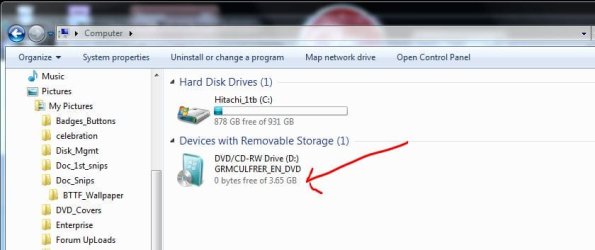
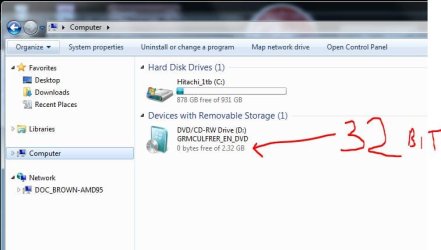
Valid win7 DVDs when burned are less than 4gb, so they will fit on a DVD or 4gb USB flash
 

Attachments

  • Win7_DVD_GBs.JPG
    Win7_DVD_GBs.JPG
    40.1 KB · Views: 11
  • Win7_DVD_GBs_32bit.JPG
    Win7_DVD_GBs_32bit.JPG
    40.5 KB · Views: 8

My Computer

Computer type
PC/Desktop
Computer Manufacturer/Model Number
Built them myself, Science Experiments !
OS
Win7 Enterprise, Win7 x86 (Ult 7600), Win7 x64 Ult 7600, TechNet RTM on AMD x64 (2.8Ghz)
CPU
AMD fx8350 4ghz, AMD-32 2400mhz, AMD-64 3200mhz, AMDx64 2.8G
Motherboard
SIS 755, ECS-K8M890M-M (Ult 7600), GigaByte & others
Memory
2gb, 4gb on the Ult 7600, 4gb on Technet RTM, 32gb on FX8350
Graphics Card(s)
Draw my own Graphics, several nVidia cards
Sound Card
on motherboard
Monitor(s) Displays
19" flat scr, 28" I-Inc widescr,22" Emprex Widescr, 23" Acer
Screen Resolution
1280 x 1024, 1440 x 900, 1920 x 1080
Hard Drives
6 pata Ide HD's & 2 Sata HD's
added 80gb external on Ult 7600 computer,
numerous extra 1tb, 2TB, 3Tb SATA HD's
A collection of ext HD Docks w/ HDs
PSU
430w, 550w, 600w, 700, 800, etc
Case
All Generic Full Towers
Cooling
Open Air & a few fans, some w/ colored LEDs
Keyboard
Compaq & Dell recycled from GoodWill
Mouse
Made in China Optical Wired Mouse
Internet Speed
Fast Cable InterNet
Antivirus
AVG Free on 24 different Desktops, NO Problems!
Browser
IE 8 is preferred, but use FireFox sometimes
Other Info
Linksys Routers, switches, & Hubs
Too Many USB Flash Drives to count, Biggest is 64GB !
Eight computers in my home network.
Sixteen computers at my business network.
Linked via TeamViewer !
Lots of old used spare computer parts everywhere!
oh sorry, looked wrong lol. then no need for me to buy a new memory stick after all^^
gonna try to install like that after I get my new ram and memory then :)
 

My Computer

Computer Manufacturer/Model Number
Me
OS
Windows 7
CPU
Intel® Core™ i5-2400 (4x3.1Ghz)
Motherboard
ASUS P8H61 -=Rev.3.0=-
Memory
Corsair 4 GB DDR3-1600
Graphics Card(s)
MSI R6850 Cyclone 1GD5 Power Edition/OC
Sound Card
mobo soundcard
Monitor(s) Displays
Samsung Syncmaster 2333T 23"
Screen Resolution
1920x1080
Hard Drives
Harddisks 3,5 inch SATA
Samsung HD103SJ
1TB
PSU
OCZ ModXStream Pro 500W
Case
Sharkoon Venga Economy
Cooling
Be Quiet!
Keyboard
some logitech keyboard
Mouse
logitech m100
Internet Speed
20 mbps
Are you sure you're not using a Recovery Disk from the computer's maker? It would be larger than the Windows 7 installer (approx. 2.3-3gb).

It would help if you would say where you got Win7. Did you buy it retail, download from the web, or was it preinstalled by maker? How is it activated?
 
Are you sure you're not using a Recovery Disk from the computer's maker? It would be larger than the Windows 7 installer (approx. 2.3-3gb).

It would help if you would say where you got Win7. Did you buy it retail, download from the web, or was it preinstalled by maker? How is it activated?

the cd works fine and i got the windows with my friend of the windows site. its the ultimate version. and yes i got an external hdd(it's 1TB)
 
Last edited:

My Computer

Computer Manufacturer/Model Number
Me
OS
Windows 7
CPU
Intel® Core™ i5-2400 (4x3.1Ghz)
Motherboard
ASUS P8H61 -=Rev.3.0=-
Memory
Corsair 4 GB DDR3-1600
Graphics Card(s)
MSI R6850 Cyclone 1GD5 Power Edition/OC
Sound Card
mobo soundcard
Monitor(s) Displays
Samsung Syncmaster 2333T 23"
Screen Resolution
1920x1080
Hard Drives
Harddisks 3,5 inch SATA
Samsung HD103SJ
1TB
PSU
OCZ ModXStream Pro 500W
Case
Sharkoon Venga Economy
Cooling
Be Quiet!
Keyboard
some logitech keyboard
Mouse
logitech m100
Internet Speed
20 mbps
thanks a lot everybody for the help, I returned my HDD and memory today and got new ones. the installation worked and I'm on my PC again :)
 

My Computer

Computer Manufacturer/Model Number
Me
OS
Windows 7
CPU
Intel® Core™ i5-2400 (4x3.1Ghz)
Motherboard
ASUS P8H61 -=Rev.3.0=-
Memory
Corsair 4 GB DDR3-1600
Graphics Card(s)
MSI R6850 Cyclone 1GD5 Power Edition/OC
Sound Card
mobo soundcard
Monitor(s) Displays
Samsung Syncmaster 2333T 23"
Screen Resolution
1920x1080
Hard Drives
Harddisks 3,5 inch SATA
Samsung HD103SJ
1TB
PSU
OCZ ModXStream Pro 500W
Case
Sharkoon Venga Economy
Cooling
Be Quiet!
Keyboard
some logitech keyboard
Mouse
logitech m100
Internet Speed
20 mbps
Good to see you got it running and thanks for the update.
 

My Computer

Computer Manufacturer/Model Number
* BFK Customs *
OS
W 7 64-bit Ultimate
CPU
Intel Q9550 Yorkfield
Motherboard
ASUS P5Q Pro
Memory
8GB Dominator 8500C5D
Graphics Card(s)
ATI : XFX 5870
Sound Card
Realtek HD Audio 7-1
Monitor(s) Displays
1x 47" LCD HDMI & 3x 26" LCD HDMI
Screen Resolution
1920x1080P & 1920x1200
Hard Drives
1x 80GB Intel X25-M G2 SSD : 1x 500GB & 1x 640GB WD Caviar Black(s)
PSU
Corsair 620HX
Case
Cooler Master RC-690
Cooling
Tuniq Tower 120, 2x 140mm and 3x 120mm case fans
Keyboard
Microsoft 500
Mouse
Razer Diamondback 3G
Internet Speed
14 Mb/s
Other Info
1x Koutech 3Gb/s SATA HDD Hot Swap Rack
Back
Top