Windows 7 Installation HELP!!

icu

New member
Local time
1:17 PM
Messages
16

My Computer

Computer Manufacturer/Model Number
Packard ell
OS
windows 7 ultimate
Motherboard
Intel® Core 2 Quad Q8200 processor (2.33GHz, 1333MHz FSB
Memory
600GB
Graphics Card(s)
768MB NVIDIA GeForce 9600 GS
It is still looking for the hard drive.

If you have an F12 key during boot to select the DVD to boot first, use that.

Otherwise, go into the bios and set the DVD first in the boot priority and then watch for the "Hit any key to Boot From DVD" message.
 

My Computer

Computer Manufacturer/Model Number
Homebuilt
OS
Windows 7 x64
CPU
i7-2600K
Motherboard
Asus P8Z77-v Pro
Memory
8 G
Graphics Card(s)
GTX 480
Sound Card
Onboard
Monitor(s) Displays
LG W2753V
Screen Resolution
1920x1080
Hard Drives
Crucial M4 128 G SSD
its found the new hdd, tried that before and im still getting the same message.

any other ideas?
 

My Computer

Computer Manufacturer/Model Number
Packard ell
OS
windows 7 ultimate
Motherboard
Intel® Core 2 Quad Q8200 processor (2.33GHz, 1333MHz FSB
Memory
600GB
Graphics Card(s)
768MB NVIDIA GeForce 9600 GS
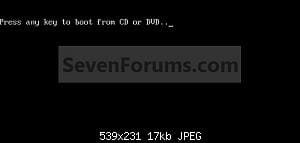
Do you get this screen?
 

Attachments

  • Step1.jpg
    Step1.jpg
    3.3 KB · Views: 198

My Computer

OS
ME/XP/Vista/Win7
Do you get this screen?

no dude, all i get is the same screen, but with DISK BOOT FAILURE, INSERT SYSTEM DISK AND PRESS ENTER
 

My Computer

Computer Manufacturer/Model Number
Packard ell
OS
windows 7 ultimate
Motherboard
Intel® Core 2 Quad Q8200 processor (2.33GHz, 1333MHz FSB
Memory
600GB
Graphics Card(s)
768MB NVIDIA GeForce 9600 GS
done that and now in getting CDBOOT: couldn't find BOOTMGR
 

My Computer

Computer Manufacturer/Model Number
Packard ell
OS
windows 7 ultimate
Motherboard
Intel® Core 2 Quad Q8200 processor (2.33GHz, 1333MHz FSB
Memory
600GB
Graphics Card(s)
768MB NVIDIA GeForce 9600 GS
i have mutiple times lol. anything else i culd try?
 

My Computer

Computer Manufacturer/Model Number
Packard ell
OS
windows 7 ultimate
Motherboard
Intel® Core 2 Quad Q8200 processor (2.33GHz, 1333MHz FSB
Memory
600GB
Graphics Card(s)
768MB NVIDIA GeForce 9600 GS
Do you have another computer you could try the DVD in?

Bottom line, if you burned the DVD as an image and not a data disc and it is useable, and you have your system set to boot to a DVD, then either something is still wrong with the DVD or your system is not operating correctly.

If you can't get it sorted out, you may have to go the bootable flash drive route.
 

My Computer

Computer Manufacturer/Model Number
Homebuilt
OS
Windows 7 x64
CPU
i7-2600K
Motherboard
Asus P8Z77-v Pro
Memory
8 G
Graphics Card(s)
GTX 480
Sound Card
Onboard
Monitor(s) Displays
LG W2753V
Screen Resolution
1920x1080
Hard Drives
Crucial M4 128 G SSD

My Computer

Computer Manufacturer/Model Number
Packard ell
OS
windows 7 ultimate
Motherboard
Intel® Core 2 Quad Q8200 processor (2.33GHz, 1333MHz FSB
Memory
600GB
Graphics Card(s)
768MB NVIDIA GeForce 9600 GS

My Computer

Computer Manufacturer/Model Number
Packard ell
OS
windows 7 ultimate
Motherboard
Intel® Core 2 Quad Q8200 processor (2.33GHz, 1333MHz FSB
Memory
600GB
Graphics Card(s)
768MB NVIDIA GeForce 9600 GS
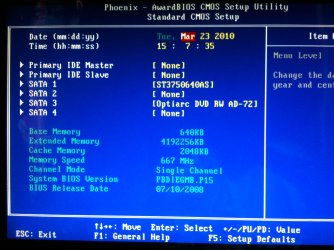
that is what it shows.
 

Attachments

  • IMG_0580.jpg
    IMG_0580.jpg
    286.2 KB · Views: 2

My Computer

Computer Manufacturer/Model Number
Packard ell
OS
windows 7 ultimate
Motherboard
Intel® Core 2 Quad Q8200 processor (2.33GHz, 1333MHz FSB
Memory
600GB
Graphics Card(s)
768MB NVIDIA GeForce 9600 GS
no, but i think i have sussed it! i have created the ISO and put on a bootable USB and its now loading the windows files for installation :D. fingers crossed it should complete without any errors.
do you have any ideas y my cd drive wouldn't read the disk properly?

thank you for your replies m8
 

My Computer

Computer Manufacturer/Model Number
Packard ell
OS
windows 7 ultimate
Motherboard
Intel® Core 2 Quad Q8200 processor (2.33GHz, 1333MHz FSB
Memory
600GB
Graphics Card(s)
768MB NVIDIA GeForce 9600 GS
Is that the latest BIOS version? There are newer BIOS for many mobos since Win7 arose.

The exact failure by Vista DVD means it is a BIOS or Optical Drive failure. Eliminate OD by trying another. Update BIOS, try another SATA port.
 
it failed :( now im just gettin BOOTMGR is missing.............................any ideas?

oh and ive changed the SATA port, still no luck
 

My Computer

Computer Manufacturer/Model Number
Packard ell
OS
windows 7 ultimate
Motherboard
Intel® Core 2 Quad Q8200 processor (2.33GHz, 1333MHz FSB
Memory
600GB
Graphics Card(s)
768MB NVIDIA GeForce 9600 GS
Is the installer booting? It sounds like it is defaulting to HD which has no OS.

Use the one-time Boot Menu key given on first BIOS screen. Make sure you are booting either DVD or flash stick (listed under HD's sometimes).
 
Back
Top