Windows 7 Installation - Transfer to a New Computer

How to Transfer your Complete Windows 7 Installation to New Computer

To start, a warning from Microsoft:

   Note
Important

You must use the Sysprep /generalize command to generalize a complete Windows installation before you can use the installation for deployment to a new computer, whether you use imaging, hard disk duplication, or another method. Moving or copying a Windows image to a different computer without running the Sysprep /generalize command is not supported.

This tutorial will show you how to do the transfer.

   Information
Windows 7 System Preparation Tool is a powerful, native Windows tool. When for instance used in so called Audit Mode, it let's you to freely configure Windows 7 to be then deployed to other computers as hardware independent image.

In this tutorial we use System Preparation Tool (sysprep) to prepare your Windows 7 installation to be moved to a new computer, keeping all your installed applications, program settings and user profiles. You can use this method for instance when you have bought a new PC and want to transfer your existing setup completely, without need to reinstall everything, or when you want to make major hardware changes like change the motherboard or GPU, which would usually cause Windows to stop booting normally.

   Warning
Using this method causes Windows 7 to lose all activation information, and it needs to be reactivated afterwards. If your Windows 7 is an OEM version, you might not be able to reactivate it, at least not without phone activation option.

I do not recommend to use this method on RAID systems. All experiments on RAID I know have failed.

With the speed of today's hardware evolution, most of us geeks are upgrading the hardware more often than operating system. Upgrading hardware can be painfully slow process if we need to reinstall the operating system and all our installed applications, plus transfer program settings and user profiles.

Using sysprep makes this easy. Changing the motherboard, or for instance an old ATI GPU to a new nVidia GPU quite often causes Windows 7 not to be able to boot anymore. This fact is usually accepted by the user, who then reinstalls the OS and all applications and transfers user profiles from a backup location.

Same thing when buying a new computer with completely different hardware setup compared to the old one, or trying to restore a system image to different hardware setup. Normally this would include a complete reinstallation of Windows 7 and all applications.

Why not use sysprep to avoid reinstalling? Here are the different scenarios where you can use it.


   Warning

An upgraded Windows cannot be sysprepped. As this method is based in sysprepping, this tutorial is valid only for Windows setups which have not been upgraded.

This means that if you have for instance in-place upgraded Vista to Seven, or using Anytime Upgrade upgraded for instance a Home Premium to Ultimate, you cannot sysprep and this tutorial cannot be used in your case.

Notice that a repair install is also an upgrade install, so if you have ever done a repair install (= in-place upgrade to same edition), you cannot sysprep.


PLEASE DO NOT FORGET TO CREATE A SYSTEM IMAGE BEFORE PROCEEDING!​


As you can read on this thread, on rare occasions this method does not work. If this happens, you can always restore your system using your backup image.

Backup Complete Computer - Create an Image Backup
System Image Recovery

IE10 Users: Please read this article first: Sysprep Fatal Error With IE 10 (FIX) | System Administration


METHOD ONE

Changing hardware components but keeping old hard disk(s)


Use this method if you:
- Change other hardware components but keep your old HD containing Windows 7
- Move the HD containing Windows 7 to another computer
  1. Before installing new hardware, boot Windows 7 normally
  2. Disconnect all external hardware except mouse, keyboard and main display. If your system folders are located only on C: drive, disconnect all other hard disks except that containing the C:. In case of relocated system folders, for instance the profile folder Users located in another drive and other system folders on C:, first move the relocated system folders back to C: then disconnect all other drives. Reboot after this
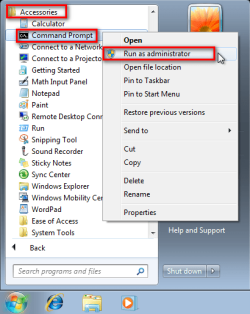
  3. Run Command Prompt as administrator
    .
    Audit_1.png
    .
  4. Type to Command Prompt: %windir%\System32\Sysprep\Sysprep.exe, and hit Enter
    .
    sysprep_start.png
    .
  5. In sysprep dialog that opens, choose System Cleanup Action as Enter System Out-of-Box-Experience (OOBE), select Generalize, select Shutdown Options Shutdown. Click OK
    .
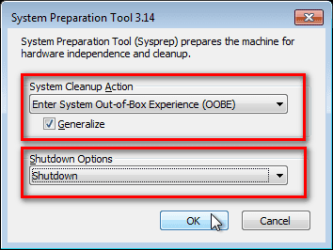
    Sysprep_Run_and_generalize.png
    .
  6. Sysprep generalizes now your Windows 7 setup and shuts down your computer. Do not run any other programs during this phase!
    .
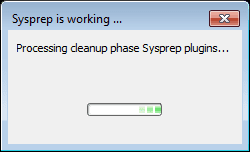
    Sysprep_Run_and_generalize_2.png
    .
    Sysprep_Run_and_generalize_3.png
    .
  7. Switch the main power of your PC off and install the new hardware OR dismount the hard disk(s) and mount it (them) to a new computer
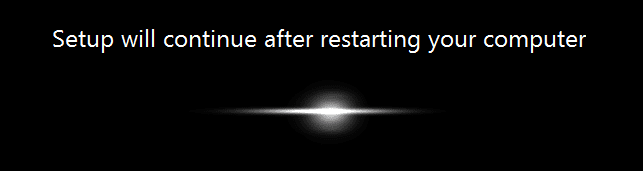
  8. Boot the PC from sysprep generalized hard disk. You will notice Windows booting as if it was the first boot after installation, installing default drivers and updating registry. One or two reboots are needed, depending on your system specifications
    .

    Sysprep_Reinstalling_devices.png
    .
    Sysprep_Registry_settings.png
    .
    Sysprep_Reboot_needed.png
    .
  9. When Windows finally boots up, you will need to enter all information as if this really was a new, fresh installation
    .
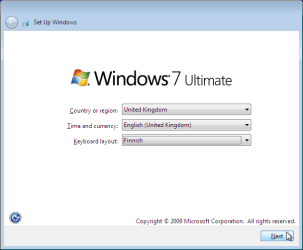
    Sysprep_First_boot_2.png
    .
  10. Because your old user profiles already exist, Windows does not accept your normal username, but instead you have to create a new temporary user. I use username Test for this purpose
    .
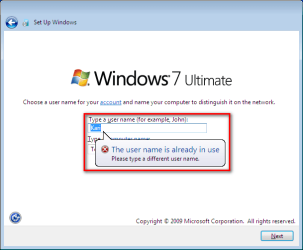
    Sysprep_First_boot_3.png
    .
  11. When login screen appears, choose your old user account to login
    .

    Sysprep_First_boot_5.png
    .
  12. Windows boots now to default OOBE first boot desktop, with default 800*600 resolution and default theme. All your installed applications are there, as well as your old user profiles and folders. Windows has installed the default drivers for your setup, you can update them if needed
    .
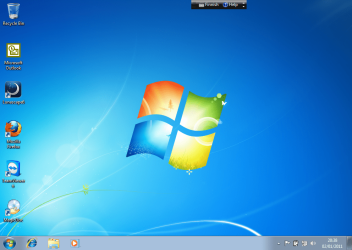
    Sysprep_First_boot_6.png
    .
  13. Go to Control Panel > User Accounts and delete the temporary user account (in this case Test) that you just created


METHOD TWO

Change the hard disk(s) or move Windows 7 setup to a new computer using third party imaging software

Use this method if you:
- Replace the HD containing Windows 7 on your old computer
- Move Windows 7 to a new HD on another computer
  1. Follow steps 1 through 5 above (method 1)
  2. Boot PC with an imaging CD/DVD (Paragon, Macrium etc.). See Macrium Reflect Free:at our sister site TenForums.com: Backup and Restore with Macrium Reflect Windows 10 Backup Restore Tutorials . Also see this post for a practical tip to create a Macrium system image.
  3. Create an image of your system
  4. Turn PC off, change the hard disk(s) and reboot with imaging application, restoring the image OR boot the new computer with imaging software and restore the image
  5. Continue from step 7 above (method 1)

This procedure is failsafe, and works every time. There is nothing to worry, but of course it is recommended to make a backup before trying this. I have even used this method when some serious driver issues caused the PC to constantly crash (BSOD), to reset all drivers to Windows defaults and then reinstalling them one by one to find the culprit.

   Note
What does Sysprep generalizing do to my Windows 7 setup?
  • All system specific information is removed or uninstalled
  • Security ID (SID) of your hardware setup is reseted
  • All system restore points are deleted
  • All event logs are deleted
  • All personalization is removed (taskbar, toolbars, folder options, start orb etc.)
  • Built-in administrator account is disabled (if it was enabled) and needs to be re-enabled after the transfer if needed

What happens when booting first time after sysprep generalizing?
  • First boot configuration is run
  • New SID is created
  • Re-arm counter is reseted if not already re-armed three times
  • Windows 7 is booted using first boot default drivers and settings


I have tested all above mentioned methods with all versions of Windows 7, from Starter to Enterprise. It works every time, with one exception: for reasons unknown to me, sysprep seems sometimes dislike Windows Media Player networking service, which is by default started every time Windows 7 starts. In about every third time I've done this, I've got an error message when trying to generalize:
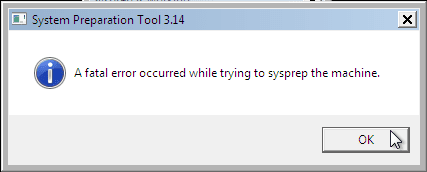
Sysprep_Fatal_Error.png

However, this is not a big problem. You just need to stop the WMP networking service, and run sysprep with generalize option again. You can stop the service in question by typing net stop WMPNetworkSvc to command prompt, and hitting Enter:

Sysprep_Stop_WMP_service.png

If you have any questions, do not hesitate to ask.

Happy computing!

Kari

EDIT: A Useful tip from xxxwea, as later confirmed by Victor:
Kari, just a suggestion.

You might note in the tutorial that if on first booting Windows can't finish configuring, a reboot into safe mode, then a normal reboot will allow it to finish successfully.

This has happened to me both times I used a sysprepped system drive in a new computer. I found the answer to this problem buried deep in this thread the first time I ran into it, and the same thing happened yesterday on a different computer.

It's a seemingly very silly solution, but it works. I do believe many people have abandoned their sysprep work when they encounter the problem.

I think the solution deserves more visibility.
 
Last edited:
Here is a screenshot of the relevant device manager page.
Step 2 you have already done! Step 4 after first paragraph isn't important because you have standard disk drivers.

  1. First disable automatic updates or disable wifi or simply disconnect network cable. Sure there no updates pending?? If so, continue. (otherwise first finish the updates).
  2. You can install the Microsoft standard AHCI driver from within Win7 through Device Manager. In Device Manager you expand “IDE ATA/ATAPI controllers”. Now rightclick on the branch that is listed and selected updat driver. Then select browse my computer for driver software. Select let me pick from list. In the screen tick the box (it’s already checked I think) "show compatible hardware". Select “standard AHCI 1.0 serial ATA controler”. And click next. Follow instructions. You have to reboot. Check afterwards in “device manager” if win7 realy replaced driver! Eventually do the same for IDE so set it to standard as well!
  3. I think you have many onboard things on old motherboard. For example on board wifi, on board network card, on board graphics, on board sound etc. Uninstall all those drivers from “device manager” (just to cleanup). DON’T reboot.
  4. I think you have some software belonging to old motherboard. For example graphics configuration utility. Uninstall that software. DON’T reboot.

    Now everything has been cleaned and disk driver is default (very important!!) If you forgot and still have NFORCE disk driver and the new controller is INTEL it doesn’t boot!! And then you can’t replace driver anymore! Default disk driver is the most important step!
  5. Now shutdown and power off (don’t reboot). Replace motherbord and connect disk drives. Enable SATA AHCI in BIOS. Set your BOOT priority good in BIOS (first CD then sata-disk I assume). Try to boot.
  6. Enable automatic updates or enable wifi or connect network cable. So undo what you did in step 1.
  7. Insert your new motherboard CD and let it install the new drivers. A reboot is required afterwards.
  8. Now it should work and nothing is lost! Check “device manager” for unknown devices or strange things. If any unknown devices… uninstall them and reboot. Still unknown stuff?
  9. Check if win7 is still activated (system properties).
 

My Computer My Computer

At a glance

Microsoft Windows 7 Home Premium 64-bits 7601...Intel(R) Core(TM) i3 CPU M 370 @ 2.40GHz4,00 GBATI Mobility Radeon HD 5400 Series
Computer type
Laptop
Computer Manufacturer/Model Number
ACER ASPIRE 5742G
OS
Microsoft Windows 7 Home Premium 64-bits 7601 Multiprocessor Free Service Pack 1
CPU
Intel(R) Core(TM) i3 CPU M 370 @ 2.40GHz
Motherboard
Acer Aspire 5742G
Memory
4,00 GB
Graphics Card(s)
ATI Mobility Radeon HD 5400 Series
Sound Card
(1) AMD High Definition Audio Device (2) Realtek High Defi
Screen Resolution
1366 x 768 x 32 bits (4294967296 colors) @ 60 Hz
Hard Drives
WDC WD5000BEVT-22ZAT0
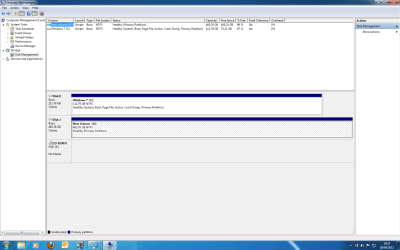
Please post screenshot of "disk management" with all fields visible!!

Be sure new motherboard BIOS has SATA AHCI enabled
Be sure new motherboard BIOS starts from SSD instead of HDD. Or simply say harddisk, but it's possible it starts from HDD if it has an active partition. Mark all HDD partition as inactive prior to swap. check in "disk management"

Are you very sure it boots from SSD???!!! check in device management what partition has boot flag. If it's SSD partition then mark HDD partitions as inactive (if any)

1. Enter diskpart, then list disk after diskpart is loaded.

2. Enter select disk [number of the disk the partition is on].

3. Enter list partition, followed by select partition [partition number].

4. Type inactive.


5. type exit
Now check again in "disk management". Be sure not to make SSD partition inactive!
 

My Computer My Computer

At a glance

Microsoft Windows 7 Home Premium 64-bits 7601...Intel(R) Core(TM) i3 CPU M 370 @ 2.40GHz4,00 GBATI Mobility Radeon HD 5400 Series
Computer type
Laptop
Computer Manufacturer/Model Number
ACER ASPIRE 5742G
OS
Microsoft Windows 7 Home Premium 64-bits 7601 Multiprocessor Free Service Pack 1
CPU
Intel(R) Core(TM) i3 CPU M 370 @ 2.40GHz
Motherboard
Acer Aspire 5742G
Memory
4,00 GB
Graphics Card(s)
ATI Mobility Radeon HD 5400 Series
Sound Card
(1) AMD High Definition Audio Device (2) Realtek High Defi
Screen Resolution
1366 x 768 x 32 bits (4294967296 colors) @ 60 Hz
Hard Drives
WDC WD5000BEVT-22ZAT0
The motherboard change won't be for a few days. Do you want a screen shot of disk management with the current board?

I have been having so many problems, I do not know if I can keep the pc running long enough to do the preparation work. It even fails in BIOS and booting to BIOS. If I am lucky, I can get into Windows then it will crash again. I did have a similar problem a few months ago, but not as dramatic. With lots of help from this forum I thought it had been solved by a new graphics card, however its back with avengance. The only 2 components that haven't been changed are the motherboard and CPU.

I wanted to move away from the ASUS M4A87TD/USB3 in light of the problems, however I might have to change for the same model, if I am unable to do the correct preparation for a different board.
 

My Computer My Computer

At a glance

Windows 7 Home Premium 64 BitAMD Phenom II X6 1055TKingston 8GB (2x4GB) DDR3 1600MHz HyperX Memo...PowerColor HD 6850 1GB GDDR5 Dual DVI HDMI Di...
Computer Manufacturer/Model Number
Self Build
OS
Windows 7 Home Premium 64 Bit
CPU
AMD Phenom II X6 1055T
Motherboard
MSi 990XA-GD55
Memory
Kingston 8GB (2x4GB) DDR3 1600MHz HyperX Memory Kit CL9 1.65
Graphics Card(s)
PowerColor HD 6850 1GB GDDR5 Dual DVI HDMI DisplayPort PCI-E
Monitor(s) Displays
LG
Hard Drives
OCZ Vertex 3 SSD 120Gb
Seagate ST3500418AS ATA 500Gb
PSU
Antec TruePower New 750W Modular PSU
Case
Antec 300
Keyboard
Microsoft Wireless 3000 V2.0
Mouse
Microsoft wireless 5000
The motherboard change won't be for a few days. Do you want a screen shot of disk management with the current board?

I have been having so many problems, I do not know if I can keep the pc running long enough to do the preparation work. It even fails in BIOS and booting to BIOS. If I am lucky, I can get into Windows then it will crash again. I did have a similar problem a few months ago, but not as dramatic. With lots of help from this forum I thought it had been solved by a new graphics card, however its back with avengance. The only 2 components that haven't been changed are the motherboard and CPU.

I wanted to move away from the ASUS M4A87TD/USB3 in light of the problems, however I might have to change for the same model, if I am unable to do the correct preparation for a different board.
Tip: Do all things in "safe mode" maybe it's more stable then(?)
  • I think you have many onboard things on old motherboard. For example on board wifi, on board network card, on board graphics, on board sound etc. Uninstall all those drivers from “device manager” (just to cleanup). DON’T reboot.
  • I think you have some software belonging to old motherboard. For example graphics configuration utility. Uninstall that software. DON’T reboot.
Only these steps take some time to complete. You have even problems to get in BIOS. Booting to BIOS??? What kind of problems, please explain.

And yes I wanna see screenshot of "disk management"
 

My Computer My Computer

At a glance

Microsoft Windows 7 Home Premium 64-bits 7601...Intel(R) Core(TM) i3 CPU M 370 @ 2.40GHz4,00 GBATI Mobility Radeon HD 5400 Series
Computer type
Laptop
Computer Manufacturer/Model Number
ACER ASPIRE 5742G
OS
Microsoft Windows 7 Home Premium 64-bits 7601 Multiprocessor Free Service Pack 1
CPU
Intel(R) Core(TM) i3 CPU M 370 @ 2.40GHz
Motherboard
Acer Aspire 5742G
Memory
4,00 GB
Graphics Card(s)
ATI Mobility Radeon HD 5400 Series
Sound Card
(1) AMD High Definition Audio Device (2) Realtek High Defi
Screen Resolution
1366 x 768 x 32 bits (4294967296 colors) @ 60 Hz
Hard Drives
WDC WD5000BEVT-22ZAT0
Hi Kaktussoft,

I am away from the suspect PC for a few days, but will get the screenshots as soon as I am back. The problems with booting are that on many occasions the PC fails to get past the welcome to windows page, or it stalls at the point where you would press delete to enter BIOS, or it does nothing, just sits there with a blank screen, but fans etc running on the PC. Sometimes, pressing the reset button starts the boot process up and others it takes many resets to gain any progress. Sometimes I have to turn it off and unplug before anything happens. I have had a screen come up telling me that overclocking has failed, when I don't overclock. I have had the screen appear telling me to press F1 to set BIOS and it actually freezes at that screen. If I get into BIOS, almost certainly it will freeze at some point and I have to go through reset again.

Once into Windows, I can still get crashes for no apparent reason, but if I manage to keep it running for over an hour, I have a chance of it stabilising. If I leave the PC when it appears stable, it will often require a reboot when I come back to it. Very infuriating.

Steve
 

My Computer My Computer

At a glance

Windows 7 Home Premium 64 BitAMD Phenom II X6 1055TKingston 8GB (2x4GB) DDR3 1600MHz HyperX Memo...PowerColor HD 6850 1GB GDDR5 Dual DVI HDMI Di...
Computer Manufacturer/Model Number
Self Build
OS
Windows 7 Home Premium 64 Bit
CPU
AMD Phenom II X6 1055T
Motherboard
MSi 990XA-GD55
Memory
Kingston 8GB (2x4GB) DDR3 1600MHz HyperX Memory Kit CL9 1.65
Graphics Card(s)
PowerColor HD 6850 1GB GDDR5 Dual DVI HDMI DisplayPort PCI-E
Monitor(s) Displays
LG
Hard Drives
OCZ Vertex 3 SSD 120Gb
Seagate ST3500418AS ATA 500Gb
PSU
Antec TruePower New 750W Modular PSU
Case
Antec 300
Keyboard
Microsoft Wireless 3000 V2.0
Mouse
Microsoft wireless 5000

My Computer My Computer

At a glance

Microsoft Windows 7 Home Premium 64-bits 7601...Intel(R) Core(TM) i3 CPU M 370 @ 2.40GHz4,00 GBATI Mobility Radeon HD 5400 Series
Computer type
Laptop
Computer Manufacturer/Model Number
ACER ASPIRE 5742G
OS
Microsoft Windows 7 Home Premium 64-bits 7601 Multiprocessor Free Service Pack 1
CPU
Intel(R) Core(TM) i3 CPU M 370 @ 2.40GHz
Motherboard
Acer Aspire 5742G
Memory
4,00 GB
Graphics Card(s)
ATI Mobility Radeon HD 5400 Series
Sound Card
(1) AMD High Definition Audio Device (2) Realtek High Defi
Screen Resolution
1366 x 768 x 32 bits (4294967296 colors) @ 60 Hz
Hard Drives
WDC WD5000BEVT-22ZAT0
Kaktussoft,

I have previously stressed the memory using prime 65 and and GPU test from the UBCD. This didn't show any fault, but I changed the memory 'just in case'

If its any use, here are the specifications of my system showing the changes since I first posted on here:

OS Windows 7 Home Premium 64 Bit
Main Software MSOffice 2010
CPU AMD Phenom II X6 1055T
Motherboard Asus M4A87TD/USB3
Memory Kingston 8GB (2x4GB) DDR3 1600MHz HyperX Memory Kit CL9 1.65V
Graphics Card PowerColor HD 6850 1GB GDDR5 Dual DVI HDMI DisplayPort PCI-E Graphics Card
Monitor(s) Displays LG
Keyboard Microsoft Wireless 3000 V2.0
Mouse
Microsoft wireless 5000
PSU
Antec TruePower New 750W Modular PSU
Case
Antec 300
Hard Drives
OCZ Vertex 3 SSD and Seagate ST3500418ASATA 500Gb

I have also added the disk management screen shot.

Many thanks

Steve
 

Attachments

  • Disk Management.png
    Disk Management.png
    47.2 KB · Views: 369

My Computer My Computer

At a glance

Windows 7 Home Premium 64 BitAMD Phenom II X6 1055TKingston 8GB (2x4GB) DDR3 1600MHz HyperX Memo...PowerColor HD 6850 1GB GDDR5 Dual DVI HDMI Di...
Computer Manufacturer/Model Number
Self Build
OS
Windows 7 Home Premium 64 Bit
CPU
AMD Phenom II X6 1055T
Motherboard
MSi 990XA-GD55
Memory
Kingston 8GB (2x4GB) DDR3 1600MHz HyperX Memory Kit CL9 1.65
Graphics Card(s)
PowerColor HD 6850 1GB GDDR5 Dual DVI HDMI DisplayPort PCI-E
Monitor(s) Displays
LG
Hard Drives
OCZ Vertex 3 SSD 120Gb
Seagate ST3500418AS ATA 500Gb
PSU
Antec TruePower New 750W Modular PSU
Case
Antec 300
Keyboard
Microsoft Wireless 3000 V2.0
Mouse
Microsoft wireless 5000
Kaktussoft,

I have previously stressed the memory using prime 65 and and GPU test from the UBCD. This didn't show any fault, but I changed the memory 'just in case'

If its any use, here are the specifications of my system showing the changes since I first posted on here:

OS Windows 7 Home Premium 64 Bit
Main Software MSOffice 2010
CPU AMD Phenom II X6 1055T
Motherboard Asus M4A87TD/USB3
Memory Kingston 8GB (2x4GB) DDR3 1600MHz HyperX Memory Kit CL9 1.65V
Graphics Card PowerColor HD 6850 1GB GDDR5 Dual DVI HDMI DisplayPort PCI-E Graphics Card
Monitor(s) Displays LG
Keyboard Microsoft Wireless 3000 V2.0
Mouse Microsoft wireless 5000
PSU Antec TruePower New 750W Modular PSU
Case Antec 300
Hard Drives OCZ Vertex 3 SSD and Seagate ST3500418ASATA 500Gb

I have also added the disk management screen shot.

Many thanks

Steve
I already told you what to do. Disk management is prefect!
 
Last edited:

My Computer My Computer

At a glance

Microsoft Windows 7 Home Premium 64-bits 7601...Intel(R) Core(TM) i3 CPU M 370 @ 2.40GHz4,00 GBATI Mobility Radeon HD 5400 Series
Computer type
Laptop
Computer Manufacturer/Model Number
ACER ASPIRE 5742G
OS
Microsoft Windows 7 Home Premium 64-bits 7601 Multiprocessor Free Service Pack 1
CPU
Intel(R) Core(TM) i3 CPU M 370 @ 2.40GHz
Motherboard
Acer Aspire 5742G
Memory
4,00 GB
Graphics Card(s)
ATI Mobility Radeon HD 5400 Series
Sound Card
(1) AMD High Definition Audio Device (2) Realtek High Defi
Screen Resolution
1366 x 768 x 32 bits (4294967296 colors) @ 60 Hz
Hard Drives
WDC WD5000BEVT-22ZAT0
Thanks for the help. Motherboard will be changed in a couple of days. I suppose, as I only installed Windows 7 onto the new ssd a couple of months ago, and therefore it is not too full of unwanted stuff, I could clean the SSD and reinstall 7 and the other programs again. I don't think it is to onerous a job and at least there would be no errant drivers about.

I will let you know how it all goes, and thanks again.

Steve
 

My Computer My Computer

At a glance

Windows 7 Home Premium 64 BitAMD Phenom II X6 1055TKingston 8GB (2x4GB) DDR3 1600MHz HyperX Memo...PowerColor HD 6850 1GB GDDR5 Dual DVI HDMI Di...
Computer Manufacturer/Model Number
Self Build
OS
Windows 7 Home Premium 64 Bit
CPU
AMD Phenom II X6 1055T
Motherboard
MSi 990XA-GD55
Memory
Kingston 8GB (2x4GB) DDR3 1600MHz HyperX Memory Kit CL9 1.65
Graphics Card(s)
PowerColor HD 6850 1GB GDDR5 Dual DVI HDMI DisplayPort PCI-E
Monitor(s) Displays
LG
Hard Drives
OCZ Vertex 3 SSD 120Gb
Seagate ST3500418AS ATA 500Gb
PSU
Antec TruePower New 750W Modular PSU
Case
Antec 300
Keyboard
Microsoft Wireless 3000 V2.0
Mouse
Microsoft wireless 5000
Thanks for the tutorial, Kari
I just used sysprep to move my Win 7 system to a different computer.
Got the error that indicated I had to disable Network sharing services.
Did that and it ran - didn't time it, but it was pretty fast.
It shut down the computer when it finished.
"New" computer has different socket/CPU, MB, sound, graphics, etc., etc.
Even has only PATA drives, versus all SATA on original.
I used a Ghost 15 image of the sysprep'ed original.
After putting the image on the " new" box it got stuck at at the "Windows could not finish configuring" loop.
I used the method first posted by xxxwea to get past that.
Safe mode until it stops again, then reboot. That's a really lame bug.
The hotfix sometimes referenced to fix that sysprep problem is included in SP1, which I was using. So there's still confusion about that.
But thanks to xxxwea!
All progams were there, with desktop shortcuts.
Five stars for sysprep.

Then I tried the other method mentioned here - no sysprep.
Loaded Standard IDE PCI drivers to my IDE ATA/ATAPI controllers, rebooted to install, verified they were installed, shut down, and took an image.
That image failed on the new machine. Initial Windows load screen came up for a few seconds, then it repeatedly rebooted to the same load screen. Recovery disk tried, but failed to fix it.

Seems sysprep is the clean method, and there's no reason I can see to try the "deleted/changed" driver method.
 

My Computer My Computer

At a glance

Windows 7 Ultimate x64QuadCore Intel Core i7 920, 2666 MHz (20 x 133)6134 MB (DDR3-1333 DDR3 SDRAM)(2 - SLI) NVIDIA GeForce GTS 250 (1024 MB)
Computer Manufacturer/Model Number
Home Built
OS
Windows 7 Ultimate x64
CPU
QuadCore Intel Core i7 920, 2666 MHz (20 x 133)
Motherboard
Asus P6T
Memory
6134 MB (DDR3-1333 DDR3 SDRAM)
Graphics Card(s)
(2 - SLI) NVIDIA GeForce GTS 250 (1024 MB)
Sound Card
Onboard Realtek ALC888/1200 @ Intel 82801JB IC
Monitor(s) Displays
HDMII
Screen Resolution
1280 x 800
Hard Drives
Crucial M4 (64 GB SSD)
WD Caviar Blacks
WD5001AALS-00J7B1 ATA Device (465 GB)
WD5001AALS-00L3B2 ATA Device (465 GB)
WD Elements USB External (250 GB)
PSU
Corsair 550
Case
iStarUSA S-10000BL Black
Thanks for the tutorial, Kari
I just used sysprep to move my Win 7 system to a different computer.
Got the error that indicated I had to disable Network sharing services.
Did that and it ran - didn't time it, but it was pretty fast.
It shut down the computer when it finished.
"New" computer has different socket/CPU, MB, sound, graphics, etc., etc.
Even has only PATA drives, versus all SATA on original.
I used a Ghost 15 image of the sysprep'ed original.
After putting the image on the " new" box it got stuck at at the "Windows could not finish configuring" loop.
I used the method first posted by xxxwea to get past that.
Safe mode until it stops again, then reboot. That's a really lame bug.
The hotfix sometimes referenced to fix that sysprep problem is included in SP1, which I was using. So there's still confusion about that.
But thanks to xxxwea!
All progams were there, with desktop shortcuts.
Five stars for sysprep.

Then I tried the other method mentioned here - no sysprep.
Loaded Standard IDE PCI drivers to my IDE ATA/ATAPI controllers, rebooted to install, verified they were installed, shut down, and took an image.
That image failed on the new machine. Initial Windows load screen came up for a few seconds, then it repeatedly rebooted to the same load screen. Recovery disk tried, but failed to fix it.


Seems sysprep is the clean method, and there's no reason I can see to try the "deleted/changed" driver method.
I think (of course not sure) you changed from SATA to normal IDE disks(?) You had to:


  • In win7 (registry key HKEY_LOCAL_MACHINE\SYSTEM\CurrentControlSet\services\pciide set Start to 0 instead of 3). Do the same for ControlSet001, ControlSet002 etc.
  • Shutdown and enter BIOS. Change old bios settings to SATA in IDE-mode.
  • Replace driver (device managment: IDE ATA/ATAPI controllers): "Standard Dual Channel PCI IDE Controller".
In your case you forgot to do it I assume. This causes the infamous STOP 0x0000007B Blue Screen Of Death (and system reboot).

http://www.sevenforums.com/hardware-devices/165671-enable-disable-ahci.html
Advanced Host Controller Interface - Wikipedia, the free encyclopedia
 

My Computer My Computer

At a glance

Microsoft Windows 7 Home Premium 64-bits 7601...Intel(R) Core(TM) i3 CPU M 370 @ 2.40GHz4,00 GBATI Mobility Radeon HD 5400 Series
Computer type
Laptop
Computer Manufacturer/Model Number
ACER ASPIRE 5742G
OS
Microsoft Windows 7 Home Premium 64-bits 7601 Multiprocessor Free Service Pack 1
CPU
Intel(R) Core(TM) i3 CPU M 370 @ 2.40GHz
Motherboard
Acer Aspire 5742G
Memory
4,00 GB
Graphics Card(s)
ATI Mobility Radeon HD 5400 Series
Sound Card
(1) AMD High Definition Audio Device (2) Realtek High Defi
Screen Resolution
1366 x 768 x 32 bits (4294967296 colors) @ 60 Hz
Hard Drives
WDC WD5000BEVT-22ZAT0
I think (of course not sure) you changed from SATA to normal IDE disks(?) You had to:


  • In win7 (registry key HKEY_LOCAL_MACHINE\SYSTEM\CurrentControlSet\services\pciide set Start to 0 instead of 3). Do the same for ControlSet001, ControlSet002 etc.
  • Shutdown and enter BIOS. Change old bios settings to SATA in IDE-mode.
  • Replace driver (device managment: IDE ATA/ATAPI controllers): "Standard Dual Channel PCI IDE Controller".
In your case you forgot to do it I assume. This causes the infamous STOP 0x0000007B Blue Screen Of Death (and system reboot).

http://www.sevenforums.com/hardware-devices/165671-enable-disable-ahci.html
Advanced Host Controller Interface - Wikipedia, the free encyclopedia

I just changed the drivers to Standard Dual Channel PCI IDE Controller, as I've read in this thread and elsewhere.
Since sysprep generalizes all drivers automatically, is simple to use, and works, I'd need to see an advantage to do it the way you suggest.
Do you have one?
 

My Computer My Computer

At a glance

Windows 7 Ultimate x64QuadCore Intel Core i7 920, 2666 MHz (20 x 133)6134 MB (DDR3-1333 DDR3 SDRAM)(2 - SLI) NVIDIA GeForce GTS 250 (1024 MB)
Computer Manufacturer/Model Number
Home Built
OS
Windows 7 Ultimate x64
CPU
QuadCore Intel Core i7 920, 2666 MHz (20 x 133)
Motherboard
Asus P6T
Memory
6134 MB (DDR3-1333 DDR3 SDRAM)
Graphics Card(s)
(2 - SLI) NVIDIA GeForce GTS 250 (1024 MB)
Sound Card
Onboard Realtek ALC888/1200 @ Intel 82801JB IC
Monitor(s) Displays
HDMII
Screen Resolution
1280 x 800
Hard Drives
Crucial M4 (64 GB SSD)
WD Caviar Blacks
WD5001AALS-00J7B1 ATA Device (465 GB)
WD5001AALS-00L3B2 ATA Device (465 GB)
WD Elements USB External (250 GB)
PSU
Corsair 550
Case
iStarUSA S-10000BL Black
I think (of course not sure) you changed from SATA to normal IDE disks(?) You had to:


  • In win7 (registry key HKEY_LOCAL_MACHINE\SYSTEM\CurrentControlSet\services\pciide set Start to 0 instead of 3). Do the same for ControlSet001, ControlSet002 etc.
  • Shutdown and enter BIOS. Change old bios settings to SATA in IDE-mode.
  • Replace driver (device managment: IDE ATA/ATAPI controllers): "Standard Dual Channel PCI IDE Controller".
In your case you forgot to do it I assume. This causes the infamous STOP 0x0000007B Blue Screen Of Death (and system reboot).

http://www.sevenforums.com/hardware-devices/165671-enable-disable-ahci.html
Advanced Host Controller Interface - Wikipedia, the free encyclopedia

I just changed the drivers to Standard Dual Channel PCI IDE Controller, as I've read in this thread and elsewhere.
Since sysprep generalizes all drivers automatically, is simple to use, and works, I'd need to see an advantage to do it the way you suggest.
Do you have one?
Sysprep is not just a clone
If your motherboard crashes you can't do sysprep!!

   Note


What does Sysprep generalizing do to my Windows 7 setup?
  • All system specific information is removed or uninstalled
  • Security ID (SID) of your hardware setup is reseted
  • All system restore points are deleted
  • All event logs are deleted
  • All personalization is removed (taskbar, toolbars, folder options, start orb etc.)
  • Built-in administrator account is disabled (if it was enabled) and needs to be re-enabled if needed
What happens when booting first time after sysprep generalizing?
  • First boot configuration is run
  • New SID is created
  • Re-arm counter is reseted if not already re-armed three times
  • Windows 7 is booted using first boot default drivers and settings


I have tested all above mentioned methods with all versions of Windows 7, from Starter to Enterprise. It works every time, with one exception: for reasons unknown to me, sysprep seems sometimes dislike Windows Media Player networking service, which is by default started every time Windows 7 starts. In about every third time I've done this, I've got an error message when trying to generalize:


However, this is not a big problem. You just need to stop the WMP networking service, and run sysprep with generalize option again. You can stop the service in question by typing net stop WMPNetworkSvc to command prompt, and hitting Enter:


==================
And switching to PCIIDE temporary is quite easy
Assuming pciide isn't started in registry you can easily activate it even from recovery environment. "Standard Dual Channel PCI IDE Controller" will be activated then. Load the registry key offline Load registry hive for offline registry editing | Troubleshoot | Smallvoid.com
Of course also activate SATA IDE mode in BIOS
----
 

My Computer My Computer

At a glance

Microsoft Windows 7 Home Premium 64-bits 7601...Intel(R) Core(TM) i3 CPU M 370 @ 2.40GHz4,00 GBATI Mobility Radeon HD 5400 Series
Computer type
Laptop
Computer Manufacturer/Model Number
ACER ASPIRE 5742G
OS
Microsoft Windows 7 Home Premium 64-bits 7601 Multiprocessor Free Service Pack 1
CPU
Intel(R) Core(TM) i3 CPU M 370 @ 2.40GHz
Motherboard
Acer Aspire 5742G
Memory
4,00 GB
Graphics Card(s)
ATI Mobility Radeon HD 5400 Series
Sound Card
(1) AMD High Definition Audio Device (2) Realtek High Defi
Screen Resolution
1366 x 768 x 32 bits (4294967296 colors) @ 60 Hz
Hard Drives
WDC WD5000BEVT-22ZAT0
Kaktussoft, now it is my turn to speak. You are from now on on my ignore list so please PM me if you want to answer, I can no longer see your posts.

First, can you please give me a reason why you have quoted my tutorial without marking it as a quote. The text is mine and I want to have credits for that. I am quite vain, ask anyone here. My vocabulary does not know the word modesty ;)

I hate those long posts with long quotes but now I really have no choice, I have to show what I mean. All this is taken from my tutorial:

   Note

What does Sysprep generalizing do to my Windows 7 setup?
  • All system specific information is removed or uninstalled
  • Security ID (SID) of your hardware setup is reseted
  • All system restore points are deleted
  • All event logs are deleted
  • All personalization is removed (taskbar, toolbars, folder options, start orb etc.)
  • Built-in administrator account is disabled (if it was enabled) and needs to be re-enabled if needed
What happens when booting first time after sysprep generalizing?
  • First boot configuration is run
  • New SID is created
  • Re-arm counter is reseted if not already re-armed three times
  • Windows 7 is booted using first boot default drivers and settings


I have tested all above mentioned methods with all versions of Windows 7, from Starter to Enterprise. It works every time, with one exception: for reasons unknown to me, sysprep seems sometimes dislike Windows Media Player networking service, which is by default started every time Windows 7 starts. In about every third time I've done this, I've got an error message when trying to generalize:


However, this is not a big problem. You just need to stop the WMP networking service, and run sysprep with generalize option again. You can stop the service in question by typing net stop WMPNetworkSvc to command prompt, and hitting Enter:


Why did you not mention that is from my tutorial?

I have given you quite a lot credit for finding alternative ways to do this. I am an old school geek so I understand you: you hate it when someone else has found a better way to do the stuff. All this your bulls**t of forgetting sysprep and doing it manually, it's exactly as those hardcore geeks refusing to right click a file and selecting Delete but instead going to command promt and typing del this_s**t_file.exe. I mean, doing so you of course know it is a stupid way to do that but you can feel superior thinking you are A Geek, you know how to do it manually.

I have been wondering how come you are so bloody s***id stubborn, why do you tell users responding to this thread, this tutorial of mine, that they should forget the perfect automated system Microsoft has created and instead do it all manually, exponentially increasing the possibility that something goes wrong.

I have told other members to listen to you because I thought I am a big enough person to forgive you for trying to nullify my efforts in helping fellow Windows users. Now I have noticed that's not true: I am not big enough person. I do not like it, I do not like you telling the users this is not the right or correct method.

I really can understand you. It is not a nice feeling, to think you are the best and then someone else finds a better method. You just have to live with it. With our fellow member Victor's words:


Since sysprep generalizes all drivers automatically, is simple to use, and works, I'd need to see an advantage to do it the way you suggest.

Do you have one?

Kari
 
Last edited:

My Computer My Computer

At a glance

Windows 10 Pro x64 EN-GB1.6 GHz Intel Core i7-720QM Processor6 GBATI Mobility Radeon HD 5850 Graphics
Computer type
Laptop
Computer Manufacturer/Model Number
HP ENVY 17-1150eg
OS
Windows 10 Pro x64 EN-GB
CPU
1.6 GHz Intel Core i7-720QM Processor
Memory
6 GB
Graphics Card(s)
ATI Mobility Radeon HD 5850 Graphics
Sound Card
Beats sound system with integrated subwoofer
Monitor(s) Displays
17" laptop display, 22" LED and 32" Full HD TV through HDMI
Screen Resolution
1600*900 (1), 1920*1080 (2&3)
Hard Drives
Internal: 2 x 500 GB SATA Hard Disk Drive 7200 rpm
External: 2TB for backups, 3TB USB3 network drive for media
Cooling
As Envy runs a bit warm, I have it on a Cooler Master pad
Keyboard
Logitech diNovo Media Desktop Laser (bluetooth)
Mouse
Logitech Performance Mouse MX
Internet Speed
50/10 Mbps VDSL
Antivirus
Windows Defender 4.3.9431.0
Browser
Maxthon 3.5.2., IE11
Hi first time poster ....First of all I want to thank Kari for all your time and info on this fascinating subject. Especially for us non geeks it is truly a blessing . I have been following this thread and although there are different ways(Kaktussoft) of swapping computers/motherboards/drivers ,being a non computer person, I find your way to be so much easier. So I want to upgrade,but I still get the chills thinking of going through with this, afraid of screwing up something and of course Murphy's Law. So I will ask this before I proceed. I have made a system image on a back up HD of the same make and size .Can I Sysprep that image and use it for the change? I am upgrading mobo/proc from a 775 socket to a 1155 SB. I am also changing vendors (Gigabyte to a Asrock). All other components will remain the same. This way if for some reason it does not work I can go back to the "beginning" with the original HD. I can't afford to loose my data or have a non functioning "anchor". What ever method I use after I switch components and I hit the power botton what is the first thing that will happen and what should I do/look for first? I'm about to pull the trigger and your reply will help make all the difference...

and yes you do deserve all the credit for this thread ...
great job and thanks in advance!
 

My Computer My Computer

At a glance

Win7 Prof.x64Q8400 @3.2ghz8GB GSkill 1600 CL9NiVIDA GTS 450
Computer Manufacturer/Model Number
Gigabyte
OS
Win7 Prof.x64
CPU
Q8400 @3.2ghz
Motherboard
GA-EP45T-USB3P
Memory
8GB GSkill 1600 CL9
Graphics Card(s)
NiVIDA GTS 450
Sound Card
N/A
Monitor(s) Displays
ACER 21.5" HD Widescreen 1920x1080 x3
Hard Drives
WD Black 640gb x2
PSU
Kingwin 1000w
Case
Raidmax Smilodon
Cooling
Zalmen Z2
Hi Av8tor, welcome to the Seven Forums.

This is my recommendation:
  • Create a system image on external disk
  • Follow the steps on this tutorial as described in Method One
  • When you reach step 6 of Method One, change the motherboard and continue from step 7

Everything should work just fine. Worst case scenario: if it does not boot, put old motherboard back, restore the system image and come back, will find something else. But don't worry, it will work.

Kari
 

My Computer My Computer

At a glance

Windows 10 Pro x64 EN-GB1.6 GHz Intel Core i7-720QM Processor6 GBATI Mobility Radeon HD 5850 Graphics
Computer type
Laptop
Computer Manufacturer/Model Number
HP ENVY 17-1150eg
OS
Windows 10 Pro x64 EN-GB
CPU
1.6 GHz Intel Core i7-720QM Processor
Memory
6 GB
Graphics Card(s)
ATI Mobility Radeon HD 5850 Graphics
Sound Card
Beats sound system with integrated subwoofer
Monitor(s) Displays
17" laptop display, 22" LED and 32" Full HD TV through HDMI
Screen Resolution
1600*900 (1), 1920*1080 (2&3)
Hard Drives
Internal: 2 x 500 GB SATA Hard Disk Drive 7200 rpm
External: 2TB for backups, 3TB USB3 network drive for media
Cooling
As Envy runs a bit warm, I have it on a Cooler Master pad
Keyboard
Logitech diNovo Media Desktop Laser (bluetooth)
Mouse
Logitech Performance Mouse MX
Internet Speed
50/10 Mbps VDSL
Antivirus
Windows Defender 4.3.9431.0
Browser
Maxthon 3.5.2., IE11
Ok then Kari I will give it a go this weekend...thanks
 

My Computer My Computer

At a glance

Win7 Prof.x64Q8400 @3.2ghz8GB GSkill 1600 CL9NiVIDA GTS 450
Computer Manufacturer/Model Number
Gigabyte
OS
Win7 Prof.x64
CPU
Q8400 @3.2ghz
Motherboard
GA-EP45T-USB3P
Memory
8GB GSkill 1600 CL9
Graphics Card(s)
NiVIDA GTS 450
Sound Card
N/A
Monitor(s) Displays
ACER 21.5" HD Widescreen 1920x1080 x3
Hard Drives
WD Black 640gb x2
PSU
Kingwin 1000w
Case
Raidmax Smilodon
Cooling
Zalmen Z2
I am getting ready to put in a new motherboard and processor....Will this still work the same as just swapping the motherboard?....I would like to keep everything I have on current hard drive and SSD I am using and just put in new Mobo and Processor without having to buy a new windows 7 as this system came with it and no CDs.
 

My Computer My Computer

At a glance

Windows 7 Home Premium 64bit
OS
Windows 7 Home Premium 64bit
I am getting ready to put in a new motherboard and processor....Will this still work the same as just swapping the motherboard?....I would like to keep everything I have on current hard drive and SSD I am using and just put in new Mobo and Processor without having to buy a new windows 7 as this system came with it and no CDs.

Yes, the processor isn't really a problem. If it is compatible with the motherboard, the CPU should not be an issue.

If you change motherboards, you will likely need a new Windows license if your existing license is OEM rather than retail.
 

My Computer My Computer

At a glance

Windows 7 Home Premium SP1, 64-bitIntel Skylake i5-6600K, not overclocked8 GB HyperX DDR4-2666 (2 x 4 GB)none; graphics are integrated on CPU
Computer type
PC/Desktop
Computer Manufacturer/Model Number
Ignatz Special; 4 speed manual gearbox; factory air conditioning; one of one
OS
Windows 7 Home Premium SP1, 64-bit
CPU
Intel Skylake i5-6600K, not overclocked
Motherboard
AsRock Z170M Extreme 4, micro ATX
Memory
8 GB HyperX DDR4-2666 (2 x 4 GB)
Graphics Card(s)
none; graphics are integrated on CPU
Sound Card
onboard: Realtek ALC1150; external: USB Behringer UF0-202
Monitor(s) Displays
Dell S2340M 23 inch IPS
Screen Resolution
1600 x 900
Hard Drives
System: Crucial MX100 series SSD, 128 GB;
Data: Samsung Spinpoint 103SJ, 1 TB;
Backup: WD Caviar Green WD30EZRX-00D8PB0, 3 TB
PSU
Rosewill SilentNight 500 watt fanless, semi-modular
Case
Antec Solo II
Cooling
Noctua NH-U12S; Noctua F12 intake, Noctua S12A exhaust
Keyboard
Microsoft 200 6JH-00001 USB
Mouse
Dell or Microsoft optical wired; USB
Antivirus
Microsoft Security Essentials and Malwarebytes Premium
Browser
Pale Moon
Other Info
All fans PWM; speeds at idle: CPU circa 500 rpm; intake circa 600 rpm; exhaust circa 600 rpm; CPU temps 27 idle and 47 C load in a warm room (27 C/81 F) when running Intel Extreme Tuning Utility stress test.
Just thought I would add my thanks to everyone who has given me guidance. I changed the motherboard last week (MSi 990XA-GD55) and it is now totally obvious that my old board was the cause of all previous headaches!

The change-over was seamless and the performance and stability increase are pretty amazing. Everyone in the house is happy again.

I couldn't have done it without this forum and the contributors that freely give their advice.

Steve
 

My Computer My Computer

At a glance

Windows 7 Home Premium 64 BitAMD Phenom II X6 1055TKingston 8GB (2x4GB) DDR3 1600MHz HyperX Memo...PowerColor HD 6850 1GB GDDR5 Dual DVI HDMI Di...
Computer Manufacturer/Model Number
Self Build
OS
Windows 7 Home Premium 64 Bit
CPU
AMD Phenom II X6 1055T
Motherboard
MSi 990XA-GD55
Memory
Kingston 8GB (2x4GB) DDR3 1600MHz HyperX Memory Kit CL9 1.65
Graphics Card(s)
PowerColor HD 6850 1GB GDDR5 Dual DVI HDMI DisplayPort PCI-E
Monitor(s) Displays
LG
Hard Drives
OCZ Vertex 3 SSD 120Gb
Seagate ST3500418AS ATA 500Gb
PSU
Antec TruePower New 750W Modular PSU
Case
Antec 300
Keyboard
Microsoft Wireless 3000 V2.0
Mouse
Microsoft wireless 5000
Back
Top