Windows 7 Installation - Transfer to a New Computer

How to Transfer your Complete Windows 7 Installation to New Computer

To start, a warning from Microsoft:

   Note
Important

You must use the Sysprep /generalize command to generalize a complete Windows installation before you can use the installation for deployment to a new computer, whether you use imaging, hard disk duplication, or another method. Moving or copying a Windows image to a different computer without running the Sysprep /generalize command is not supported.

This tutorial will show you how to do the transfer.

   Information
Windows 7 System Preparation Tool is a powerful, native Windows tool. When for instance used in so called Audit Mode, it let's you to freely configure Windows 7 to be then deployed to other computers as hardware independent image.

In this tutorial we use System Preparation Tool (sysprep) to prepare your Windows 7 installation to be moved to a new computer, keeping all your installed applications, program settings and user profiles. You can use this method for instance when you have bought a new PC and want to transfer your existing setup completely, without need to reinstall everything, or when you want to make major hardware changes like change the motherboard or GPU, which would usually cause Windows to stop booting normally.

   Warning
Using this method causes Windows 7 to lose all activation information, and it needs to be reactivated afterwards. If your Windows 7 is an OEM version, you might not be able to reactivate it, at least not without phone activation option.

I do not recommend to use this method on RAID systems. All experiments on RAID I know have failed.

With the speed of today's hardware evolution, most of us geeks are upgrading the hardware more often than operating system. Upgrading hardware can be painfully slow process if we need to reinstall the operating system and all our installed applications, plus transfer program settings and user profiles.

Using sysprep makes this easy. Changing the motherboard, or for instance an old ATI GPU to a new nVidia GPU quite often causes Windows 7 not to be able to boot anymore. This fact is usually accepted by the user, who then reinstalls the OS and all applications and transfers user profiles from a backup location.

Same thing when buying a new computer with completely different hardware setup compared to the old one, or trying to restore a system image to different hardware setup. Normally this would include a complete reinstallation of Windows 7 and all applications.

Why not use sysprep to avoid reinstalling? Here are the different scenarios where you can use it.


   Warning

An upgraded Windows cannot be sysprepped. As this method is based in sysprepping, this tutorial is valid only for Windows setups which have not been upgraded.

This means that if you have for instance in-place upgraded Vista to Seven, or using Anytime Upgrade upgraded for instance a Home Premium to Ultimate, you cannot sysprep and this tutorial cannot be used in your case.

Notice that a repair install is also an upgrade install, so if you have ever done a repair install (= in-place upgrade to same edition), you cannot sysprep.


PLEASE DO NOT FORGET TO CREATE A SYSTEM IMAGE BEFORE PROCEEDING!​


As you can read on this thread, on rare occasions this method does not work. If this happens, you can always restore your system using your backup image.

Backup Complete Computer - Create an Image Backup
System Image Recovery

IE10 Users: Please read this article first: Sysprep Fatal Error With IE 10 (FIX) | System Administration


METHOD ONE

Changing hardware components but keeping old hard disk(s)


Use this method if you:
- Change other hardware components but keep your old HD containing Windows 7
- Move the HD containing Windows 7 to another computer
  1. Before installing new hardware, boot Windows 7 normally
  2. Disconnect all external hardware except mouse, keyboard and main display. If your system folders are located only on C: drive, disconnect all other hard disks except that containing the C:. In case of relocated system folders, for instance the profile folder Users located in another drive and other system folders on C:, first move the relocated system folders back to C: then disconnect all other drives. Reboot after this
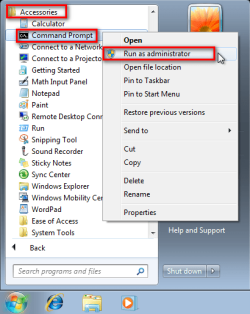
  3. Run Command Prompt as administrator
    .
    Audit_1.png
    .
  4. Type to Command Prompt: %windir%\System32\Sysprep\Sysprep.exe, and hit Enter
    .
    sysprep_start.png
    .
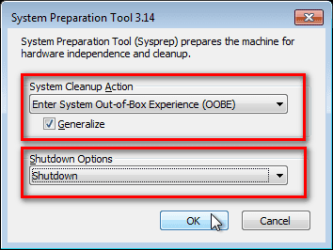
  5. In sysprep dialog that opens, choose System Cleanup Action as Enter System Out-of-Box-Experience (OOBE), select Generalize, select Shutdown Options Shutdown. Click OK
    .
    Sysprep_Run_and_generalize.png
    .
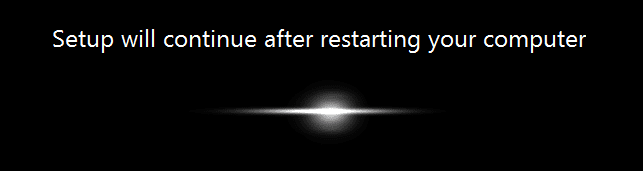
  6. Sysprep generalizes now your Windows 7 setup and shuts down your computer. Do not run any other programs during this phase!
    .
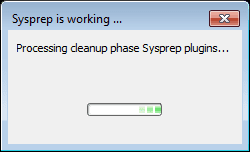
    Sysprep_Run_and_generalize_2.png
    .
    Sysprep_Run_and_generalize_3.png
    .
  7. Switch the main power of your PC off and install the new hardware OR dismount the hard disk(s) and mount it (them) to a new computer
  8. Boot the PC from sysprep generalized hard disk. You will notice Windows booting as if it was the first boot after installation, installing default drivers and updating registry. One or two reboots are needed, depending on your system specifications
    .

    Sysprep_Reinstalling_devices.png
    .
    Sysprep_Registry_settings.png
    .
    Sysprep_Reboot_needed.png
    .
  9. When Windows finally boots up, you will need to enter all information as if this really was a new, fresh installation
    .
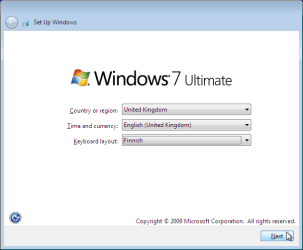
    Sysprep_First_boot_2.png
    .
  10. Because your old user profiles already exist, Windows does not accept your normal username, but instead you have to create a new temporary user. I use username Test for this purpose
    .
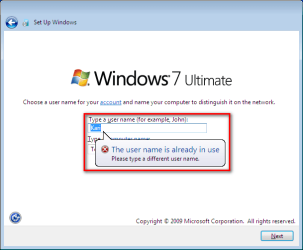
    Sysprep_First_boot_3.png
    .
  11. When login screen appears, choose your old user account to login
    .

    Sysprep_First_boot_5.png
    .
  12. Windows boots now to default OOBE first boot desktop, with default 800*600 resolution and default theme. All your installed applications are there, as well as your old user profiles and folders. Windows has installed the default drivers for your setup, you can update them if needed
    .
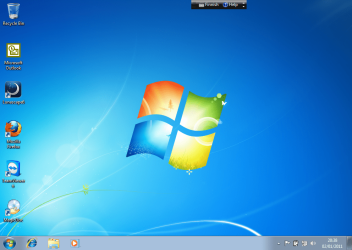
    Sysprep_First_boot_6.png
    .
  13. Go to Control Panel > User Accounts and delete the temporary user account (in this case Test) that you just created


METHOD TWO

Change the hard disk(s) or move Windows 7 setup to a new computer using third party imaging software

Use this method if you:
- Replace the HD containing Windows 7 on your old computer
- Move Windows 7 to a new HD on another computer
  1. Follow steps 1 through 5 above (method 1)
  2. Boot PC with an imaging CD/DVD (Paragon, Macrium etc.). See Macrium Reflect Free:at our sister site TenForums.com: Backup and Restore with Macrium Reflect Windows 10 Backup Restore Tutorials . Also see this post for a practical tip to create a Macrium system image.
  3. Create an image of your system
  4. Turn PC off, change the hard disk(s) and reboot with imaging application, restoring the image OR boot the new computer with imaging software and restore the image
  5. Continue from step 7 above (method 1)

This procedure is failsafe, and works every time. There is nothing to worry, but of course it is recommended to make a backup before trying this. I have even used this method when some serious driver issues caused the PC to constantly crash (BSOD), to reset all drivers to Windows defaults and then reinstalling them one by one to find the culprit.

   Note
What does Sysprep generalizing do to my Windows 7 setup?
  • All system specific information is removed or uninstalled
  • Security ID (SID) of your hardware setup is reseted
  • All system restore points are deleted
  • All event logs are deleted
  • All personalization is removed (taskbar, toolbars, folder options, start orb etc.)
  • Built-in administrator account is disabled (if it was enabled) and needs to be re-enabled after the transfer if needed

What happens when booting first time after sysprep generalizing?
  • First boot configuration is run
  • New SID is created
  • Re-arm counter is reseted if not already re-armed three times
  • Windows 7 is booted using first boot default drivers and settings


I have tested all above mentioned methods with all versions of Windows 7, from Starter to Enterprise. It works every time, with one exception: for reasons unknown to me, sysprep seems sometimes dislike Windows Media Player networking service, which is by default started every time Windows 7 starts. In about every third time I've done this, I've got an error message when trying to generalize:
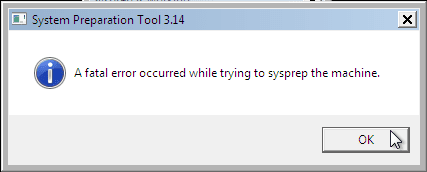
Sysprep_Fatal_Error.png

However, this is not a big problem. You just need to stop the WMP networking service, and run sysprep with generalize option again. You can stop the service in question by typing net stop WMPNetworkSvc to command prompt, and hitting Enter:

Sysprep_Stop_WMP_service.png

If you have any questions, do not hesitate to ask.

Happy computing!

Kari

EDIT: A Useful tip from xxxwea, as later confirmed by Victor:
Kari, just a suggestion.

You might note in the tutorial that if on first booting Windows can't finish configuring, a reboot into safe mode, then a normal reboot will allow it to finish successfully.

This has happened to me both times I used a sysprepped system drive in a new computer. I found the answer to this problem buried deep in this thread the first time I ran into it, and the same thing happened yesterday on a different computer.

It's a seemingly very silly solution, but it works. I do believe many people have abandoned their sysprep work when they encounter the problem.

I think the solution deserves more visibility.
 
Last edited:
Generally a factory OEM, such as Dell, HP, etc, can't be moved. System Builder OEMs can be but will take a call to MS to reactivate it.

Thanks for the info. I might give it a try since, after reading Kari's thread, I've been interested in trying Sysprep out to see what happens. I haven't set aside the time yet to do one but I want to try a proactive Sysprep image so that it will be there in case I have a MoBo failure.

I won't try it with my Toshiba Laptop, OEM, factory brand-name, etc.

I wonder if the 3rd-party tools, such as Acronis, or Macrium Reflect (paid) provide a disclaimer regarding Windows OEM version restores to new hardware.
 

My Computer My Computer

At a glance

Windows 7 Home Premium 64 bitIntel i5 650 Dual Core 3.20 GHz Cache 4MB Thr...Corsair 16GB DDR3 1600MHz 9-9-9-24 P/N: CMZ8G...ZOTAC GeFORCE 9500 ZT-95TEK2M-FSL 1GB GDDR2
Computer type
PC/Desktop
Computer Manufacturer/Model Number
Built at Micro Center Richardson, TX
OS
Windows 7 Home Premium 64 bit
CPU
Intel i5 650 Dual Core 3.20 GHz Cache 4MB Threads: 4
Motherboard
ASUS PRO P7P55D-E
Memory
Corsair 16GB DDR3 1600MHz 9-9-9-24 P/N: CMZ8GX3M2A1600C
Graphics Card(s)
ZOTAC GeFORCE 9500 ZT-95TEK2M-FSL 1GB GDDR2
Sound Card
Mother Bd
Monitor(s) Displays
ASUS V228H 21.5” Diag
Screen Resolution
1440 x 900
Hard Drives
SEAGATE BARRACUDA (2ea) 3.5” INTERNAL 1Tb 16 MB SATA ST1000DM003-9YN162 7200RPM, 64MB, SATA 6Gb/s ** 2 Sata Hot-Swap Racks installed in Tower
PSU
Thermaltake Model TR2 RX 750W
Cooling
2 Tower Fans
Keyboard
Dell Quietkey PS/2 Windows 104 P/N 0463CD
Mouse
Kensington Mechanical Trackball USB Model 64217
Internet Speed
35/35
Antivirus
Norton 360 & MBAM Pro
Browser
IE10
Other Info
Printer: HP DeskJet 3520 USB 2.0 **
Speakers: ALTEC Model VS4621 2.1 28 W/Channel w/Sub-woofer **
IOGEAR HDMI Monitor Switcher Swx3 MODEL GHDSW3 ** Addonics ZDRWESU3 eSata/USB 3.0 external DVD Read/Write DVD Drive** SEAGATE GoFlex USB 2.0 Portable HD 500GB 5400 RPM P/N: 9ZF2A2-570
I have just changed over my motherboard from AMD to Intel and I followed this tutorial very closely. Initially it failed to boot and on the surface seem to have got itself in the loop of rebooting. Patience is the name of the game.

What I did was to try the repair function of Windows but that also failed. But I think this was important to let it know that Windows disk was in the drive. On to more boots it gave me the opportunity to boot in safe mode. That to failed. But with nothing to lose except the daunting task of reinstallation that I wanted to avoid at all costs I persisted in allowing the system to reboot multiple times. I couple more times is successfully went into "Setup Is Installing Devices". Doing this it was accessing the Windows disk

This is a great tutorial has been a big help to me. I just wanted to share my experience and for anyone else just to be patient. Whether going into system repair really was necessary I don't know. I just take it that a lot of the hardware was not enumerating for the new motherboard.

Finally any software that uses activation may have to be re-activated as well as Windows.

Thanks very much, a tutorial everyone should keep a reference to.

Robert…
 

My Computer My Computer

At a glance

Windows 7 64Intel i78GB
Computer type
PC/Desktop
Computer Manufacturer/Model Number
Custom build
OS
Windows 7 64
CPU
Intel i7
Motherboard
Asus Z86
Memory
8GB
Antivirus
Avast
Browser
Firefox
Good to know Robert you got it working.

Usually the Safe Mode boot method works if there are any complications, personally I have never needed system repair to get it work. Simply, if the first boot after sysprep and replacing hardware fails, boot to Safe Mode, shutdown, boot normally.

Anyway, thanks for sharing your experience.

Kari
 

My Computer My Computer

At a glance

Windows 10 Pro x64 EN-GB1.6 GHz Intel Core i7-720QM Processor6 GBATI Mobility Radeon HD 5850 Graphics
Computer type
Laptop
Computer Manufacturer/Model Number
HP ENVY 17-1150eg
OS
Windows 10 Pro x64 EN-GB
CPU
1.6 GHz Intel Core i7-720QM Processor
Memory
6 GB
Graphics Card(s)
ATI Mobility Radeon HD 5850 Graphics
Sound Card
Beats sound system with integrated subwoofer
Monitor(s) Displays
17" laptop display, 22" LED and 32" Full HD TV through HDMI
Screen Resolution
1600*900 (1), 1920*1080 (2&3)
Hard Drives
Internal: 2 x 500 GB SATA Hard Disk Drive 7200 rpm
External: 2TB for backups, 3TB USB3 network drive for media
Cooling
As Envy runs a bit warm, I have it on a Cooler Master pad
Keyboard
Logitech diNovo Media Desktop Laser (bluetooth)
Mouse
Logitech Performance Mouse MX
Internet Speed
50/10 Mbps VDSL
Antivirus
Windows Defender 4.3.9431.0
Browser
Maxthon 3.5.2., IE11
:cry: tys so much man....
 

My Computer My Computer

At a glance

7/zorin/
Computer type
PC/Desktop
OS
7/zorin/
Kari,
I'm having an issue. I tried the sysprep method and I am unable to get it to boot into windiows. I am also unable to boot into safe mode, it starts loading the drivers then stops and states there is an issue with startup and it will attempt to repair, then I get "windows is unable to repair this startup". I've tried different things and at one point the startup repair takes like 30 mins then goes to something like "windows is unable to repair this startup, would you like to send an error report?"

Is there anything I can do here?

Bruce

Edit: My system specs are everything it will be once I get it booted up into the Asus P5N-D motherboard. Right now I am working off a Dell Inspiron 745 mini tower. Everything in the mini tower has been upgraded except the MB and I installed windows 7 64 bit, it is not an OEM version.
 

My Computer My Computer

At a glance

Windows 7 Ultimate x64Core Quad 2.66ghz Q67008gb 800mhzEVGA Geforce 750 Ti 2gb
Computer type
PC/Desktop
Computer Manufacturer/Model Number
Custom Buiilt
OS
Windows 7 Ultimate x64
CPU
Core Quad 2.66ghz Q6700
Motherboard
Asus P5n-D
Memory
8gb 800mhz
Graphics Card(s)
EVGA Geforce 750 Ti 2gb
Sound Card
Sound Blaster Zx
Monitor(s) Displays
Vizio 24" flatscreen TV
Screen Resolution
1920x1080
Hard Drives
Crucial 120gb SSD, WD 1TB green HDD, Touro 1TB external USB 2.0
PSU
Thermaltake Purepower 500W V2.0
Case
Antec GX 700
Cooling
Air cooled with 5 fans and a cpu fan, I plan to add one more
Keyboard
Corsair K95
Mouse
Logitech Optical Marble Trackball
Internet Speed
50 - 58 mbps
Antivirus
AVG
Browser
Chrome
Other Info
I also have two PCIe add on cards (SATA III and a USB 3.0). I am in the process of building a new full tower gaming rig. It will either be a socket 2011 with the Asus Rampage IV Black edition MB or a socket 1150 with a MSI Z97 XPOWER AC MB.
Hi Bruce

This is exactly the same problem that I had. Just be very persistent and keep doing it over and over again. To be honest I lost count in the number of times that I tried to reboot and repair, but finally started to give a little each time.

Good luck and keep persevering. I eventually got there and I was very happy with the result because I simply did not want to have to do all that reinstallation again.

Robert…
 

My Computer My Computer

At a glance

Windows 7 64Intel i78GB
Computer type
PC/Desktop
Computer Manufacturer/Model Number
Custom build
OS
Windows 7 64
CPU
Intel i7
Motherboard
Asus Z86
Memory
8GB
Antivirus
Avast
Browser
Firefox
yeah I am the same way. Other than that another fear is what effect this is having on my SSD with moving it back and forth and doing the sysprep twice so far along with a system restore.
I did think it was taking longer and longer to get to the "unable to repair startup" message. I will try it again tonight. One thing, should I keep doing start up repair or just keep trying to boot into windows safe mode (it took like 10 mins the last time). Another thing is at one point I got the windows background screen with a mouse cursor but nothing else. I let it sit for awhile and eventually had to hold in the power button for 7 seconds to restart it.
Also what's with this "windows registry fix" that shows up at the top of every page of this thread?

Bruce
 

My Computer My Computer

At a glance

Windows 7 Ultimate x64Core Quad 2.66ghz Q67008gb 800mhzEVGA Geforce 750 Ti 2gb
Computer type
PC/Desktop
Computer Manufacturer/Model Number
Custom Buiilt
OS
Windows 7 Ultimate x64
CPU
Core Quad 2.66ghz Q6700
Motherboard
Asus P5n-D
Memory
8gb 800mhz
Graphics Card(s)
EVGA Geforce 750 Ti 2gb
Sound Card
Sound Blaster Zx
Monitor(s) Displays
Vizio 24" flatscreen TV
Screen Resolution
1920x1080
Hard Drives
Crucial 120gb SSD, WD 1TB green HDD, Touro 1TB external USB 2.0
PSU
Thermaltake Purepower 500W V2.0
Case
Antec GX 700
Cooling
Air cooled with 5 fans and a cpu fan, I plan to add one more
Keyboard
Corsair K95
Mouse
Logitech Optical Marble Trackball
Internet Speed
50 - 58 mbps
Antivirus
AVG
Browser
Chrome
Other Info
I also have two PCIe add on cards (SATA III and a USB 3.0). I am in the process of building a new full tower gaming rig. It will either be a socket 2011 with the Asus Rampage IV Black edition MB or a socket 1150 with a MSI Z97 XPOWER AC MB.
Kari,
I'm having an issue. I tried the sysprep method and I am unable to get it to boot into windiows. I am also unable to boot into safe mode, it starts loading the drivers then stops and states there is an issue with startup and it will attempt to repair, then I get "windows is unable to repair this startup". I've tried different things and at one point the startup repair takes like 30 mins then goes to something like "windows is unable to repair this startup, would you like to send an error report?"

Is there anything I can do here?

Bruce

Edit: My system specs are everything it will be once I get it booted up into the Asus P5N-D motherboard. Right now I am working off a Dell Inspiron 745 mini tower. Everything in the mini tower has been upgraded except the MB and I installed windows 7 64 bit, it is not an OEM version.
Try disconnecting all external devices, leaving just display, mouse and keyboard. Reboot, keep trying the Safe Mode.

Worst case scenario is to restore your computer from backup and try again or reinstall from scratch. If you have a backup to restore, move all your personal data to an external storage before trying again, in case you need to reinstall.

Hi Bruce

This is exactly the same problem that I had. Just be very persistent and keep doing it over and over again. To be honest I lost count in the number of times that I tried to reboot and repair, but finally started to give a little each time.

Good luck and keep persevering. I eventually got there and I was very happy with the result because I simply did not want to have to do all that reinstallation again.

Robert…
Good to hear your persistence helped :).
 

My Computer My Computer

At a glance

Windows 10 Pro x64 EN-GB1.6 GHz Intel Core i7-720QM Processor6 GBATI Mobility Radeon HD 5850 Graphics
Computer type
Laptop
Computer Manufacturer/Model Number
HP ENVY 17-1150eg
OS
Windows 10 Pro x64 EN-GB
CPU
1.6 GHz Intel Core i7-720QM Processor
Memory
6 GB
Graphics Card(s)
ATI Mobility Radeon HD 5850 Graphics
Sound Card
Beats sound system with integrated subwoofer
Monitor(s) Displays
17" laptop display, 22" LED and 32" Full HD TV through HDMI
Screen Resolution
1600*900 (1), 1920*1080 (2&3)
Hard Drives
Internal: 2 x 500 GB SATA Hard Disk Drive 7200 rpm
External: 2TB for backups, 3TB USB3 network drive for media
Cooling
As Envy runs a bit warm, I have it on a Cooler Master pad
Keyboard
Logitech diNovo Media Desktop Laser (bluetooth)
Mouse
Logitech Performance Mouse MX
Internet Speed
50/10 Mbps VDSL
Antivirus
Windows Defender 4.3.9431.0
Browser
Maxthon 3.5.2., IE11
Sorry to hear that Bruce is owing so much problem but I am pleased to see that Kari is online to help as I'm certainly not a technical person. I have just read through my post that I wrote when I finally got the system up and running. It certainly reminded me that the system disk needed to be in the drive because during those attempts it was continually accessing that drive.

Since I did a Sysrep I haven't looked back. There was still quite a bit of work to do getting everything running again because a lot of the software such as PhotoShop & Dragon NaturallySpeaking became deregistered. I also had to manually remove the old motherboard drivers just to make sure the system was nice and clean.

I'm signing off now but please report back to us when you get things going because your experience can help other people as well.

Robert…
 

My Computer My Computer

At a glance

Windows 7 64Intel i78GB
Computer type
PC/Desktop
Computer Manufacturer/Model Number
Custom build
OS
Windows 7 64
CPU
Intel i7
Motherboard
Asus Z86
Memory
8GB
Antivirus
Avast
Browser
Firefox
Try disconnecting all external devices, leaving just display, mouse and keyboard. Reboot, keep trying the Safe Mode.

Worst case scenario is to restore your computer from backup and try again or reinstall from scratch. If you have a backup to restore, move all your personal data to an external storage before trying again, in case you need to reinstall.
Nothing else is connected except the monitor, which is connected via the mini HDMI cable on the GT 630 card. I made it a point not to install anything else. I really hope I don't need to re-install because at this time I would be unable to as I have no idea where my win 7 disc is. I downloaded a win 7 64 bit ISO image that was supposed to work with my license but it doesn't work. It starts going through the install process and freezes part way through.
Sorry to hear that Bruce is owing so much problem but I am pleased to see that Kari is online to help as I'm certainly not a technical person. I have just read through my post that I wrote when I finally got the system up and running. It certainly reminded me that the system disk needed to be in the drive because during those attempts it was continually accessing that drive.

Since I did a Sysrep I haven't looked back. There was still quite a bit of work to do getting everything running again because a lot of the software such as PhotoShop & Dragon NaturallySpeaking became deregistered. I also had to manually remove the old motherboard drivers just to make sure the system was nice and clean.

I'm signing off now but please report back to us when you get things going because your experience can help other people as well.

Robert…

Robert, you used the win 7 system disc? If so them I may be screwed. I have a repair disc and 2 image back ups but I have no idea where my actual win 7 disc is. I may have accidentally thrown it out.
Is it possible to get a windows 7 64 bit ISO through the Windows website?

Bruce

EDIT: I was able to find the ISO images for windows 7 on on of their forums. I downloaded and put it on the disc. Now I'm going to re-sysprep my drive, and put everything onto the new MB (for now that is only the RAM and the PSU, as my old Dell PSU's cables would not even fit across the board). As it is booting up I will put the new windows 7 ISO into the CD rom..... So wish me luck!
 
Last edited:

My Computer My Computer

At a glance

Windows 7 Ultimate x64Core Quad 2.66ghz Q67008gb 800mhzEVGA Geforce 750 Ti 2gb
Computer type
PC/Desktop
Computer Manufacturer/Model Number
Custom Buiilt
OS
Windows 7 Ultimate x64
CPU
Core Quad 2.66ghz Q6700
Motherboard
Asus P5n-D
Memory
8gb 800mhz
Graphics Card(s)
EVGA Geforce 750 Ti 2gb
Sound Card
Sound Blaster Zx
Monitor(s) Displays
Vizio 24" flatscreen TV
Screen Resolution
1920x1080
Hard Drives
Crucial 120gb SSD, WD 1TB green HDD, Touro 1TB external USB 2.0
PSU
Thermaltake Purepower 500W V2.0
Case
Antec GX 700
Cooling
Air cooled with 5 fans and a cpu fan, I plan to add one more
Keyboard
Corsair K95
Mouse
Logitech Optical Marble Trackball
Internet Speed
50 - 58 mbps
Antivirus
AVG
Browser
Chrome
Other Info
I also have two PCIe add on cards (SATA III and a USB 3.0). I am in the process of building a new full tower gaming rig. It will either be a socket 2011 with the Asus Rampage IV Black edition MB or a socket 1150 with a MSI Z97 XPOWER AC MB.
** DIRECT DOWNLOAD LINKS REMOVED **
 
Last edited by a moderator:

My Computer My Computer

At a glance

Windows 7 64Intel i78GB
Computer type
PC/Desktop
Computer Manufacturer/Model Number
Custom build
OS
Windows 7 64
CPU
Intel i7
Motherboard
Asus Z86
Memory
8GB
Antivirus
Avast
Browser
Firefox
Thanks Robert, I edited my post to include updated info that I had found the windows ISO download links.
I am attempting this again as soon as I log off here. Wish me luck!
 

My Computer My Computer

At a glance

Windows 7 Ultimate x64Core Quad 2.66ghz Q67008gb 800mhzEVGA Geforce 750 Ti 2gb
Computer type
PC/Desktop
Computer Manufacturer/Model Number
Custom Buiilt
OS
Windows 7 Ultimate x64
CPU
Core Quad 2.66ghz Q6700
Motherboard
Asus P5n-D
Memory
8gb 800mhz
Graphics Card(s)
EVGA Geforce 750 Ti 2gb
Sound Card
Sound Blaster Zx
Monitor(s) Displays
Vizio 24" flatscreen TV
Screen Resolution
1920x1080
Hard Drives
Crucial 120gb SSD, WD 1TB green HDD, Touro 1TB external USB 2.0
PSU
Thermaltake Purepower 500W V2.0
Case
Antec GX 700
Cooling
Air cooled with 5 fans and a cpu fan, I plan to add one more
Keyboard
Corsair K95
Mouse
Logitech Optical Marble Trackball
Internet Speed
50 - 58 mbps
Antivirus
AVG
Browser
Chrome
Other Info
I also have two PCIe add on cards (SATA III and a USB 3.0). I am in the process of building a new full tower gaming rig. It will either be a socket 2011 with the Asus Rampage IV Black edition MB or a socket 1150 with a MSI Z97 XPOWER AC MB.
I have nothing to add to what Robert has already told you but I will be following this. Please keep us posted.
 

My Computer My Computer

At a glance

Windows 10 Pro x64 EN-GB1.6 GHz Intel Core i7-720QM Processor6 GBATI Mobility Radeon HD 5850 Graphics
Computer type
Laptop
Computer Manufacturer/Model Number
HP ENVY 17-1150eg
OS
Windows 10 Pro x64 EN-GB
CPU
1.6 GHz Intel Core i7-720QM Processor
Memory
6 GB
Graphics Card(s)
ATI Mobility Radeon HD 5850 Graphics
Sound Card
Beats sound system with integrated subwoofer
Monitor(s) Displays
17" laptop display, 22" LED and 32" Full HD TV through HDMI
Screen Resolution
1600*900 (1), 1920*1080 (2&3)
Hard Drives
Internal: 2 x 500 GB SATA Hard Disk Drive 7200 rpm
External: 2TB for backups, 3TB USB3 network drive for media
Cooling
As Envy runs a bit warm, I have it on a Cooler Master pad
Keyboard
Logitech diNovo Media Desktop Laser (bluetooth)
Mouse
Logitech Performance Mouse MX
Internet Speed
50/10 Mbps VDSL
Antivirus
Windows Defender 4.3.9431.0
Browser
Maxthon 3.5.2., IE11
It's not working. I just spent something like the last 4 hours (time between this post and my prior post) booting and rebooting the computer over and over again. I was actually able to sort of get into safe mode once. It froze up, I let it sit and that's what it did sit there. The little "safe mode" signs showed up in the corners and there was a black screen with my mouse cursor, but nothing else. It wasn't accessing the CD rom as there was no light to indicate it was running, though I am not sure if it was accessing the ssd as there are no spinning disc sounds. When I got into safe mode I clicked it without networking or anything else. I'm not sure if I was supposed to enable networking or not. Either way it looks as though I will have to re-install windows which works quite well with the new ISO I downloaded. I'm not looking forward to it. I have to put everything back into my old Dell case first then maybe I will play some games because it will be a good while before I can get everything loaded up again and re-installed. I have a lot of games and other programs on that computer (right now I am using my old Dell Inspiron 9200 laptop to post this). Some questions:
1. There is an option to load up drivers in the system diagnostics tools when I boot from the Win 7 disc, is it possible to load the drivers up manually for the motherboard?
2. If there is no other solution by later tomorrow I will start doing the re-install process. I use three different game servers; Origin, Steam, and Uplay. I know with Origin I can simply save the game install folders and when I go to re-install a game it will automatically detect the files in the location I point it to so I don't have to re-download the files. Is this the same way with Steam and Uplay? I think I have over 80 gigs of games between the three. Hey don't judge, the games are pretty inexpensive at times. I usually spend less than $10 on most games, less than $20 on a few and only one or two were over $30....
Thanks for the advice so far everyone, it's great advice but apparently this method will not work with my set up.
Bruce
 

My Computer My Computer

At a glance

Windows 7 Ultimate x64Core Quad 2.66ghz Q67008gb 800mhzEVGA Geforce 750 Ti 2gb
Computer type
PC/Desktop
Computer Manufacturer/Model Number
Custom Buiilt
OS
Windows 7 Ultimate x64
CPU
Core Quad 2.66ghz Q6700
Motherboard
Asus P5n-D
Memory
8gb 800mhz
Graphics Card(s)
EVGA Geforce 750 Ti 2gb
Sound Card
Sound Blaster Zx
Monitor(s) Displays
Vizio 24" flatscreen TV
Screen Resolution
1920x1080
Hard Drives
Crucial 120gb SSD, WD 1TB green HDD, Touro 1TB external USB 2.0
PSU
Thermaltake Purepower 500W V2.0
Case
Antec GX 700
Cooling
Air cooled with 5 fans and a cpu fan, I plan to add one more
Keyboard
Corsair K95
Mouse
Logitech Optical Marble Trackball
Internet Speed
50 - 58 mbps
Antivirus
AVG
Browser
Chrome
Other Info
I also have two PCIe add on cards (SATA III and a USB 3.0). I am in the process of building a new full tower gaming rig. It will either be a socket 2011 with the Asus Rampage IV Black edition MB or a socket 1150 with a MSI Z97 XPOWER AC MB.
Nevermind, forget I said all that above. It works! This is what I did two more boot tries after I made that post:
When I got into the boot menu for safe mode I selected the win 7 disc instead of the SSD the OS is on. It went into loading drivers then it gave the message that it was unable to complete loading the drivers and that I needed to restart windows to complete loading the drivers (or something like that). I re-started and expected it to give me another error. It went through the whole setup and now I am posting to you from that new MB!
I guess maybe somewhere it stated that one had to go into safe mode off the win 7 disc to get this to work and I missed it. Great idea Kari thanks for the help!

I'm having a few minor problems though:
1. I store all my music on my actual HDD (not enough room on the 120gb SSD). When I booted everything on the new MB it changed the drive letter of the HDD. Now none of my playlists will work because it is searching for the songs in the playlists on drive "E" when it is all on drive "D" now. How do I change the drive letter or is there a way to get it to locate the correct songs in windows media player?

2. After about 5 boot ups, my OS still takes almost a minute to load when on the other MB it booted up much faster in about 15 - 30 seconds. Now each time I re-started it I was adding new hardware. Should it be starting faster now or is there a setting I forgot about?

3. I had two new PCIe cards I wanted to install, a SATA 3 (Rosewill) board and a USB 3.0 (Tecknet) board. The SATA board didn't load up correctly but the USB 3.0 board works just fine. I at first had a "unknown device" in Device Manager, but windows found an update: ATK - system - ATK0110 ACPI UTILITY, after installing that update the "unknown device" disappeared, but there are no new SATA or RAID controllers, or any other kind of new storage device listed. Anyone know what gives?

Bruce


Bruce
 

My Computer My Computer

At a glance

Windows 7 Ultimate x64Core Quad 2.66ghz Q67008gb 800mhzEVGA Geforce 750 Ti 2gb
Computer type
PC/Desktop
Computer Manufacturer/Model Number
Custom Buiilt
OS
Windows 7 Ultimate x64
CPU
Core Quad 2.66ghz Q6700
Motherboard
Asus P5n-D
Memory
8gb 800mhz
Graphics Card(s)
EVGA Geforce 750 Ti 2gb
Sound Card
Sound Blaster Zx
Monitor(s) Displays
Vizio 24" flatscreen TV
Screen Resolution
1920x1080
Hard Drives
Crucial 120gb SSD, WD 1TB green HDD, Touro 1TB external USB 2.0
PSU
Thermaltake Purepower 500W V2.0
Case
Antec GX 700
Cooling
Air cooled with 5 fans and a cpu fan, I plan to add one more
Keyboard
Corsair K95
Mouse
Logitech Optical Marble Trackball
Internet Speed
50 - 58 mbps
Antivirus
AVG
Browser
Chrome
Other Info
I also have two PCIe add on cards (SATA III and a USB 3.0). I am in the process of building a new full tower gaming rig. It will either be a socket 2011 with the Asus Rampage IV Black edition MB or a socket 1150 with a MSI Z97 XPOWER AC MB.
Bruce congratulations I knew you would get there in the end. You will find that there's a few little things that you have to tweak but that's no problem. I'm not very technically minded these days but Kari seems to have done a good job.

Kari, I remember several years ago reading of changing the motherboard by first loading the new motherboard's chipset drivers into Windows. I think the magazine was Australian Personal Computing APC. What this guy said was not to run the normal setup routine that comes with the disc because like is not it will probably won't run, but to find the chipset drivers on the disc and load them this way. Then immediately shut down, just open change the motherboard and it should enumerate the new drivers. I must say I never tried this but you think this could be some of the problems that both myself and Bruce is encountered. In my case I went from an AMD motherboard to Intel. I'm just hoping that anybody else who reads this thread reads the whole of the thread and realise they need patience, perseverance and time.

Robert…
 

My Computer My Computer

At a glance

Windows 7 64Intel i78GB
Computer type
PC/Desktop
Computer Manufacturer/Model Number
Custom build
OS
Windows 7 64
CPU
Intel i7
Motherboard
Asus Z86
Memory
8GB
Antivirus
Avast
Browser
Firefox
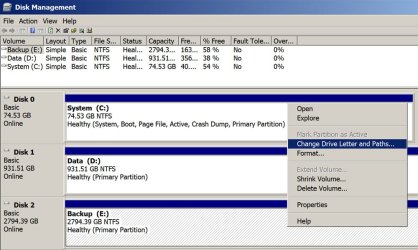
How do I change the drive letter or is there a way to get it to locate the correct songs in windows media player?

That's done from Windows Disk Management. Right click the drive you want to change and use the menu.
 

Attachments

  • Untitled-1.jpg
    Untitled-1.jpg
    106.9 KB · Views: 113

My Computer My Computer

At a glance

Windows 7 Home Premium SP1, 64-bitIntel Skylake i5-6600K, not overclocked8 GB HyperX DDR4-2666 (2 x 4 GB)none; graphics are integrated on CPU
Computer type
PC/Desktop
Computer Manufacturer/Model Number
Ignatz Special; 4 speed manual gearbox; factory air conditioning; one of one
OS
Windows 7 Home Premium SP1, 64-bit
CPU
Intel Skylake i5-6600K, not overclocked
Motherboard
AsRock Z170M Extreme 4, micro ATX
Memory
8 GB HyperX DDR4-2666 (2 x 4 GB)
Graphics Card(s)
none; graphics are integrated on CPU
Sound Card
onboard: Realtek ALC1150; external: USB Behringer UF0-202
Monitor(s) Displays
Dell S2340M 23 inch IPS
Screen Resolution
1600 x 900
Hard Drives
System: Crucial MX100 series SSD, 128 GB;
Data: Samsung Spinpoint 103SJ, 1 TB;
Backup: WD Caviar Green WD30EZRX-00D8PB0, 3 TB
PSU
Rosewill SilentNight 500 watt fanless, semi-modular
Case
Antec Solo II
Cooling
Noctua NH-U12S; Noctua F12 intake, Noctua S12A exhaust
Keyboard
Microsoft 200 6JH-00001 USB
Mouse
Dell or Microsoft optical wired; USB
Antivirus
Microsoft Security Essentials and Malwarebytes Premium
Browser
Pale Moon
Other Info
All fans PWM; speeds at idle: CPU circa 500 rpm; intake circa 600 rpm; exhaust circa 600 rpm; CPU temps 27 idle and 47 C load in a warm room (27 C/81 F) when running Intel Extreme Tuning Utility stress test.
A horror story turned romantic drama :).

It is good to know you finally got it working Bruce. About your 3 minor issues:
  1. See this tutorial for how to change drive letters: http://www.sevenforums.com/tutorials/82994-drive-letter-add-change-remove-windows.html. You need to change first the current D: (CD/DVD) to an unused on like X: to free the E:, then change the D: to E: and finally the X: to something else.
  2. Run Windows Update with all optional updates (if using Ultimate, this does not apply to language packs) as many times as required to get "No updates available".
  3. If you have installed chipset driver, Windows should be able to storage drivers. I will check this a bit more.

Robert, I do not believe that is a good solution. it might work well if changed a bit: download the chipset drivers to an external drive. Generalize as told in this tutorial, then instead of booting the new system from HDD boot from Windows install media and enter system repair > command console and install chipset drivers manually, boot normally.

Kari
 

My Computer My Computer

At a glance

Windows 10 Pro x64 EN-GB1.6 GHz Intel Core i7-720QM Processor6 GBATI Mobility Radeon HD 5850 Graphics
Computer type
Laptop
Computer Manufacturer/Model Number
HP ENVY 17-1150eg
OS
Windows 10 Pro x64 EN-GB
CPU
1.6 GHz Intel Core i7-720QM Processor
Memory
6 GB
Graphics Card(s)
ATI Mobility Radeon HD 5850 Graphics
Sound Card
Beats sound system with integrated subwoofer
Monitor(s) Displays
17" laptop display, 22" LED and 32" Full HD TV through HDMI
Screen Resolution
1600*900 (1), 1920*1080 (2&3)
Hard Drives
Internal: 2 x 500 GB SATA Hard Disk Drive 7200 rpm
External: 2TB for backups, 3TB USB3 network drive for media
Cooling
As Envy runs a bit warm, I have it on a Cooler Master pad
Keyboard
Logitech diNovo Media Desktop Laser (bluetooth)
Mouse
Logitech Performance Mouse MX
Internet Speed
50/10 Mbps VDSL
Antivirus
Windows Defender 4.3.9431.0
Browser
Maxthon 3.5.2., IE11
Thanks for this great tutorial

With this tool several headaches will go away in my life.

However, right now I have a mess in my house: the family computer's motherboard suddenly stopped working! (problems with the video card) and I didn't have time to do what is specified in your tutorial. Is there any way to perform this procedure after changing computer?

Thanks again.
 

My Computer My Computer

At a glance

Windows 7 Ultimate 32bitOptiplex GX6202GbIntel on board
Computer type
PC/Desktop
Computer Manufacturer/Model Number
Dell
OS
Windows 7 Ultimate 32bit
CPU
Optiplex GX620
Motherboard
Factory Optiplex GX620
Memory
2Gb
Graphics Card(s)
Intel on board
Hard Drives
Seagate 320Gb
Antivirus
Avast
Browser
Mozilla Firefox
I don't think it is possible to set it up after removing it from the original computer. You have to run sysprep and set it to generalize before removing the HDD or changing out the motherboard. Then again maybe there is a way to do it through a restore disc or something of the like. The others on here can probably clarify that better than I can.
On the other hand if you can't set it up and have to re-install windows then you can still save all the important files by connecting the drive to another computer and saving them on another HDD. Alternately you could purchase another MB of the same type, which would be less work for you but more time as you wait for the MB to arrive.

Bruce
 

My Computer My Computer

At a glance

Windows 7 Ultimate x64Core Quad 2.66ghz Q67008gb 800mhzEVGA Geforce 750 Ti 2gb
Computer type
PC/Desktop
Computer Manufacturer/Model Number
Custom Buiilt
OS
Windows 7 Ultimate x64
CPU
Core Quad 2.66ghz Q6700
Motherboard
Asus P5n-D
Memory
8gb 800mhz
Graphics Card(s)
EVGA Geforce 750 Ti 2gb
Sound Card
Sound Blaster Zx
Monitor(s) Displays
Vizio 24" flatscreen TV
Screen Resolution
1920x1080
Hard Drives
Crucial 120gb SSD, WD 1TB green HDD, Touro 1TB external USB 2.0
PSU
Thermaltake Purepower 500W V2.0
Case
Antec GX 700
Cooling
Air cooled with 5 fans and a cpu fan, I plan to add one more
Keyboard
Corsair K95
Mouse
Logitech Optical Marble Trackball
Internet Speed
50 - 58 mbps
Antivirus
AVG
Browser
Chrome
Other Info
I also have two PCIe add on cards (SATA III and a USB 3.0). I am in the process of building a new full tower gaming rig. It will either be a socket 2011 with the Asus Rampage IV Black edition MB or a socket 1150 with a MSI Z97 XPOWER AC MB.
Back
Top