Hello All,
I know this is a pretty old problem, but I can't seem to get the below solution to work for me.
1. Click start, type cmd in the Start Search box, right-click cmd.exe, click Run as administrator, and then press Continue.
2. Type netsh winsock reset at the command prompt, and then press ENTER.
Note If the command is typed incorrectly, you will receive an error message. Type the command again. When the command is completed successfully, a confirmation appears, followed by a new command prompt. Then, go to step 3.
3. Type exit, and then press ENTER. You should be prompted to reboot, if not you should reboot and test.
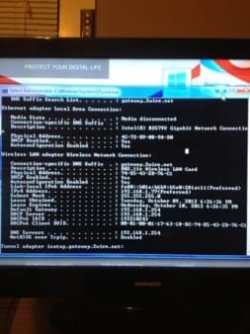
Some pages will load, but either very slowly or give me the timed out message when I use firefox. The home pages will load instantly though. This Desktop is now 2 days old and worked perfectly fine when I did the initial set up at my brothers house. All other laptops and devices connect fine and load pages quickly. I havent had a desktop since my family computer and am using my tv as a monitor. Could this be interference from the tv since it is sitting behind it, or is it that I just have a slow internet provider? I do not have a pic of my ipconfig, but I will get that tonight if I have to. Any suggestions will be very much appreciated.
I know this is a pretty old problem, but I can't seem to get the below solution to work for me.
1. Click start, type cmd in the Start Search box, right-click cmd.exe, click Run as administrator, and then press Continue.
2. Type netsh winsock reset at the command prompt, and then press ENTER.
Note If the command is typed incorrectly, you will receive an error message. Type the command again. When the command is completed successfully, a confirmation appears, followed by a new command prompt. Then, go to step 3.
3. Type exit, and then press ENTER. You should be prompted to reboot, if not you should reboot and test.
Some pages will load, but either very slowly or give me the timed out message when I use firefox. The home pages will load instantly though. This Desktop is now 2 days old and worked perfectly fine when I did the initial set up at my brothers house. All other laptops and devices connect fine and load pages quickly. I havent had a desktop since my family computer and am using my tv as a monitor. Could this be interference from the tv since it is sitting behind it, or is it that I just have a slow internet provider? I do not have a pic of my ipconfig, but I will get that tonight if I have to. Any suggestions will be very much appreciated.
My Computer
- OS
- windows 7