
- Local time
- 5:09 PM
- Messages
- 21
Umm. Hey there guys. I have posted about this problem earliar too. But there has been very poor response from sevenforums.com .
I installed windows 7 and encountered the NETWORK (No internet access) problem.
This is what I am connected through. I am using a PPPoE connection which directly comes through a switch.
I get two connections. One is LAN and the other is dailup.
When I start my computer (w/o dialing up ) I see the yellow exclamation mark on the taskbar on network connections icon. In windows XP it used to show me a status of connected with network access.
But in windows 7 it shows me a yellow exclamation mark with connected, but with no network access.
When I dial up using the dialer the exclamation mark goes away and it shows me two connections viz, Local area connection (No internet access) and Broadband Connection (Internet Access)
When I leave the configuration to automatically obtain IP addresses it shows me a "Local area connection doesn't have a valid IP" error. So, I have entered all the details manually.
The problem is that even though I can connect to the internet and browse normally, I get very low browsing speed. Also I cannot connect to any users in DC++ because of LAN not working. (It was working flawlessely in windows XP)
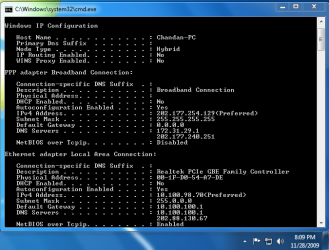
I have attached images on ipconfig /all command. One is when not dailed up and the other is when connected to the internet.
Also I want to know, why do the connections show DHCP enabled in windows xp and disabled in windows 7.
THIS PROBLEM HAS BEEN LEFT UNADDRESSD BY SEVEN FORUMS FOR A LONG TIME. I AM LOOKING FORWARD FOR SOME ANSWERS SINCE MANY PEOPLE ARE FACING THE SAME PROBLEM.
I installed windows 7 and encountered the NETWORK (No internet access) problem.
This is what I am connected through. I am using a PPPoE connection which directly comes through a switch.
I get two connections. One is LAN and the other is dailup.
When I start my computer (w/o dialing up ) I see the yellow exclamation mark on the taskbar on network connections icon. In windows XP it used to show me a status of connected with network access.
But in windows 7 it shows me a yellow exclamation mark with connected, but with no network access.
When I dial up using the dialer the exclamation mark goes away and it shows me two connections viz, Local area connection (No internet access) and Broadband Connection (Internet Access)
When I leave the configuration to automatically obtain IP addresses it shows me a "Local area connection doesn't have a valid IP" error. So, I have entered all the details manually.
The problem is that even though I can connect to the internet and browse normally, I get very low browsing speed. Also I cannot connect to any users in DC++ because of LAN not working. (It was working flawlessely in windows XP)
I have attached images on ipconfig /all command. One is when not dailed up and the other is when connected to the internet.
Also I want to know, why do the connections show DHCP enabled in windows xp and disabled in windows 7.
THIS PROBLEM HAS BEEN LEFT UNADDRESSD BY SEVEN FORUMS FOR A LONG TIME. I AM LOOKING FORWARD FOR SOME ANSWERS SINCE MANY PEOPLE ARE FACING THE SAME PROBLEM.
Attachments

My Computer
- OS
- windows XP
- CPU
- intel q8400
- Motherboard
- giga-byte S3G
- Memory
- kingston 2gigs 800MHz
- Graphics Card(s)
- Palit hd4850 512mb
- Sound Card
- on-board realtek
- Monitor(s) Displays
- lg 19"
- Hard Drives
- WD 500gb
- PSU
- cm Xtreme 500 w
- Case
- cm 690
- Cooling
- cm 690


