
- Local time
- 4:38 AM
- Messages
- 179
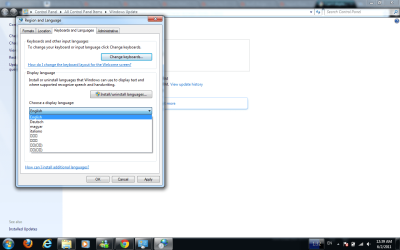
I've installed the pacts, and on the first day, all the chinese characters were correct, but now they're all squares. Even when I go to the regions and languages option in control panel, it's squares (see attachment). What gives? This is Windows 7, 64 bit.
Thanks in advance!!
Thanks in advance!!
Attachments
My Computer
- OS
- Windows 7
- CPU
- AMD Phenom II X4 555
- Motherboard
- Biostar TA785G3
- Memory
- 2x2GB OCZ Platinum Edition DDR3 PC3-10666
- Graphics Card(s)
- Sapphire Radeon 6870
- Hard Drives
- Generic SSD (64GB)
Samsung F3 (1TB)
Seagate (1TB)
- Case
- Antec 300


