Windows 7 keeps crashing over and over....

Zankantou

New member
Local time
4:23 AM
Messages
3
Hi I'm new here, nice to meet you all. I've recently changed my OS from XP to Win 7 Ultimate x64. Windows 7 looks really cool. Unfortunately, problem started to show. First I've been getting frequent crashes. I did some search (before I came across this forum) and found out that the SQM Client and bad registry are some of the causes for crashing Windows 7. I tried some of the methods, however the problem still remains. I did some test to see if any of my applications would be the cause, and found out that uTorrent seems to be the major issue. I've been using uTorrent for quite a while with no problems at all. But ever since I switched to Win 7, problem seem to show.

I tried to run uTorrent alone for a couple of hours and it freezes the OS. I tried it numerous of times without any other applications and it gave me the same results. Heck, when Firefox is used together with uTorrent it speeds up the crash. My drives are all up to date and my PC specs meets the requirement for Win 7. (Except I don't have a Graphic Card):
Athlon 64 3000+ / 2GB Ram / HD 500 GB I also use a router, D-Link DI-604. uTorrent never had any problems with this when I was using XP.

Another problem which recently occurred is with the Windows Photo Viewer. When I click on a picture (regardless of which format) it 'stucks' at the loading page and the picture never shows. Strange as this did not occur when I first installed Win 7.

Last problem is with videos, I tried to use VLC player to play AVI, MKV files and it simply does not work. Now I'm not sure if this has to do with Win 7, but I'm certain it has nothing to do with the codecs.

Please, any professional insights would be mostly appreciated. This was suppose to be a great experience, but has now become a frustrating one. I checked some of the comments posted here, unfortunately none of them could solve my problem. (I'm sorry if I missed something) Thanks in advance!
 

My Computer My Computer

At a glance

Windows 7 Ultimate X64
OS
Windows 7 Ultimate X64
Hi I'm new here, nice to meet you all. I've recently changed my OS from XP to Win 7 Ultimate x64. Windows 7 looks really cool. Unfortunately, problem started to show. First I've been getting frequent crashes. I did some search (before I came across this forum) and found out that the SQM Client and bad registry are some of the causes for crashing Windows 7. I tried some of the methods, however the problem still remains. I did some test to see if any of my applications would be the cause, and found out that uTorrent seems to be the major issue. I've been using uTorrent for quite a while with no problems at all. But ever since I switched to Win 7, problem seem to show.

I tried to run uTorrent alone for a couple of hours and it freezes the OS. I tried it numerous of times without any other applications and it gave me the same results. Heck, when Firefox is used together with uTorrent it speeds up the crash. My drives are all up to date and my PC specs meets the requirement for Win 7. (Except I don't have a Graphic Card):
Athlon 64 3000+ / 2GB Ram / HD 500 GB I also use a router, D-Link DI-604. uTorrent never had any problems with this when I was using XP.

Another problem which recently occurred is with the Windows Photo Viewer. When I click on a picture (regardless of which format) it 'stucks' at the loading page and the picture never shows. Strange as this did not occur when I first installed Win 7.

Last problem is with videos, I tried to use VLC player to play AVI, MKV files and it simply does not work. Now I'm not sure if this has to do with Win 7, but I'm certain it has nothing to do with the codecs.

Please, any professional insights would be mostly appreciated. This was suppose to be a great experience, but has now become a frustrating one. I checked some of the comments posted here, unfortunately none of them could solve my problem. (I'm sorry if I missed something) Thanks in advance!


Hi and welcome

Are you having true BSOD, with stop numbers, etc? If so we can gleen alot of information from the crash dump file(*.DMP). It is in C:\windows\minidump. can you zip the dmp file and upload it to us?

We can also also use information on your computer. Can you fill in the system specs located in your lower left corner.

Also was it a clean install or u pgrade? 32 bit or 64

Thanks and let us know if you need help with any of this


Ken J+
 

My Computer My Computer

At a glance

Win 8 Release candidate 8400[email protected]4 gigsNvidia 9600M
Computer Manufacturer/Model Number
HP Pavillion dv-7 1005 Tx
OS
Win 8 Release candidate 8400
CPU
[email protected]
Memory
4 gigs
Graphics Card(s)
Nvidia 9600M
Sound Card
HD built-in
Monitor(s) Displays
17" Wxga
Screen Resolution
1440x900
Cooling
none
Internet Speed
45Mb down 5Mb up
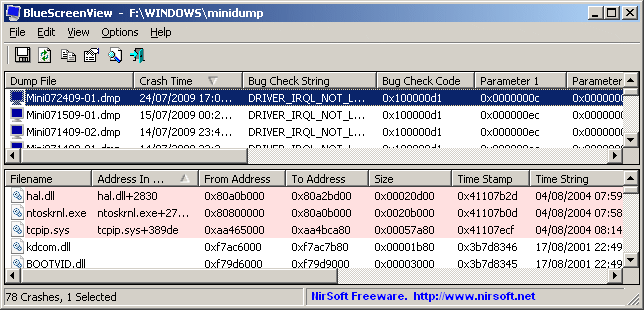
Try dowmloading this freeware utility that better diagnoses Blue Screen error:

BlueScreenView v1.15

BlueScreenView scans all your minidump files created during 'blue screen of death' crashes, and displays the information about all crashes in one table.

For each crash, BlueScreenView displays the minidump filename, the date/time of the crash, the basic crash information displayed in the blue screen (Bug Check Code and 4 parameters), and the details of the driver or module that possibly caused the crash (filename, product name, file description, and file version).

For each crash displayed in the upper pane, you can view the details of the device drivers loaded during the crash in the lower pane. BlueScreenView also mark the drivers that their addresses found in the crash stack, so you can easily locate the suspected drivers that possibly caused the crash.
bluescreenview.gif
 

My Computer My Computer

At a glance

Windows 7 Pro & Vista Home PremiumAthlon 64 3800+ (Orleans) 2.40GHz2GB DDR2 RAM DIMMNVIDIA GeForce 8500 GT 512 MB memory HDMI out
Computer Manufacturer/Model Number
Cheap $399.00 E-Machine
OS
Windows 7 Pro & Vista Home Premium
CPU
Athlon 64 3800+ (Orleans) 2.40GHz
Motherboard
Winfast
Memory
2GB DDR2 RAM DIMM
Graphics Card(s)
NVIDIA GeForce 8500 GT 512 MB memory HDMI out
Sound Card
creative X-Fi Exteme 7..1 channel
Monitor(s) Displays
Acer V223W 22" widescreen DVI
Screen Resolution
1680x1050
Hard Drives
WDC WD5 500GB
WDC WD25 250GB
PSU
OCZ 550 watt
Case
Gateway
Cooling
2 fans
Keyboard
Dell
Mouse
Sony Vaio
Internet Speed
18MB/s down - .72MB /s up
Hi and welcome

Are you having true BSOD, with stop numbers, etc? If so we can gleen alot of information from the crash dump file(*.DMP). It is in C:\windows\minidump. can you zip the dmp file and upload it to us?

We can also also use information on your computer. Can you fill in the system specs located in your lower left corner.

Also was it a clean install or u pgrade? 32 bit or 64

Thanks and let us know if you need help with any of this


Ken J+

Thanks for the replies both zigzag3143 & reghakr! I am not having the Blue Screen of Death crashes, but whenever it starts to crash, the whole screen just freezes. I am able to move my mouse however, when I click on any application or simply the start menu it crashes all in all. My Windows Photo Viewer doesn't crash the OS, but it simply stucks at the loading page.

I did a clean install to x64.

Ken J+, you said to fill in the system specs at the lower left corner? You mean? My PC specs are - AMD Athlon 64 3000 + / 2GB Ram

If there is any other info that is needed please let me know thanks.

reghakr the software you suggested, does it also read other crashes aside from the Blue Screen? If yes, I might give it a try as well. Thanks once again.
 

My Computer My Computer

At a glance

Windows 7 Ultimate X64
OS
Windows 7 Ultimate X64
Back
Top