Windows 7 Locking up, winsock reset is only fix

jweitzel

New member
Local time
3:23 PM
Messages
5
We have quite a few laptops that are locking up when turned on. Sometimes a reboot will fix this, other times, we are forced to reset the winsock. I've ran Dell diagnostics and the drive diagnostics. I've seen nothing that is wrong. The event log show various items, but the only critical item is a kernel-power. The rest are errors or warnings. I've also updated the bios to a newer version too. Tech at Dell are pushing a reinstall of the OS, which really is a last option.

Dell E6330 Laptops, 32 bit Windows 7
SED Drives, encrypted and using Kaspersky for AV
Using Verizon phones with their hotspots for Internet

It's not all of my computers, but various ones. All worked fine during setup, but started to have issues after my users got them.
 

My Computer My Computer

At a glance

32
OS
32
Hi jweitzel,


Not sure if this will help your issue or if you have already tried these methods but it will check your files
and disk for errors and eliminate these problems and there is no harm in trying these.


Start>Type cmd> Right click and run as Administrator, then run chkdsk:


run a chkdsk /f /r to make sure you don’t have any disk errors

then run System File checker:


run sfc.exe /scannow to validate your system files


If any faults found reboot and see if issue is still present.


Also check and install latest drivers.


Hope this helps

Cheer

Dave
 

My Computer My Computer

At a glance

Windows 7 Professional 64bitAMD Athlon (tm) X2 5200+ Dual Core 2712 Mhz4GBNividia GeForce 8600 GTS- DIED 25/7/2013 R.I.P
Computer type
PC/Desktop
OS
Windows 7 Professional 64bit
CPU
AMD Athlon (tm) X2 5200+ Dual Core 2712 Mhz
Motherboard
Asus
Memory
4GB
Graphics Card(s)
Nividia GeForce 8600 GTS- DIED 25/7/2013 R.I.P
Sound Card
None
Monitor(s) Displays
22" Yuraku LCD (Dont ask)
Screen Resolution
1280x960
Hard Drives
2TB WD Caviar green
PSU
Windy up type
Case
Scout cm Storm
Cooling
Hair dryer on full cool power ;-)
Keyboard
QWERTY
Mouse
Microsoft Special
Internet Speed
BT Infinity 9.38Mb/s Wheeeeeeeeeeeeeeee!!
Antivirus
MSE
Browser
Internet Explore 10 and Chrome
Other Info
Don't shout...I've got a Hangover!
What happens when you boot into safe mode?
 

My Computer My Computer

At a glance

Windows 7 Ultimate x64
OS
Windows 7 Ultimate x64
Safe mode runs fine and I've ran the chkdsk and sfc scannow. The network drivers are on my list to do next. I actually ran those first, prior to the winsock reset, and at this point, this is the only thing that fixes it and unsure how long this will last.
 

My Computer My Computer

At a glance

32
OS
32
Safe mode runs fine and I've ran the chkdsk and sfc scannow. The network drivers are on my list to do next. I actually ran those first, prior to the winsock reset, and at this point, this is the only thing that fixes it and unsure how long this will last.

Hi,

If it runs fine in safe mode then possible driver issues, update all drivers

Cheers

Dave
 

My Computer My Computer

At a glance

Windows 7 Professional 64bitAMD Athlon (tm) X2 5200+ Dual Core 2712 Mhz4GBNividia GeForce 8600 GTS- DIED 25/7/2013 R.I.P
Computer type
PC/Desktop
OS
Windows 7 Professional 64bit
CPU
AMD Athlon (tm) X2 5200+ Dual Core 2712 Mhz
Motherboard
Asus
Memory
4GB
Graphics Card(s)
Nividia GeForce 8600 GTS- DIED 25/7/2013 R.I.P
Sound Card
None
Monitor(s) Displays
22" Yuraku LCD (Dont ask)
Screen Resolution
1280x960
Hard Drives
2TB WD Caviar green
PSU
Windy up type
Case
Scout cm Storm
Cooling
Hair dryer on full cool power ;-)
Keyboard
QWERTY
Mouse
Microsoft Special
Internet Speed
BT Infinity 9.38Mb/s Wheeeeeeeeeeeeeeee!!
Antivirus
MSE
Browser
Internet Explore 10 and Chrome
Other Info
Don't shout...I've got a Hangover!
Update to my issues

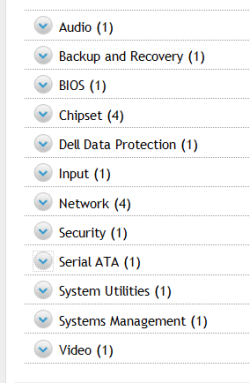
I've ran specific driver updates on various laptops. I ran to dell.com and looked under my laptops and chose the NIC drivers and a serial ata driver that was deemed "Urgent" and I still am having the issue. I've tried both the LAN and wireless drivers. I've also checked to verify that the Dell, DW LAN service is not running ( conflicts with Windows ) and I am no further ahead than I was last week.

My tech support from Dell wants me to wipe the system, which really isn't an option, considering the number of laptops I would have to reconfigure. I'm attaching a screenshot of my "Dell" driver options, or I'm hoping it attached. Backup, Dell Data are not options I would run. Bios has already been updated too.
 

Attachments

  • laptop options.PNG
    laptop options.PNG
    5.4 KB · Views: 24

My Computer My Computer

At a glance

32
OS
32
I've ran specific driver updates on various laptops. I ran to dell.com and looked under my laptops and chose the NIC drivers and a serial ata driver that was deemed "Urgent" and I still am having the issue. I've tried both the LAN and wireless drivers. I've also checked to verify that the Dell, DW LAN service is not running ( conflicts with Windows ) and I am no further ahead than I was last week.

My tech support from Dell wants me to wipe the system, which really isn't an option, considering the number of laptops I would have to reconfigure. I'm attaching a screenshot of my "Dell" driver options, or I'm hoping it attached. Backup, Dell Data are not options I would run. Bios has already been updated too.

Hi,

Well if they run fine in safe-mode then its unlikely its hardware, so that good-ish news.
If they are all the same make and model laptop, then it is likely that there is a common denominator and all the faults are same or similar faults, i.e. - like the same installed program etc. (I know this isnt helping much...but we have very little to go on at this point without further info).

Please upload your msinfo32.nfo file. To get this:
Start Menu -> Type msinfo32 into the Search programs and files box
-> When it opens, go to File, Save -> Save as msinfo32.nfo and save in a place you will remember
-> Let it finish the process of gathering and saving the system info
-> Right click the .nfo file, click send to compressed (zipped) folder -> Upload the .zip file here.

There maybe something in there that might point to the problem. Obviously just do it for say 2 laptops that you know are having the issues with and we can compare.

Consider using a different Anti-virus than Kaspersky, try Microsoft essentials which is free and has a smaller footprint.

Have you considered a repair install? All your data, drivers etc will be untouched. Please read this guide:

http://www.sevenforums.com/tutorials/3413-repair-install.html

Sorry I can offer a precise solution, but were talking multiple laptops!!

Hope this helps somewhat.

Cheers

Dave
 

My Computer My Computer

At a glance

Windows 7 Professional 64bitAMD Athlon (tm) X2 5200+ Dual Core 2712 Mhz4GBNividia GeForce 8600 GTS- DIED 25/7/2013 R.I.P
Computer type
PC/Desktop
OS
Windows 7 Professional 64bit
CPU
AMD Athlon (tm) X2 5200+ Dual Core 2712 Mhz
Motherboard
Asus
Memory
4GB
Graphics Card(s)
Nividia GeForce 8600 GTS- DIED 25/7/2013 R.I.P
Sound Card
None
Monitor(s) Displays
22" Yuraku LCD (Dont ask)
Screen Resolution
1280x960
Hard Drives
2TB WD Caviar green
PSU
Windy up type
Case
Scout cm Storm
Cooling
Hair dryer on full cool power ;-)
Keyboard
QWERTY
Mouse
Microsoft Special
Internet Speed
BT Infinity 9.38Mb/s Wheeeeeeeeeeeeeeee!!
Antivirus
MSE
Browser
Internet Explore 10 and Chrome
Other Info
Don't shout...I've got a Hangover!
Kaspersky's firewall may be the problem.

Have you also flushed the DNS cache and restored Microsoft's Host file, on these computers?
 

My Computer My Computer

At a glance

Windows 7 Ultimate 32bit SP1Intel(R) Core(TM)2 Quad CPU @ 2.40GHz, 2400 MHz4 GBATI Radeon HD 2600 Pro
Computer type
PC/Desktop
Computer Manufacturer/Model Number
Bruce ... somewhere in his 40's
OS
Windows 7 Ultimate 32bit SP1
CPU
Intel(R) Core(TM)2 Quad CPU @ 2.40GHz, 2400 MHz
Motherboard
INTEL/D975XBX2
Memory
4 GB
Graphics Card(s)
ATI Radeon HD 2600 Pro
Monitor(s) Displays
Samsung SyncMaster 914v
Screen Resolution
1280 x 1024
Hard Drives
2/500GB each ... ST3500630AS ATA Device.
One is not connected
PSU
Rocketfish 700 W
Case
G.Skill Gigabyte Chassis
Keyboard
Standard PS/2 Keyboard
Mouse
Microsoft PS/2 Mouse
Internet Speed
DSL
Antivirus
Avira Internet Security
Browser
IE 11
Other Info
ATI HDMI Audio
I will take a peek at one of the laptops ms32 file and see what we can find. Kaspersky is our corporate AV, so replacing it in the field probably isn't an option and I don't want anyone running "naked" without it. We're actually running identical laptops across the board, some have a tweaked image from Dell, the others default. Goofy thing is, is that it's sporadic. Some no issues at all, others, repeated issues. We are setting our own host files as a secondary way to deny users viewing unwelcomed sites if they do not vpn in.

I have not flushed the dns cache, but that is an idea I will put on my attempt list. I have not tried a repair yet, problem is, that my users are almost all remote, but if I can get my hands on one, I'll try it.
 

My Computer My Computer

At a glance

32
OS
32
I will take a peek at one of the laptops ms32 file and see what we can find. Kaspersky is our corporate AV, so replacing it in the field probably isn't an option and I don't want anyone running "naked" without it. We're actually running identical laptops across the board, some have a tweaked image from Dell, the others default. Goofy thing is, is that it's sporadic. Some no issues at all, others, repeated issues. We are setting our own host files as a secondary way to deny users viewing unwelcomed sites if they do not vpn in.

I have not flushed the dns cache, but that is an idea I will put on my attempt list. I have not tried a repair yet, problem is, that my users are almost all remote, but if I can get my hands on one, I'll try it.

Hi jweitzel,

Im really at a loss what your next course of action could be, as Jacee and I suggested (Either Firewall or uninstall) it could be a Kaspersky problem, can you not try it on one laptop perhaps...just to eliminate that as a cause? And if this is found to be the case then at least you can advise your company of the problem and let them decide what to do?
And if its sporadic then I would approach the problem one laptop at a time.

Let us know any further developments and hopefully we might be able to shed a bit of light on the situation.

Cheers

Dave
 

My Computer My Computer

At a glance

Windows 7 Professional 64bitAMD Athlon (tm) X2 5200+ Dual Core 2712 Mhz4GBNividia GeForce 8600 GTS- DIED 25/7/2013 R.I.P
Computer type
PC/Desktop
OS
Windows 7 Professional 64bit
CPU
AMD Athlon (tm) X2 5200+ Dual Core 2712 Mhz
Motherboard
Asus
Memory
4GB
Graphics Card(s)
Nividia GeForce 8600 GTS- DIED 25/7/2013 R.I.P
Sound Card
None
Monitor(s) Displays
22" Yuraku LCD (Dont ask)
Screen Resolution
1280x960
Hard Drives
2TB WD Caviar green
PSU
Windy up type
Case
Scout cm Storm
Cooling
Hair dryer on full cool power ;-)
Keyboard
QWERTY
Mouse
Microsoft Special
Internet Speed
BT Infinity 9.38Mb/s Wheeeeeeeeeeeeeeee!!
Antivirus
MSE
Browser
Internet Explore 10 and Chrome
Other Info
Don't shout...I've got a Hangover!
Ok, attached is one of my problem child laptops ms32 info. I've uploaded as a txt file, because it did not like the .nfo format to upload
 

My Computer My Computer

At a glance

32
OS
32
Ok, attached is one of my problem child laptops ms32 info. I've uploaded as a txt file, because it did not like the .nfo format to upload


No attachment there Im afraid!!
 

My Computer My Computer

At a glance

Windows 7 Professional 64bitAMD Athlon (tm) X2 5200+ Dual Core 2712 Mhz4GBNividia GeForce 8600 GTS- DIED 25/7/2013 R.I.P
Computer type
PC/Desktop
OS
Windows 7 Professional 64bit
CPU
AMD Athlon (tm) X2 5200+ Dual Core 2712 Mhz
Motherboard
Asus
Memory
4GB
Graphics Card(s)
Nividia GeForce 8600 GTS- DIED 25/7/2013 R.I.P
Sound Card
None
Monitor(s) Displays
22" Yuraku LCD (Dont ask)
Screen Resolution
1280x960
Hard Drives
2TB WD Caviar green
PSU
Windy up type
Case
Scout cm Storm
Cooling
Hair dryer on full cool power ;-)
Keyboard
QWERTY
Mouse
Microsoft Special
Internet Speed
BT Infinity 9.38Mb/s Wheeeeeeeeeeeeeeee!!
Antivirus
MSE
Browser
Internet Explore 10 and Chrome
Other Info
Don't shout...I've got a Hangover!
We are seeing identical "funkiness" on windows 2008 R2 servers. All have latest patches. Firmare on newest is latest and greatest from IBM, but older serves may be up to 6 months behind on firmware, not patches. We notice the funkiness starts at different times, but generally the most common problem occues after a reboot for patches (that happoens monthly). My latest problem occurred on a brand new server, with all of the latest patches from Microsoft and firmware/drivers form IBM, using Sophos as the AV and using a standard IBM image we use again and again. Most of the time there is no issue. Then, without warning, our application folks call is to say their app is not working and names do not resolve in DNS. Fix works every time running netsh windsock reset and a reboot. If it was our image or our procedure for building these servers, then I would expect it to happen on all of these. But it hits randomly and on different servers across different subnets with different firewalls. Sure smells like a winsock issue and not our configuration. Common pieces of the puzzle are Windows 2008 R2, reboots, Sophos AV, latest patches and firmware.
 

My Computer My Computer

At a glance

Windows 7
Computer type
PC/Desktop
Computer Manufacturer/Model Number
Lenovo
OS
Windows 7
Antivirus
Sophis
Browser
IE 8
Back
Top