
Windows 7 machine unable to access Windows XP machine

Nightliner

New member
Local time
4:52 AM
Messages
2
Hi folks,

got the following weird problem on my network:

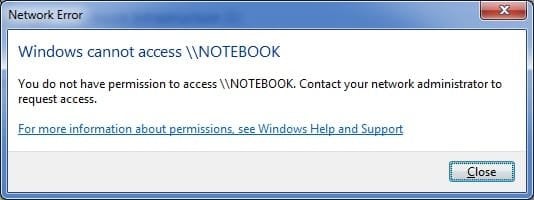
I have one Win XP machine and one Win7 machine. They can see and ping each other. However, the Win7 machine is unable to access the XP machine. When i double-click on the machine in Win7, I get an "Windows cannot access \\NOTEBOOK - you do not have permission" error. The other way round, everything works fine - from the XP machine, I can do all the things i want...

Some Information on the XP machine: Win XP SP3 Home, Avast Anti-Virus (as on the Win7 machine), Windows built-in firewall.


Any suggestions?
 

Attachments
  • screen_1.jpg
    screen_1.jpg
    15 KB · Views: 61
Last edited:

My Computer

Computer Manufacturer/Model Number
Built on my own
OS
Windows 7 Ultimate RC
CPU
Intel Core2Duo E6600
Motherboard
ASUS P5B Wifi-Deluxe AP, Bios 1212
Memory
4 GB DDR2-800
Graphics Card(s)
GeForce 7600GT 256 MB
Sound Card
SB Audigy
Monitor(s) Displays
Samtron 92B
Hard Drives
2x 300 GB Hitachi
PSU
480 Watts SilentPower
Case
Coolermaster
Cooling
Coolermaster

My Computer

Computer Manufacturer/Model Number
Too many to list.
OS
XP, Seven, 2008R2
CPU
AMD, Intel, VIA
Motherboard
Various
Memory
Corsair, Kingston, etc.
Graphics Card(s)
ATI, NVIDIA
Monitor(s) Displays
Samsung
Hard Drives
Maxtor, Western Digital
Keyboard
qwerty
Internet Speed
22 Mb/s @ home, 1 Gb/s @ server
Other Info
All of my systems still run fastest on XP 32-bit for the most part. Win7 is fun to play with, but I still prefer XP for raw speed, security, and functionality.
Disable firewall on xp machine and see if it works,if doesn't work maybe you have problems with permissions on xp machine!
 

My Computer

Computer Manufacturer/Model Number
Fujitsu Siemens
OS
XP SP2
CPU
Intel Celeron D 3.07 GHz
Motherboard
/
Memory
1GB
Graphics Card(s)
Nvidia GeForce 6200 SE 256mb
Sound Card
Realtek
Monitor(s) Displays
17 "
Screen Resolution
1280x1024
Hard Drives
160GB
Internet Speed
2mb
It's not a firewall problem, just to get that out of the way. You'd get something more like "Network path not found" error if it was.

His error is typical when anonymous access has been disabled (which is a good thing for security but bad if you don't know how to use it).
 

My Computer

Computer Manufacturer/Model Number
Too many to list.
OS
XP, Seven, 2008R2
CPU
AMD, Intel, VIA
Motherboard
Various
Memory
Corsair, Kingston, etc.
Graphics Card(s)
ATI, NVIDIA
Monitor(s) Displays
Samsung
Hard Drives
Maxtor, Western Digital
Keyboard
qwerty
Internet Speed
22 Mb/s @ home, 1 Gb/s @ server
Other Info
All of my systems still run fastest on XP 32-bit for the most part. Win7 is fun to play with, but I still prefer XP for raw speed, security, and functionality.
Hi folks,

got the following weird problem on my network:

I have one Win XP machine and one Win7 machine. They can see and ping each other. However, the Win7 machine is unable to access the XP machine. When i double-click on the machine in Win7, I get an "Windows cannot access \\NOTEBOOK - you do not have permission" error. The other way round, everything works fine - from the XP machine, I can do all the things i want...

Some Information on the XP machine: Win XP SP3 Home, Avast Anti-Virus (as on the Win7 machine), Windows built-in firewall.

Any suggestions?

This is a common issue when using XP with Vista or 7. I've always found that creating identical users and passwords on all machines, then disabling simple file sharing on XP machines, tends to solve these issues.
 

My Computer

Computer Manufacturer/Model Number
Dell XPS 15 L502x
OS
Windows 7 Ultimate x64 SP1
CPU
Core i7-2670QM
Memory
8GB DDR3 PC3-10600
Graphics Card(s)
Intel HD Graphics 3000 + GeForce GT 540M
Screen Resolution
1920x1080
Hard Drives
1TB 5400RPM Seagate
Yes that will solve the problem too. +rep for you

It's similar to how I setup my shares at home. But I do not create the same accounts on all machines (it's unnecessary) because if setup correctly the computer will ask you for a username and password when you try to access it from Network.
 

My Computer

Computer Manufacturer/Model Number
Too many to list.
OS
XP, Seven, 2008R2
CPU
AMD, Intel, VIA
Motherboard
Various
Memory
Corsair, Kingston, etc.
Graphics Card(s)
ATI, NVIDIA
Monitor(s) Displays
Samsung
Hard Drives
Maxtor, Western Digital
Keyboard
qwerty
Internet Speed
22 Mb/s @ home, 1 Gb/s @ server
Other Info
All of my systems still run fastest on XP 32-bit for the most part. Win7 is fun to play with, but I still prefer XP for raw speed, security, and functionality.
Yes that will solve the problem too. +rep for you

It's similar to how I setup my shares at home. But I do not create the same accounts on all machines (it's unnecessary) because if setup correctly the computer will ask you for a username and password when you try to access it from Network.

Yep, that's true. To avoid having to input credentials, (and since it's entirely possible the same user will use each computer at some point anyway) I just create identical users - sort of like being part of a domain controller/active directory, where users can log into any machine that belongs to the domain.
 

My Computer

Computer Manufacturer/Model Number
Dell XPS 15 L502x
OS
Windows 7 Ultimate x64 SP1
CPU
Core i7-2670QM
Memory
8GB DDR3 PC3-10600
Graphics Card(s)
Intel HD Graphics 3000 + GeForce GT 540M
Screen Resolution
1920x1080
Hard Drives
1TB 5400RPM Seagate
Ah yes. Very good distinction. That is the very essence of workgroups and domains.

Now we have homegroups.. The problem is, most people still can't figure it out. :/ So I think Microsoft could have done a better job in the area of file sharing.
 

My Computer

Computer Manufacturer/Model Number
Too many to list.
OS
XP, Seven, 2008R2
CPU
AMD, Intel, VIA
Motherboard
Various
Memory
Corsair, Kingston, etc.
Graphics Card(s)
ATI, NVIDIA
Monitor(s) Displays
Samsung
Hard Drives
Maxtor, Western Digital
Keyboard
qwerty
Internet Speed
22 Mb/s @ home, 1 Gb/s @ server
Other Info
All of my systems still run fastest on XP 32-bit for the most part. Win7 is fun to play with, but I still prefer XP for raw speed, security, and functionality.
Ah yes. Very good distinction. That is the very essence of workgroups and domains.

Now we have homegroups.. The problem is, most people still can't figure it out. :/ So I think Microsoft could have done a better job in the area of file sharing.

There will always be people that can't share files, but I think Homegroups are definitely much easier for people to understand than current sharing techniques! It's easy to create a Homegroup, and it's easy to join one, but unless you know where to look, it's not very obvious to an average computer user. That's why there are user groups like this one, to help people out in their time of need! (I bet the retail version will come with a very nice Homegroup section in the manual - too bad I've never purchased a retail version to know what that manual would look like!)
 

My Computer

Computer Manufacturer/Model Number
Dell XPS 15 L502x
OS
Windows 7 Ultimate x64 SP1
CPU
Core i7-2670QM
Memory
8GB DDR3 PC3-10600
Graphics Card(s)
Intel HD Graphics 3000 + GeForce GT 540M
Screen Resolution
1920x1080
Hard Drives
1TB 5400RPM Seagate
I have tried setting the u/p to be identical on both machines. I can see and access the 7 machine fine from the XP machine, but going the other way I get: "You do not have permission to access \\Laptop. Contact your network administrator to request access.
It amazes me that Microsoft would throw such a roadblock into a (usually) easy problem to solve. BTW, I tried the registry patch. It didn't help.
 
Last edited:

My Computer

OS
Windows 7
Hey Phil, Are you an administrator on both machines? (Ken question)
 

My Computer

Computer Manufacturer/Model Number
Dell Vostro 220 mini
OS
Windows 7 Pro. 32 bit
CPU
2.93 GHz E7500 Intel Core 2 Duo
Motherboard
Dell
Memory
2 GB
Graphics Card(s)
Intel G45/G43
Sound Card
Realtek High Def.
Monitor(s) Displays
17" acer (I know...its bad)
Screen Resolution
1024x768
Hard Drives
WD 250 GB
Keyboard
Dell L100
Mouse
Dell optical (standard)
Internet Speed
100 Mbps 11.91 dl 12.46 ul
Other Info
Have questions, just ask.
Is your laptop shared? The hard drive or a specific folder on the drive?

Also are you working in homegroup or a workgroup?
 

My Computer

Computer Manufacturer/Model Number
Dell Vostro 220 mini
OS
Windows 7 Pro. 32 bit
CPU
2.93 GHz E7500 Intel Core 2 Duo
Motherboard
Dell
Memory
2 GB
Graphics Card(s)
Intel G45/G43
Sound Card
Realtek High Def.
Monitor(s) Displays
17" acer (I know...its bad)
Screen Resolution
1024x768
Hard Drives
WD 250 GB
Keyboard
Dell L100
Mouse
Dell optical (standard)
Internet Speed
100 Mbps 11.91 dl 12.46 ul
Other Info
Have questions, just ask.
And, as far as I can tell, Homegroups are a Windows 7 creation, so if I want my painless network back, I can 'upgrade' all my hardware and OSes to Win 7. Thanks a bunch, Micro$oft.

XP to XP was so easy.
 

My Computer

Computer Manufacturer/Model Number
Dell Studio 15 Notebook
OS
Windows 7 Home Premium
CPU
Intel Core2 Duo P8600 2.40 GHz
Memory
4 GB
Graphics Card(s)
Mobile Intel 4 Series Express Chipset Family
Monitor(s) Displays
Generic LCD
Internet Speed
4.5 MBit/sec DSL
Other Info
Dell Wireless 370 Bluetooth Mini-card
Intel WiFi 5100 AGN
Broadcomm Netlink Gigabit Ethernet
Point,
Homegroup is a windows 7 only choice. If you want to network XP with windows 7 all you have to do is put them in the same workgroup.
 

My Computer

Computer Manufacturer/Model Number
Dell Vostro 220 mini
OS
Windows 7 Pro. 32 bit
CPU
2.93 GHz E7500 Intel Core 2 Duo
Motherboard
Dell
Memory
2 GB
Graphics Card(s)
Intel G45/G43
Sound Card
Realtek High Def.
Monitor(s) Displays
17" acer (I know...its bad)
Screen Resolution
1024x768
Hard Drives
WD 250 GB
Keyboard
Dell L100
Mouse
Dell optical (standard)
Internet Speed
100 Mbps 11.91 dl 12.46 ul
Other Info
Have questions, just ask.
CHECKLIST - Network sharing troubleshooting

Hi All,

I thought I'd post a quick checklist on network sharing troubleshooting for home users. It should be good for the last 3 versions of windows at least. I also dropped it into a text file and attached if anyone wanted to keep a copy. :-)

This contains a few things to check that have not yet been covered in this thread.

A few small points, although I agree that these things can help if you are stuck....
- You can share Win7 and XP without them being in the same workgroup.
- You don't need to have the same user name or password.

=CHECKLIST=

SERVICES
Check that the following are running and automatic
- Computer Browser
- Server (if it exists)
- Workstation
- Event Viewer (to fin problems)

GUEST ACCOUNT
The win7 and XP machines don't actually need to be in the same workgroup providing that the guest account is active. To check this
-START
-RUN
-CMD [ENTER] (admin mode for Vista/Win7)
-type 'net user guest' (it should tell you if the account is active)
-If not active, make it active by typing 'net user guest /active:yes'

SECURITY POLICY
Check permissions by opening the secpol.msc from RUN
-START
-RUN
-Secpol.msc [ENTER]
-Security Settings\Local Policies\User Rights Assignment
NOTE: [Double click on the line to adjust the settings]
-In 'Access this computer from the network' ensure that 'Everyone' user is added (this is the win7 default anyway; but worth a look)
-On the computer that you need to connect to, check the 'Deny access to this computer from the network' setting. Ensure that this doesn't have guest in it (by default windows 7 does). If you only share from Win7->XP you can leave guest denied on the win7 box.

CONNECTION PROPERTIES
Check that 'File and Printer Sharing for Microsoft Networks' is installed and enabled
- Open Network connections and right click on the Network Connection
- Check the Networking tab and install or enable

NETBIOS IP4
(if WINS is needed only - not for vista->vista and above)
Check that NETBIOS is set to default on IP4 connections
- Open network connections and right click on the connection
- Select Internet Protocol version 4
- CLick properties
- On the general tab, click advanced
- On the wins tab, check that NETBIOS is on default

FIREWALL EXCEPTIONS
Ensure that there is an exception for file and printer sharing on your firewall.

SHARED FOLDERS
Check that you have a folder security and share permissions to enable that folder to be found

I hope this helps someone


-
 

Attachments

My Computer

Computer Manufacturer/Model Number
Custom Hack job
OS
Windows 7 Ultimate 64 bit
CPU
Intel(R) Core(TM)2 Quad CPU Q8200 @ 2.33GHz
Motherboard
GigaByte EP45-UD3
Memory
8 GB Kingston
Graphics Card(s)
Nvidia GeForce 9600GT
Sound Card
Soundblaster Audigy
Monitor(s) Displays
AOC x2 22"
Hard Drives
2 x Samsung 500GB (RAID)
2 x Samsung 2TB
1 x WD Green 2TB
1 x Seagate 1TB
1 x Samsung 500GB
PSU
Thermaltake QFan 750W
Case
CM Scout Gaming
Cooling
Coolermaster V10
Keyboard
Microsoft Wireless Keyboard 1000
Mouse
Microsoft Wireless Optical 2000
Internet Speed
320
Other Info
Winfast PVR2000CP
LG DVD-RAM DVD/RW/DL Super Multi
Linksys WMP300Nx2 Wireless Adapter
Where is the "run" command on Windows 7??
The more I usw W7, the less I like it.

Never mind. I found where Micro$oft hid it...

Tim, your suggestions worked! Thank you. Valuable lessons there.
 

My Computer

OS
Windows 7
Where is the "run" command on Windows 7??
The more I usw W7, the less I like it.

Never mind. I found where Micro$oft hid it...

Tim, your suggestions worked! Thank you. Valuable lessons there.

You're welcome!

re:the RUN command: I like to think that part of the fun of a new OS.... is finding stuff like this :D
 

My Computer

Computer Manufacturer/Model Number
Custom Hack job
OS
Windows 7 Ultimate 64 bit
CPU
Intel(R) Core(TM)2 Quad CPU Q8200 @ 2.33GHz
Motherboard
GigaByte EP45-UD3
Memory
8 GB Kingston
Graphics Card(s)
Nvidia GeForce 9600GT
Sound Card
Soundblaster Audigy
Monitor(s) Displays
AOC x2 22"
Hard Drives
2 x Samsung 500GB (RAID)
2 x Samsung 2TB
1 x WD Green 2TB
1 x Seagate 1TB
1 x Samsung 500GB
PSU
Thermaltake QFan 750W
Case
CM Scout Gaming
Cooling
Coolermaster V10
Keyboard
Microsoft Wireless Keyboard 1000
Mouse
Microsoft Wireless Optical 2000
Internet Speed
320
Other Info
Winfast PVR2000CP
LG DVD-RAM DVD/RW/DL Super Multi
Linksys WMP300Nx2 Wireless Adapter
☻☻☻☻

No extra need... Just follow the following easy steps.

In Windows XP machine,
♣ Goto Tools > Folder Options
♣ Click View
♣ Remove the Check mark from " Use simple file sharing (Recommended)"
♣ Now access this XP machine from any system on network ... ""make sure password on any one account is given on Windows XP machine...

♠♠♠♠ Hopefully Issue is solved noW ♠♠♠♠
 

My Computer

OS
Windows 7 Professional x64
Back
Top