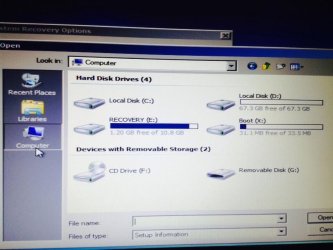
Windows 7 maybe thinks it's on (E:) and not (C:)

Attachments

  • 1549464_198055590392352_1295288071_n.jpg
    1549464_198055590392352_1295288071_n.jpg
    42.5 KB · Views: 0
Last edited:

My Computer My Computer

At a glance

Windows 7 Home Premium8gb ramNvidia 1gb
Computer type
Laptop
Computer Manufacturer/Model Number
Dell
OS
Windows 7 Home Premium
Memory
8gb ram
Graphics Card(s)
Nvidia 1gb
Hard Drives
1tb
Use Partition Wizard boot disk and the Win7 disk to do the steps I just gave you if you have not, then post back a camera snap of PW drive map showing all listings clearly.

Try the bootrec commands you mentioned earlier from the 7 disk Command Line accessed by booting the disk, at first screen press Shift + F10 to open Command Box. This may force it to show an install to repair.
 
Use Partition Wizard boot disk and the Win7 disk to do the steps I just gave you if you have not, then post back a camera snap of PW drive map showing all listings clearly.

Try the bootrec commands you mentioned earlier from the 7 disk Command Line accessed by booting the disk, at first screen press Shift + F10 to open Command Box. This may force it to show an install to repair.

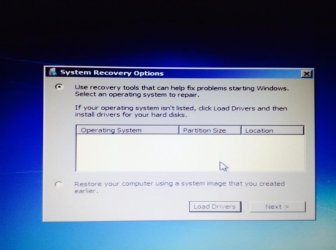
It says Windows will search for an Operating System to repair. my doesn't do anything it just stays like the photo i took before and when i put load drivers this pops out, Insert the installation media for the device and click OK to select the driver and this happens
 

Attachments

  • 1555461_198065867057991_2009499366_n.jpg
    1555461_198065867057991_2009499366_n.jpg
    52.6 KB · Views: 0

My Computer My Computer

At a glance

Windows 7 Home Premium8gb ramNvidia 1gb
Computer type
Laptop
Computer Manufacturer/Model Number
Dell
OS
Windows 7 Home Premium
Memory
8gb ram
Graphics Card(s)
Nvidia 1gb
Hard Drives
1tb
Waiting for any confirmation that you have marked C Active and run three Startup Repairs.

I'd use Partition Wizard boot disk to mark C Active, so you can post back a camera snap of the drive map showing all listings. It is those listings we need to see.

Otherwise use Diskpart from the Win7 disk Command Line to Mark Active then run the 3 repairs. You can access Startup Repair on the next menu even if Win7 doesn't show up in the windows to repair. It may still work. But if it never appears then to force it use the bootrec commands you referenced earlier, but from the disk Command Line.

ANy questions?
 
Waiting for any confirmation that you have marked C Active and run three Startup Repairs.

I'd use Partition Wizard boot disk to mark C Active, so you can post back a camera snap of the drive map showing all listings. It is those listings we need to see.

Otherwise use Diskpart from the Win7 disk Command Line to Mark Active then run the 3 repairs. You can access Startup Repair on the next menu even if Win7 doesn't show up in the windows to repair. It may still work. But if it never appears then to force it use the bootrec commands you referenced earlier, but from the disk Command Line.

ANy questions?

When I run the bootable partition wizard my laptop just restarts it's installed right because i've used the same program before and it gets the the boot menu where i get three options but all three make my computer restart.
 

My Computer My Computer

At a glance

Windows 7 Home Premium8gb ramNvidia 1gb
Computer type
Laptop
Computer Manufacturer/Model Number
Dell
OS
Windows 7 Home Premium
Memory
8gb ram
Graphics Card(s)
Nvidia 1gb
Hard Drives
1tb
Waiting for any confirmation that you have marked C Active and run three Startup Repairs.

I'd use Partition Wizard boot disk to mark C Active, so you can post back a camera snap of the drive map showing all listings. It is those listings we need to see.

Otherwise use Diskpart from the Win7 disk Command Line to Mark Active then run the 3 repairs. You can access Startup Repair on the next menu even if Win7 doesn't show up in the windows to repair. It may still work. But if it never appears then to force it use the bootrec commands you referenced earlier, but from the disk Command Line.

ANy questions?

When I run the bootable partition wizard my laptop just restarts it's installed right because i've used the same program before and it gets the the boot menu where i get three options but all three make my computer restart.

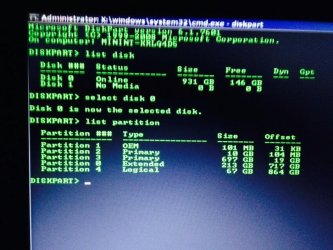
Alright i used the other option and here are my partitions.
 

Attachments

  • 1044515_198088820389029_1143793608_n (1).jpg
    1044515_198088820389029_1143793608_n (1).jpg
    79.2 KB · Views: 1

My Computer My Computer

At a glance

Windows 7 Home Premium8gb ramNvidia 1gb
Computer type
Laptop
Computer Manufacturer/Model Number
Dell
OS
Windows 7 Home Premium
Memory
8gb ram
Graphics Card(s)
Nvidia 1gb
Hard Drives
1tb
Confirm you have been attempting these repairs from the booted Win7 disk.

In diskpart from where you are now in screenshot type:

Sel Part 1

Detail Part

Is it marked Active?

If not type:

Active

Then run Startup Repair 3 separate times, with reboots, no matter what it reports..
 
Last edited:
Confirm you have been attempting these repairs from the booted Win7 disk.

In diskpart from where you are now in screenshot type:

Sel Part 1

Detail

Is it marked Active?

If not type:

Active

Then run Startup Repair 3 separate times, with reboots, no matter what it reports..Wait this is edited didnt you just say to reset the bios to default or did i see that somewhere else??

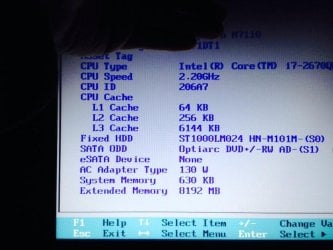
Reset to default here is what it looks like
 

Attachments

  • 1505158_198090477055530_619152260_n.jpg
    1505158_198090477055530_619152260_n.jpg
    59.6 KB · Views: 0
Last edited:

My Computer My Computer

At a glance

Windows 7 Home Premium8gb ramNvidia 1gb
Computer type
Laptop
Computer Manufacturer/Model Number
Dell
OS
Windows 7 Home Premium
Memory
8gb ram
Graphics Card(s)
Nvidia 1gb
Hard Drives
1tb
Elsewhere under storage there should be a SATA controller setting. You may need to highlight it and click Enter to see if you can change it's setting. What are the choices?
 
Elsewhere under storage there should be a SATA controller setting. You may need to highlight it and click Enter to see if you can change it's setting. What are the choices?

I guess its SATA operation and it says ATA & AHCI
 

My Computer My Computer

At a glance

Windows 7 Home Premium8gb ramNvidia 1gb
Computer type
Laptop
Computer Manufacturer/Model Number
Dell
OS
Windows 7 Home Premium
Memory
8gb ram
Graphics Card(s)
Nvidia 1gb
Hard Drives
1tb
If three Startup Repairs don't fix it then I'd cut my losses and rescue files using the booted Win7 disk via Copy & Paste - in Windows Recovery Console or Paragon Rescue Kit Free Edition 11.0 Free CD.

Then do a Clean Reinstall - Factory OEM Windows 7 making sure to read over and understand all the steps first, especially the Note to Dell OWners at the end.

I'm going to try Paragon since my Local Disk says I have no users and it also says in the command prompt I have 0 windows installations
 

My Computer My Computer

At a glance

Windows 7 Home Premium8gb ramNvidia 1gb
Computer type
Laptop
Computer Manufacturer/Model Number
Dell
OS
Windows 7 Home Premium
Memory
8gb ram
Graphics Card(s)
Nvidia 1gb
Hard Drives
1tb
If you try lis vol at diskpart instead of lis par, hopefully you will see which is active and the letters assigned to your windows volume and your active volume.

Then worth exiting diskaprt and running :

bcdboot windowsvolumeletter:\windows /s activevolumeletter:

E.G.

bcdboot E:\windows /s C:

bootsect /nt60 all /mbr

See if that helps.

If not, then do as Greg suggests and clean reinstall.
 

My Computers My Computers

  • At a glance

    7 X64i5 84002x8gb 3200mhz
    Computer type
    PC/Desktop
    OS
    7 X64
    CPU
    i5 8400
    Motherboard
    gigabyte b365m ds3h
    Memory
    2x8gb 3200mhz
    Hard Drives
    various
    PSU
    pure power 11 400w cm
    Case
    Coolermaster
    Cooling
    cryorig m9i
  • At a glance

    7x64g54008gb ddr4 2400
    Computer type
    PC/Desktop
    OS
    7x64
    CPU
    g5400
    Motherboard
    ga b365m ds3h
    Memory
    8gb ddr4 2400
    PSU
    xfx pro 450w
So if I do a clean reinstall I will get Windows 7 back but no my files right?
 

My Computer My Computer

At a glance

Windows 7 Home Premium8gb ramNvidia 1gb
Computer type
Laptop
Computer Manufacturer/Model Number
Dell
OS
Windows 7 Home Premium
Memory
8gb ram
Graphics Card(s)
Nvidia 1gb
Hard Drives
1tb
Normally it will save the existing contents into a folder called windows.old if you don't format the install partition.

Try the above 2 commands first .
 

My Computers My Computers

  • At a glance

    7 X64i5 84002x8gb 3200mhz
    Computer type
    PC/Desktop
    OS
    7 X64
    CPU
    i5 8400
    Motherboard
    gigabyte b365m ds3h
    Memory
    2x8gb 3200mhz
    Hard Drives
    various
    PSU
    pure power 11 400w cm
    Case
    Coolermaster
    Cooling
    cryorig m9i
  • At a glance

    7x64g54008gb ddr4 2400
    Computer type
    PC/Desktop
    OS
    7x64
    CPU
    g5400
    Motherboard
    ga b365m ds3h
    Memory
    8gb ddr4 2400
    PSU
    xfx pro 450w
Normally it will save the existing contents into a folder called windows.old if you don't format the install partition.

Try the above 2 commands first .
Alright I ran it and it says Volume 3 F OS NTFS Partion 697gb so i guess it's on F: could you give me the exact command line
 

My Computer My Computer

At a glance

Windows 7 Home Premium8gb ramNvidia 1gb
Computer type
Laptop
Computer Manufacturer/Model Number
Dell
OS
Windows 7 Home Premium
Memory
8gb ram
Graphics Card(s)
Nvidia 1gb
Hard Drives
1tb
Normally it will save the existing contents into a folder called windows.old if you don't format the install partition.

Try the above 2 commands first .
Alright I ran it and it says Volume 3 F OS NTFS Partion 697gb so i guess it's on F: could you give me the exact command line

Here is a photo of what I see
 

Attachments

  • 1546151_198105730387338_432242483_n.jpg
    1546151_198105730387338_432242483_n.jpg
    76.2 KB · Views: 1

My Computer My Computer

At a glance

Windows 7 Home Premium8gb ramNvidia 1gb
Computer type
Laptop
Computer Manufacturer/Model Number
Dell
OS
Windows 7 Home Premium
Memory
8gb ram
Graphics Card(s)
Nvidia 1gb
Hard Drives
1tb
I would not count on Windows.old saving your files if you don't format the partition before install, too risky.

I would rescue your files first if you value them.

If you can get into Startup Repair as your screenshot shows you can, then you should be able to browse for your files to copy them to external flash as shown in Copy & Paste - in Windows Recovery Console.

But first try SIW2's commands.
 
Looking at that pic, I would try:

diskpart
(press enter)

sel vol f
(press enter)

act
(press enter)

exi
(press enter)

bcdboot f:\windows /s f:

(press enter)

bootsect /nt60 all /mbr

(press enter)


Worth a go. Sometimes the commands do the job when startup repair can't figure out what to do.
 

My Computers My Computers

  • At a glance

    7 X64i5 84002x8gb 3200mhz
    Computer type
    PC/Desktop
    OS
    7 X64
    CPU
    i5 8400
    Motherboard
    gigabyte b365m ds3h
    Memory
    2x8gb 3200mhz
    Hard Drives
    various
    PSU
    pure power 11 400w cm
    Case
    Coolermaster
    Cooling
    cryorig m9i
  • At a glance

    7x64g54008gb ddr4 2400
    Computer type
    PC/Desktop
    OS
    7x64
    CPU
    g5400
    Motherboard
    ga b365m ds3h
    Memory
    8gb ddr4 2400
    PSU
    xfx pro 450w
Back
Top