Solved Windows 7, multiple UAC problems

ABM

New member
Local time
2:45 AM
Messages
14
Hi,
I've been facing some problems with UAC for over a year. I tried solving it myself initially but failed. So I ignored the problem for a year as it didn't bother me too much, but need to get it solved now as it has come in the way of my work.

I'm using Windows 7 Ultimate x64 SP1 on a Dell Precision T3500 Workstation.

Everything was working great until one day I noticed something had changed when I right clicked on any shortcut icon: Run as admin user.jpg
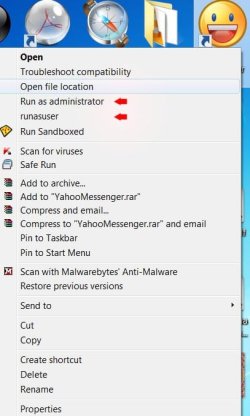
The shield icon next to the "Run as administrator" option was missing and there was a new option there called "runasuser".

When I click on either option, I get this message:
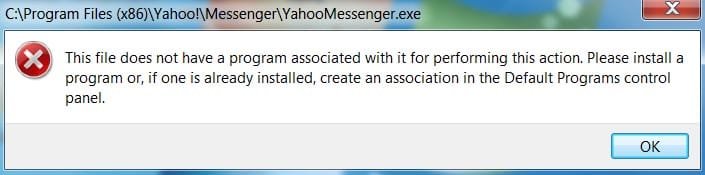
Error.jpg

I tried doing a system restore but it failed and on restart I got a similar message. System restore never worked after that. Also have trouble installing some applications and running some programs like team viewer or time trackers.
Timetracker problem message.jpg

I'm also unable to change UAC settings here:UAC Settings.jpg
I can move the slider but nothing happens when I click the OK button. And the slider is back to where it was when I close and open the window again. But I was able to get around this using the program TweakUAC.

The resource monitor button in the task manager does nothing when clicked:
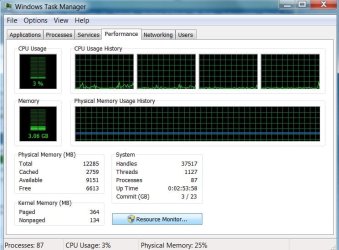
Resource monitor.jpg

When I right click on a shortcut and clicked on Advanced properties, the options are always disabled. Even when I am on an Administrator user account.
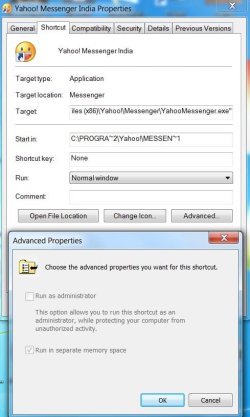
run as admin disabled.jpg

These are the problems I noticed and appear to persist whether I am on a Standard user account or Administrator account. I believe they are all linked? I tried searching everywhere but was unable to get much info on this problem. It will really be great if somebody can let me know what's going on and what I should do.

Thanks in advance!
 

My Computer

Computer Manufacturer/Model Number
Dell Precision Workstation T3500
OS
Windows 7 Ultimate x64 SP1
CPU
Intel(R) Xeon(R) CPU W3530 (4 CPUs), ~2.8GHz
Memory
12GB RAM
Graphics Card(s)
nVidia Quadro FX 3800
Sound Card
Creative SB X-Fi
Monitor(s) Displays
Alienware AW2310
Keyboard
Dell USB Multimedia Pro Keyboard
Mouse
Dell 6-button USB Laser Mouse
Other Info
Wacom Intuos 4 Medium
Yes I think they are all related. But of course not 100% sure.
Can you open http://www.sevenforums.com/tutorials/783-elevated-command-prompt.html
Or is opening an adminstrator command prompt impossible? If impossible is th built-in admin account enabled. Log on as user called "administrator" and open a command pormpt normally.

Is that working?
 

My Computer

Computer type
Laptop
Computer Manufacturer/Model Number
ACER ASPIRE 5742G
OS
Microsoft Windows 7 Home Premium 64-bits 7601 Multiprocessor Free Service Pack 1
CPU
Intel(R) Core(TM) i3 CPU M 370 @ 2.40GHz
Motherboard
Acer Aspire 5742G
Memory
4,00 GB
Graphics Card(s)
ATI Mobility Radeon HD 5400 Series
Sound Card
(1) AMD High Definition Audio Device (2) Realtek High Defi
Screen Resolution
1366 x 768 x 32 bits (4294967296 colors) @ 60 Hz
Hard Drives
WDC WD5000BEVT-22ZAT0
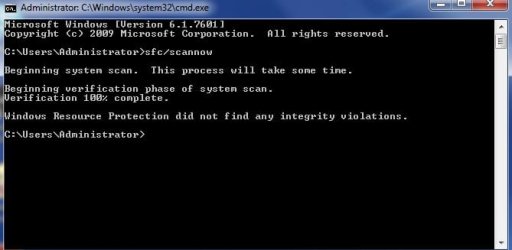
When in elevated command prompt:

sfc/scannow

post results
 

My Computer

Computer type
Laptop
Computer Manufacturer/Model Number
ACER ASPIRE 5742G
OS
Microsoft Windows 7 Home Premium 64-bits 7601 Multiprocessor Free Service Pack 1
CPU
Intel(R) Core(TM) i3 CPU M 370 @ 2.40GHz
Motherboard
Acer Aspire 5742G
Memory
4,00 GB
Graphics Card(s)
ATI Mobility Radeon HD 5400 Series
Sound Card
(1) AMD High Definition Audio Device (2) Realtek High Defi
Screen Resolution
1366 x 768 x 32 bits (4294967296 colors) @ 60 Hz
Hard Drives
WDC WD5000BEVT-22ZAT0
Thanks for the quick reply Kaktussoft. It was impossible to open an elevated command prompt as a Standard user like you had guessed. I got the same error message. So I logged on to the user called "Administrator" and could run the command normally.
Results:
Scan results.jpg
 

My Computer

Computer Manufacturer/Model Number
Dell Precision Workstation T3500
OS
Windows 7 Ultimate x64 SP1
CPU
Intel(R) Xeon(R) CPU W3530 (4 CPUs), ~2.8GHz
Memory
12GB RAM
Graphics Card(s)
nVidia Quadro FX 3800
Sound Card
Creative SB X-Fi
Monitor(s) Displays
Alienware AW2310
Keyboard
Dell USB Multimedia Pro Keyboard
Mouse
Dell 6-button USB Laser Mouse
Other Info
Wacom Intuos 4 Medium
User "administrator" has admin rights by default. No UAC prompt will be shown. Everything works fine here (check things that don't work previously)?

Do you see a UAC-prompt to confirm (under own account) or just the error message?
Same problem for all accounts? New created accounts? Create them when logged on as user Administrator
 

My Computer

Computer type
Laptop
Computer Manufacturer/Model Number
ACER ASPIRE 5742G
OS
Microsoft Windows 7 Home Premium 64-bits 7601 Multiprocessor Free Service Pack 1
CPU
Intel(R) Core(TM) i3 CPU M 370 @ 2.40GHz
Motherboard
Acer Aspire 5742G
Memory
4,00 GB
Graphics Card(s)
ATI Mobility Radeon HD 5400 Series
Sound Card
(1) AMD High Definition Audio Device (2) Realtek High Defi
Screen Resolution
1366 x 768 x 32 bits (4294967296 colors) @ 60 Hz
Hard Drives
WDC WD5000BEVT-22ZAT0
I checked the other things that didn't work previously. but they are not working in the administrator user account too.

I didn't see UAC-prompt to confirm but just the error message. Also created new accounts and had the same problem. I will log on to administrator and create a new account and let you know what happens.
 

My Computer

Computer Manufacturer/Model Number
Dell Precision Workstation T3500
OS
Windows 7 Ultimate x64 SP1
CPU
Intel(R) Xeon(R) CPU W3530 (4 CPUs), ~2.8GHz
Memory
12GB RAM
Graphics Card(s)
nVidia Quadro FX 3800
Sound Card
Creative SB X-Fi
Monitor(s) Displays
Alienware AW2310
Keyboard
Dell USB Multimedia Pro Keyboard
Mouse
Dell 6-button USB Laser Mouse
Other Info
Wacom Intuos 4 Medium
I created a new user account while I was on administrator account, but it has the same problems too.
 

My Computer

Computer Manufacturer/Model Number
Dell Precision Workstation T3500
OS
Windows 7 Ultimate x64 SP1
CPU
Intel(R) Xeon(R) CPU W3530 (4 CPUs), ~2.8GHz
Memory
12GB RAM
Graphics Card(s)
nVidia Quadro FX 3800
Sound Card
Creative SB X-Fi
Monitor(s) Displays
Alienware AW2310
Keyboard
Dell USB Multimedia Pro Keyboard
Mouse
Dell 6-button USB Laser Mouse
Other Info
Wacom Intuos 4 Medium
In administor account open regedit goto key HKEY_CLASSES_ROOT\exefile ane export it. Do you see this? Especially focus on the bolded text

Windows Registry Editor Version 5.00
[HKEY_CLASSES_ROOT\exefile]
@="Application"
"EditFlags"=hex:38,07,00,00
"FriendlyTypeName"=hex(2):40,00,25,00,53,00,79,00,73,00,74,00,65,00,6d,00,52,\
00,6f,00,6f,00,74,00,25,00,5c,00,53,00,79,00,73,00,74,00,65,00,6d,00,33,00,\
32,00,5c,00,73,00,68,00,65,00,6c,00,6c,00,33,00,32,00,2e,00,64,00,6c,00,6c,\
00,2c,00,2d,00,31,00,30,00,31,00,35,00,36,00,00,00
[HKEY_CLASSES_ROOT\exefile\DefaultIcon]
@="%1"
[HKEY_CLASSES_ROOT\exefile\shell]
[HKEY_CLASSES_ROOT\exefile\shell\open]
"EditFlags"=hex:00,00,00,00
[HKEY_CLASSES_ROOT\exefile\shell\open\command]
@="\"%1\" %*"
"IsolatedCommand"="\"%1\" %*"
[HKEY_CLASSES_ROOT\exefile\shell\runas]
"HasLUAShield"=""
[HKEY_CLASSES_ROOT\exefile\shell\runas\command]
@="\"%1\" %*"
"IsolatedCommand"="\"%1\" %*"
[HKEY_CLASSES_ROOT\exefile\shell\runasuser]
@="@shell32.dll,-50944"
"Extended"=""
"SuppressionPolicyEx"="{F211AA05-D4DF-4370-A2A0-9F19C09756A7}"
[HKEY_CLASSES_ROOT\exefile\shell\runasuser\command]
"DelegateExecute"="{ea72d00e-4960-42fa-ba92-7792a7944c1d}"
[HKEY_CLASSES_ROOT\exefile\shellex]
[HKEY_CLASSES_ROOT\exefile\shellex\ContextMenuHandlers]
@="Compatibility"
[HKEY_CLASSES_ROOT\exefile\shellex\ContextMenuHandlers\Compatibility]
@="{1d27f844-3a1f-4410-85ac-14651078412d}"
[HKEY_CLASSES_ROOT\exefile\shellex\DropHandler]
@="{86C86720-42A0-1069-A2E8-08002B30309D}"
[HKEY_CLASSES_ROOT\exefile\shellex\PropertySheetHandlers]
[HKEY_CLASSES_ROOT\exefile\shellex\PropertySheetHandlers\ShimLayer Property Page]
@="{513D916F-2A8E-4F51-AEAB-0CBC76FB1AF8}"
[HKEY_CLASSES_ROOT\exefile\shellex\PropertySheetHandlers\{B41DB860-64E4-11D2-9906-E49FADC173CA}]
@=""
[HKEY_CLASSES_ROOT\exefile\shellex\PropertySheetHandlers\{B41DB860-8EE4-11D2-9906-E49FADC173CA}]
@=""
 

My Computer

Computer type
Laptop
Computer Manufacturer/Model Number
ACER ASPIRE 5742G
OS
Microsoft Windows 7 Home Premium 64-bits 7601 Multiprocessor Free Service Pack 1
CPU
Intel(R) Core(TM) i3 CPU M 370 @ 2.40GHz
Motherboard
Acer Aspire 5742G
Memory
4,00 GB
Graphics Card(s)
ATI Mobility Radeon HD 5400 Series
Sound Card
(1) AMD High Definition Audio Device (2) Realtek High Defi
Screen Resolution
1366 x 768 x 32 bits (4294967296 colors) @ 60 Hz
Hard Drives
WDC WD5000BEVT-22ZAT0
rightclick on exe file (so not the shorcut!) gives you also on option "runasuser" exactly that text?
 

My Computer

Computer type
Laptop
Computer Manufacturer/Model Number
ACER ASPIRE 5742G
OS
Microsoft Windows 7 Home Premium 64-bits 7601 Multiprocessor Free Service Pack 1
CPU
Intel(R) Core(TM) i3 CPU M 370 @ 2.40GHz
Motherboard
Acer Aspire 5742G
Memory
4,00 GB
Graphics Card(s)
ATI Mobility Radeon HD 5400 Series
Sound Card
(1) AMD High Definition Audio Device (2) Realtek High Defi
Screen Resolution
1366 x 768 x 32 bits (4294967296 colors) @ 60 Hz
Hard Drives
WDC WD5000BEVT-22ZAT0
I did as you said and this is what I got -

Windows Registry Editor Version 5.00

[HKEY_CLASSES_ROOT\exefile]
@="Application"
"EditFlags"=hex:38,07,00,00
"FriendlyTypeName"=hex(2):40,00,25,00,53,00,79,00,73,00,74,00,65,00,6d,00,52,\
00,6f,00,6f,00,74,00,25,00,5c,00,53,00,79,00,73,00,74,00,65,00,6d,00,33,00,\
32,00,5c,00,73,00,68,00,65,00,6c,00,6c,00,33,00,32,00,2e,00,64,00,6c,00,6c,\
00,2c,00,2d,00,31,00,30,00,31,00,35,00,36,00,00,00

[HKEY_CLASSES_ROOT\exefile\DefaultIcon]
@="%1"

[HKEY_CLASSES_ROOT\exefile\shell]

[HKEY_CLASSES_ROOT\exefile\shell\Open]

[HKEY_CLASSES_ROOT\exefile\shell\Open\Command]
@="\"%1\" %*"

[HKEY_CLASSES_ROOT\exefile\shell\runas]

[HKEY_CLASSES_ROOT\exefile\shell\runas\command]

[HKEY_CLASSES_ROOT\exefile\shell\runasuser]

[HKEY_CLASSES_ROOT\exefile\shell\runasuser\command]

[HKEY_CLASSES_ROOT\exefile\shellex]

[HKEY_CLASSES_ROOT\exefile\shellex\ContextMenuHandlers]
@="Compatibility"

[HKEY_CLASSES_ROOT\exefile\shellex\ContextMenuHandlers\CmdLineExt]
@="{9869EFB4-18E9-11D3-A837-00104B9E30B5}"

[HKEY_CLASSES_ROOT\exefile\shellex\ContextMenuHandlers\Compatibility]
@="{1d27f844-3a1f-4410-85ac-14651078412d}"

[HKEY_CLASSES_ROOT\exefile\shellex\DropHandler]
@="{86C86720-42A0-1069-A2E8-08002B30309D}"

[HKEY_CLASSES_ROOT\exefile\shellex\PropertySheetHandlers]

[HKEY_CLASSES_ROOT\exefile\shellex\PropertySheetHandlers\ShimLayer Property Page]
@="{513D916F-2A8E-4F51-AEAB-0CBC76FB1AF8}"

[HKEY_CLASSES_ROOT\exefile\shellex\PropertySheetHandlers\{B41DB860-64E4-11D2-9906-E49FADC173CA}]
@=""

[HKEY_CLASSES_ROOT\exefile\shellex\PropertySheetHandlers\{B41DB860-8EE4-11D2-9906-E49FADC173CA}]
@=""
 

My Computer

Computer Manufacturer/Model Number
Dell Precision Workstation T3500
OS
Windows 7 Ultimate x64 SP1
CPU
Intel(R) Xeon(R) CPU W3530 (4 CPUs), ~2.8GHz
Memory
12GB RAM
Graphics Card(s)
nVidia Quadro FX 3800
Sound Card
Creative SB X-Fi
Monitor(s) Displays
Alienware AW2310
Keyboard
Dell USB Multimedia Pro Keyboard
Mouse
Dell 6-button USB Laser Mouse
Other Info
Wacom Intuos 4 Medium
That's right! Even right-clicking on .exe files gives me me theoption "runasuser".
 

My Computer

Computer Manufacturer/Model Number
Dell Precision Workstation T3500
OS
Windows 7 Ultimate x64 SP1
CPU
Intel(R) Xeon(R) CPU W3530 (4 CPUs), ~2.8GHz
Memory
12GB RAM
Graphics Card(s)
nVidia Quadro FX 3800
Sound Card
Creative SB X-Fi
Monitor(s) Displays
Alienware AW2310
Keyboard
Dell USB Multimedia Pro Keyboard
Mouse
Dell 6-button USB Laser Mouse
Other Info
Wacom Intuos 4 Medium
So:

[HKEY_CLASSES_ROOT\exefile\shell\runas]

[HKEY_CLASSES_ROOT\exefile\shell\runas\command]

[HKEY_CLASSES_ROOT\exefile\shell\runasuser]

[HKEY_CLASSES_ROOT\exefile\shell\runasuser\command]

Nothing under them? Like in my text?
A lot is missing! I gonna prepare something.

Post HKEY_CLASSES_ROOT\batfile\shell\runasuser key as well please
 

My Computer

Computer type
Laptop
Computer Manufacturer/Model Number
ACER ASPIRE 5742G
OS
Microsoft Windows 7 Home Premium 64-bits 7601 Multiprocessor Free Service Pack 1
CPU
Intel(R) Core(TM) i3 CPU M 370 @ 2.40GHz
Motherboard
Acer Aspire 5742G
Memory
4,00 GB
Graphics Card(s)
ATI Mobility Radeon HD 5400 Series
Sound Card
(1) AMD High Definition Audio Device (2) Realtek High Defi
Screen Resolution
1366 x 768 x 32 bits (4294967296 colors) @ 60 Hz
Hard Drives
WDC WD5000BEVT-22ZAT0
Yes that's weird!

Thanks very much for your help and time! I really appreciate it.

Key Name: HKEY_CLASSES_ROOT\batfile\shell\runasuser
Class Name: <NO CLASS>
Last Write Time: 14-07-2009 - 10:23
Value 0
Name: <NO NAME>
Type: REG_SZ
Data: @shell32.dll,-50944

Value 1
Name: Extended
Type: REG_SZ
Data:

Value 2
Name: SuppressionPolicyEx
Type: REG_SZ
Data: {F211AA05-D4DF-4370-A2A0-9F19C09756A7}


Key Name: HKEY_CLASSES_ROOT\batfile\shell\runasuser\command
Class Name: <NO CLASS>
Last Write Time: 14-07-2009 - 10:23
Value 0
Name: DelegateExecute
Type: REG_SZ
Data: {ea72d00e-4960-42fa-ba92-7792a7944c1d}
 

My Computer

Computer Manufacturer/Model Number
Dell Precision Workstation T3500
OS
Windows 7 Ultimate x64 SP1
CPU
Intel(R) Xeon(R) CPU W3530 (4 CPUs), ~2.8GHz
Memory
12GB RAM
Graphics Card(s)
nVidia Quadro FX 3800
Sound Card
Creative SB X-Fi
Monitor(s) Displays
Alienware AW2310
Keyboard
Dell USB Multimedia Pro Keyboard
Mouse
Dell 6-button USB Laser Mouse
Other Info
Wacom Intuos 4 Medium
I want you to import a reg file. Do it under under administrator. Still problems with exe? use attachment

{F211AA05-D4DF-4370-A2A0-9F19C09756A7} means not visible. Right clicking exe file (not shortcut) doesn't show runasuser? But does shift-right click do?
ea72d00e-4960-42fa-ba92-7792a7944c1d is also a fixed number on all win7 machines.

Contents:

Windows Registry Editor Version 5.00
[HKEY_CLASSES_ROOT\exefile\shell\open]
"EditFlags"=hex:00,00,00,00
[HKEY_CLASSES_ROOT\exefile\shell\open\command]
@="\"%1\" %*"
"IsolatedCommand"="\"%1\" %*"
[HKEY_CLASSES_ROOT\exefile\shell\runas]
"HasLUAShield"=""
[HKEY_CLASSES_ROOT\exefile\shell\runas\command]
@="\"%1\" %*"
"IsolatedCommand"="\"%1\" %*"
[HKEY_CLASSES_ROOT\exefile\shell\runasuser]
@="@shell32.dll,-50944"
"Extended"=""
"SuppressionPolicyEx"="{F211AA05-D4DF-4370-A2A0-9F19C09756A7}"
[HKEY_CLASSES_ROOT\exefile\shell\runasuser\command]
"DelegateExecute"="{ea72d00e-4960-42fa-ba92-7792a7944c1d}"
------------------
 

Attachments

My Computer

Computer type
Laptop
Computer Manufacturer/Model Number
ACER ASPIRE 5742G
OS
Microsoft Windows 7 Home Premium 64-bits 7601 Multiprocessor Free Service Pack 1
CPU
Intel(R) Core(TM) i3 CPU M 370 @ 2.40GHz
Motherboard
Acer Aspire 5742G
Memory
4,00 GB
Graphics Card(s)
ATI Mobility Radeon HD 5400 Series
Sound Card
(1) AMD High Definition Audio Device (2) Realtek High Defi
Screen Resolution
1366 x 768 x 32 bits (4294967296 colors) @ 60 Hz
Hard Drives
WDC WD5000BEVT-22ZAT0
so bat registry key looks fine? cmd registry key as well? mcs and msi as well? all have a runas and runasuser subkey?

All are keys under HKEY_CLASSES_ROOT for example HKEY_CLASSES_ROOT\cmdfile
All runasuser subkeys must have a subkey Command. If you click on "Command" you see in right pane:
DelegateExecute with value: {ea72d00e-4960-42fa-ba92-7792a7944c1d}
 

My Computer

Computer type
Laptop
Computer Manufacturer/Model Number
ACER ASPIRE 5742G
OS
Microsoft Windows 7 Home Premium 64-bits 7601 Multiprocessor Free Service Pack 1
CPU
Intel(R) Core(TM) i3 CPU M 370 @ 2.40GHz
Motherboard
Acer Aspire 5742G
Memory
4,00 GB
Graphics Card(s)
ATI Mobility Radeon HD 5400 Series
Sound Card
(1) AMD High Definition Audio Device (2) Realtek High Defi
Screen Resolution
1366 x 768 x 32 bits (4294967296 colors) @ 60 Hz
Hard Drives
WDC WD5000BEVT-22ZAT0
Last Write Time: 14-07-2009 - 10:23? That looks like before win7 even existed! Maybe form a standard install and never changed.

How do you see "Last write time" anyway?? Nice feature... want to know how you did that?

Yes that's weird!

Thanks very much for your help and time! I really appreciate it.

Key Name: HKEY_CLASSES_ROOT\batfile\shell\runasuser
Class Name: <NO CLASS>
Last Write Time: 14-07-2009 - 10:23
Value 0
Name: <NO NAME>
Type: REG_SZ
Data: @shell32.dll,-50944

Value 1
Name: Extended
Type: REG_SZ
Data:

Value 2
Name: SuppressionPolicyEx
Type: REG_SZ
Data: {F211AA05-D4DF-4370-A2A0-9F19C09756A7}


Key Name: HKEY_CLASSES_ROOT\batfile\shell\runasuser\command
Class Name: <NO CLASS>
Last Write Time: 14-07-2009 - 10:23
Value 0
Name: DelegateExecute
Type: REG_SZ
Data: {ea72d00e-4960-42fa-ba92-7792a7944c1d}
 

My Computer

Computer type
Laptop
Computer Manufacturer/Model Number
ACER ASPIRE 5742G
OS
Microsoft Windows 7 Home Premium 64-bits 7601 Multiprocessor Free Service Pack 1
CPU
Intel(R) Core(TM) i3 CPU M 370 @ 2.40GHz
Motherboard
Acer Aspire 5742G
Memory
4,00 GB
Graphics Card(s)
ATI Mobility Radeon HD 5400 Series
Sound Card
(1) AMD High Definition Audio Device (2) Realtek High Defi
Screen Resolution
1366 x 768 x 32 bits (4294967296 colors) @ 60 Hz
Hard Drives
WDC WD5000BEVT-22ZAT0
I imported the reg file you prepared under administrator. Wow. No problems with exe anymore! The runasuser option is gone both when right-clicking and shift+right-clicking. The shield next to "Run as administrator" has been restored. The UAC settings are working now. Can also open the resource monitor. Pretty much everything is working as it should! Now I can finally use the time tracker!

That was like a miracle medicine you gave my computer. Thank you very much Kaktussoft! What do you think might have caused the problem? Are there any more steps to be carried out?
 

My Computer

Computer Manufacturer/Model Number
Dell Precision Workstation T3500
OS
Windows 7 Ultimate x64 SP1
CPU
Intel(R) Xeon(R) CPU W3530 (4 CPUs), ~2.8GHz
Memory
12GB RAM
Graphics Card(s)
nVidia Quadro FX 3800
Sound Card
Creative SB X-Fi
Monitor(s) Displays
Alienware AW2310
Keyboard
Dell USB Multimedia Pro Keyboard
Mouse
Dell 6-button USB Laser Mouse
Other Info
Wacom Intuos 4 Medium
Last Write Time: 14-07-2009 - 10:23? That looks like before win7 even existed! Maybe form a standard install and never changed.

How do you see "Last write time" anyway?? Nice feature... want to know how you did that?

Yes that's weird!

Thanks very much for your help and time! I really appreciate it.

Key Name: HKEY_CLASSES_ROOT\batfile\shell\runasuser
Class Name: <NO CLASS>
Last Write Time: 14-07-2009 - 10:23
Value 0
Name: <NO NAME>
Type: REG_SZ
Data: @shell32.dll,-50944

Value 1
Name: Extended
Type: REG_SZ
Data:

Value 2
Name: SuppressionPolicyEx
Type: REG_SZ
Data: {F211AA05-D4DF-4370-A2A0-9F19C09756A7}


Key Name: HKEY_CLASSES_ROOT\batfile\shell\runasuser\command
Class Name: <NO CLASS>
Last Write Time: 14-07-2009 - 10:23
Value 0
Name: DelegateExecute
Type: REG_SZ
Data: {ea72d00e-4960-42fa-ba92-7792a7944c1d}

That's funny I noticed that too... I purchased the computer in 2010 and was wondering where 2009 came from. While exporting the reg file I saved it out as .txt directly. I think that added the last write time bit lol. Not sure :)
 

My Computer

Computer Manufacturer/Model Number
Dell Precision Workstation T3500
OS
Windows 7 Ultimate x64 SP1
CPU
Intel(R) Xeon(R) CPU W3530 (4 CPUs), ~2.8GHz
Memory
12GB RAM
Graphics Card(s)
nVidia Quadro FX 3800
Sound Card
Creative SB X-Fi
Monitor(s) Displays
Alienware AW2310
Keyboard
Dell USB Multimedia Pro Keyboard
Mouse
Dell 6-button USB Laser Mouse
Other Info
Wacom Intuos 4 Medium
I imported the reg file you prepared under administrator. Wow. No problems with exe anymore! The runasuser option is gone both when right-clicking and shift+right-clicking. The shield next to "Run as administrator" has been restored. The UAC settings are working now. Can also open the resource monitor. Pretty much everything is working as it should! Now I can finally use the time tracker!

That was like a miracle medicine you gave my computer. Thank you very much Kaktussoft! What do you think might have caused the problem? Are there any more steps to be carried out?
shift right click show an option "run as onther user now"?
 

My Computer

Computer type
Laptop
Computer Manufacturer/Model Number
ACER ASPIRE 5742G
OS
Microsoft Windows 7 Home Premium 64-bits 7601 Multiprocessor Free Service Pack 1
CPU
Intel(R) Core(TM) i3 CPU M 370 @ 2.40GHz
Motherboard
Acer Aspire 5742G
Memory
4,00 GB
Graphics Card(s)
ATI Mobility Radeon HD 5400 Series
Sound Card
(1) AMD High Definition Audio Device (2) Realtek High Defi
Screen Resolution
1366 x 768 x 32 bits (4294967296 colors) @ 60 Hz
Hard Drives
WDC WD5000BEVT-22ZAT0
Yes :) It gives me the option "Run as different user". I tested this with all user accounts and is working fine.
 

My Computer

Computer Manufacturer/Model Number
Dell Precision Workstation T3500
OS
Windows 7 Ultimate x64 SP1
CPU
Intel(R) Xeon(R) CPU W3530 (4 CPUs), ~2.8GHz
Memory
12GB RAM
Graphics Card(s)
nVidia Quadro FX 3800
Sound Card
Creative SB X-Fi
Monitor(s) Displays
Alienware AW2310
Keyboard
Dell USB Multimedia Pro Keyboard
Mouse
Dell 6-button USB Laser Mouse
Other Info
Wacom Intuos 4 Medium
Back
Top