Windows (7) not allowing me to click "Control Panel"

clubmimo123

New member
Local time
1:06 PM
Messages
46
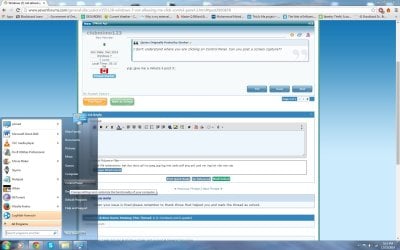
As the title says, windows is for some reason not allowing me to click on "control panel" on the icon from "home".

I have a windows 7 and if im requested to use malwarebytes, please note it is expired. Thank you.
 

My Computer My Computer

At a glance

Windows 7 Ultimate 64-bit 7601 Multiprocessor...Intel(R) Core(TM)2 Duo CPU E6550 @ 2.33GHz4 GB RAMHD Raedon 5700
Computer type
PC/Desktop
Computer Manufacturer/Model Number
custom build
OS
Windows 7 Ultimate 64-bit 7601 Multiprocessor Free Service Pack 1
CPU
Intel(R) Core(TM)2 Duo CPU E6550 @ 2.33GHz
Motherboard
ASUSTeK Computer INC. P5K
Memory
4 GB RAM
Graphics Card(s)
HD Raedon 5700
Sound Card
AMD High Definition Audio Device
Monitor(s) Displays
HP w2207 Wide LCD Monitor
Screen Resolution
1680x1050
Hard Drives
1. Hitachi HDE721064SLA360 ATA Device
2. ST3250620AS ATA Device
Antivirus
Kaspersky Anti-virus
Browser
Google Chrome

My Computer My Computer

At a glance

win7 64bit Ult. using: XP Mode, in English or...8GB - included when purchased.
Computer type
Laptop
OS
win7 64bit Ult. using: XP Mode, in English or Español, SUA, Bitlocker
Memory
8GB - included when purchased.
Monitor(s) Displays
two: Laptop: 1366x768 and HP 1024x768.
Hard Drives
1: 750GB
Keyboard
Second: PS2 connection Compaq kboard, used w/adapter cable.
Mouse
USB mouse.
Antivirus
MS Security Essentials
Other Info
XP Mode Apps used: VC6 C++ and MSDN help as virtual PC apps - one for ea. monitor.
Tri-boot machine. Has Ubuntu 12.04 and Win 8.0 on as well - both used seldomly.
Uninstall the current installed malwarebytes, download and run the latest free version of malwarebytes.
 

My Computer My Computer

At a glance

Windows 10 Pro X64Intel Quad Core i7-4770 @ 3.4Ghz16.0GB PC3-12800 DDR3 SDRAM 1600 MHzIntel Integrated HD Graphics
Computer type
PC/Desktop
Computer Manufacturer/Model Number
Lenovo IdeaCenter 450
OS
Windows 10 Pro X64
CPU
Intel Quad Core i7-4770 @ 3.4Ghz
Memory
16.0GB PC3-12800 DDR3 SDRAM 1600 MHz
Graphics Card(s)
Intel Integrated HD Graphics
Sound Card
Realtek HD Audio
Monitor(s) Displays
HP 22" LCD
Screen Resolution
1680 x 1050
Hard Drives
250GB Samsung EVO SATA-3 SSD
2TB Seagate ST2000DM001 SATA-2
1.5TB Seagate ST3150041AS SATA
Keyboard
Dell USB
Mouse
Lenovo USB
Internet Speed
Cable via Road Runner 3MB Upload, 30MB Download
Antivirus
Windows Defender, MBAM Pro, MBAE
Browser
Seamonkey
Other Info
UEFI/GPT
PLDS DVD-RW DH16AERSH
Yes it does redirect me, but is there a way to fix this issue?

If not, how can this be caused?
 

My Computer My Computer

At a glance

Windows 7 Ultimate 64-bit 7601 Multiprocessor...Intel(R) Core(TM)2 Duo CPU E6550 @ 2.33GHz4 GB RAMHD Raedon 5700
Computer type
PC/Desktop
Computer Manufacturer/Model Number
custom build
OS
Windows 7 Ultimate 64-bit 7601 Multiprocessor Free Service Pack 1
CPU
Intel(R) Core(TM)2 Duo CPU E6550 @ 2.33GHz
Motherboard
ASUSTeK Computer INC. P5K
Memory
4 GB RAM
Graphics Card(s)
HD Raedon 5700
Sound Card
AMD High Definition Audio Device
Monitor(s) Displays
HP w2207 Wide LCD Monitor
Screen Resolution
1680x1050
Hard Drives
1. Hitachi HDE721064SLA360 ATA Device
2. ST3250620AS ATA Device
Antivirus
Kaspersky Anti-virus
Browser
Google Chrome
If you were talking to me.... (?)

Per Ztruker's post.

Hint: When you download and start, you don't have to enable the deluxe Malwarebytes. The basic one does the job fine. Just remember to click at the end of the scan to quarantine all that it finds.
 

My Computer My Computer

At a glance

win7 64bit Ult. using: XP Mode, in English or...8GB - included when purchased.
Computer type
Laptop
OS
win7 64bit Ult. using: XP Mode, in English or Español, SUA, Bitlocker
Memory
8GB - included when purchased.
Monitor(s) Displays
two: Laptop: 1366x768 and HP 1024x768.
Hard Drives
1: 750GB
Keyboard
Second: PS2 connection Compaq kboard, used w/adapter cable.
Mouse
USB mouse.
Antivirus
MS Security Essentials
Other Info
XP Mode Apps used: VC6 C++ and MSDN help as virtual PC apps - one for ea. monitor.
Tri-boot machine. Has Ubuntu 12.04 and Win 8.0 on as well - both used seldomly.
Press Win key and R - to get command prompt
enter 'control' without the quotes.
How to Start the Control Panel from the Command Line: 5 Steps

Does this work?

Another method is just to hit the start button and start typing "Control Panel". This will cause a list of programs and files to appear, the top-most of which should be the Control Panel. Then, just click. I use this method a lot around here as most of the new systems I deal with have Win 8, and this is the easiest way to get there.
 

My Computer My Computer

At a glance

Microsoft Windows 10 Home Build 15036Intel(R) Core(TM) i7-860 @ 2.80GHz4.00 GBNVIDIA GeForce GTX 750
Computer type
PC/Desktop
Computer Manufacturer/Model Number
iBuyPower NZXT
OS
Microsoft Windows 10 Home Build 15036
CPU
Intel(R) Core(TM) i7-860 @ 2.80GHz
Motherboard
Gigabyte Technology Co., Ltd. P55-UD3L
Memory
4.00 GB
Graphics Card(s)
NVIDIA GeForce GTX 750
Sound Card
(1) Line 6 UX2 (2) Realtek High Definition Audio
Monitor(s) Displays
23" acer
Screen Resolution
1920 x 1080 x 32 bits (4294967296 colors) @ 60 Hz
Hard Drives
(1) WDC WD5000AAKS-00D2B0 ATA Device (2) Seagate FreeAgent Go 250G USB Device
Cooling
Corsair H75 liquid cooler (Very easy to install, actually)
Internet Speed
60M cable modem-->Linksys E1200-->1Gbps net card
Browser
Chrome
Other Info
This is probably the longest I've ever had a Windows machine run without having to restore it to scratch. I'm used to restoring to "factory" about every 2 yrs. I've run with Win7 since new in 2009 and only recently (Nov, '14) restored to clean up the machine from all my 'xperimenting. LOL!! I may never need another machine.

Upgraded to 10 when it was still free, then installed 2017 update.
Thanks they all work, but im unsure why im not allowed to press control panel?
 

My Computer My Computer

At a glance

Windows 7 Ultimate 64-bit 7601 Multiprocessor...Intel(R) Core(TM)2 Duo CPU E6550 @ 2.33GHz4 GB RAMHD Raedon 5700
Computer type
PC/Desktop
Computer Manufacturer/Model Number
custom build
OS
Windows 7 Ultimate 64-bit 7601 Multiprocessor Free Service Pack 1
CPU
Intel(R) Core(TM)2 Duo CPU E6550 @ 2.33GHz
Motherboard
ASUSTeK Computer INC. P5K
Memory
4 GB RAM
Graphics Card(s)
HD Raedon 5700
Sound Card
AMD High Definition Audio Device
Monitor(s) Displays
HP w2207 Wide LCD Monitor
Screen Resolution
1680x1050
Hard Drives
1. Hitachi HDE721064SLA360 ATA Device
2. ST3250620AS ATA Device
Antivirus
Kaspersky Anti-virus
Browser
Google Chrome
Okay, try this: Hit the Windows key and begin typing "Control Panel". When the list of Programs/Documents comes up, drag the control panel shortcut out to your desktop. See if the resulting shortcut takes you where you need to be.

If it does, then I would try to move this shortcut back onto the start menu, and test again.

It may just end up being a problem with the old shortcut's properties. It may no longer point to the right place, the right way, with the right parameters, etc...
 

My Computer My Computer

At a glance

Microsoft Windows 10 Home Build 15036Intel(R) Core(TM) i7-860 @ 2.80GHz4.00 GBNVIDIA GeForce GTX 750
Computer type
PC/Desktop
Computer Manufacturer/Model Number
iBuyPower NZXT
OS
Microsoft Windows 10 Home Build 15036
CPU
Intel(R) Core(TM) i7-860 @ 2.80GHz
Motherboard
Gigabyte Technology Co., Ltd. P55-UD3L
Memory
4.00 GB
Graphics Card(s)
NVIDIA GeForce GTX 750
Sound Card
(1) Line 6 UX2 (2) Realtek High Definition Audio
Monitor(s) Displays
23" acer
Screen Resolution
1920 x 1080 x 32 bits (4294967296 colors) @ 60 Hz
Hard Drives
(1) WDC WD5000AAKS-00D2B0 ATA Device (2) Seagate FreeAgent Go 250G USB Device
Cooling
Corsair H75 liquid cooler (Very easy to install, actually)
Internet Speed
60M cable modem-->Linksys E1200-->1Gbps net card
Browser
Chrome
Other Info
This is probably the longest I've ever had a Windows machine run without having to restore it to scratch. I'm used to restoring to "factory" about every 2 yrs. I've run with Win7 since new in 2009 and only recently (Nov, '14) restored to clean up the machine from all my 'xperimenting. LOL!! I may never need another machine.

Upgraded to 10 when it was still free, then installed 2017 update.
Okay, try this: Hit the Windows key and begin typing "Control Panel". When the list of Programs/Documents comes up, drag the control panel shortcut out to your desktop. See if the resulting shortcut takes you where you need to be.

If it does, then I would try to move this shortcut back onto the start menu, and test again.

It may just end up being a problem with the old shortcut's properties. It may no longer point to the right place, the right way, with the right parameters, etc...

The shortcut works and i've pinned it to the start menu. However when i click the "Control Panel" button on the right it still doesn't open.
 

My Computer My Computer

At a glance

Windows 7 Ultimate 64-bit 7601 Multiprocessor...Intel(R) Core(TM)2 Duo CPU E6550 @ 2.33GHz4 GB RAMHD Raedon 5700
Computer type
PC/Desktop
Computer Manufacturer/Model Number
custom build
OS
Windows 7 Ultimate 64-bit 7601 Multiprocessor Free Service Pack 1
CPU
Intel(R) Core(TM)2 Duo CPU E6550 @ 2.33GHz
Motherboard
ASUSTeK Computer INC. P5K
Memory
4 GB RAM
Graphics Card(s)
HD Raedon 5700
Sound Card
AMD High Definition Audio Device
Monitor(s) Displays
HP w2207 Wide LCD Monitor
Screen Resolution
1680x1050
Hard Drives
1. Hitachi HDE721064SLA360 ATA Device
2. ST3250620AS ATA Device
Antivirus
Kaspersky Anti-virus
Browser
Google Chrome
I don't understand where you are clicking on Control Panel. Can you post a screen capture??
 

My Computer My Computer

At a glance

Windows 10 Pro X64Intel Quad Core i7-4770 @ 3.4Ghz16.0GB PC3-12800 DDR3 SDRAM 1600 MHzIntel Integrated HD Graphics
Computer type
PC/Desktop
Computer Manufacturer/Model Number
Lenovo IdeaCenter 450
OS
Windows 10 Pro X64
CPU
Intel Quad Core i7-4770 @ 3.4Ghz
Memory
16.0GB PC3-12800 DDR3 SDRAM 1600 MHz
Graphics Card(s)
Intel Integrated HD Graphics
Sound Card
Realtek HD Audio
Monitor(s) Displays
HP 22" LCD
Screen Resolution
1680 x 1050
Hard Drives
250GB Samsung EVO SATA-3 SSD
2TB Seagate ST2000DM001 SATA-2
1.5TB Seagate ST3150041AS SATA
Keyboard
Dell USB
Mouse
Lenovo USB
Internet Speed
Cable via Road Runner 3MB Upload, 30MB Download
Antivirus
Windows Defender, MBAM Pro, MBAE
Browser
Seamonkey
Other Info
UEFI/GPT
PLDS DVD-RW DH16AERSH
I don't understand where you are clicking on Control Panel. Can you post a screen capture??

yup give me a minute il post it.
 

My Computer My Computer

At a glance

Windows 7 Ultimate 64-bit 7601 Multiprocessor...Intel(R) Core(TM)2 Duo CPU E6550 @ 2.33GHz4 GB RAMHD Raedon 5700
Computer type
PC/Desktop
Computer Manufacturer/Model Number
custom build
OS
Windows 7 Ultimate 64-bit 7601 Multiprocessor Free Service Pack 1
CPU
Intel(R) Core(TM)2 Duo CPU E6550 @ 2.33GHz
Motherboard
ASUSTeK Computer INC. P5K
Memory
4 GB RAM
Graphics Card(s)
HD Raedon 5700
Sound Card
AMD High Definition Audio Device
Monitor(s) Displays
HP w2207 Wide LCD Monitor
Screen Resolution
1680x1050
Hard Drives
1. Hitachi HDE721064SLA360 ATA Device
2. ST3250620AS ATA Device
Antivirus
Kaspersky Anti-virus
Browser
Google Chrome
I don't understand where you are clicking on Control Panel. Can you post a screen capture??

Alright here is the picture (attached with this reply)
 

Attachments

  • Untitled.jpg
    Untitled.jpg
    149.9 KB · Views: 8

My Computer My Computer

At a glance

Windows 7 Ultimate 64-bit 7601 Multiprocessor...Intel(R) Core(TM)2 Duo CPU E6550 @ 2.33GHz4 GB RAMHD Raedon 5700
Computer type
PC/Desktop
Computer Manufacturer/Model Number
custom build
OS
Windows 7 Ultimate 64-bit 7601 Multiprocessor Free Service Pack 1
CPU
Intel(R) Core(TM)2 Duo CPU E6550 @ 2.33GHz
Motherboard
ASUSTeK Computer INC. P5K
Memory
4 GB RAM
Graphics Card(s)
HD Raedon 5700
Sound Card
AMD High Definition Audio Device
Monitor(s) Displays
HP w2207 Wide LCD Monitor
Screen Resolution
1680x1050
Hard Drives
1. Hitachi HDE721064SLA360 ATA Device
2. ST3250620AS ATA Device
Antivirus
Kaspersky Anti-virus
Browser
Google Chrome
Thanks, understand now.

What happens when you click on Control Panel in the Start Menu? Does anything happen?

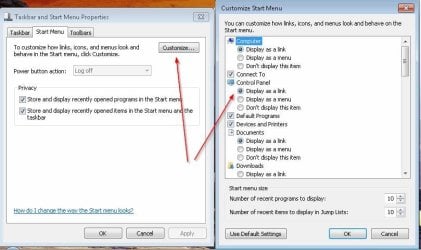
How is it setup in Start Menu, Properties?

ControlPanel.jpg

If it's as I show, change it to Display as menu then click OK.
Go back and click Display as link and click OK.

See if that helps.
 

My Computer My Computer

At a glance

Windows 10 Pro X64Intel Quad Core i7-4770 @ 3.4Ghz16.0GB PC3-12800 DDR3 SDRAM 1600 MHzIntel Integrated HD Graphics
Computer type
PC/Desktop
Computer Manufacturer/Model Number
Lenovo IdeaCenter 450
OS
Windows 10 Pro X64
CPU
Intel Quad Core i7-4770 @ 3.4Ghz
Memory
16.0GB PC3-12800 DDR3 SDRAM 1600 MHz
Graphics Card(s)
Intel Integrated HD Graphics
Sound Card
Realtek HD Audio
Monitor(s) Displays
HP 22" LCD
Screen Resolution
1680 x 1050
Hard Drives
250GB Samsung EVO SATA-3 SSD
2TB Seagate ST2000DM001 SATA-2
1.5TB Seagate ST3150041AS SATA
Keyboard
Dell USB
Mouse
Lenovo USB
Internet Speed
Cable via Road Runner 3MB Upload, 30MB Download
Antivirus
Windows Defender, MBAM Pro, MBAE
Browser
Seamonkey
Other Info
UEFI/GPT
PLDS DVD-RW DH16AERSH
Thanks, understand now.

What happens when you click on Control Panel in the Start Menu? Does anything happen?

How is it setup in Start Menu, Properties?

View attachment 343354

If it's as I show, change it to Display as menu then click OK.
Go back and click Display as link and click OK.

See if that helps.

How do i access that menu? The one your showing me in the attached image?
 

My Computer My Computer

At a glance

Windows 7 Ultimate 64-bit 7601 Multiprocessor...Intel(R) Core(TM)2 Duo CPU E6550 @ 2.33GHz4 GB RAMHD Raedon 5700
Computer type
PC/Desktop
Computer Manufacturer/Model Number
custom build
OS
Windows 7 Ultimate 64-bit 7601 Multiprocessor Free Service Pack 1
CPU
Intel(R) Core(TM)2 Duo CPU E6550 @ 2.33GHz
Motherboard
ASUSTeK Computer INC. P5K
Memory
4 GB RAM
Graphics Card(s)
HD Raedon 5700
Sound Card
AMD High Definition Audio Device
Monitor(s) Displays
HP w2207 Wide LCD Monitor
Screen Resolution
1680x1050
Hard Drives
1. Hitachi HDE721064SLA360 ATA Device
2. ST3250620AS ATA Device
Antivirus
Kaspersky Anti-virus
Browser
Google Chrome
Thanks, understand now.

What happens when you click on Control Panel in the Start Menu? Does anything happen?

How is it setup in Start Menu, Properties?

View attachment 343354

If it's as I show, change it to Display as menu then click OK.
Go back and click Display as link and click OK.

See if that helps.

Nope, i did it and it didn't do anything. If you would like, i can record a video of the problem to better assist you.
 

My Computer My Computer

At a glance

Windows 7 Ultimate 64-bit 7601 Multiprocessor...Intel(R) Core(TM)2 Duo CPU E6550 @ 2.33GHz4 GB RAMHD Raedon 5700
Computer type
PC/Desktop
Computer Manufacturer/Model Number
custom build
OS
Windows 7 Ultimate 64-bit 7601 Multiprocessor Free Service Pack 1
CPU
Intel(R) Core(TM)2 Duo CPU E6550 @ 2.33GHz
Motherboard
ASUSTeK Computer INC. P5K
Memory
4 GB RAM
Graphics Card(s)
HD Raedon 5700
Sound Card
AMD High Definition Audio Device
Monitor(s) Displays
HP w2207 Wide LCD Monitor
Screen Resolution
1680x1050
Hard Drives
1. Hitachi HDE721064SLA360 ATA Device
2. ST3250620AS ATA Device
Antivirus
Kaspersky Anti-virus
Browser
Google Chrome

My Computer My Computer

At a glance

Windows 10 Pro X64Intel Quad Core i7-4770 @ 3.4Ghz16.0GB PC3-12800 DDR3 SDRAM 1600 MHzIntel Integrated HD Graphics
Computer type
PC/Desktop
Computer Manufacturer/Model Number
Lenovo IdeaCenter 450
OS
Windows 10 Pro X64
CPU
Intel Quad Core i7-4770 @ 3.4Ghz
Memory
16.0GB PC3-12800 DDR3 SDRAM 1600 MHz
Graphics Card(s)
Intel Integrated HD Graphics
Sound Card
Realtek HD Audio
Monitor(s) Displays
HP 22" LCD
Screen Resolution
1680 x 1050
Hard Drives
250GB Samsung EVO SATA-3 SSD
2TB Seagate ST2000DM001 SATA-2
1.5TB Seagate ST3150041AS SATA
Keyboard
Dell USB
Mouse
Lenovo USB
Internet Speed
Cable via Road Runner 3MB Upload, 30MB Download
Antivirus
Windows Defender, MBAM Pro, MBAE
Browser
Seamonkey
Other Info
UEFI/GPT
PLDS DVD-RW DH16AERSH

My Computer My Computer

At a glance

Windows 7 Ultimate 64-bit 7601 Multiprocessor...Intel(R) Core(TM)2 Duo CPU E6550 @ 2.33GHz4 GB RAMHD Raedon 5700
Computer type
PC/Desktop
Computer Manufacturer/Model Number
custom build
OS
Windows 7 Ultimate 64-bit 7601 Multiprocessor Free Service Pack 1
CPU
Intel(R) Core(TM)2 Duo CPU E6550 @ 2.33GHz
Motherboard
ASUSTeK Computer INC. P5K
Memory
4 GB RAM
Graphics Card(s)
HD Raedon 5700
Sound Card
AMD High Definition Audio Device
Monitor(s) Displays
HP w2207 Wide LCD Monitor
Screen Resolution
1680x1050
Hard Drives
1. Hitachi HDE721064SLA360 ATA Device
2. ST3250620AS ATA Device
Antivirus
Kaspersky Anti-virus
Browser
Google Chrome

My Computer My Computer

At a glance

Windows 7 Ultimate 64-bit 7601 Multiprocessor...Intel(R) Core(TM)2 Duo CPU E6550 @ 2.33GHz4 GB RAMHD Raedon 5700
Computer type
PC/Desktop
Computer Manufacturer/Model Number
custom build
OS
Windows 7 Ultimate 64-bit 7601 Multiprocessor Free Service Pack 1
CPU
Intel(R) Core(TM)2 Duo CPU E6550 @ 2.33GHz
Motherboard
ASUSTeK Computer INC. P5K
Memory
4 GB RAM
Graphics Card(s)
HD Raedon 5700
Sound Card
AMD High Definition Audio Device
Monitor(s) Displays
HP w2207 Wide LCD Monitor
Screen Resolution
1680x1050
Hard Drives
1. Hitachi HDE721064SLA360 ATA Device
2. ST3250620AS ATA Device
Antivirus
Kaspersky Anti-virus
Browser
Google Chrome

My Computer My Computer

At a glance

Windows 10 Pro X64Intel Quad Core i7-4770 @ 3.4Ghz16.0GB PC3-12800 DDR3 SDRAM 1600 MHzIntel Integrated HD Graphics
Computer type
PC/Desktop
Computer Manufacturer/Model Number
Lenovo IdeaCenter 450
OS
Windows 10 Pro X64
CPU
Intel Quad Core i7-4770 @ 3.4Ghz
Memory
16.0GB PC3-12800 DDR3 SDRAM 1600 MHz
Graphics Card(s)
Intel Integrated HD Graphics
Sound Card
Realtek HD Audio
Monitor(s) Displays
HP 22" LCD
Screen Resolution
1680 x 1050
Hard Drives
250GB Samsung EVO SATA-3 SSD
2TB Seagate ST2000DM001 SATA-2
1.5TB Seagate ST3150041AS SATA
Keyboard
Dell USB
Mouse
Lenovo USB
Internet Speed
Cable via Road Runner 3MB Upload, 30MB Download
Antivirus
Windows Defender, MBAM Pro, MBAE
Browser
Seamonkey
Other Info
UEFI/GPT
PLDS DVD-RW DH16AERSH

My Computer My Computer

At a glance

Windows 7 Ultimate 64-bit 7601 Multiprocessor...Intel(R) Core(TM)2 Duo CPU E6550 @ 2.33GHz4 GB RAMHD Raedon 5700
Computer type
PC/Desktop
Computer Manufacturer/Model Number
custom build
OS
Windows 7 Ultimate 64-bit 7601 Multiprocessor Free Service Pack 1
CPU
Intel(R) Core(TM)2 Duo CPU E6550 @ 2.33GHz
Motherboard
ASUSTeK Computer INC. P5K
Memory
4 GB RAM
Graphics Card(s)
HD Raedon 5700
Sound Card
AMD High Definition Audio Device
Monitor(s) Displays
HP w2207 Wide LCD Monitor
Screen Resolution
1680x1050
Hard Drives
1. Hitachi HDE721064SLA360 ATA Device
2. ST3250620AS ATA Device
Antivirus
Kaspersky Anti-virus
Browser
Google Chrome
Back
Top