Windows 7 not Booting after removing XP partition from Dual Boot

Hemendra123

New member
Local time
4:13 AM
Messages
3
Hello,
I have Installed Windows XP like ages ago and then there was some error with the XP back then while booting up so I called up my technician, He dual booted my system with Windows 7 Ultimate.

I've stopped using XP since a while so I thought of removing I from my system, The XP files and Windows 7 were on two different partitions of same HDD. So I used Minitool Partition wizard to remove the Partition in which XP files were there. It even prompted a message saying that I may not be able to boot if I format the specific Partition. I clicked on continue and it showed me that the specific partition is in use and the asked me to restart it and minitool will delete it by itself while restarting. And after it deleted the XP partition, my system can't Boot Windows 7 now. I just don't get it.

I've even lost my Windows 7 OS DVD to try repair the OS. Can anyone help me to Boot into my Windows 7 without losing any data from that Partition.
 

My Computer My Computer

At a glance

Windows 7 Ultimate 32bitIntel Pentinum Dual Core3GB DDR2Nvidia GT440
Computer type
PC/Desktop
Computer Manufacturer/Model Number
Custom Build
OS
Windows 7 Ultimate 32bit
CPU
Intel Pentinum Dual Core
Memory
3GB DDR2
Graphics Card(s)
Nvidia GT440
Why didn`t you listen to the message ?

You deleted your Active partition now windows 7 won`t boot.

Your windows 7 partition must 1st be marked Active, then startup repair must be run to write the system files to the Windows 7 partition.

Without an install dvd or a system repair disc, you can`t do that. You can easily make a system repair disc on another Windows 7 PC, all you need is a blank cd and a cd burner. But it has to be the same bit version (32 or 64) and Service Pack version as the version you are trying to repair.

Others may have another method. They will post it.

Or call your Tech

http://www.sevenforums.com/tutorials/2083-system-repair-disc-create.html

http://www.sevenforums.com/tutorials/681-startup-repair.html

http://www.sevenforums.com/tutorials/71432-partition-mark-active.html

You can also make and use a Partition Wizard Boot CD

Bootable Partition Manger | MiniTool Partition Wizard Bootable Edition
 

My Computer My Computer

At a glance

Windows 10 Pro x64Intel Core i7 6700KGSkill TridentZ RGB 16GB 3600 16-16-16-36EVGA GTX 980 Ti SC x2
Computer type
PC/Desktop
Computer Manufacturer/Model Number
Skylake Special #666
OS
Windows 10 Pro x64
CPU
Intel Core i7 6700K
Motherboard
Asus Sabertooth Z170 Mark 1
Memory
GSkill TridentZ RGB 16GB 3600 16-16-16-36
Graphics Card(s)
EVGA GTX 980 Ti SC x2
Sound Card
Realtek High Definition
Monitor(s) Displays
AOC G2460PG
Screen Resolution
1920 x 1080 144Hz
Hard Drives
Samsung 860 Pro 256GB, Seagate Barracuda 4TB x2
PSU
EVGA 1000 P2, EVGA White Custom Braided Cables
Case
Corsair Vengeance C70 Gunmetal Black
Cooling
Corsair H100i v2, Corsair ML120 x2, Thermal Grizzly Kryonaut
Keyboard
Logitech G910 Orion Spectrum
Mouse
Logitech G700s
Internet Speed
Verizon Fios Quantum Gateway 75/75
Antivirus
Windows Defender, Malwarebytes Free 3.8.3
Browser
Chrome
Other Info
Corsair SP120 x4, LG Blu-ray Drive, Durabrand HT-395 100 Watt Dolby Digital Amp, Corsair H2100 Wireless 7.1 Headset
No I'm pretty sure Windows 7 was the active partition.
I even checked in boot option in msconfig. It showed that C drive Windows was default and Acitve.
And also in the mintool partition wizard C drive Windows 7 was shown as Active.
 

My Computer My Computer

At a glance

Windows 7 Ultimate 32bitIntel Pentinum Dual Core3GB DDR2Nvidia GT440
Computer type
PC/Desktop
Computer Manufacturer/Model Number
Custom Build
OS
Windows 7 Ultimate 32bit
CPU
Intel Pentinum Dual Core
Memory
3GB DDR2
Graphics Card(s)
Nvidia GT440
Impossible if XP was installed 1st, XP had the system files, if Windows 7 is marked Active then you should just have to run startup repair.

MSconfig does not show if the OS is Active, only if it is the default.

Incredible how well your memory is, but yet you loose discs and don`t pay attention to warning messages, Good job.
 

Attachments

  • user189524_pic8190_1425484433.gif
    user189524_pic8190_1425484433.gif
    499.9 KB · Views: 13

My Computer My Computer

At a glance

Windows 10 Pro x64Intel Core i7 6700KGSkill TridentZ RGB 16GB 3600 16-16-16-36EVGA GTX 980 Ti SC x2
Computer type
PC/Desktop
Computer Manufacturer/Model Number
Skylake Special #666
OS
Windows 10 Pro x64
CPU
Intel Core i7 6700K
Motherboard
Asus Sabertooth Z170 Mark 1
Memory
GSkill TridentZ RGB 16GB 3600 16-16-16-36
Graphics Card(s)
EVGA GTX 980 Ti SC x2
Sound Card
Realtek High Definition
Monitor(s) Displays
AOC G2460PG
Screen Resolution
1920 x 1080 144Hz
Hard Drives
Samsung 860 Pro 256GB, Seagate Barracuda 4TB x2
PSU
EVGA 1000 P2, EVGA White Custom Braided Cables
Case
Corsair Vengeance C70 Gunmetal Black
Cooling
Corsair H100i v2, Corsair ML120 x2, Thermal Grizzly Kryonaut
Keyboard
Logitech G910 Orion Spectrum
Mouse
Logitech G700s
Internet Speed
Verizon Fios Quantum Gateway 75/75
Antivirus
Windows Defender, Malwarebytes Free 3.8.3
Browser
Chrome
Other Info
Corsair SP120 x4, LG Blu-ray Drive, Durabrand HT-395 100 Watt Dolby Digital Amp, Corsair H2100 Wireless 7.1 Headset
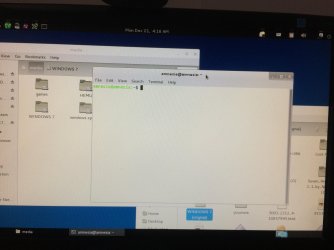
I could boot kies using through USB and could access all my partitions.
Is there any way I could change the Active partition now through Kies?
 

Attachments

  • image.jpg
    image.jpg
    599.9 KB · Views: 3

My Computer My Computer

At a glance

Windows 7 Ultimate 32bitIntel Pentinum Dual Core3GB DDR2Nvidia GT440
Computer type
PC/Desktop
Computer Manufacturer/Model Number
Custom Build
OS
Windows 7 Ultimate 32bit
CPU
Intel Pentinum Dual Core
Memory
3GB DDR2
Graphics Card(s)
Nvidia GT440
Change the Actve partition ?

:doh:

Did you not read post #2 ????? :banghead:
 

Attachments

  • user189524_pic8311_1427784981.gif
    user189524_pic8311_1427784981.gif
    836.6 KB · Views: 10

My Computer My Computer

At a glance

Windows 10 Pro x64Intel Core i7 6700KGSkill TridentZ RGB 16GB 3600 16-16-16-36EVGA GTX 980 Ti SC x2
Computer type
PC/Desktop
Computer Manufacturer/Model Number
Skylake Special #666
OS
Windows 10 Pro x64
CPU
Intel Core i7 6700K
Motherboard
Asus Sabertooth Z170 Mark 1
Memory
GSkill TridentZ RGB 16GB 3600 16-16-16-36
Graphics Card(s)
EVGA GTX 980 Ti SC x2
Sound Card
Realtek High Definition
Monitor(s) Displays
AOC G2460PG
Screen Resolution
1920 x 1080 144Hz
Hard Drives
Samsung 860 Pro 256GB, Seagate Barracuda 4TB x2
PSU
EVGA 1000 P2, EVGA White Custom Braided Cables
Case
Corsair Vengeance C70 Gunmetal Black
Cooling
Corsair H100i v2, Corsair ML120 x2, Thermal Grizzly Kryonaut
Keyboard
Logitech G910 Orion Spectrum
Mouse
Logitech G700s
Internet Speed
Verizon Fios Quantum Gateway 75/75
Antivirus
Windows Defender, Malwarebytes Free 3.8.3
Browser
Chrome
Other Info
Corsair SP120 x4, LG Blu-ray Drive, Durabrand HT-395 100 Watt Dolby Digital Amp, Corsair H2100 Wireless 7.1 Headset
Back
Top