Windows 7 not detecting Wireless card

jarhar98

New member
Local time
9:26 PM
Messages
18
So, i had this problem a few weeks ago when i was on windows 8 and i changed something in the bios and it started working but i changed to windows 7 a few days ago and i had the same problem again so i have been changing everything i can in the bios to try and get it to work but it doesnt, i have installed all drivers from my motherboard and i tried to install the tp link driver but it just says that it cannot detect a card and one should be put in.
Network card:TP LINK WDN4800
Mobo: Gigabyte z97-D3H
CPU: Intel i5 4690k
PSU: PSU: Corsair Builder CXM 600W
GPU: MSI GTX 970 Gaming
RAM: 2x4GB GSkill Ares
 

My Computer

Computer type
PC/Desktop
Computer Manufacturer/Model Number
Custom Build
OS
Windows 8 Pro 64 Bit
CPU
Intel i5 4690k
Motherboard
Gigabyte Z97-D3H
Memory
2x4GB Gskill Ares
Graphics Card(s)
MSI GTX 970 4GB Gaming
Monitor(s) Displays
PackardBell visio 234D
Screen Resolution
1920x1080
Hard Drives
1 TB Seagate + 256GB Hyperx Fury SSD
PSU
Corsair CXM Builder series 600W
Case
InWin gt1
Cooling
Corsair H80i
Keyboard
Tt eSPORTS Meka G-Unit Cherry MX Black switch
Mouse
Tecknet Z4
Browser
Google Chrome
Hi Welcome to Seven Forums .... Try Re-seating the Wireless Card ...

Did you also Install the Hotfix from the Motherboard Website ? ....
 

My Computer

Computer Manufacturer/Model Number
W530-3630QM1
OS
windows 7 home 64bit
CPU
INTEL-CORE I7
Memory
16GB
Hard Drives
750GB
Browser
Chrome
Yes i have re-seated it multiple times and in different ports too, i have also installed the hot fix
 

My Computer

Computer type
PC/Desktop
Computer Manufacturer/Model Number
Custom Build
OS
Windows 8 Pro 64 Bit
CPU
Intel i5 4690k
Motherboard
Gigabyte Z97-D3H
Memory
2x4GB Gskill Ares
Graphics Card(s)
MSI GTX 970 4GB Gaming
Monitor(s) Displays
PackardBell visio 234D
Screen Resolution
1920x1080
Hard Drives
1 TB Seagate + 256GB Hyperx Fury SSD
PSU
Corsair CXM Builder series 600W
Case
InWin gt1
Cooling
Corsair H80i
Keyboard
Tt eSPORTS Meka G-Unit Cherry MX Black switch
Mouse
Tecknet Z4
Browser
Google Chrome
Does the Card show any sign of life green or orange Lights ? ...
 

My Computer

Computer Manufacturer/Model Number
W530-3630QM1
OS
windows 7 home 64bit
CPU
INTEL-CORE I7
Memory
16GB
Hard Drives
750GB
Browser
Chrome
No there is no lights showing up on it and I have tested it with another card and both don't work
 

My Computer

Computer type
PC/Desktop
Computer Manufacturer/Model Number
Custom Build
OS
Windows 8 Pro 64 Bit
CPU
Intel i5 4690k
Motherboard
Gigabyte Z97-D3H
Memory
2x4GB Gskill Ares
Graphics Card(s)
MSI GTX 970 4GB Gaming
Monitor(s) Displays
PackardBell visio 234D
Screen Resolution
1920x1080
Hard Drives
1 TB Seagate + 256GB Hyperx Fury SSD
PSU
Corsair CXM Builder series 600W
Case
InWin gt1
Cooling
Corsair H80i
Keyboard
Tt eSPORTS Meka G-Unit Cherry MX Black switch
Mouse
Tecknet Z4
Browser
Google Chrome
This other Card you tested do you know if it was working ? .. If it is more than likely you have a Motherboard fault ...
 

My Computer

Computer Manufacturer/Model Number
W530-3630QM1
OS
windows 7 home 64bit
CPU
INTEL-CORE I7
Memory
16GB
Hard Drives
750GB
Browser
Chrome
So, i had this problem a few weeks ago when i was on windows 8 and i changed something in the bios and it started working but i changed to windows 7 a few days ago and i had the same problem again so i have been changing everything i can in the bios to try and get it to work but it doesnt, i have installed all drivers from my motherboard and i tried to install the tp link driver but it just says that it cannot detect a card and one should be put in.
Network card:TP LINK WDN4800
Mobo: Gigabyte z97-D3H
CPU: Intel i5 4690k
PSU: PSU: Corsair Builder CXM 600W
GPU: MSI GTX 970 Gaming
RAM: 2x4GB GSkill Ares
Is there a thread for the issue when it was on Win8?

To eliminate how any changes you made in BIOS might affect redouble shooting, please reset BIOS to defaults, save, and exit.

More specific hardware information is required:
Please follow this tutorial to provide the current operating environment of your machine.
http://www.sevenforums.com/tutorials/311593-speccy-publish-snapshot-your-system-specs.html
 

My Computer

Computer type
Laptop
Computer Manufacturer/Model Number
HP Pavilion dv6-6c10us
OS
x64 (6.3.9600) Win8.1 Pro & soon dual boot x64 (6.1.7601) Win7_SP1 HomePrem
CPU
AMD A6-3420M APU with Radeon(tm) HD Graphics
Motherboard
Hewlett-Packard 1805
Memory
6.00 GB
Graphics Card(s)
AMD Radeon(TM) HD 6520G
Sound Card
(1) AMD High Definition Audio Device (2) IDT High Definiti
Monitor(s) Displays
HP W2072a 20" LCD (1600 x 900) @ 60 Hz
Screen Resolution
1366 x 768 x 32 bits (4294967296 colors) @ 60 Hz
Hard Drives
ST640LM0 00 HM641JI SATA Disk Device
Keyboard
Logitech k520 wireless KB
Mouse
Logitech m320 wireless mouse (bundled with KB)
Internet Speed
15/5 | 54 MB Wireless 'n'
Antivirus
Realtime: Defender or Avast | On-demand: Malwarebytes, ESET
Browser
IE 11 on Win8, IE 10 on win 7
Other Info
Media: [Gimp, Audacity, VLC] || Comm: [WEmail 2012, Skype] || Productivity: [OpenOffice,| Textpad] || Utils: [Sysinternals, cCleaner, Speccy, Defraggler]
The other card wasnt working wither and i have tried to reset the bios settings to default and it still wouldnt work after this.
 

My Computer

Computer type
PC/Desktop
Computer Manufacturer/Model Number
Custom Build
OS
Windows 8 Pro 64 Bit
CPU
Intel i5 4690k
Motherboard
Gigabyte Z97-D3H
Memory
2x4GB Gskill Ares
Graphics Card(s)
MSI GTX 970 4GB Gaming
Monitor(s) Displays
PackardBell visio 234D
Screen Resolution
1920x1080
Hard Drives
1 TB Seagate + 256GB Hyperx Fury SSD
PSU
Corsair CXM Builder series 600W
Case
InWin gt1
Cooling
Corsair H80i
Keyboard
Tt eSPORTS Meka G-Unit Cherry MX Black switch
Mouse
Tecknet Z4
Browser
Google Chrome
But, the graphics card works in the slots that i put the network card in
 

My Computer

Computer type
PC/Desktop
Computer Manufacturer/Model Number
Custom Build
OS
Windows 8 Pro 64 Bit
CPU
Intel i5 4690k
Motherboard
Gigabyte Z97-D3H
Memory
2x4GB Gskill Ares
Graphics Card(s)
MSI GTX 970 4GB Gaming
Monitor(s) Displays
PackardBell visio 234D
Screen Resolution
1920x1080
Hard Drives
1 TB Seagate + 256GB Hyperx Fury SSD
PSU
Corsair CXM Builder series 600W
Case
InWin gt1
Cooling
Corsair H80i
Keyboard
Tt eSPORTS Meka G-Unit Cherry MX Black switch
Mouse
Tecknet Z4
Browser
Google Chrome
So, i had this problem a few weeks ago when i was on windows 8 and i changed something in the bios and it started working but i changed to windows 7 a few days ago and i had the same problem again so i have been changing everything i can in the bios to try and get it to work but it doesnt, i have installed all drivers from my motherboard and i tried to install the tp link driver but it just says that it cannot detect a card and one should be put in.
Network card:TP LINK WDN4800
Mobo: Gigabyte z97-D3H
CPU: Intel i5 4690k
PSU: PSU: Corsair Builder CXM 600W
GPU: MSI GTX 970 Gaming
RAM: 2x4GB GSkill Ares
Is there a thread for the issue when it was on Win8?

To eliminate how any changes you made in BIOS might affect redouble shooting, please reset BIOS to defaults, save, and exit.

More specific hardware information is required:
Please follow this tutorial to provide the current operating environment of your machine.
http://www.sevenforums.com/tutorials/311593-speccy-publish-snapshot-your-system-specs.html
Okay will do that later on today
 

My Computer

Computer type
PC/Desktop
Computer Manufacturer/Model Number
Custom Build
OS
Windows 8 Pro 64 Bit
CPU
Intel i5 4690k
Motherboard
Gigabyte Z97-D3H
Memory
2x4GB Gskill Ares
Graphics Card(s)
MSI GTX 970 4GB Gaming
Monitor(s) Displays
PackardBell visio 234D
Screen Resolution
1920x1080
Hard Drives
1 TB Seagate + 256GB Hyperx Fury SSD
PSU
Corsair CXM Builder series 600W
Case
InWin gt1
Cooling
Corsair H80i
Keyboard
Tt eSPORTS Meka G-Unit Cherry MX Black switch
Mouse
Tecknet Z4
Browser
Google Chrome
Okay, i couldnt publish the info as ofcourse i had no internet connection but i have included a copy of my info by clicking save on speccy so you will be able to view it. yes have also gone to windows 8 to give it a try but no luck.
Heres a bit of info that could lead to the possible reason for it being the motherboard so,
When the problem first started was when i had bought a brand new intel cpu and motherboard to go with it i found that it wasnt working so i began trying to get it to work by installing multiple drivers with no solution then i moved it to another pci slot. When i did this the pc turned on but a bit of smoke came out of the back of the graphics card and a small component underneath the slot that the network card was in began glowing and some smoke came out too, i instantly switched off the pc and sat in shock for a few seconds ofcourse thinking my gpu had broke. I left it for a while then switched it back on and the gpu was working in all the slots. This led to me changing things on bios that made it work.
 

My Computer

Computer type
PC/Desktop
Computer Manufacturer/Model Number
Custom Build
OS
Windows 8 Pro 64 Bit
CPU
Intel i5 4690k
Motherboard
Gigabyte Z97-D3H
Memory
2x4GB Gskill Ares
Graphics Card(s)
MSI GTX 970 4GB Gaming
Monitor(s) Displays
PackardBell visio 234D
Screen Resolution
1920x1080
Hard Drives
1 TB Seagate + 256GB Hyperx Fury SSD
PSU
Corsair CXM Builder series 600W
Case
InWin gt1
Cooling
Corsair H80i
Keyboard
Tt eSPORTS Meka G-Unit Cherry MX Black switch
Mouse
Tecknet Z4
Browser
Google Chrome
Yeah, I thought of that once, then forgot the issue was a network card :o

Thanks, I sent you a Private message about the report. Let me know if you need help, your profile might not be mature enough for you to edit the post.

I'll keep looking at the Speccy.

When i did this the pc turned on but a bit of smoke came out of the back of the graphics card and a small component underneath the slot that the network card was in began glowing and some smoke came out too,

Well, that is a bit of information - see if a local shop can test the board for you.

What's the warranty status? If you did nothing wrong, then the mfr should RMA it for you.

I just stopped looking at the Speccy. I think you're right, the mobo is the culprit.
 

My Computer

Computer type
Laptop
Computer Manufacturer/Model Number
HP Pavilion dv6-6c10us
OS
x64 (6.3.9600) Win8.1 Pro & soon dual boot x64 (6.1.7601) Win7_SP1 HomePrem
CPU
AMD A6-3420M APU with Radeon(tm) HD Graphics
Motherboard
Hewlett-Packard 1805
Memory
6.00 GB
Graphics Card(s)
AMD Radeon(TM) HD 6520G
Sound Card
(1) AMD High Definition Audio Device (2) IDT High Definiti
Monitor(s) Displays
HP W2072a 20" LCD (1600 x 900) @ 60 Hz
Screen Resolution
1366 x 768 x 32 bits (4294967296 colors) @ 60 Hz
Hard Drives
ST640LM0 00 HM641JI SATA Disk Device
Keyboard
Logitech k520 wireless KB
Mouse
Logitech m320 wireless mouse (bundled with KB)
Internet Speed
15/5 | 54 MB Wireless 'n'
Antivirus
Realtime: Defender or Avast | On-demand: Malwarebytes, ESET
Browser
IE 11 on Win8, IE 10 on win 7
Other Info
Media: [Gimp, Audacity, VLC] || Comm: [WEmail 2012, Skype] || Productivity: [OpenOffice,| Textpad] || Utils: [Sysinternals, cCleaner, Speccy, Defraggler]
Yeah, I thought of that once, then forgot the issue was a network card :o

Thanks, I sent you a Private message about the report. Let me know if you need help, your profile might not be mature enough for you to edit the post.

I'll keep looking at the Speccy.

When i did this the pc turned on but a bit of smoke came out of the back of the graphics card and a small component underneath the slot that the network card was in began glowing and some smoke came out too,

Well, that is a bit of information - see if a local shop can test the board for you.

What's the warranty status? If you did nothing wrong, then the mfr should RMA it for you.

I just stopped looking at the Speccy. I think you're right, the mobo is the culprit.
Im not sure if theres anywhere i can take it to get it tested to be honest but i have ordered a replacement motherboard from amazon and i have a month to return the one i have now so i shall test the new one that comes and see. Just annoying taking the motherboard out as i will now have to take off my corsair h80i cooler and everything else, not looking forward to it :sick:
 

My Computer

Computer type
PC/Desktop
Computer Manufacturer/Model Number
Custom Build
OS
Windows 8 Pro 64 Bit
CPU
Intel i5 4690k
Motherboard
Gigabyte Z97-D3H
Memory
2x4GB Gskill Ares
Graphics Card(s)
MSI GTX 970 4GB Gaming
Monitor(s) Displays
PackardBell visio 234D
Screen Resolution
1920x1080
Hard Drives
1 TB Seagate + 256GB Hyperx Fury SSD
PSU
Corsair CXM Builder series 600W
Case
InWin gt1
Cooling
Corsair H80i
Keyboard
Tt eSPORTS Meka G-Unit Cherry MX Black switch
Mouse
Tecknet Z4
Browser
Google Chrome
Thanks for the update, you can ignore my PM asking you to update the thread with that information :)

The glow and smoke concern me though. The card might have been fried too - I don't know.
I only caution it being used on the new board. If it can't be tested off-board ... I wouldn't test it on-board.

I guess I would build up the new board without either add-on component and see how it runs. Then what?
I'm scratching my head - off-board testing is the only safe route.

Look at everything - the slots, the mobo, the GPU, the network card.

You're looking for scars or carbon residue from the glow / smoke incident.
I can only guess that there might have been something on the pins or in one of the slots that shorted.

You'll have to make the call. Do you have any test gear? A multimeter?
 

My Computer

Computer type
Laptop
Computer Manufacturer/Model Number
HP Pavilion dv6-6c10us
OS
x64 (6.3.9600) Win8.1 Pro & soon dual boot x64 (6.1.7601) Win7_SP1 HomePrem
CPU
AMD A6-3420M APU with Radeon(tm) HD Graphics
Motherboard
Hewlett-Packard 1805
Memory
6.00 GB
Graphics Card(s)
AMD Radeon(TM) HD 6520G
Sound Card
(1) AMD High Definition Audio Device (2) IDT High Definiti
Monitor(s) Displays
HP W2072a 20" LCD (1600 x 900) @ 60 Hz
Screen Resolution
1366 x 768 x 32 bits (4294967296 colors) @ 60 Hz
Hard Drives
ST640LM0 00 HM641JI SATA Disk Device
Keyboard
Logitech k520 wireless KB
Mouse
Logitech m320 wireless mouse (bundled with KB)
Internet Speed
15/5 | 54 MB Wireless 'n'
Antivirus
Realtime: Defender or Avast | On-demand: Malwarebytes, ESET
Browser
IE 11 on Win8, IE 10 on win 7
Other Info
Media: [Gimp, Audacity, VLC] || Comm: [WEmail 2012, Skype] || Productivity: [OpenOffice,| Textpad] || Utils: [Sysinternals, cCleaner, Speccy, Defraggler]
Thanks for the update, you can ignore my PM asking you to update the thread with that information :)

The glow and smoke concern me though. The card might have been fried too - I don't know.
I only caution it being used on the new board. If it can't be tested off-board ... I wouldn't test it on-board.

I guess I would build up the new board without either add-on component and see how it runs. Then what?
I'm scratching my head - off-board testing is the only safe route.

Look at everything - the slots, the mobo, the GPU, the network card.

You're looking for scars or carbon residue from the glow / smoke incident.
I can only guess that there might have been something on the pins or in one of the slots that shorted.

You'll have to make the call. Do you have any test gear? A multimeter?
No i dont have any test gear and to be honest i have never tested like that before but the gpu has been working fine ad the network card that im using now isnt the one that was in the board when the glowing and smoke started, i bought a new card thinking it was the old network card that broke but it wasnt
 

My Computer

Computer type
PC/Desktop
Computer Manufacturer/Model Number
Custom Build
OS
Windows 8 Pro 64 Bit
CPU
Intel i5 4690k
Motherboard
Gigabyte Z97-D3H
Memory
2x4GB Gskill Ares
Graphics Card(s)
MSI GTX 970 4GB Gaming
Monitor(s) Displays
PackardBell visio 234D
Screen Resolution
1920x1080
Hard Drives
1 TB Seagate + 256GB Hyperx Fury SSD
PSU
Corsair CXM Builder series 600W
Case
InWin gt1
Cooling
Corsair H80i
Keyboard
Tt eSPORTS Meka G-Unit Cherry MX Black switch
Mouse
Tecknet Z4
Browser
Google Chrome
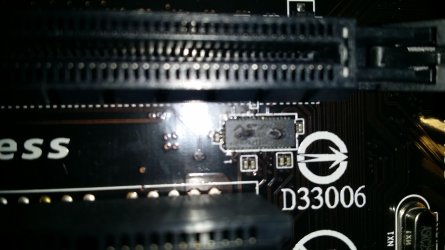
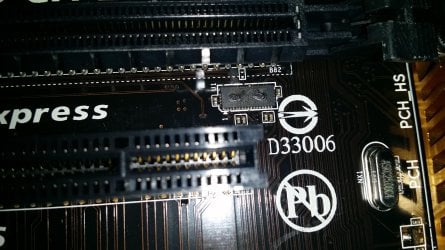
Here is an image of the part of the motherboard that was glowing. As you can see there is some clear evidence of something melting on the part under the slot
 

Attachments

  • 20150123_220235.jpg
    20150123_220235.jpg
    451.3 KB · Views: 2
  • 20150123_220310.jpg
    20150123_220310.jpg
    760.5 KB · Views: 3

My Computer

Computer type
PC/Desktop
Computer Manufacturer/Model Number
Custom Build
OS
Windows 8 Pro 64 Bit
CPU
Intel i5 4690k
Motherboard
Gigabyte Z97-D3H
Memory
2x4GB Gskill Ares
Graphics Card(s)
MSI GTX 970 4GB Gaming
Monitor(s) Displays
PackardBell visio 234D
Screen Resolution
1920x1080
Hard Drives
1 TB Seagate + 256GB Hyperx Fury SSD
PSU
Corsair CXM Builder series 600W
Case
InWin gt1
Cooling
Corsair H80i
Keyboard
Tt eSPORTS Meka G-Unit Cherry MX Black switch
Mouse
Tecknet Z4
Browser
Google Chrome
Ok, I couldn't determine which card you were moving into different slots when the smoke and mirrors ... err glow was noticed.

If you don't have test equipment, the you can't test it. I'd have to ask for some HW folks to help you anyway.
I'll put out the call, they know this inside out and can better advise you.

You have a couple of days before the new Mobo arrives, write a post when you're ready with the new board.

Bill
.
 
Last edited:

My Computer

Computer type
Laptop
Computer Manufacturer/Model Number
HP Pavilion dv6-6c10us
OS
x64 (6.3.9600) Win8.1 Pro & soon dual boot x64 (6.1.7601) Win7_SP1 HomePrem
CPU
AMD A6-3420M APU with Radeon(tm) HD Graphics
Motherboard
Hewlett-Packard 1805
Memory
6.00 GB
Graphics Card(s)
AMD Radeon(TM) HD 6520G
Sound Card
(1) AMD High Definition Audio Device (2) IDT High Definiti
Monitor(s) Displays
HP W2072a 20" LCD (1600 x 900) @ 60 Hz
Screen Resolution
1366 x 768 x 32 bits (4294967296 colors) @ 60 Hz
Hard Drives
ST640LM0 00 HM641JI SATA Disk Device
Keyboard
Logitech k520 wireless KB
Mouse
Logitech m320 wireless mouse (bundled with KB)
Internet Speed
15/5 | 54 MB Wireless 'n'
Antivirus
Realtime: Defender or Avast | On-demand: Malwarebytes, ESET
Browser
IE 11 on Win8, IE 10 on win 7
Other Info
Media: [Gimp, Audacity, VLC] || Comm: [WEmail 2012, Skype] || Productivity: [OpenOffice,| Textpad] || Utils: [Sysinternals, cCleaner, Speccy, Defraggler]
Yeah, that looks fried. The etched circuits around that area probably pulled away from the board. It looks like it got pretty hot.

Thanks for the picture.
 

My Computer

Computer type
Laptop
Computer Manufacturer/Model Number
HP Pavilion dv6-6c10us
OS
x64 (6.3.9600) Win8.1 Pro & soon dual boot x64 (6.1.7601) Win7_SP1 HomePrem
CPU
AMD A6-3420M APU with Radeon(tm) HD Graphics
Motherboard
Hewlett-Packard 1805
Memory
6.00 GB
Graphics Card(s)
AMD Radeon(TM) HD 6520G
Sound Card
(1) AMD High Definition Audio Device (2) IDT High Definiti
Monitor(s) Displays
HP W2072a 20" LCD (1600 x 900) @ 60 Hz
Screen Resolution
1366 x 768 x 32 bits (4294967296 colors) @ 60 Hz
Hard Drives
ST640LM0 00 HM641JI SATA Disk Device
Keyboard
Logitech k520 wireless KB
Mouse
Logitech m320 wireless mouse (bundled with KB)
Internet Speed
15/5 | 54 MB Wireless 'n'
Antivirus
Realtime: Defender or Avast | On-demand: Malwarebytes, ESET
Browser
IE 11 on Win8, IE 10 on win 7
Other Info
Media: [Gimp, Audacity, VLC] || Comm: [WEmail 2012, Skype] || Productivity: [OpenOffice,| Textpad] || Utils: [Sysinternals, cCleaner, Speccy, Defraggler]
Ok, I couldn't determine which card you were moving into different slots when the smoke and mirrors ... err glow was noticed.

If you don't have test equipment, the you can't test it. I'd have to ask for some HW folks to help you anyway.
I think I'll put out a call anyway, they know this inside out and can better advise you.

You have a couple of days before the new Mobo arrives, write a post when you're ready with the new board.

Bill
.
Ok i will do that, and thanks for helping me out and giving me advice, much appreciated!
 

My Computer

Computer type
PC/Desktop
Computer Manufacturer/Model Number
Custom Build
OS
Windows 8 Pro 64 Bit
CPU
Intel i5 4690k
Motherboard
Gigabyte Z97-D3H
Memory
2x4GB Gskill Ares
Graphics Card(s)
MSI GTX 970 4GB Gaming
Monitor(s) Displays
PackardBell visio 234D
Screen Resolution
1920x1080
Hard Drives
1 TB Seagate + 256GB Hyperx Fury SSD
PSU
Corsair CXM Builder series 600W
Case
InWin gt1
Cooling
Corsair H80i
Keyboard
Tt eSPORTS Meka G-Unit Cherry MX Black switch
Mouse
Tecknet Z4
Browser
Google Chrome
That indeed looks bubbled up. Make sure under where your board sits there is nothing sticking up that shouldn't be that could short the board from the bottom (a wrong placed standoff is common for this).
 

My Computer

Computer type
PC/Desktop
Computer Manufacturer/Model Number
Custom
OS
10 Pro x64
CPU
Ryzen 9 3900X
Motherboard
Asrock x370 Tachi
Memory
64GB(4x16GB) DDR4
Graphics Card(s)
EVGA 1080ti FTW3
Sound Card
ASUS Xonar Essence STX (V4 Bursons), ODAC rev B, NFB-11, O2
Monitor(s) Displays
3xASUS PB278Q/R, Optoma HD142X
Screen Resolution
3x1440p, 1080p
Hard Drives
512GB 850 EVO(OS, Programs)
4TB (Movies)
3TB (Downloads)
3TB (Programs)
1TB HDD (Games)
2x6TB R1 (videos)
PSU
AX760
Case
Fractal Define R5
Cooling
NH-D15S
Keyboard
Massdrop Ctrl with Box Navy's
Mouse
G903, Alioth XXL Mat
Internet Speed
280/40
Antivirus
MBAM, ESET
Browser
Canary 64 Bit
Other Info
I also own a Thinkpad P50 Xeon 4K, X220T, X1C5
Back
Top