Windows 7 not detecting Wireless card

That indeed looks bubbled up. Make sure under where your board sits there is nothing sticking up that shouldn't be that could short the board from the bottom (a wrong placed standoff is common for this).
Okay, will check this when i take the motherboard out to replace it with the new one, and will make sure there is nothing sticking up when i put the new one in too :)
 

My Computer

Computer type
PC/Desktop
Computer Manufacturer/Model Number
Custom Build
OS
Windows 8 Pro 64 Bit
CPU
Intel i5 4690k
Motherboard
Gigabyte Z97-D3H
Memory
2x4GB Gskill Ares
Graphics Card(s)
MSI GTX 970 4GB Gaming
Monitor(s) Displays
PackardBell visio 234D
Screen Resolution
1920x1080
Hard Drives
1 TB Seagate + 256GB Hyperx Fury SSD
PSU
Corsair CXM Builder series 600W
Case
InWin gt1
Cooling
Corsair H80i
Keyboard
Tt eSPORTS Meka G-Unit Cherry MX Black switch
Mouse
Tecknet Z4
Browser
Google Chrome
Ok mate when you get the mobo back I would be doing a quick recky on the PSU use this
Using HW Info
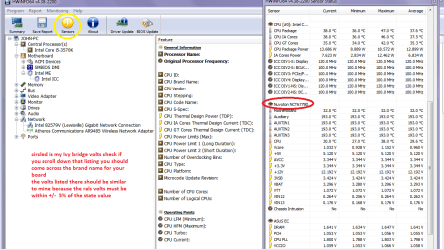
You can test the volts on the PSU with HW Info HWiNFO, HWiNFO32/64 - Download < download the right bit version and close the right hand window select Sensors and scroll down to the power section where you will see what the volts are doing see my pic.
The original right hand window shows the machine running and is handy for that but for looking at the components in some detail close it and use the main left hand side panel
 

Attachments

  • HW Info PSU VOLTS DSEKTOP.PNG
    HW Info PSU VOLTS DSEKTOP.PNG
    51.7 KB · Views: 4

My Computer

Computer type
PC/Desktop
Computer Manufacturer/Model Number
Own build (new) Desk1 / Asus ROG Win 7 / Desk2 1st build
OS
Desk1 7 Home Prem / Desk2 10 Pro / Main lap Asus ROG 10 Pro 2 laptop Toshiba 7 Pro Asus P2520 7 & 10
CPU
Desk1 i5 3750K / Laptop i7 GTX 860M / Desk2 i5 2500
Motherboard
Desk1 Asus P877-V / Desk2 Gigabyte H67 UD3H / Laptop ?
Memory
Desk1 8GB (1866) / Desk2 16GB (1333) / Laptop 8Gb DDR3
Graphics Card(s)
Desk 1& 2NVidia GTX 650 & Laptops on board Intel
Sound Card
Desk 1 & 2 -XONAR DG Realtek High Def audio Laptop
Monitor(s) Displays
Desk 1 Benq HD 2450 / Desk2 Philips 24" / Laptop 17.5"
Screen Resolution
1920x1080 D1 & D2 & Laptop 1
Hard Drives
Desk1 Samsung 120GB 830 SSD
Asus ROG 256GB 850 Pro SSD
Desk2 Samsung 840 256 SSD
Toshiba 120GB EVO
PSU
Desk 1 Corsair HX 1050/ Laptop ? / Desk 2 Corsair HX 650
Case
Desk 1 Cooler HAF XM ? Toshiba laptop / Desk2 Coolermaster
Cooling
Fans on all Desk1 -2 Desk2 - all Coolermasters 5 Laptop ?
Keyboard
Desk 1 MS Sidewinder X6 Desk 2 MS Sidewinder X 4
Mouse
Desk 1&2 - Gigabyte MS 900 gamer - laptop - Logitec wireless
Internet Speed
ADSL2+
Other Info
One other Desktop (tester) and spare Toshba laptop both with SSD's
Running Kaspersky 2016 ISS on all machines config'd identically
Logitec audio stereo systems on each machine (x3)
Canon MG5250MFC
Router/modem TP-Link running WPA2SK
Okay so im back with my new motherboard, heres the good part, i got the internet to work without having to change anything in the bios but the bad part is the better network card i bought was not working so i will assume that one is fried.
I have also attatched the hw info voltages just to make sure they are correct.
 

Attachments

  • HWInfo.jpg
    HWInfo.jpg
    71.1 KB · Views: 7

My Computer

Computer type
PC/Desktop
Computer Manufacturer/Model Number
Custom Build
OS
Windows 8 Pro 64 Bit
CPU
Intel i5 4690k
Motherboard
Gigabyte Z97-D3H
Memory
2x4GB Gskill Ares
Graphics Card(s)
MSI GTX 970 4GB Gaming
Monitor(s) Displays
PackardBell visio 234D
Screen Resolution
1920x1080
Hard Drives
1 TB Seagate + 256GB Hyperx Fury SSD
PSU
Corsair CXM Builder series 600W
Case
InWin gt1
Cooling
Corsair H80i
Keyboard
Tt eSPORTS Meka G-Unit Cherry MX Black switch
Mouse
Tecknet Z4
Browser
Google Chrome
Yes that is the right screen jarhar and the only thing I can see wrong is the CMOS battery volts are below 3v - that is your BIOS battery - VBAT now I don't now but it might not make that much difference and being a new board am wondering why the volts are down like that.
You did say new but do you mean new as in new brand new or used new? Not trying to be funny or anything just want to make sure I have it right?

The card don't discard it yet though I will beback.
 

My Computer

Computer type
PC/Desktop
Computer Manufacturer/Model Number
Own build (new) Desk1 / Asus ROG Win 7 / Desk2 1st build
OS
Desk1 7 Home Prem / Desk2 10 Pro / Main lap Asus ROG 10 Pro 2 laptop Toshiba 7 Pro Asus P2520 7 & 10
CPU
Desk1 i5 3750K / Laptop i7 GTX 860M / Desk2 i5 2500
Motherboard
Desk1 Asus P877-V / Desk2 Gigabyte H67 UD3H / Laptop ?
Memory
Desk1 8GB (1866) / Desk2 16GB (1333) / Laptop 8Gb DDR3
Graphics Card(s)
Desk 1& 2NVidia GTX 650 & Laptops on board Intel
Sound Card
Desk 1 & 2 -XONAR DG Realtek High Def audio Laptop
Monitor(s) Displays
Desk 1 Benq HD 2450 / Desk2 Philips 24" / Laptop 17.5"
Screen Resolution
1920x1080 D1 & D2 & Laptop 1
Hard Drives
Desk1 Samsung 120GB 830 SSD
Asus ROG 256GB 850 Pro SSD
Desk2 Samsung 840 256 SSD
Toshiba 120GB EVO
PSU
Desk 1 Corsair HX 1050/ Laptop ? / Desk 2 Corsair HX 650
Case
Desk 1 Cooler HAF XM ? Toshiba laptop / Desk2 Coolermaster
Cooling
Fans on all Desk1 -2 Desk2 - all Coolermasters 5 Laptop ?
Keyboard
Desk 1 MS Sidewinder X6 Desk 2 MS Sidewinder X 4
Mouse
Desk 1&2 - Gigabyte MS 900 gamer - laptop - Logitec wireless
Internet Speed
ADSL2+
Other Info
One other Desktop (tester) and spare Toshba laptop both with SSD's
Running Kaspersky 2016 ISS on all machines config'd identically
Logitec audio stereo systems on each machine (x3)
Canon MG5250MFC
Router/modem TP-Link running WPA2SK
Hi, not sure about that cmos issue but the motherboard those sensors are for is the brand new one that's been sent from amazon because the other one had that burning issue
 

My Computer

Computer type
PC/Desktop
Computer Manufacturer/Model Number
Custom Build
OS
Windows 8 Pro 64 Bit
CPU
Intel i5 4690k
Motherboard
Gigabyte Z97-D3H
Memory
2x4GB Gskill Ares
Graphics Card(s)
MSI GTX 970 4GB Gaming
Monitor(s) Displays
PackardBell visio 234D
Screen Resolution
1920x1080
Hard Drives
1 TB Seagate + 256GB Hyperx Fury SSD
PSU
Corsair CXM Builder series 600W
Case
InWin gt1
Cooling
Corsair H80i
Keyboard
Tt eSPORTS Meka G-Unit Cherry MX Black switch
Mouse
Tecknet Z4
Browser
Google Chrome
That's ok then the HW is 100% always precise but there is the rare occurrence that it shows something just off. The main thing is that the main volts are good from the PSU.
 

My Computer

Computer type
PC/Desktop
Computer Manufacturer/Model Number
Own build (new) Desk1 / Asus ROG Win 7 / Desk2 1st build
OS
Desk1 7 Home Prem / Desk2 10 Pro / Main lap Asus ROG 10 Pro 2 laptop Toshiba 7 Pro Asus P2520 7 & 10
CPU
Desk1 i5 3750K / Laptop i7 GTX 860M / Desk2 i5 2500
Motherboard
Desk1 Asus P877-V / Desk2 Gigabyte H67 UD3H / Laptop ?
Memory
Desk1 8GB (1866) / Desk2 16GB (1333) / Laptop 8Gb DDR3
Graphics Card(s)
Desk 1& 2NVidia GTX 650 & Laptops on board Intel
Sound Card
Desk 1 & 2 -XONAR DG Realtek High Def audio Laptop
Monitor(s) Displays
Desk 1 Benq HD 2450 / Desk2 Philips 24" / Laptop 17.5"
Screen Resolution
1920x1080 D1 & D2 & Laptop 1
Hard Drives
Desk1 Samsung 120GB 830 SSD
Asus ROG 256GB 850 Pro SSD
Desk2 Samsung 840 256 SSD
Toshiba 120GB EVO
PSU
Desk 1 Corsair HX 1050/ Laptop ? / Desk 2 Corsair HX 650
Case
Desk 1 Cooler HAF XM ? Toshiba laptop / Desk2 Coolermaster
Cooling
Fans on all Desk1 -2 Desk2 - all Coolermasters 5 Laptop ?
Keyboard
Desk 1 MS Sidewinder X6 Desk 2 MS Sidewinder X 4
Mouse
Desk 1&2 - Gigabyte MS 900 gamer - laptop - Logitec wireless
Internet Speed
ADSL2+
Other Info
One other Desktop (tester) and spare Toshba laptop both with SSD's
Running Kaspersky 2016 ISS on all machines config'd identically
Logitec audio stereo systems on each machine (x3)
Canon MG5250MFC
Router/modem TP-Link running WPA2SK
So because the other network card wasn't working at all in any of the ports am I to assume that it is broken?
 

My Computer

Computer type
PC/Desktop
Computer Manufacturer/Model Number
Custom Build
OS
Windows 8 Pro 64 Bit
CPU
Intel i5 4690k
Motherboard
Gigabyte Z97-D3H
Memory
2x4GB Gskill Ares
Graphics Card(s)
MSI GTX 970 4GB Gaming
Monitor(s) Displays
PackardBell visio 234D
Screen Resolution
1920x1080
Hard Drives
1 TB Seagate + 256GB Hyperx Fury SSD
PSU
Corsair CXM Builder series 600W
Case
InWin gt1
Cooling
Corsair H80i
Keyboard
Tt eSPORTS Meka G-Unit Cherry MX Black switch
Mouse
Tecknet Z4
Browser
Google Chrome
Yeah it is probably fried. Seems sound since it was probably what was causing your issue before hand to the other board (or the faulty board fried it for you. It does not show up in your device manager correct?
 

My Computer

Computer type
PC/Desktop
Computer Manufacturer/Model Number
Custom
OS
10 Pro x64
CPU
Ryzen 9 3900X
Motherboard
Asrock x370 Tachi
Memory
64GB(4x16GB) DDR4
Graphics Card(s)
EVGA 1080ti FTW3
Sound Card
ASUS Xonar Essence STX (V4 Bursons), ODAC rev B, NFB-11, O2
Monitor(s) Displays
3xASUS PB278Q/R, Optoma HD142X
Screen Resolution
3x1440p, 1080p
Hard Drives
512GB 850 EVO(OS, Programs)
4TB (Movies)
3TB (Downloads)
3TB (Programs)
1TB HDD (Games)
2x6TB R1 (videos)
PSU
AX760
Case
Fractal Define R5
Cooling
NH-D15S
Keyboard
Massdrop Ctrl with Box Navy's
Mouse
G903, Alioth XXL Mat
Internet Speed
280/40
Antivirus
MBAM, ESET
Browser
Canary 64 Bit
Other Info
I also own a Thinkpad P50 Xeon 4K, X220T, X1C5
No it doesn't show up.
 

My Computer

Computer type
PC/Desktop
Computer Manufacturer/Model Number
Custom Build
OS
Windows 8 Pro 64 Bit
CPU
Intel i5 4690k
Motherboard
Gigabyte Z97-D3H
Memory
2x4GB Gskill Ares
Graphics Card(s)
MSI GTX 970 4GB Gaming
Monitor(s) Displays
PackardBell visio 234D
Screen Resolution
1920x1080
Hard Drives
1 TB Seagate + 256GB Hyperx Fury SSD
PSU
Corsair CXM Builder series 600W
Case
InWin gt1
Cooling
Corsair H80i
Keyboard
Tt eSPORTS Meka G-Unit Cherry MX Black switch
Mouse
Tecknet Z4
Browser
Google Chrome

My Computer

Computer type
PC/Desktop
Computer Manufacturer/Model Number
Custom
OS
10 Pro x64
CPU
Ryzen 9 3900X
Motherboard
Asrock x370 Tachi
Memory
64GB(4x16GB) DDR4
Graphics Card(s)
EVGA 1080ti FTW3
Sound Card
ASUS Xonar Essence STX (V4 Bursons), ODAC rev B, NFB-11, O2
Monitor(s) Displays
3xASUS PB278Q/R, Optoma HD142X
Screen Resolution
3x1440p, 1080p
Hard Drives
512GB 850 EVO(OS, Programs)
4TB (Movies)
3TB (Downloads)
3TB (Programs)
1TB HDD (Games)
2x6TB R1 (videos)
PSU
AX760
Case
Fractal Define R5
Cooling
NH-D15S
Keyboard
Massdrop Ctrl with Box Navy's
Mouse
G903, Alioth XXL Mat
Internet Speed
280/40
Antivirus
MBAM, ESET
Browser
Canary 64 Bit
Other Info
I also own a Thinkpad P50 Xeon 4K, X220T, X1C5
Yeh, will probably just stick with the network card I have now
 

My Computer

Computer type
PC/Desktop
Computer Manufacturer/Model Number
Custom Build
OS
Windows 8 Pro 64 Bit
CPU
Intel i5 4690k
Motherboard
Gigabyte Z97-D3H
Memory
2x4GB Gskill Ares
Graphics Card(s)
MSI GTX 970 4GB Gaming
Monitor(s) Displays
PackardBell visio 234D
Screen Resolution
1920x1080
Hard Drives
1 TB Seagate + 256GB Hyperx Fury SSD
PSU
Corsair CXM Builder series 600W
Case
InWin gt1
Cooling
Corsair H80i
Keyboard
Tt eSPORTS Meka G-Unit Cherry MX Black switch
Mouse
Tecknet Z4
Browser
Google Chrome
Back
Top