wgrayson
New member
The good news: I was able to successfully replace my ailing 750gb hard drive with a 1TB hard drive.
The better news: I was even able to restore from a windows image backup!
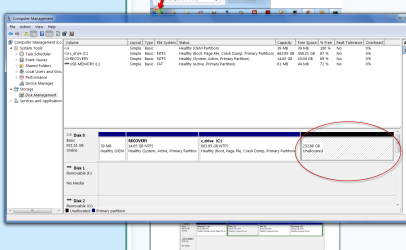
One problem -- when I right-click "properties" to check the available space on my drive, it still shows used and free data in relationship to the old drive, not the new one. Is there a way to "relcalibrate" or reset Windows to recognize the size of the new drive?
The better news: I was even able to restore from a windows image backup!
One problem -- when I right-click "properties" to check the available space on my drive, it still shows used and free data in relationship to the old drive, not the new one. Is there a way to "relcalibrate" or reset Windows to recognize the size of the new drive?
My Computer
At a glance
Windows 7 Professional 64bit
- OS
- Windows 7 Professional 64bit