Windows 7 on OLD computers

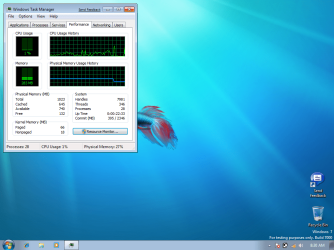
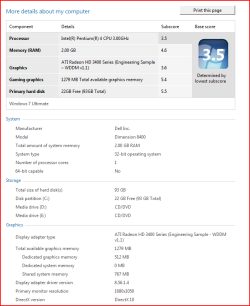
I'm running it on my 2004 Dell 8400. Granted, I've upgraded some of the components along the way, but the main parts of the system (mobo and processor) remain unchanged.

2GB of RAM
P4 3.00 GHz HT
ATI HD3450 (originally X800)

System runs splendidly, MUCH better than Vista did.
 

Attachments
  • Specs.PNG
    Specs.PNG
    18.4 KB · Views: 857

My Computer

Computer Manufacturer/Model Number
Dell 8400
OS
Windows 7 Beta 1 b7000
CPU
Intel Pentium 4
Memory
4GB
Graphics Card(s)
ATI Radeon HD3450
Sound Card
Creative SoundBlaster Audigy 2
Monitor(s) Displays
Acer AL2016W
Screen Resolution
1680x1050
Hard Drives
1x500GB
1x100GB
Case
Dell 8400
Cooling
Standard
Keyboard
Dell Multimedia Keyboard
Mouse
Logitech MediaPlay
Internet Speed
Comcastic!
Hey there, I'm running just fine on an Athalon 64 2000+ mated to an Asus K8V Deluxe mobo with an Nvidea 6800 agp. There is nothing usless about thiat system, just feed it a fair helping of pc2400 and you'd be surprised at what it'd be willing to do for You.

I'v also fed 7 to a P-3 2300mhz with just 500mb ram and a 20 gig hd. It's an old dell optiplex, and I had to borrow a dvd to put 7 on it. Once there though it is now happy as a clam and running better than it ever did on XP, or Ubuntu.
 

My Computer

OS
Windows 7 build 7000 x64
CPU
Amd Athalon 64, 2000+
Motherboard
Asus K8V Deluxe
Memory
Promise, pc2400 256mb x3, 1.5gb
Graphics Card(s)
Nvidea Geforce 6800 GTS
Sound Card
Creative Audigy 2 Platinum
Monitor(s) Displays
Westinghouse lcm22w2
Screen Resolution
1680x1050
Hard Drives
WD Caviare 250gb sata x2
Seagate Barracuda 250gb x2
PSU
Antec 500w
Case
Frankenstien in black
Cooling
when its not too dusty
Keyboard
Wolfe Claw mkII
Mouse
logitech mx100 cordless
Internet Speed
10mb p/s
I'v also fed 7 to a P-3 2300mhz with just 500mb ram and a 20 gig hd. It's an old dell optiplex, and I had to borrow a dvd to put 7 on it. Once there though it is now happy as a clam and running better than it ever did on XP, or Ubuntu.


now that is feat by itself....

thanks for letting us now.....:D
 

My Computer

Computer Manufacturer/Model Number
Tx2500z Tablet Pc/Homemade Server
OS
Windows 7 Ult x64(x2), HomePrem x32(x4), Server 08 (+VM), 08 R2 (VM) , SuSe 11.2 (VM), XP 32 (VM)
CPU
Turion X2 ultra (oh well came with laptop)/P4 @3.2 (yes P4)
Motherboard
IDK HP Motherboard / Intel DG965SS
Memory
OCZ Dual Channel 4GB kit/ 1gb Dual Channel
Graphics Card(s)
HD 3200 graphics /GMA x3100 (yay for intergrated!!)
Sound Card
Realtek HD Audio(mic working, well sort of)/Siig IC-70012
Monitor(s) Displays
built-in Hp 12" laptop screen/ Acer 19"
Screen Resolution
1280x800 /1440x900
Cooling
All Air Cooled
Mouse
Logi MX Rev. /MS Wheel Optical 1.1A /Logitech Optical Mouse
Internet Speed
College baby but its still routed through vpn to 1536k...
Other Info
love my wacom pen and pressure sensitivity...
wished it worked in 7, SUSE for that matter though
Well....1.0 isn't...to bad.
 

Attachments

  • Capture.PNG
    Capture.PNG
    7.7 KB · Views: 1,314

My Computer

Computer Manufacturer/Model Number
Self
OS
Windows 7 Build 7100 (x64)
CPU
Intel Q6600 2.4GHz
Motherboard
P5Ne-SLI
Memory
5 GB
Graphics Card(s)
GeForce GTX 260 - 896 MB
Sound Card
PCI Express X-Fi Titanium Fatal1ty Pro Series
Monitor(s) Displays
Westinghouse - 22" (L2210NW)
Screen Resolution
1680x1050
Hard Drives
500gb SATA Internal
250gb IDE External
PSU
500w
Case
Xion III Gaming Mid-Tower w/Side Windows
Cooling
5 Fans
Keyboard
Razer Tarantula
Mouse
Microsoft/Razer Habu
Internet Speed
Cable
Well....1.0 isn't...to bad.

Heh heh...if by "isn't too bad" you mean "couldn't have been worse," then yeah, it isn't too bad. ;)
 

My Computer

OS
7 Professional x64 - SP1
CPU
Phenom II x4 955BE
Motherboard
Asus M4A88TD-V
Memory
2 x 4GB GSkill Ripjaws DDR3-1333
Graphics Card(s)
XFX Radeon 5770
Monitor(s) Displays
Samsung P2770HD - 27"; Samsung 953BW - 19"
Screen Resolution
1920x1080; 1440x900
Hard Drives
Corsair Force Series 3 180 GB; Samsung 7200RPM/500GB; Samsung 5400RPM/2TB (Backup)
PSU
Antec BP550 (80+ Cert.)
Case
Cooler Master HAF 912
Cooling
Cooler Master Hyper 212 Plus + 5x120mm fans
Keyboard
Logitech K750 Solar
Mouse
Razer Mamba
well as long as its as faster than vista id say that it aint so bad....lol
 

My Computer

Computer Manufacturer/Model Number
Tx2500z Tablet Pc/Homemade Server
OS
Windows 7 Ult x64(x2), HomePrem x32(x4), Server 08 (+VM), 08 R2 (VM) , SuSe 11.2 (VM), XP 32 (VM)
CPU
Turion X2 ultra (oh well came with laptop)/P4 @3.2 (yes P4)
Motherboard
IDK HP Motherboard / Intel DG965SS
Memory
OCZ Dual Channel 4GB kit/ 1gb Dual Channel
Graphics Card(s)
HD 3200 graphics /GMA x3100 (yay for intergrated!!)
Sound Card
Realtek HD Audio(mic working, well sort of)/Siig IC-70012
Monitor(s) Displays
built-in Hp 12" laptop screen/ Acer 19"
Screen Resolution
1280x800 /1440x900
Cooling
All Air Cooled
Mouse
Logi MX Rev. /MS Wheel Optical 1.1A /Logitech Optical Mouse
Internet Speed
College baby but its still routed through vpn to 1536k...
Other Info
love my wacom pen and pressure sensitivity...
wished it worked in 7, SUSE for that matter though
Heh heh...if by "isn't too bad" you mean "couldn't have been worse," then yeah, it isn't too bad. ;)
It could have all been 1.0s

well as long as its as faster than vista id say that it aint so bad....lol
It's actually a tad faster than XP was. Unfortunately the drivers are all way old and I doubt new ones will be made. It does what I need it to, which is get on the internet and type word docs.
 

My Computer

Computer Manufacturer/Model Number
Self
OS
Windows 7 Build 7100 (x64)
CPU
Intel Q6600 2.4GHz
Motherboard
P5Ne-SLI
Memory
5 GB
Graphics Card(s)
GeForce GTX 260 - 896 MB
Sound Card
PCI Express X-Fi Titanium Fatal1ty Pro Series
Monitor(s) Displays
Westinghouse - 22" (L2210NW)
Screen Resolution
1680x1050
Hard Drives
500gb SATA Internal
250gb IDE External
PSU
500w
Case
Xion III Gaming Mid-Tower w/Side Windows
Cooling
5 Fans
Keyboard
Razer Tarantula
Mouse
Microsoft/Razer Habu
Internet Speed
Cable
I'm installing it on this computer now:

3.0ghz Pentium 4 w/Hyper Threading
1GB DDR2 RAM
120GB HDD
256mb ATI Radeon x1300 Series GFX Card.

I have a similar PC except it has Intel 915g Chipset. It's running fine so far. One thing I do like is I installed over XP, not upgrade but "custom install" and it saved my files. I made an image backup in case this didn't work but it's nice to be able to get at the files I didn't bother to copy over the network. :)
 

My Computer

Computer Manufacturer/Model Number
HP Media Center
OS
Windows 7 32 bit
CPU
AMD 5200+ dual core
Memory
2 GB
Graphics Card(s)
NVidia GeForce 6150SE 128 MB
Monitor(s) Displays
CRT
Screen Resolution
1280x1024
Hard Drives
500 GB Sata internal :

SIIG USB 3.0 docking stations w/WD Caviar Black 6 Gb/s drives
Keyboard
PS/2
Mouse
PS/2 Wheel Mouse
Other Info
SIIG USB 3.0 PCIexpress card.
If W7 can run this good on old machines with low specs, maybe the netbook makers wont be afraid to use W7.

(100th post! :p)
 

My Computer

OS
Windows 7 Ultimate Beta 7000
CPU
AMD Athlon 64 X2 5000+ Brisbane 2.6GHz Black Edition
Motherboard
ASUS M2A-VM
Memory
Kingston 2GB DDR2 667
Monitor(s) Displays
Acer AL2216Wbd 22" Widescreen
Screen Resolution
1680x1050
Hard Drives
HITACHI 500GB SATA
Other Info
Laptop: Compaq C700
I'm running W7 on an old Dell Latitude C610 with a 1.2GHz P3, 1GB RAM, 40GB HDD, and a 16mb Mobility Radeon M5.

Works pretty good. Ya, I got a 1.0, but it's using 320MB of RAM. I tried Vista on this and it was using around 450MB on a fresh install.

This is the following:
Processor: 1.8
Memory: 1.8
Graphics and Gaming Graphics: 1.0
Primary Hard Disk: 1.9

I'm going to try out some ol' XP drivers, but it *might* bluescreen the 'book. Still.. Not bad..

EDIT: Yep.. The driver that was posted in "Mobility Radeon 7500" also works on this book (it has a 16MB Mobility Radeon M5). WEI throws a fit because of the driver, but who cares. It runs Solitaire smoothly and will try DVD playback later.

EDIT2: Well, going from Standby (closed laptop lid) to Active (opened up lid) took a whopping.. 1/4 of a second! Jeez. I can't wait for the final to come out!!
 

Attachments

  • Memory C610.png
    Memory C610.png
    195.3 KB · Views: 575
  • [Latitude C610] WEI.png
    [Latitude C610] WEI.png
    130.3 KB · Views: 629
  • [Latitude C610] WEI Error.png
    [Latitude C610] WEI Error.png
    127.3 KB · Views: 391
  • [Latitude C610] System.png
    [Latitude C610] System.png
    123.9 KB · Views: 543
Last edited:

My Computer

Computer Manufacturer/Model Number
IBM ThinkCentre M50 / IBM ThinkPad R40
OS
Windows 7 (Build 7600-16385)
CPU
Intel Pentium 4 HT @ 3.2GHz 1MB Cache / Pentium-M @ 1.6GHz
Memory
2GB PC3200 / 2GB PC2700
Graphics Card(s)
nVidia GeForce 6800 256MB / ATI Radeon 7500 32MB
Sound Card
SB Audigy 2 / Onboard
Monitor(s) Displays
Dual 21" CRTs / 15" LCD
Screen Resolution
1600x1200 / 1400x1050
Hard Drives
ThinkCentre: 2x 1TB SATA HDDs
ThinkPad: 80GB PATA HDD
Internet Speed
Bresnan: 15mb UL/1mb DL
Hi guys. I'm going to jump on this W7 bandwagon soon and had a question or two about putting it on my old machine. First to the system specs:
Computer started out as a HP pavilion 716n from which I upgraded to 2gb DDR 400mhz ram, 2.6 ghz P4 Northwood processor, ATI radeon x700 AGP video card, and a 500gb seagate 7200.11 sata hard drive.
My dilema is this; I obviously don't want to lose the data I have accumulated over the past few years but I do want to try out the new OS before buying it or Vista. I do not have an install disk for my XP. I also do not have any way to back up the 500gb drive.

What I would like to know is can I install w7 on a secondary hard disk instead of partitioning the 500gb unit?
The reason I suggest this is to keep as much separation between the OS's as possible to avoid contamination and corruption that may occur with a BETA build. I have several ATA drives lying around empty and would like to use one of those.

Would I still get the same option to chose the OS during the boot menu or would I be required to change the boot priority in BIOS every time I wanted to boot W7 instead of XP?

Thanks for any advise....
 

My Computer

OS
Windows 7 Ultimate, Signature Edition 64bit
CPU
Intel C2D e7400 2.8ghz
Motherboard
Gigabyte GA-EP45-UD3R
Memory
G.Skill F2-6200CL5D-4GBPQ (4gigs)
Graphics Card(s)
MSI Radeon 4830
Monitor(s) Displays
23" Asus
Screen Resolution
1920x1080
Hard Drives
500 GB Seagate 7200.11 SATA
2TB WD Green
2TB WD Green (having issues with this one)
PSU
550 Watt Cooler Master Real Power
Case
Cooler Master CM 690
Cooling
air
Keyboard
old
Mouse
older
Internet Speed
cable modem
i think you`d better install win7 on your other hard drives,it is not a good thing if the data damaged.
it will setup a boot menu to choose start w7 or start xp automately after you install win7,
 

My Computer

OS
T40+win7
How about this situation.... Something I have not had the experience with....

Provided no other hardware changes...

Can I install W7 on a separate drive, remove my XP drive, test and experience W7 for a while, then later remove the W7 drive and replace the XP drive and retain all functionality without any hiccups in the booting process??

As I mentioned I do not have an XP disc so "repairing" or "reactivating" may be difficult.
 

My Computer

OS
Windows 7 Ultimate, Signature Edition 64bit
CPU
Intel C2D e7400 2.8ghz
Motherboard
Gigabyte GA-EP45-UD3R
Memory
G.Skill F2-6200CL5D-4GBPQ (4gigs)
Graphics Card(s)
MSI Radeon 4830
Monitor(s) Displays
23" Asus
Screen Resolution
1920x1080
Hard Drives
500 GB Seagate 7200.11 SATA
2TB WD Green
2TB WD Green (having issues with this one)
PSU
550 Watt Cooler Master Real Power
Case
Cooler Master CM 690
Cooling
air
Keyboard
old
Mouse
older
Internet Speed
cable modem
How about this situation.... Something I have not had the experience with....

Provided no other hardware changes...

Can I install W7 on a separate drive, remove my XP drive, test and experience W7 for a while, then later remove the W7 drive and replace the XP drive and retain all functionality without any hiccups in the booting process??

As I mentioned I do not have an XP disc so "repairing" or "reactivating" may be difficult.

Do you have an external USB drive? The easiest way to back out of it is to create an image backup. I use Paragon Drive Backup Personal 9. But now there is a free version of 9 that does all the backup mine does without some bells and whistles like excluding folders etc.. The program comes with a Linux based Boot CD image with USB and Networking support. If your HD gets totally hosed you boot the CD and pull the archive from either a network or a USB drive. The thing really works too. I just put my Vista back on after playing with W7 for a few days.

I think the free version name is Paragon Express or drive backup express. Google will find it. It's good to have a reliable backup tool anyway. No way would I have W7 on both my PCs at the same time otherwise. I'm that confident in the restore.
 
Last edited:

My Computer

Computer Manufacturer/Model Number
HP Media Center
OS
Windows 7 32 bit
CPU
AMD 5200+ dual core
Memory
2 GB
Graphics Card(s)
NVidia GeForce 6150SE 128 MB
Monitor(s) Displays
CRT
Screen Resolution
1280x1024
Hard Drives
500 GB Sata internal :

SIIG USB 3.0 docking stations w/WD Caviar Black 6 Gb/s drives
Keyboard
PS/2
Mouse
PS/2 Wheel Mouse
Other Info
SIIG USB 3.0 PCIexpress card.
Thanks for that quick info about a free backup utility. I have been looking for one anyway. Tell me this though: how large is the back up image created by the software? Would I seriously be able to create an image of my entire 500gb drive that would fit on removable media (DVD in this case cause my usb drive is only 2gb)?? Backing up my data is one of my resolutions this year...
I would much rather have the backup of my XP system and then install W7 on my SATA drive to utilize the speed and not have to worry about the safety of my data. If I can get the free backup software working this weekend I will be installing W7 for sure! Thanks again.
 

My Computer

OS
Windows 7 Ultimate, Signature Edition 64bit
CPU
Intel C2D e7400 2.8ghz
Motherboard
Gigabyte GA-EP45-UD3R
Memory
G.Skill F2-6200CL5D-4GBPQ (4gigs)
Graphics Card(s)
MSI Radeon 4830
Monitor(s) Displays
23" Asus
Screen Resolution
1920x1080
Hard Drives
500 GB Seagate 7200.11 SATA
2TB WD Green
2TB WD Green (having issues with this one)
PSU
550 Watt Cooler Master Real Power
Case
Cooler Master CM 690
Cooling
air
Keyboard
old
Mouse
older
Internet Speed
cable modem
I would advise against backing up to DVD unless it was a bare bones installation. On my systems I have gotten into the habit of using less than 25% of the partition. That way defrags are fast and if I should have to restore from an image backup it's usually only around 30 GB. Restores typically take less than an hour. If you have HD to spare you might consider getting an enclosure and making external USB out of them. I haven't done it myself but I hear it can be done for small money.

Also it depends how much free space you have. I couldn't resist messing with this beta some more so I sliced off 100 GB from my Vista partition and I just installed it there. The install is quick when it doesn't have to copy your old files to Windows.old.

Edit: btw I wouldn't recommend installing W7 between Vista and another OS. It hides the Vista partition from the user with both Vista and W7 booting as C:. After testing that all OS would boot I installed more programs. Tried to boot into XP and got black screen hang no error. Anyway, on my Vista machine W7 feels just the same only with the nice taskbar and the networking is a pita so I laid Vista back on. Might roll the P4 back to XP too since it keep hassling me about connecting to my printer when I can see create delete and copy files fine. It's getting annoying.

Edit2: to be fair it looks like I had a flaky USB port. Shifting stuff around trying stuff out with the printer on this machine that machine I plugged another device into a port I never used before. Intermittent hang resulted. Just have to mark that port off limits.
 
Last edited:

My Computer

Computer Manufacturer/Model Number
HP Media Center
OS
Windows 7 32 bit
CPU
AMD 5200+ dual core
Memory
2 GB
Graphics Card(s)
NVidia GeForce 6150SE 128 MB
Monitor(s) Displays
CRT
Screen Resolution
1280x1024
Hard Drives
500 GB Sata internal :

SIIG USB 3.0 docking stations w/WD Caviar Black 6 Gb/s drives
Keyboard
PS/2
Mouse
PS/2 Wheel Mouse
Other Info
SIIG USB 3.0 PCIexpress card.
I have Win7 running in a dualboot with XP Pro on my P4 2.8GHz machine (2GB ram, GeForce 7300GT). My WEI score is only 1.8 for the processor but the others scores are 3-5.5. So far, so good. My PC is only used for web surfing, Quicken, and some light picture editing so I'm happy with its performance.
 

My Computer

Computer Manufacturer/Model Number
Built by my Indian friend.
OS
Windows7 7201
CPU
Intel P4 2.8GHz
Motherboard
Asus P48X-X
Memory
2GB
Graphics Card(s)
GeForce 7300GT
Sound Card
on board
Monitor(s) Displays
HP w2007
Screen Resolution
1680x1050
Hard Drives
150GB IDE, 1TB SATA internal
1TB MyBook eSATA
PSU
RPI
Case
White and blue
Cooling
Air cooled
Keyboard
Logitech Wave
Mouse
Logitech cordless
Other Info
Also running W7 on an old Dell Insprion laptop (1.5Ghz, 1.5GB).
I have Win7 running in a dualboot with XP Pro on my P4 2.8GHz machine (2GB ram, GeForce 7300GT). My WEI score is only 1.8 for the processor but the others scores are 3-5.5. So far, so good. My PC is only used for web surfing, Quicken, and some light picture editing so I'm happy with its performance.

:sarc: a 1.8 for the processor? My P3 gets that. I don't think the WEI is accurate.
 

My Computer

Computer Manufacturer/Model Number
IBM ThinkCentre M50 / IBM ThinkPad R40
OS
Windows 7 (Build 7600-16385)
CPU
Intel Pentium 4 HT @ 3.2GHz 1MB Cache / Pentium-M @ 1.6GHz
Memory
2GB PC3200 / 2GB PC2700
Graphics Card(s)
nVidia GeForce 6800 256MB / ATI Radeon 7500 32MB
Sound Card
SB Audigy 2 / Onboard
Monitor(s) Displays
Dual 21" CRTs / 15" LCD
Screen Resolution
1600x1200 / 1400x1050
Hard Drives
ThinkCentre: 2x 1TB SATA HDDs
ThinkPad: 80GB PATA HDD
Internet Speed
Bresnan: 15mb UL/1mb DL
:sarc: a 1.8 for the processor? My P3 gets that. I don't think the WEI is accurate.

Or at least not that accurate at the level of hardware that we're using. (Read: old!) ;)
 

My Computer

Computer Manufacturer/Model Number
Built by my Indian friend.
OS
Windows7 7201
CPU
Intel P4 2.8GHz
Motherboard
Asus P48X-X
Memory
2GB
Graphics Card(s)
GeForce 7300GT
Sound Card
on board
Monitor(s) Displays
HP w2007
Screen Resolution
1680x1050
Hard Drives
150GB IDE, 1TB SATA internal
1TB MyBook eSATA
PSU
RPI
Case
White and blue
Cooling
Air cooled
Keyboard
Logitech Wave
Mouse
Logitech cordless
Other Info
Also running W7 on an old Dell Insprion laptop (1.5Ghz, 1.5GB).
Back
Top