
You are using an out of date browser. It may not display this or other websites correctly.
You should upgrade or use an alternative browser.
You should upgrade or use an alternative browser.
Solved Windows 7 partition lost. Laptop cant boot
- Thread starter didi
- Start date

Hello and welcome didi irst up -
SYSTEM SPECS
mate can we have some system specs please as what you have postedgives us not that much to work with and given there are so many manufacturersof components and configurations that do influence what goes on within anygiven machine and OS.
http://www.sevenforums.com/tutorials/180324-system-info-see-your-system-specs.html
and please take a look at this http://www.sevenforums.com/tutorials/219533-troubleshooting-windows-7-failure-boot.html
SYSTEM SPECS
mate can we have some system specs please as what you have postedgives us not that much to work with and given there are so many manufacturersof components and configurations that do influence what goes on within anygiven machine and OS.
http://www.sevenforums.com/tutorials/180324-system-info-see-your-system-specs.html
and please take a look at this http://www.sevenforums.com/tutorials/219533-troubleshooting-windows-7-failure-boot.html
My Computer
- Computer type
- PC/Desktop
- Computer Manufacturer/Model Number
- Own build (new) Desk1 / Asus ROG Win 7 / Desk2 1st build
- OS
- Desk1 7 Home Prem / Desk2 10 Pro / Main lap Asus ROG 10 Pro 2 laptop Toshiba 7 Pro Asus P2520 7 & 10
- CPU
- Desk1 i5 3750K / Laptop i7 GTX 860M / Desk2 i5 2500
- Motherboard
- Desk1 Asus P877-V / Desk2 Gigabyte H67 UD3H / Laptop ?
- Memory
- Desk1 8GB (1866) / Desk2 16GB (1333) / Laptop 8Gb DDR3
- Graphics Card(s)
- Desk 1& 2NVidia GTX 650 & Laptops on board Intel
- Sound Card
- Desk 1 & 2 -XONAR DG Realtek High Def audio Laptop
- Monitor(s) Displays
- Desk 1 Benq HD 2450 / Desk2 Philips 24" / Laptop 17.5"
- Screen Resolution
- 1920x1080 D1 & D2 & Laptop 1
- Hard Drives
- Desk1 Samsung 120GB 830 SSD
Asus ROG 256GB 850 Pro SSD
Desk2 Samsung 840 256 SSD
Toshiba 120GB EVO
- PSU
- Desk 1 Corsair HX 1050/ Laptop ? / Desk 2 Corsair HX 650
- Case
- Desk 1 Cooler HAF XM ? Toshiba laptop / Desk2 Coolermaster
- Cooling
- Fans on all Desk1 -2 Desk2 - all Coolermasters 5 Laptop ?
- Keyboard
- Desk 1 MS Sidewinder X6 Desk 2 MS Sidewinder X 4
- Mouse
- Desk 1&2 - Gigabyte MS 900 gamer - laptop - Logitec wireless
- Internet Speed
- ADSL2+
- Other Info
- One other Desktop (tester) and spare Toshba laptop both with SSD's
Running Kaspersky 2016 ISS on all machines config'd identically
Logitec audio stereo systems on each machine (x3)
Canon MG5250MFC
Router/modem TP-Link running WPA2SK
Sorry for not giving spec.
As it is my wife laptop I didnt put it in my profile and it cant be booted to see the exact spec.
It is Toshiba L750 laptop with i3 intel, 4mb ram, 500gb HD that partitioned to C: Win7 and D: Data Ntfs drives, DVD and Gforce graphic card.
As it is my wife laptop I didnt put it in my profile and it cant be booted to see the exact spec.
It is Toshiba L750 laptop with i3 intel, 4mb ram, 500gb HD that partitioned to C: Win7 and D: Data Ntfs drives, DVD and Gforce graphic card.
My Computer
- OS
- Windows 7 x64
Looked at the link for troubleshooting.
There is a SYSTEM 400mb partition that is not Active but no Active 100mb System Reserved.
And no C Windows 7 partition only lost one in PW.
Yesterday I run Startup Repair repeatedly 3 separate times with reboots in between each but it didnt helped.
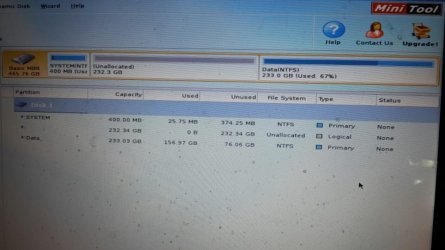
There is a SYSTEM 400mb partition that is not Active but no Active 100mb System Reserved.
And no C Windows 7 partition only lost one in PW.
Yesterday I run Startup Repair repeatedly 3 separate times with reboots in between each but it didnt helped.
Last edited:
My Computer
- OS
- Windows 7 x64

- Local time
- 8:22 AM
- Messages
- 5,915
Hi,
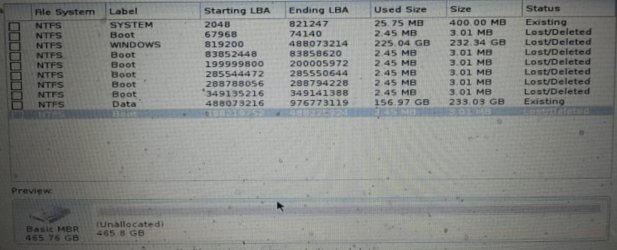
Looking at the Partition Wizard screenshot you posted in your first post
1. Put a tick mark in the first square which says System: Size: 400 MB Status: Existing,
2. Put a tick mark in the third square which says Windows: Size: 232.34GB Status: Lost/Deleted ( This is your lost Windows Partition)
3. Put a tick mark in the ninth square which says Data: Size: 233.03GB Staus: Existing.
Now look at the Preview Disk Map at the bottom of that screen and it should have turned from Unallocated and now show your drive as before with all three partitions and no unallocated space anywhere.( You can also double click on the Windows and Data partition and the Partition Explorer should show all the files. Close the Partition Explorer screen.)
If your full disk is shown as before in the Preview Disk Map, click on Finish and then on APPLY in the main screen. If your system Partition does not have a drive letter, then give it the same drive letter which was there before and click on APPLY.
I think you should be through.
Looking at the Partition Wizard screenshot you posted in your first post
1. Put a tick mark in the first square which says System: Size: 400 MB Status: Existing,
2. Put a tick mark in the third square which says Windows: Size: 232.34GB Status: Lost/Deleted ( This is your lost Windows Partition)
3. Put a tick mark in the ninth square which says Data: Size: 233.03GB Staus: Existing.
Now look at the Preview Disk Map at the bottom of that screen and it should have turned from Unallocated and now show your drive as before with all three partitions and no unallocated space anywhere.( You can also double click on the Windows and Data partition and the Partition Explorer should show all the files. Close the Partition Explorer screen.)
If your full disk is shown as before in the Preview Disk Map, click on Finish and then on APPLY in the main screen. If your system Partition does not have a drive letter, then give it the same drive letter which was there before and click on APPLY.
I think you should be through.
My Computer
- OS
- Windows 7 Home Premium 32 bit
- Local time
- 8:22 AM
- Messages
- 5,915
Yep, I see that after you pointed out.. Ending LBA of System Partition is 821247 and starting of Windows partition is 819210. So there is indeed an overlap. But how did it happen? It couldn't have happened on its own unless some manipulation had been done on the system drive because of which you lost access..
Now repairing it and shifting Windows to beyond LBA 821247 is a dangerous job with unpredictable results. We really can't undo the damage done by wrong manipulation of the system drive. May be it happened when you tried to create a data partition.
Have you made the recovery disks for your Toshiba Laptop? If you have done that perhaps you can try to recover any data from the Data Partition using TestDisk - if you have any critical data on it and then do a factory restore.
I can't see any other solution. May be you have to wait to see if someone else can come up with any other easy way out to rectify the damage.
EDIT: If your System is under warranty, you may contact Toshiba Tech Support rather than meddling with it on your own - except Factory restore with the Recovery Disks which the user is authorised to do.
Now repairing it and shifting Windows to beyond LBA 821247 is a dangerous job with unpredictable results. We really can't undo the damage done by wrong manipulation of the system drive. May be it happened when you tried to create a data partition.
Have you made the recovery disks for your Toshiba Laptop? If you have done that perhaps you can try to recover any data from the Data Partition using TestDisk - if you have any critical data on it and then do a factory restore.
I can't see any other solution. May be you have to wait to see if someone else can come up with any other easy way out to rectify the damage.
EDIT: If your System is under warranty, you may contact Toshiba Tech Support rather than meddling with it on your own - except Factory restore with the Recovery Disks which the user is authorised to do.
My Computer
- OS
- Windows 7 Home Premium 32 bit
Dont know how it happend.
The only way I can think of this to happend is malware of some kind.
The data partition was created several years ago when the laptop was new with no problems till now.
Sorry, didnt made recovery disks to the laptop but I used another Win7 install DVD to try repair and to use CMD.
Can see data in DATA partition through CMD but I also have critical data on Windows partition that lost.
The System is not under warranty anymore.
So came here to seak help restoring laptop to last working order.
Or at least to find a way to copy data from Windows and Data partition to extenal drive and then install/restore laptop
The only way I can think of this to happend is malware of some kind.
The data partition was created several years ago when the laptop was new with no problems till now.
Sorry, didnt made recovery disks to the laptop but I used another Win7 install DVD to try repair and to use CMD.
Can see data in DATA partition through CMD but I also have critical data on Windows partition that lost.
The System is not under warranty anymore.
So came here to seak help restoring laptop to last working order.
Or at least to find a way to copy data from Windows and Data partition to extenal drive and then install/restore laptop
My Computer
- OS
- Windows 7 x64
Well try the SFC and chkdsk and then if you suspect malware try these for starters
http://www.sevenforums.com/tutorials/1538-sfc-scannow-command-system-file-checker.html
http://www.sevenforums.com/tutorials/433-disk-check.html< if necessary include the /f and /r in the command line as per Option2
http://www.superantispyware.com/
http://www.malwarebytes.org/products/malwarebytes_free/
http://www.bleepingcomputer.com/download/adwcleaner/
ADW download from bleeping computer delete any rubbish found with themalware scans
(NBIf one is running Kaspersky security it may rant about ADW - just ignore it ordisable Kaspersky while the ADW is being used)
If these do nothing then I would give this a run you will need to make a bootable disk or stick and set the BIOS to boot from whatever device you make (I prefer a disk)
Kaspersky Rescue Disk 10
http://www.sevenforums.com/tutorials/1538-sfc-scannow-command-system-file-checker.html
http://www.sevenforums.com/tutorials/433-disk-check.html< if necessary include the /f and /r in the command line as per Option2
http://www.superantispyware.com/
http://www.malwarebytes.org/products/malwarebytes_free/
http://www.bleepingcomputer.com/download/adwcleaner/
ADW download from bleeping computer delete any rubbish found with themalware scans
(NBIf one is running Kaspersky security it may rant about ADW - just ignore it ordisable Kaspersky while the ADW is being used)
If these do nothing then I would give this a run you will need to make a bootable disk or stick and set the BIOS to boot from whatever device you make (I prefer a disk)
Kaspersky Rescue Disk 10
My Computer
- Computer type
- PC/Desktop
- Computer Manufacturer/Model Number
- Own build (new) Desk1 / Asus ROG Win 7 / Desk2 1st build
- OS
- Desk1 7 Home Prem / Desk2 10 Pro / Main lap Asus ROG 10 Pro 2 laptop Toshiba 7 Pro Asus P2520 7 & 10
- CPU
- Desk1 i5 3750K / Laptop i7 GTX 860M / Desk2 i5 2500
- Motherboard
- Desk1 Asus P877-V / Desk2 Gigabyte H67 UD3H / Laptop ?
- Memory
- Desk1 8GB (1866) / Desk2 16GB (1333) / Laptop 8Gb DDR3
- Graphics Card(s)
- Desk 1& 2NVidia GTX 650 & Laptops on board Intel
- Sound Card
- Desk 1 & 2 -XONAR DG Realtek High Def audio Laptop
- Monitor(s) Displays
- Desk 1 Benq HD 2450 / Desk2 Philips 24" / Laptop 17.5"
- Screen Resolution
- 1920x1080 D1 & D2 & Laptop 1
- Hard Drives
- Desk1 Samsung 120GB 830 SSD
Asus ROG 256GB 850 Pro SSD
Desk2 Samsung 840 256 SSD
Toshiba 120GB EVO
- PSU
- Desk 1 Corsair HX 1050/ Laptop ? / Desk 2 Corsair HX 650
- Case
- Desk 1 Cooler HAF XM ? Toshiba laptop / Desk2 Coolermaster
- Cooling
- Fans on all Desk1 -2 Desk2 - all Coolermasters 5 Laptop ?
- Keyboard
- Desk 1 MS Sidewinder X6 Desk 2 MS Sidewinder X 4
- Mouse
- Desk 1&2 - Gigabyte MS 900 gamer - laptop - Logitec wireless
- Internet Speed
- ADSL2+
- Other Info
- One other Desktop (tester) and spare Toshba laptop both with SSD's
Running Kaspersky 2016 ISS on all machines config'd identically
Logitec audio stereo systems on each machine (x3)
Canon MG5250MFC
Router/modem TP-Link running WPA2SK
- Local time
- 8:22 AM
- Messages
- 5,915
OK, Since you said
1. The Data Partition was created long ago and therefore it could not be the reason for the botched up disk structure
2. You haven't made the Recovery Disks
3. Your laptop is no longer under warranty
and
4. You do have some data in the Windows partition as well as the data partition
I shall deal with the data recovery aspect only.
Create your Lucid Puppy Live Linux USB pendrive, boot from it and see whether you can see the data and copy it to another external drive.
http://www.sevenforums.com/hardware...ly-unrecognisable-hard-drive.html#post2936753
1. The Data Partition was created long ago and therefore it could not be the reason for the botched up disk structure
2. You haven't made the Recovery Disks
3. Your laptop is no longer under warranty
and
4. You do have some data in the Windows partition as well as the data partition
I shall deal with the data recovery aspect only.
Create your Lucid Puppy Live Linux USB pendrive, boot from it and see whether you can see the data and copy it to another external drive.
http://www.sevenforums.com/hardware...ly-unrecognisable-hard-drive.html#post2936753
My Computer
- OS
- Windows 7 Home Premium 32 bit
Just to let you know
After your last post here I made bootCD of TestDisk to try copy data to external HD.
When I did a fullscan, it did find a backup of windows partition table that did not overlap with system partition.
So I took my chances and recovered it.
After reboot it said he need a boot file(cant remember file type) so I lunched Startup repair that fixed the problem.
After a second Startup repair the win7 booted up normaly.
Then I could do full backup of my data from all drives and burned theToshiba recovery disks.
Before reinstaling win7 I run Seatools for Dos to find and fix 5 bad sectors.
Now everything is Ok and run normal.
Thank you for your time and help
After your last post here I made bootCD of TestDisk to try copy data to external HD.
When I did a fullscan, it did find a backup of windows partition table that did not overlap with system partition.
So I took my chances and recovered it.
After reboot it said he need a boot file(cant remember file type) so I lunched Startup repair that fixed the problem.
After a second Startup repair the win7 booted up normaly.
Then I could do full backup of my data from all drives and burned theToshiba recovery disks.
Before reinstaling win7 I run Seatools for Dos to find and fix 5 bad sectors.
Now everything is Ok and run normal.
Thank you for your time and help
My Computer
- OS
- Windows 7 x64

Similar threads
- Replies
- 7
- Views
- 2K

- Replies
- 3
- Views
- 1K

- Replies
- 11
- Views
- 2K
- Replies
- 17
- Views
- 4K
