Windows 7 pro keeps re installing shared printer driver.

Dolke

New member
Local time
11:47 PM
Messages
76
Location
Novi Sad, Serbia
Hi guys,

I was trying to search the web and this forums for an answer to this question but I couldn't find any sing of solution...

Problem is with this single PC in our LAN that is running windows 7 pro.
Whenever user reboots the computer and tries to print something on our shared printer he will be prompt with the re install driver message.

Other PCs are using shared printer without any issue and there are all kinds of PCs, running XP, Windows 7 x64, Windows 7 x86 etc...

Although after re-installation printing is successful this can be quite frustrating as sometimes happens few times on a daily basis.

Any ideas why this is happening?

btw, there is only one user account on problematic PC and that user account has administrator privileges.

Thanks
Dean
 

My Computer

OS
Windows 7 Professional x64 SP1
Hi Dolke , I am not an expert on this.. but.. could you give specs on the problematic computer.. I am sure it has all its updates.. this issue should not be happening if set up correctly for sharing .. i am stumped ..give us more info on the one computer and the type of network connections you have made for it to share .. lets see if we can get this sorted out..
 

My Computer

Computer type
PC/Desktop
Computer Manufacturer/Model Number
Dell optiplex 740
OS
Win 7 Home Premium SP1 32 bit
CPU
AMD Athlon 64 X2 5000B
Motherboard
Dell Inc. 0YP696 (Socket M2 )
Memory
4.00 GB Dual-Channel DDR2 @ 370MHz (6-6-6-18)
Graphics Card(s)
Acer E181H (1366x768@60Hz) 64MB GeForce 6150 LE (Dell)
Sound Card
SigmaTel High Definition Audio CODEC
Monitor(s) Displays
Acer E181H (1366x768@60Hz) 64MB GeForce 6150 LE (Dell)
Hard Drives
699GB Seagate ST375064 0NS SCSI Disk Device (ATA)
Case
Mini tower
Internet Speed
Ping 36 ms, Download 57.71 mbps , Upload 11.79mbps
Antivirus
Free Avast. Pro paid Mbam , Free Sas
Browser
Palemoon .
Thanks for replaying Yard...

Well PC is just one of several small-office PCs.

Its running Windows 7 professional x86 SP1, and it is part of LAN.
All PCs within this LAN are also part of the same workgroup.

Also, all PCs, including the one with the specific issue, have hamachi client installed and they are part of VPN with some other remote PCs that are located in other offices.

PCs is up to date when it comes to windows updates and most of other software is also updated to newest versions.

PC can access all other computers on the network (shared hard drivers, folders etc...) including server PC on which this shared printer is physically attached. I was able to ping this server PC from problematic PC and vice versa so I'm guessing this is not network related issue.

I might have some other info for you but atm I'm not smart to write them...
If you need anything to help you help me just shoot :)


Thanks
 

My Computer

OS
Windows 7 Professional x64 SP1
hmmmm.. most interesting .. so .. all is set correct.. but.. the one pc needs to have drivers reinstalled... to use normally.. ? dang it man. Not sure how to fix this.. maybe some experts will see this thread and respond ..
 

My Computer

Computer type
PC/Desktop
Computer Manufacturer/Model Number
Dell optiplex 740
OS
Win 7 Home Premium SP1 32 bit
CPU
AMD Athlon 64 X2 5000B
Motherboard
Dell Inc. 0YP696 (Socket M2 )
Memory
4.00 GB Dual-Channel DDR2 @ 370MHz (6-6-6-18)
Graphics Card(s)
Acer E181H (1366x768@60Hz) 64MB GeForce 6150 LE (Dell)
Sound Card
SigmaTel High Definition Audio CODEC
Monitor(s) Displays
Acer E181H (1366x768@60Hz) 64MB GeForce 6150 LE (Dell)
Hard Drives
699GB Seagate ST375064 0NS SCSI Disk Device (ATA)
Case
Mini tower
Internet Speed
Ping 36 ms, Download 57.71 mbps , Upload 11.79mbps
Antivirus
Free Avast. Pro paid Mbam , Free Sas
Browser
Palemoon .
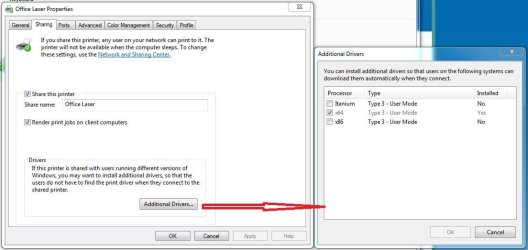
On the server > Devices & Printers > subject Printer > Printer Properties

Have you tried installing the additional drivers?

_
 

Attachments

  • Capture.JPG
    Capture.JPG
    121.7 KB · Views: 1

My Computer

Computer type
PC/Desktop
Computer Manufacturer/Model Number
Home Built - Jan 2013
OS
Windows 7 64 Bit Home Premium SP1
CPU
i7-3820
Motherboard
Asus P9X79-PRO - Bios 4608
Memory
GSkill F3-14900CL9Q - 16GB
Graphics Card(s)
EVGA GeForce GTX660 - Driver 352.86
Sound Card
On board Realtek ALC898
Monitor(s) Displays
Acer S271HL
Screen Resolution
1920 x 1080
Hard Drives
#1- Samsung 840 Pro Series
#2- Western Digital WD1002FAEX Sata3 Black
#3- Western Digital WD1002FAEX Sata3 Black
PSU
Corsair CMPSU-850TX-V2 - 850 watt (by Seasonic)
Case
Corsair Obsidian 550D
Cooling
Standard 3 120mm case fans, Cooler Master Hyper 212 EVO
Keyboard
MS KC-0405
Mouse
Intellimouse 5-button
Internet Speed
56 Mbits/Sec (on a good day)
Antivirus
Avast & Malwarebytes
Browser
Firefox
Other Info
Asus DVD - DRW-24B1ST 24X
Thank you for replaying TVeblen.

I will try this tip in a couple of minutes and let you and others know if this helped.

Update:

I would need to do this after working hours as I'm not able to reboot the PC that have issues atm.
Ill test this in about 2h and get back here...
 

My Computer

OS
Windows 7 Professional x64 SP1
I tried the following but PC that is having the problem is running x86 windows not x64 so this cant be the reason.

Another problem is that I dont have x64 version of the driver...
 

My Computer

OS
Windows 7 Professional x64 SP1
I'm lost.
What Windows version is the server (w/printer) running?
What version is the problem PC running?

What happens when you click the x86/x64 box? Does it ask you for a driver?
 

My Computer

Computer type
PC/Desktop
Computer Manufacturer/Model Number
Home Built - Jan 2013
OS
Windows 7 64 Bit Home Premium SP1
CPU
i7-3820
Motherboard
Asus P9X79-PRO - Bios 4608
Memory
GSkill F3-14900CL9Q - 16GB
Graphics Card(s)
EVGA GeForce GTX660 - Driver 352.86
Sound Card
On board Realtek ALC898
Monitor(s) Displays
Acer S271HL
Screen Resolution
1920 x 1080
Hard Drives
#1- Samsung 840 Pro Series
#2- Western Digital WD1002FAEX Sata3 Black
#3- Western Digital WD1002FAEX Sata3 Black
PSU
Corsair CMPSU-850TX-V2 - 850 watt (by Seasonic)
Case
Corsair Obsidian 550D
Cooling
Standard 3 120mm case fans, Cooler Master Hyper 212 EVO
Keyboard
MS KC-0405
Mouse
Intellimouse 5-button
Internet Speed
56 Mbits/Sec (on a good day)
Antivirus
Avast & Malwarebytes
Browser
Firefox
Other Info
Asus DVD - DRW-24B1ST 24X
"Server" is actually regular PC with Windows 7 x86. We call it server as we have important files on it and all other PCs are connecting to it. Also, printer is physically attached to this server so its shared printer not network printer.

Problematic PC has the same version of windows, so windows 7 x86 and it is connected to "server" via LAN (cable).

x86 box is check meaning that driver is installed, yet x64 is not checked and when I check it, it prompts me to chose location of the driver...


Sorry for the confusion...
 

My Computer

OS
Windows 7 Professional x64 SP1
I've got it now. Thanks.

If i think of anything else I will post back.
 

My Computer

Computer type
PC/Desktop
Computer Manufacturer/Model Number
Home Built - Jan 2013
OS
Windows 7 64 Bit Home Premium SP1
CPU
i7-3820
Motherboard
Asus P9X79-PRO - Bios 4608
Memory
GSkill F3-14900CL9Q - 16GB
Graphics Card(s)
EVGA GeForce GTX660 - Driver 352.86
Sound Card
On board Realtek ALC898
Monitor(s) Displays
Acer S271HL
Screen Resolution
1920 x 1080
Hard Drives
#1- Samsung 840 Pro Series
#2- Western Digital WD1002FAEX Sata3 Black
#3- Western Digital WD1002FAEX Sata3 Black
PSU
Corsair CMPSU-850TX-V2 - 850 watt (by Seasonic)
Case
Corsair Obsidian 550D
Cooling
Standard 3 120mm case fans, Cooler Master Hyper 212 EVO
Keyboard
MS KC-0405
Mouse
Intellimouse 5-button
Internet Speed
56 Mbits/Sec (on a good day)
Antivirus
Avast & Malwarebytes
Browser
Firefox
Other Info
Asus DVD - DRW-24B1ST 24X
Back
Top