Windows 7 pro lags excessively

KrissKross

New member
Local time
4:30 PM
Messages
4
Location
Malaysia
Windows 7 pro lags

Hello all,

Recently my pc started lagging excessively. I was using windows 7 pro x86 with 4gb ram, now using 8gb with windows 7 pro x64 and firefox 46. Still no difference. Same lagging. HDD already reformatted fully, installed fresh copy. As for hardware's im using :

AMD Phenom II X2 555 Black Edition
ASRock N68C-S UCC
Radeon HD4800
VIA 3.0 pci-e card
Asus Xonar DG sound card
2tb western digital blue
asus bd writer

1234.jpg


Tried memtest in dos, result was good. Tested hdd in windows, result was good. Test GPU in windows, result was good

My pc was super fast and running perfectly previously. Only lately it started to act weird. I have even updated all drivers to latest from their respective websites. When surfing firefox, i can see the lag like mouse is crawling. Updated windows updates. I'm lost, did i miss anything else here? Please help me :cry:
 
Last edited:

My Computer

Computer type
PC/Desktop
Computer Manufacturer/Model Number
Custom Build
OS
Windows 7 Pro x64
CPU
Amd Phenom II X2 555 Black Edition
Motherboard
ASRock N68C-S UCC
Memory
Kingston DDR3 1333Mhz 8GB
Graphics Card(s)
Radeon HD4800
Hard Drives
WD Blue 2TB
Antivirus
Avast Internet Security
Browser
Firefox 46
Hi and welcome to SevenForums,
I'd use RealTemp and see what the temperature and load is being used
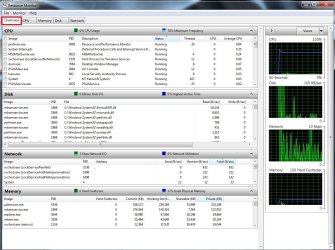
If more than 50% I'd use resource monitor and the Overview section to see what all is going on
svchost has been pretty popular at disrupting operation mostly caused by the windows update system
Easy workaround was to set windows updates to Never check for updates.
Download Real Temp 3.70 | techPowerUp

resource monitor overview.jpg
 

My Computer

Computer type
PC/Desktop
Computer Manufacturer/Model Number
Custom assembled by me :}
OS
Win-7-Pro64bit 7-H-Prem-64bit
CPU
i7-5930K 2nd i9-9940x both water blocked VRM's too
Motherboard
ASUS SABERTOOTH X99 2nd ASUS x299 Apex
Memory
Trident-z 3200C14 2nd Trident-z 3600C16
Graphics Card(s)
EVGA 1080ti ftw3 2nd Titan Xp both water blocked
Sound Card
Built-in Realtek
Monitor(s) Displays
1-AOC G2460PG 24"G-Sync 144Hz/ 2nd 1-ASUS VG248QE 24" 144Hz
Screen Resolution
1920 x 1080 144Hz
Hard Drives
2-Samsung M.2 Evo & Evo Plus
2-Samsung 850 EVO 500GB SSD's/ 3-2.5 W.D. Black 1tb-&3-1tb/3-3.5 WD Black 1tb hdd's
PSU
EVGA SuperNOVA 1000-P2 2nd 1200-P2
Case
2-Corsair Obsidian Series 450D Black ATX Mid Tower
Cooling
Custom water loops
Keyboard
Logitech G710+/ 2nd Logitech G910
Mouse
2-RedDragon M901 Perdition 16400 dpi Gaming mouse = wired
Internet Speed
Comcast Ping 19ms 89.31mbps download speed 6.12mbps upload
Antivirus
Malwarebytes Pro/ Superantispyware Pro
Browser
FireFox & Pale moon
Other Info
2nd ASUS X299 Apex/Intel i9-9940x with Custom water loop/7H-Prem-x64/Corsair 450D case/Ram Trident-z 3600C16 4x8gb / Samsung970Evo plus 500gb SSD/Dual ssd EZ swap evo/PSU EVGA SuperNova 1200w-P2 80+Platinum/GPU Titan Xp /8-ML-140 on push-pull on 2-280GTX rads
Hi Thrashzone, thank you for replying. Realtemp is only designed for Intel and not AMD so i dont think i can use realtemp but i will try with coretemp

Update with coretemp

Core_Temp_Scr.png
 

My Computer

Computer type
PC/Desktop
Computer Manufacturer/Model Number
Custom Build
OS
Windows 7 Pro x64
CPU
Amd Phenom II X2 555 Black Edition
Motherboard
ASRock N68C-S UCC
Memory
Kingston DDR3 1333Mhz 8GB
Graphics Card(s)
Radeon HD4800
Hard Drives
WD Blue 2TB
Antivirus
Avast Internet Security
Browser
Firefox 46
Hi,
Skip to resource monitor and see what is happening there
Post a screen shot if you want too.
 

My Computer

Computer type
PC/Desktop
Computer Manufacturer/Model Number
Custom assembled by me :}
OS
Win-7-Pro64bit 7-H-Prem-64bit
CPU
i7-5930K 2nd i9-9940x both water blocked VRM's too
Motherboard
ASUS SABERTOOTH X99 2nd ASUS x299 Apex
Memory
Trident-z 3200C14 2nd Trident-z 3600C16
Graphics Card(s)
EVGA 1080ti ftw3 2nd Titan Xp both water blocked
Sound Card
Built-in Realtek
Monitor(s) Displays
1-AOC G2460PG 24"G-Sync 144Hz/ 2nd 1-ASUS VG248QE 24" 144Hz
Screen Resolution
1920 x 1080 144Hz
Hard Drives
2-Samsung M.2 Evo & Evo Plus
2-Samsung 850 EVO 500GB SSD's/ 3-2.5 W.D. Black 1tb-&3-1tb/3-3.5 WD Black 1tb hdd's
PSU
EVGA SuperNOVA 1000-P2 2nd 1200-P2
Case
2-Corsair Obsidian Series 450D Black ATX Mid Tower
Cooling
Custom water loops
Keyboard
Logitech G710+/ 2nd Logitech G910
Mouse
2-RedDragon M901 Perdition 16400 dpi Gaming mouse = wired
Internet Speed
Comcast Ping 19ms 89.31mbps download speed 6.12mbps upload
Antivirus
Malwarebytes Pro/ Superantispyware Pro
Browser
FireFox & Pale moon
Other Info
2nd ASUS X299 Apex/Intel i9-9940x with Custom water loop/7H-Prem-x64/Corsair 450D case/Ram Trident-z 3600C16 4x8gb / Samsung970Evo plus 500gb SSD/Dual ssd EZ swap evo/PSU EVGA SuperNova 1200w-P2 80+Platinum/GPU Titan Xp /8-ML-140 on push-pull on 2-280GTX rads
While my task manager is ON, i can see CPU spike up almost to 100% while surfing firefox and playing a video on youtube or facebook or winamp or kmplayer or anything the audio stutters.
 

My Computer

Computer type
PC/Desktop
Computer Manufacturer/Model Number
Custom Build
OS
Windows 7 Pro x64
CPU
Amd Phenom II X2 555 Black Edition
Motherboard
ASRock N68C-S UCC
Memory
Kingston DDR3 1333Mhz 8GB
Graphics Card(s)
Radeon HD4800
Hard Drives
WD Blue 2TB
Antivirus
Avast Internet Security
Browser
Firefox 46
Hello? Anyone? Nobody?

My PC is giving me various headaches with this lagging windows problem.

I just replaced a brand new motherboard since my old board port faulty. Install windows x64 a couple of times, there's various problems occurring. Like after first windows install and the second boot it goes completely blank. Then even if i manage to install it successfully, my windows update pissing me off by not updating while it says updating for several hours and svchost using by update exceeds 1,570,100 K in memory usage. Seriously? And the lagging is seriously bad. Windows 64bit, 8gb ram and its lagging?

Ive tested my ram, its working fine

HDD seems good test with all the software tests.

CPU?

OMG. Can someone help me before i throw this pc out of the window?
 

My Computer

Computer type
PC/Desktop
Computer Manufacturer/Model Number
Custom Build
OS
Windows 7 Pro x64
CPU
Amd Phenom II X2 555 Black Edition
Motherboard
ASRock N68C-S UCC
Memory
Kingston DDR3 1333Mhz 8GB
Graphics Card(s)
Radeon HD4800
Hard Drives
WD Blue 2TB
Antivirus
Avast Internet Security
Browser
Firefox 46
Back
Top