
Windows 7 Pro x64 Slow Start - Monitor Sleeps then Wakes

tjg79

New member
Power User
VIP
Local time
8:06 PM
Messages
512
I've had an issue with very slow restarts where once I get the Windows Start screen I then get a black screen where the monitors go to sleep then awake and then very slow Windows Welcome screen, sometimes another black screen with cursor and then slow to the desktop.

I suspect this may be related to Nvidia drivers for my Nvidia GeForce 9800 GT. I'm considering deleting all Nvidia programs and drivers and reloading. I've checked the system memory with the Windows 7 memory checker. I've checked the BIOS settings and everything is as it should be. I could do a recovery BIOS update just to leave no stone unturned, but I don't expect that to accomplish anything. I've checked the Event Viewer System Log and Application Log and I'm not getting any errors or warnings other than a warning that my magicJack driver didn't load, but that happens late in the system start sequence and it must load eventually, because the magicJack starts.

Google searches don't yield any solutions. I've seen a few threads on this forum, but they didn't seem to apply, because I don't have the system configured to wake from Nvidia network. I can't really recall when it started doing this very slow start with monitor sleep sequence, because I usually just tolerate these types of issues for a while before I've finally had enough.

Does anyone have any suggestions other than reloading Nividia drivers and software? I don't know if that drill will lead to success or not.

Thanks in advance for your assistance.

Regards
 
Last edited:

My Computer My Computer

At a glance

Windows 7 Professional x64 SP1Intel i7-980x @ 3.6GHzCorsair 12GB DDR3 RAM (3x4GB)EVGA NVIDIA GeForce GTX 760 SC
Computer type
PC/Desktop
Computer Manufacturer/Model Number
Custom Build
OS
Windows 7 Professional x64 SP1
CPU
Intel i7-980x @ 3.6GHz
Motherboard
Intel DX58SO
Memory
Corsair 12GB DDR3 RAM (3x4GB)
Graphics Card(s)
EVGA NVIDIA GeForce GTX 760 SC
Sound Card
Intel High Definition 7.1 Audio Subsystem - Realtek ALC889
Monitor(s) Displays
Dual Display - LG Electronics Flatron L227WTG
Screen Resolution
1680 x 1050 60Hz 32-bit
Hard Drives
2 Seagate Constellation ST1000NM0033 1TB SATA 6Gb/s HDDs configured as Intel SATA Array 0, RST RAID 1, Vol. 0 (C:\) & Vol. 1 (D:\), & 2 Seagate Barracuda ST500DM002 500GB SATA 6Gb/s HDDs configured as Intel SATA Array 1 RST RAID 1, Vol. 0 (E:\)
PSU
Corsair HX850W
Case
Antec P182
Cooling
Stock Intel i7-980x Cooling Solution + 4 120mm Case Fans
Keyboard
Microsoft Wireless Multimedia Keyboard 1.1
Mouse
Microsoft Standard Wireless Optical Mouse
Internet Speed
DSL - 3.0 Mb/s download 768 Kb/s upload
Antivirus
ESET Smart Security 12, Defender & SuperAntiSpyware Pro
Browser
Firefox Quantum 64-bit
Other Info
Optical Drives: Pioneer DVR-216R & TSSTcorp SH-S223Q, Anker USB 3.0 PCI-E Card, Hauppauge WinTV-HVR 2250 Dual TV Tuner Board for Windows Media Center, Bose Companion 3 Series II multimedia speaker system, APC Smart-UPS SMT1500
I'd take a look in your Startup and see what programs you have set to load on startup. It may be worth trimming it down to just the programs and services you really need, take a screenshot and post in here for people to take a look and recommend what could be removed.
 

My Computer My Computer

At a glance

W7 Pro x64 SP1 | W10 Pro IP x64 | W8.1 Pro x6...i7-4790k @ 4GHz (4.4GHz Boost)16GB DDR3 Kingston HyperX Fury @ 1600MHz CL 9...EVGA GTX 980 Classified
Computer type
PC/Desktop
Computer Manufacturer/Model Number
Custom Build
OS
W7 Pro x64 SP1 | W10 Pro IP x64 | W8.1 Pro x64 VM | Linux Mint VM
CPU
i7-4790k @ 4GHz (4.4GHz Boost)
Motherboard
ASUS Sabertooth Z87 (BIOS Rev 2004)
Memory
16GB DDR3 Kingston HyperX Fury @ 1600MHz CL 9-9-9-27
Graphics Card(s)
EVGA GTX 980 Classified
Sound Card
Realtek Onboard
Monitor(s) Displays
Samsung S27D390
Screen Resolution
1920 x 1080
Hard Drives
240GB Intel 520 Series SSD |
Samsung 850 EVO 120GB SSD |
2TB WD Caviar Black |
2TB WD Caviar Green
PSU
Corsair HX850-80 Gold Modular
Case
Cooler Master Silencio 650
Cooling
Corsair H80i w/2 x Corsair SP120 | 2 x 120mm Noctua NF-S12B
Keyboard
Microsoft Sidewinder X4
Mouse
Gigabyte M6900 optical
Internet Speed
152mb
Antivirus
F-Secure
Browser
Firefox 38.0
Other Info
Backup Rig: Win 7 Pro 64-bit | AMD A10-5800k | ASUS F2A85-V Pro | 8GB Samsung DDR3 @1600MHz | 120GB Toshiba SDD | 2TB Seagate HDD | Cooler Master Silencio 550
Right click Computer in start menu, select manage, click Device Manager.
Check that none of the drivers for mouse, keyboard and Network adapters are set for "Allow this device to wake the computer".
Do this by right click on the device, select Properties, click the Power management tab. You will see there if the wake option is ticked or not.
 

My Computer My Computer

At a glance

Windows 7 Home Premium 64bit.Intel Core i5 3470 @ 3.20GHz Ivy Bridge 22nm ...8.00 GB Single-Channel DDR3 @ 804MHz (9-9-9-24)NVIDIA GeForce GT 610 Clock: 810MHz Memory: 1...
Computer type
PC/Desktop
Computer Manufacturer/Model Number
Asus
OS
Windows 7 Home Premium 64bit.
CPU
Intel Core i5 3470 @ 3.20GHz Ivy Bridge 22nm Technology
Motherboard
ASUSTeK COMPUTER INC. P8Z77-M (LGA1155)
Memory
8.00 GB Single-Channel DDR3 @ 804MHz (9-9-9-24)
Graphics Card(s)
NVIDIA GeForce GT 610 Clock: 810MHz Memory: 1024MB
Monitor(s) Displays
Prolite E2409HDS 23"
Screen Resolution
1920 x 1080
Hard Drives
932GB Western Digital WDC WD1002FAEX-00Z3A0 (SATA)
Case
Cooler Master
Keyboard
Logitech K520 wireless
Mouse
Logitech M310 wireless
Antivirus
Microsoft Security Essentials. WinPatrol. SAS. AMWB. etc
Browser
Coolnovo. PirateBrowser.
I'd take a look in your Startup and see what programs you have set to load on startup. It may be worth trimming it down to just the programs and services you really need, take a screenshot and post in here for people to take a look and recommend what could be removed.

Thanks for the help.

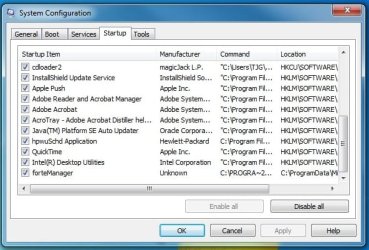
The following screen shots of msconfig show the start up programs.

Start up 1.jpg

Start up 2.jpg

I completely deleted the display adapter software and drivers and reinstalled. I did notice some improvement.

Although there seems to be some variation, but what follows is what my start up sequence looks like on a restart. The times are in minutes/seconds from start of BIOS cursor.

Windows Start screen: 0:16
Black screen: 0:48
Monitors sleep mode: 0:54
Windows Welcome: 1:36
Desktop: 2:21
All icons in notification area: 4:00
 

My Computer My Computer

At a glance

Windows 7 Professional x64 SP1Intel i7-980x @ 3.6GHzCorsair 12GB DDR3 RAM (3x4GB)EVGA NVIDIA GeForce GTX 760 SC
Computer type
PC/Desktop
Computer Manufacturer/Model Number
Custom Build
OS
Windows 7 Professional x64 SP1
CPU
Intel i7-980x @ 3.6GHz
Motherboard
Intel DX58SO
Memory
Corsair 12GB DDR3 RAM (3x4GB)
Graphics Card(s)
EVGA NVIDIA GeForce GTX 760 SC
Sound Card
Intel High Definition 7.1 Audio Subsystem - Realtek ALC889
Monitor(s) Displays
Dual Display - LG Electronics Flatron L227WTG
Screen Resolution
1680 x 1050 60Hz 32-bit
Hard Drives
2 Seagate Constellation ST1000NM0033 1TB SATA 6Gb/s HDDs configured as Intel SATA Array 0, RST RAID 1, Vol. 0 (C:\) & Vol. 1 (D:\), & 2 Seagate Barracuda ST500DM002 500GB SATA 6Gb/s HDDs configured as Intel SATA Array 1 RST RAID 1, Vol. 0 (E:\)
PSU
Corsair HX850W
Case
Antec P182
Cooling
Stock Intel i7-980x Cooling Solution + 4 120mm Case Fans
Keyboard
Microsoft Wireless Multimedia Keyboard 1.1
Mouse
Microsoft Standard Wireless Optical Mouse
Internet Speed
DSL - 3.0 Mb/s download 768 Kb/s upload
Antivirus
ESET Smart Security 12, Defender & SuperAntiSpyware Pro
Browser
Firefox Quantum 64-bit
Other Info
Optical Drives: Pioneer DVR-216R & TSSTcorp SH-S223Q, Anker USB 3.0 PCI-E Card, Hauppauge WinTV-HVR 2250 Dual TV Tuner Board for Windows Media Center, Bose Companion 3 Series II multimedia speaker system, APC Smart-UPS SMT1500
Right click Computer in start menu, select manage, click Device Manager.
Check that none of the drivers for mouse, keyboard and Network adapters are set for "Allow this device to wake the computer".
Do this by right click on the device, select Properties, click the Power management tab. You will see there if the wake option is ticked or not.

Thanks for the help.

None of my Network adapters are set to wake the computer, but the mouse and keyboard are. If I make the change for the mouse and keyboard, how will I get out of screen saver mode? Or, is that different from sleep mode?

Regards
 

My Computer My Computer

At a glance

Windows 7 Professional x64 SP1Intel i7-980x @ 3.6GHzCorsair 12GB DDR3 RAM (3x4GB)EVGA NVIDIA GeForce GTX 760 SC
Computer type
PC/Desktop
Computer Manufacturer/Model Number
Custom Build
OS
Windows 7 Professional x64 SP1
CPU
Intel i7-980x @ 3.6GHz
Motherboard
Intel DX58SO
Memory
Corsair 12GB DDR3 RAM (3x4GB)
Graphics Card(s)
EVGA NVIDIA GeForce GTX 760 SC
Sound Card
Intel High Definition 7.1 Audio Subsystem - Realtek ALC889
Monitor(s) Displays
Dual Display - LG Electronics Flatron L227WTG
Screen Resolution
1680 x 1050 60Hz 32-bit
Hard Drives
2 Seagate Constellation ST1000NM0033 1TB SATA 6Gb/s HDDs configured as Intel SATA Array 0, RST RAID 1, Vol. 0 (C:\) & Vol. 1 (D:\), & 2 Seagate Barracuda ST500DM002 500GB SATA 6Gb/s HDDs configured as Intel SATA Array 1 RST RAID 1, Vol. 0 (E:\)
PSU
Corsair HX850W
Case
Antec P182
Cooling
Stock Intel i7-980x Cooling Solution + 4 120mm Case Fans
Keyboard
Microsoft Wireless Multimedia Keyboard 1.1
Mouse
Microsoft Standard Wireless Optical Mouse
Internet Speed
DSL - 3.0 Mb/s download 768 Kb/s upload
Antivirus
ESET Smart Security 12, Defender & SuperAntiSpyware Pro
Browser
Firefox Quantum 64-bit
Other Info
Optical Drives: Pioneer DVR-216R & TSSTcorp SH-S223Q, Anker USB 3.0 PCI-E Card, Hauppauge WinTV-HVR 2250 Dual TV Tuner Board for Windows Media Center, Bose Companion 3 Series II multimedia speaker system, APC Smart-UPS SMT1500
I never use screen saver myself. No point on modern monitors.
It is different from sleep mode. Screen saver will go off when you move the mouse or press a key.
 

My Computer My Computer

At a glance

Windows 7 Home Premium 64bit.Intel Core i5 3470 @ 3.20GHz Ivy Bridge 22nm ...8.00 GB Single-Channel DDR3 @ 804MHz (9-9-9-24)NVIDIA GeForce GT 610 Clock: 810MHz Memory: 1...
Computer type
PC/Desktop
Computer Manufacturer/Model Number
Asus
OS
Windows 7 Home Premium 64bit.
CPU
Intel Core i5 3470 @ 3.20GHz Ivy Bridge 22nm Technology
Motherboard
ASUSTeK COMPUTER INC. P8Z77-M (LGA1155)
Memory
8.00 GB Single-Channel DDR3 @ 804MHz (9-9-9-24)
Graphics Card(s)
NVIDIA GeForce GT 610 Clock: 810MHz Memory: 1024MB
Monitor(s) Displays
Prolite E2409HDS 23"
Screen Resolution
1920 x 1080
Hard Drives
932GB Western Digital WDC WD1002FAEX-00Z3A0 (SATA)
Case
Cooler Master
Keyboard
Logitech K520 wireless
Mouse
Logitech M310 wireless
Antivirus
Microsoft Security Essentials. WinPatrol. SAS. AMWB. etc
Browser
Coolnovo. PirateBrowser.
I never use screen saver myself. No point on modern monitors.
It is different from sleep mode. Screen saver will go off when you move the mouse or press a key.

OK, I'll remove the wake mode feature from the mouse and keyboard to see what happens.

Thanks.
 

My Computer My Computer

At a glance

Windows 7 Professional x64 SP1Intel i7-980x @ 3.6GHzCorsair 12GB DDR3 RAM (3x4GB)EVGA NVIDIA GeForce GTX 760 SC
Computer type
PC/Desktop
Computer Manufacturer/Model Number
Custom Build
OS
Windows 7 Professional x64 SP1
CPU
Intel i7-980x @ 3.6GHz
Motherboard
Intel DX58SO
Memory
Corsair 12GB DDR3 RAM (3x4GB)
Graphics Card(s)
EVGA NVIDIA GeForce GTX 760 SC
Sound Card
Intel High Definition 7.1 Audio Subsystem - Realtek ALC889
Monitor(s) Displays
Dual Display - LG Electronics Flatron L227WTG
Screen Resolution
1680 x 1050 60Hz 32-bit
Hard Drives
2 Seagate Constellation ST1000NM0033 1TB SATA 6Gb/s HDDs configured as Intel SATA Array 0, RST RAID 1, Vol. 0 (C:\) & Vol. 1 (D:\), & 2 Seagate Barracuda ST500DM002 500GB SATA 6Gb/s HDDs configured as Intel SATA Array 1 RST RAID 1, Vol. 0 (E:\)
PSU
Corsair HX850W
Case
Antec P182
Cooling
Stock Intel i7-980x Cooling Solution + 4 120mm Case Fans
Keyboard
Microsoft Wireless Multimedia Keyboard 1.1
Mouse
Microsoft Standard Wireless Optical Mouse
Internet Speed
DSL - 3.0 Mb/s download 768 Kb/s upload
Antivirus
ESET Smart Security 12, Defender & SuperAntiSpyware Pro
Browser
Firefox Quantum 64-bit
Other Info
Optical Drives: Pioneer DVR-216R & TSSTcorp SH-S223Q, Anker USB 3.0 PCI-E Card, Hauppauge WinTV-HVR 2250 Dual TV Tuner Board for Windows Media Center, Bose Companion 3 Series II multimedia speaker system, APC Smart-UPS SMT1500
There was no improvement from removing the wake feature from the mouse and keyboard. If anything, it seemed to make boot take longer. It's about 4:40 minutes from BIOS cursor to all notification area icons on a restart. There are no errors or warnings in the Event Viewer Windows Logs for Application and System.
 

My Computer My Computer

At a glance

Windows 7 Professional x64 SP1Intel i7-980x @ 3.6GHzCorsair 12GB DDR3 RAM (3x4GB)EVGA NVIDIA GeForce GTX 760 SC
Computer type
PC/Desktop
Computer Manufacturer/Model Number
Custom Build
OS
Windows 7 Professional x64 SP1
CPU
Intel i7-980x @ 3.6GHz
Motherboard
Intel DX58SO
Memory
Corsair 12GB DDR3 RAM (3x4GB)
Graphics Card(s)
EVGA NVIDIA GeForce GTX 760 SC
Sound Card
Intel High Definition 7.1 Audio Subsystem - Realtek ALC889
Monitor(s) Displays
Dual Display - LG Electronics Flatron L227WTG
Screen Resolution
1680 x 1050 60Hz 32-bit
Hard Drives
2 Seagate Constellation ST1000NM0033 1TB SATA 6Gb/s HDDs configured as Intel SATA Array 0, RST RAID 1, Vol. 0 (C:\) & Vol. 1 (D:\), & 2 Seagate Barracuda ST500DM002 500GB SATA 6Gb/s HDDs configured as Intel SATA Array 1 RST RAID 1, Vol. 0 (E:\)
PSU
Corsair HX850W
Case
Antec P182
Cooling
Stock Intel i7-980x Cooling Solution + 4 120mm Case Fans
Keyboard
Microsoft Wireless Multimedia Keyboard 1.1
Mouse
Microsoft Standard Wireless Optical Mouse
Internet Speed
DSL - 3.0 Mb/s download 768 Kb/s upload
Antivirus
ESET Smart Security 12, Defender & SuperAntiSpyware Pro
Browser
Firefox Quantum 64-bit
Other Info
Optical Drives: Pioneer DVR-216R & TSSTcorp SH-S223Q, Anker USB 3.0 PCI-E Card, Hauppauge WinTV-HVR 2250 Dual TV Tuner Board for Windows Media Center, Bose Companion 3 Series II multimedia speaker system, APC Smart-UPS SMT1500
Wow, that is a slow start up. I've got 28 seconds.
I think that needs to be tackled first then.
You could try a repair install. http://www.sevenforums.com/tutorials/3413-repair-install.html

This The Best Tips for Speeding Up Your Windows PC might be of some help. For starters cut back on everything you can: set desktop display to Windows basic, in services set all un-necessary processes to manual. Black Viper is the go to guy for info about services. » Black Viper’s Windows 7 Service Pack 1 Service Configurations
I would also disable (in services) the Realtek audio and cut the Geoforce down to basics. If you do these in services.msc, you can re-set them after the next boot.
I doubt a virus is the problem but it won't hurt to check.
 

My Computer My Computer

At a glance

Windows 7 Home Premium 64bit.Intel Core i5 3470 @ 3.20GHz Ivy Bridge 22nm ...8.00 GB Single-Channel DDR3 @ 804MHz (9-9-9-24)NVIDIA GeForce GT 610 Clock: 810MHz Memory: 1...
Computer type
PC/Desktop
Computer Manufacturer/Model Number
Asus
OS
Windows 7 Home Premium 64bit.
CPU
Intel Core i5 3470 @ 3.20GHz Ivy Bridge 22nm Technology
Motherboard
ASUSTeK COMPUTER INC. P8Z77-M (LGA1155)
Memory
8.00 GB Single-Channel DDR3 @ 804MHz (9-9-9-24)
Graphics Card(s)
NVIDIA GeForce GT 610 Clock: 810MHz Memory: 1024MB
Monitor(s) Displays
Prolite E2409HDS 23"
Screen Resolution
1920 x 1080
Hard Drives
932GB Western Digital WDC WD1002FAEX-00Z3A0 (SATA)
Case
Cooler Master
Keyboard
Logitech K520 wireless
Mouse
Logitech M310 wireless
Antivirus
Microsoft Security Essentials. WinPatrol. SAS. AMWB. etc
Browser
Coolnovo. PirateBrowser.
Wow, that is a slow start up. I've got 28 seconds.
I think that needs to be tackled first then.
You could try a repair install. http://www.sevenforums.com/tutorials/3413-repair-install.html

This The Best Tips for Speeding Up Your Windows PC might be of some help. For starters cut back on everything you can: set desktop display to Windows basic, in services set all un-necessary processes to manual. Black Viper is the go to guy for info about services. » Black Viper’s Windows 7 Service Pack 1 Service Configurations
I would also disable (in services) the Realtek audio and cut the Geoforce down to basics. If you do these in services.msc, you can re-set them after the next boot.
I doubt a virus is the problem but it won't hurt to check.

I don't think I've got an install that needs repair at this point in time.

I've got the sleepy monitor issue 98% resolved. After the Windows Start screen comes up at about 0:16 after BIOS cursor appears, it's displayed for about 25 seconds before I get a momentary black screen that puts the monitors a few seconds from sleep. Then I get the Windows Welcome at about 1:00 and the desktop with almost all the icons in the notification area by 2:00. I have a USB magicJack installed and that is finally started at about 2:05. I also have an Intel RST RAID5 and that notification area icon usually comes up in a not running status at 2:24 and is running by 3:05. There's nothing I can do about the Intel RST. It's slow to start by nature.

The magicJack is causing an issue, because there is a Event Viewer Windows System Log warning, Event 219, Kernel-PnP, with every system start or restart. The device works as intended and the only indication of an issue is the Windows System Log. I contacted their support and elevated the issue to see if they will come up with a fix. I've got two of those devices and they both behave the same.

Thanks for posting Black Viper's Win 7 Service configurations. I'm going to take a look at that and see what I can implement to speed up the start. The Intel RST RAID5 may be the main reason why I can only expect to see everything on the desktop by 2:00 on a restart.

I'm not getting any errors in the System or Application logs; only the warning about the failed driver install for the magicJack which must ultimately load or otherwise the device wouldn't function.

I don't think I've got any virus issues, because I scan a lot.

The task at hand is the magicJack warning and I was told on a support chat that I should hear something in about two days. I can tell the Jack is partly responsible for some of the slowness. With every start or restart, I get the warning or the device fails to install completely. It never installs with out issue on a start.

Thanks again for all that information. It gives me something to try.

Regards
 
Last edited:

My Computer My Computer

At a glance

Windows 7 Professional x64 SP1Intel i7-980x @ 3.6GHzCorsair 12GB DDR3 RAM (3x4GB)EVGA NVIDIA GeForce GTX 760 SC
Computer type
PC/Desktop
Computer Manufacturer/Model Number
Custom Build
OS
Windows 7 Professional x64 SP1
CPU
Intel i7-980x @ 3.6GHz
Motherboard
Intel DX58SO
Memory
Corsair 12GB DDR3 RAM (3x4GB)
Graphics Card(s)
EVGA NVIDIA GeForce GTX 760 SC
Sound Card
Intel High Definition 7.1 Audio Subsystem - Realtek ALC889
Monitor(s) Displays
Dual Display - LG Electronics Flatron L227WTG
Screen Resolution
1680 x 1050 60Hz 32-bit
Hard Drives
2 Seagate Constellation ST1000NM0033 1TB SATA 6Gb/s HDDs configured as Intel SATA Array 0, RST RAID 1, Vol. 0 (C:\) & Vol. 1 (D:\), & 2 Seagate Barracuda ST500DM002 500GB SATA 6Gb/s HDDs configured as Intel SATA Array 1 RST RAID 1, Vol. 0 (E:\)
PSU
Corsair HX850W
Case
Antec P182
Cooling
Stock Intel i7-980x Cooling Solution + 4 120mm Case Fans
Keyboard
Microsoft Wireless Multimedia Keyboard 1.1
Mouse
Microsoft Standard Wireless Optical Mouse
Internet Speed
DSL - 3.0 Mb/s download 768 Kb/s upload
Antivirus
ESET Smart Security 12, Defender & SuperAntiSpyware Pro
Browser
Firefox Quantum 64-bit
Other Info
Optical Drives: Pioneer DVR-216R & TSSTcorp SH-S223Q, Anker USB 3.0 PCI-E Card, Hauppauge WinTV-HVR 2250 Dual TV Tuner Board for Windows Media Center, Bose Companion 3 Series II multimedia speaker system, APC Smart-UPS SMT1500
It sounds like you are getting to grips with the problem. These things are never straight forward but sometimes just discussing the problem helps you to see it more clearly. Most people just learn to live with these things but I never can, even if I don't get them solved. Things I have learned are: 1. Contrary to popular opinion a virus is rarely the cause, 2. often the fault has multiple causes, and 3. problems get solved but you are never certain what you did. Oh, 4. installing software to tweak your system will likely cause future problems.
When you get sorted do a weekly disc image backup. Restoring an image solves the majority of problems without hassle.
 

My Computer My Computer

At a glance

Windows 7 Home Premium 64bit.Intel Core i5 3470 @ 3.20GHz Ivy Bridge 22nm ...8.00 GB Single-Channel DDR3 @ 804MHz (9-9-9-24)NVIDIA GeForce GT 610 Clock: 810MHz Memory: 1...
Computer type
PC/Desktop
Computer Manufacturer/Model Number
Asus
OS
Windows 7 Home Premium 64bit.
CPU
Intel Core i5 3470 @ 3.20GHz Ivy Bridge 22nm Technology
Motherboard
ASUSTeK COMPUTER INC. P8Z77-M (LGA1155)
Memory
8.00 GB Single-Channel DDR3 @ 804MHz (9-9-9-24)
Graphics Card(s)
NVIDIA GeForce GT 610 Clock: 810MHz Memory: 1024MB
Monitor(s) Displays
Prolite E2409HDS 23"
Screen Resolution
1920 x 1080
Hard Drives
932GB Western Digital WDC WD1002FAEX-00Z3A0 (SATA)
Case
Cooler Master
Keyboard
Logitech K520 wireless
Mouse
Logitech M310 wireless
Antivirus
Microsoft Security Essentials. WinPatrol. SAS. AMWB. etc
Browser
Coolnovo. PirateBrowser.
I've been using system restore to fix issues that pop-up out of nowhere. I make "Good System Check Points" regularly and delete old restore points. It's the lazy man's way to troubleshoot. My OS was a clean install at the end of April and I've accumulated a lot of errors and warnings in the Windows Log Files. I decided to fix everything. Unfortunately, not everything can be fixed at the user level. I've got two issues that need software drivers updated by the manufacturer. Motorola needs to fix their Bluetooth driver so not to cause COM Add-in issues with MS Office and magicJack needs to fix the driver so it will load on a Win 7 platform without causing warnings and failed installs. The Motorola issue will be the toughest, because the device is an accessory for an Intel board and Intel is not too concerned about it.

Thanks again for the info you posted.

Regards
 

My Computer My Computer

At a glance

Windows 7 Professional x64 SP1Intel i7-980x @ 3.6GHzCorsair 12GB DDR3 RAM (3x4GB)EVGA NVIDIA GeForce GTX 760 SC
Computer type
PC/Desktop
Computer Manufacturer/Model Number
Custom Build
OS
Windows 7 Professional x64 SP1
CPU
Intel i7-980x @ 3.6GHz
Motherboard
Intel DX58SO
Memory
Corsair 12GB DDR3 RAM (3x4GB)
Graphics Card(s)
EVGA NVIDIA GeForce GTX 760 SC
Sound Card
Intel High Definition 7.1 Audio Subsystem - Realtek ALC889
Monitor(s) Displays
Dual Display - LG Electronics Flatron L227WTG
Screen Resolution
1680 x 1050 60Hz 32-bit
Hard Drives
2 Seagate Constellation ST1000NM0033 1TB SATA 6Gb/s HDDs configured as Intel SATA Array 0, RST RAID 1, Vol. 0 (C:\) & Vol. 1 (D:\), & 2 Seagate Barracuda ST500DM002 500GB SATA 6Gb/s HDDs configured as Intel SATA Array 1 RST RAID 1, Vol. 0 (E:\)
PSU
Corsair HX850W
Case
Antec P182
Cooling
Stock Intel i7-980x Cooling Solution + 4 120mm Case Fans
Keyboard
Microsoft Wireless Multimedia Keyboard 1.1
Mouse
Microsoft Standard Wireless Optical Mouse
Internet Speed
DSL - 3.0 Mb/s download 768 Kb/s upload
Antivirus
ESET Smart Security 12, Defender & SuperAntiSpyware Pro
Browser
Firefox Quantum 64-bit
Other Info
Optical Drives: Pioneer DVR-216R & TSSTcorp SH-S223Q, Anker USB 3.0 PCI-E Card, Hauppauge WinTV-HVR 2250 Dual TV Tuner Board for Windows Media Center, Bose Companion 3 Series II multimedia speaker system, APC Smart-UPS SMT1500
System Restore is far from perfect, and it doesn't backup and restore everything.
Get an 1 TB external hard drive,from $50. Best go for a mains powered if you can, from $100, and free backup and imaging software such as Macrium Reflect. If you get a Western Digit hard drive you get, or did anyway, free Acronis True Image. My choice.
 

My Computer My Computer

At a glance

Windows 7 Home Premium 64bit.Intel Core i5 3470 @ 3.20GHz Ivy Bridge 22nm ...8.00 GB Single-Channel DDR3 @ 804MHz (9-9-9-24)NVIDIA GeForce GT 610 Clock: 810MHz Memory: 1...
Computer type
PC/Desktop
Computer Manufacturer/Model Number
Asus
OS
Windows 7 Home Premium 64bit.
CPU
Intel Core i5 3470 @ 3.20GHz Ivy Bridge 22nm Technology
Motherboard
ASUSTeK COMPUTER INC. P8Z77-M (LGA1155)
Memory
8.00 GB Single-Channel DDR3 @ 804MHz (9-9-9-24)
Graphics Card(s)
NVIDIA GeForce GT 610 Clock: 810MHz Memory: 1024MB
Monitor(s) Displays
Prolite E2409HDS 23"
Screen Resolution
1920 x 1080
Hard Drives
932GB Western Digital WDC WD1002FAEX-00Z3A0 (SATA)
Case
Cooler Master
Keyboard
Logitech K520 wireless
Mouse
Logitech M310 wireless
Antivirus
Microsoft Security Essentials. WinPatrol. SAS. AMWB. etc
Browser
Coolnovo. PirateBrowser.
Back
Top