Windows 7 x64 slow and hangs, ctrl+alt+delete error

nocomply65

New member
Local time
10:16 PM
Messages
8
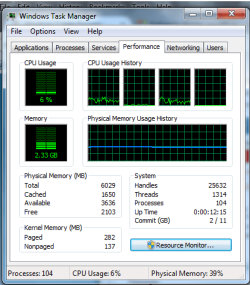
I've been having an issue with my OS, Win 7 x64, 5.89 gigs usable ram, i5 processor. The image in the bottom is a reference to what I was seeing the one time I could get up task manager, but this is performance info right this moment. CPU usage was constantly at 25%, 1st and 3rd graphs for CPU usage were way toward the top,, in the top 5 bars and the 2nd and 4th were barely off the bottom. Memory usage was sitting steady at 1.5 ish, not moving at all.

I would say the problem is intermittent, but it's more that it working normally and being functional is intermittent, thus why I can make a thread right now. It hangs, programs become unresponsive, can't do much of anything with it without it crashing, however the mouse moves fine so it's not as if all the drivers are effected. I recently had to do a factory restore, maybe a month and half ago and lost all of my files, and I just recently got everything back to how I like it on here, so I'd rather not have to go through re-installing things again. Before now, I usually let my system sleep if I was going to pick it up later, as to not start and stop the C drive. So I was wondering if maybe that has to do with the odd behavior lately. I'm willing to wipe and restart with everything again if it's nessesary, but I don't know if it's something simple. Since it works sometimes, I'm doubting it being a hardware issue

I can hardly pull up any sort of system control or performance info while it's acting up. When I try pulling up task manager, I get an error that says something to the effect of "Failure to display security and shutdown options", and the whole system goes black and I have to manually hit the power button to cycle the system.

It starts fine in safe mode or a clean boot when all of these things are happening. One thing I do notice, is now that it's working fine, Panda Antivirus has an error saying "Antivirus protection disabled" and says it wants to restart. I have that, a VPN (PIA) program, Malware Bytes,and Spybot Search and destroy that start as soon as windows does, I'm curious if those applications, especially Panda, have anything to do with what's been happening. I've ran chkdsk as well, and it didn't find anything. I've reset winsock. I've ran memory diagnostics through the repairtool and tried a few other auto-repair tools that are built in. I'm not sure what to try next.

Let me know if there's anything I can do to without wiping my files.
 

Attachments
  • task pref.png
    task pref.png
    63.9 KB · Views: 29

My Computer

Computer type
PC/Desktop
Computer Manufacturer/Model Number
Asus
OS
Windows 7 64bit
From your system post pictures like these from my system.

Services.JPG

Start Ups.JPG
 

My Computer

Computer type
PC/Desktop
Computer Manufacturer/Model Number
Home made Desktop
OS
Windows 10 Pro. 64/ version 1709 Windows 7 Pro/64
CPU
Intel i7-6800K @ 4.3
Motherboard
ASUS X-99 Deluxe II
Memory
Corsair Platinum 16 gig @2400
Graphics Card(s)
EVGA GTX 1070 OC
Monitor(s) Displays
Asus 27" LED LCD/VE278Q
Screen Resolution
1920-1080 or 1280-720 HDMI
Hard Drives
INTEL SSD 730-240 Gb Sata 3.0/
PSU
EVGA Platium 1200W
Case
Phanteks Luxe Tempered Glass 8 fans/ one radiator
Cooling
XSPC/ Water Cooled CPU
Keyboard
Das 4 Professional
Mouse
Logitech M705/MX Anywhere 2-S
Internet Speed
100 mbits
Antivirus
Microsoft Security Essentials/ Malwarebytes Premium 3.0/ SAS
Browser
I.E. 11 default/Firefox/ ISP Time Warner Cable/Spectrum
Other Info
LG BluRay Burner/
Sound system-KLipsch-THX/
Icy Dock ssd Hot Swap bays.
Here we go. It's been running fine every time I've started it up recently, but every boot I have to uninstall and re-install my network adapters to get it to pick up wi-fi...very strange.
 

Attachments

  • services.png
    services.png
    55 KB · Views: 25
  • services2.png
    services2.png
    62.1 KB · Views: 25
  • services3.png
    services3.png
    61.4 KB · Views: 25
  • startup.png
    startup.png
    69.7 KB · Views: 25
  • startup2.png
    startup2.png
    73.9 KB · Views: 25

My Computer

Computer type
PC/Desktop
Computer Manufacturer/Model Number
Asus
OS
Windows 7 64bit
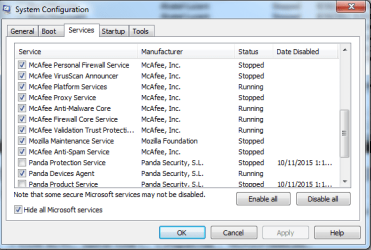
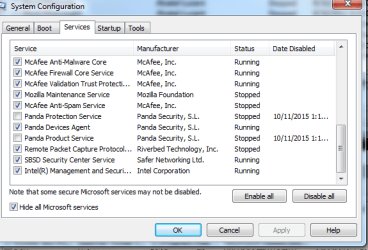
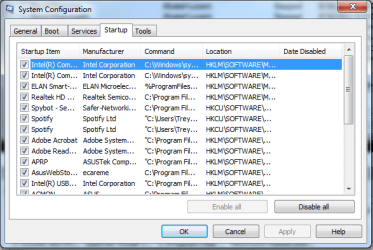
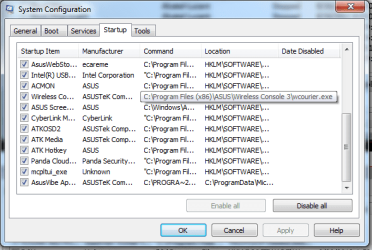
Layback Bear will tell you that your Startup is pretty obscene, Windows only needs your AV starting with it and nothing else. So uncheck everything other than Panda and click apply, reboot and see if performance improves.

EDIT: You have Panda and McAfee installed? One needs to go as they're more than likely conflicting with each other.

Panda Uninstaller:


Download


McAfee Uninstaller:


Download


My Computer

Computer type
PC/Desktop
Computer Manufacturer/Model Number
Custom Build
OS
W7 Pro x64 SP1 | W10 Pro IP x64 | W8.1 Pro x64 VM | Linux Mint VM
CPU
i7-4790k @ 4GHz (4.4GHz Boost)
Motherboard
ASUS Sabertooth Z87 (BIOS Rev 2004)
Memory
16GB DDR3 Kingston HyperX Fury @ 1600MHz CL 9-9-9-27
Graphics Card(s)
EVGA GTX 980 Classified
Sound Card
Realtek Onboard
Monitor(s) Displays
Samsung S27D390
Screen Resolution
1920 x 1080
Hard Drives
240GB Intel 520 Series SSD |
Samsung 850 EVO 120GB SSD |
2TB WD Caviar Black |
2TB WD Caviar Green
PSU
Corsair HX850-80 Gold Modular
Case
Cooler Master Silencio 650
Cooling
Corsair H80i w/2 x Corsair SP120 | 2 x 120mm Noctua NF-S12B
Keyboard
Microsoft Sidewinder X4
Mouse
Gigabyte M6900 optical
Internet Speed
152mb
Antivirus
F-Secure
Browser
Firefox 38.0
Other Info
Backup Rig: Win 7 Pro 64-bit | AMD A10-5800k | ASUS F2A85-V Pro | 8GB Samsung DDR3 @1600MHz | 120GB Toshiba SDD | 2TB Seagate HDD | Cooler Master Silencio 550
You are correct Gav.
WAY to much in the Startup and Non Microsoft Services.
McAfee alone is a problem in my opinion along with another anti virus program is just asking for problems.
104 processes running is very high.
Cleaning up your msconfig will help a lot.

I personally don't do any auto updates of anything. That being said I have to remember to do them manually. To me that is not a big deal.


nocomply65
so you understand I will explain a little more about Startup and Non Microsoft Services.
When all those things except Security programs are not checked does not mean they will not work when they should. It just means they will not be running in the background using computer resources when they are not needed.

Here is a example I use.

Microsoft Office.
If it doesn't start up with Windows 7 it's still usable in a normal fashion.
All one has to do is tick on it when one wants to use Office. When done with Office all one has to do is close Office and it is no longer running in the background.
 

My Computer

Computer type
PC/Desktop
Computer Manufacturer/Model Number
Home made Desktop
OS
Windows 10 Pro. 64/ version 1709 Windows 7 Pro/64
CPU
Intel i7-6800K @ 4.3
Motherboard
ASUS X-99 Deluxe II
Memory
Corsair Platinum 16 gig @2400
Graphics Card(s)
EVGA GTX 1070 OC
Monitor(s) Displays
Asus 27" LED LCD/VE278Q
Screen Resolution
1920-1080 or 1280-720 HDMI
Hard Drives
INTEL SSD 730-240 Gb Sata 3.0/
PSU
EVGA Platium 1200W
Case
Phanteks Luxe Tempered Glass 8 fans/ one radiator
Cooling
XSPC/ Water Cooled CPU
Keyboard
Das 4 Professional
Mouse
Logitech M705/MX Anywhere 2-S
Internet Speed
100 mbits
Antivirus
Microsoft Security Essentials/ Malwarebytes Premium 3.0/ SAS
Browser
I.E. 11 default/Firefox/ ISP Time Warner Cable/Spectrum
Other Info
LG BluRay Burner/
Sound system-KLipsch-THX/
Icy Dock ssd Hot Swap bays.
Now I have touchpad issues

So, I didn't know McAfee was still on there, I thought I uninstalled it when wiped everything and started over.

Now I only have my touchpad and Asus Vibe (which is what I'm assuming you mean by AV)

However, since I did that, I can't scroll with my touchpad.. Tried updating driver, said it was up to date. Then I made the mistake of trying to use Smart Gesture...and now I can scroll but it's too sensitive and basically worthless. Tried rolling back the smartgesture driver, but it gave me a different one I never had before and the sensitivity settings wouldn't respond to changes when I messed around in the control panel. Now I'm back to smart gesture, and I'm not happy.

Know of a compatible driver that will actually work? I dont even understand why it stopped working after I took out all those services at start up.

Also, what other services are even necessary? Just thinking of other ways to speed my computer's performance.
 

My Computer

Computer type
PC/Desktop
Computer Manufacturer/Model Number
Asus
OS
Windows 7 64bit
Your system spec indicate a PC desktop, so I'm not understanding (touch pad)

Computer type PC/Desktop
System Manufacturer/Model Number Asus
OS Windows 7 64bit
 

My Computer

Computer type
PC/Desktop
Computer Manufacturer/Model Number
Home made Desktop
OS
Windows 10 Pro. 64/ version 1709 Windows 7 Pro/64
CPU
Intel i7-6800K @ 4.3
Motherboard
ASUS X-99 Deluxe II
Memory
Corsair Platinum 16 gig @2400
Graphics Card(s)
EVGA GTX 1070 OC
Monitor(s) Displays
Asus 27" LED LCD/VE278Q
Screen Resolution
1920-1080 or 1280-720 HDMI
Hard Drives
INTEL SSD 730-240 Gb Sata 3.0/
PSU
EVGA Platium 1200W
Case
Phanteks Luxe Tempered Glass 8 fans/ one radiator
Cooling
XSPC/ Water Cooled CPU
Keyboard
Das 4 Professional
Mouse
Logitech M705/MX Anywhere 2-S
Internet Speed
100 mbits
Antivirus
Microsoft Security Essentials/ Malwarebytes Premium 3.0/ SAS
Browser
I.E. 11 default/Firefox/ ISP Time Warner Cable/Spectrum
Other Info
LG BluRay Burner/
Sound system-KLipsch-THX/
Icy Dock ssd Hot Swap bays.

My Computer

Computer type
PC/Desktop
Computer Manufacturer/Model Number
Custom Build
OS
W7 Pro x64 SP1 | W10 Pro IP x64 | W8.1 Pro x64 VM | Linux Mint VM
CPU
i7-4790k @ 4GHz (4.4GHz Boost)
Motherboard
ASUS Sabertooth Z87 (BIOS Rev 2004)
Memory
16GB DDR3 Kingston HyperX Fury @ 1600MHz CL 9-9-9-27
Graphics Card(s)
EVGA GTX 980 Classified
Sound Card
Realtek Onboard
Monitor(s) Displays
Samsung S27D390
Screen Resolution
1920 x 1080
Hard Drives
240GB Intel 520 Series SSD |
Samsung 850 EVO 120GB SSD |
2TB WD Caviar Black |
2TB WD Caviar Green
PSU
Corsair HX850-80 Gold Modular
Case
Cooler Master Silencio 650
Cooling
Corsair H80i w/2 x Corsair SP120 | 2 x 120mm Noctua NF-S12B
Keyboard
Microsoft Sidewinder X4
Mouse
Gigabyte M6900 optical
Internet Speed
152mb
Antivirus
F-Secure
Browser
Firefox 38.0
Other Info
Backup Rig: Win 7 Pro 64-bit | AMD A10-5800k | ASUS F2A85-V Pro | 8GB Samsung DDR3 @1600MHz | 120GB Toshiba SDD | 2TB Seagate HDD | Cooler Master Silencio 550
huh...nope it's a laptop. I didn't notice that when I was sharing system info.
 

My Computer

Computer type
PC/Desktop
Computer Manufacturer/Model Number
Asus
OS
Windows 7 64bit

My Computer

Computer type
PC/Desktop
Computer Manufacturer/Model Number
Home made Desktop
OS
Windows 10 Pro. 64/ version 1709 Windows 7 Pro/64
CPU
Intel i7-6800K @ 4.3
Motherboard
ASUS X-99 Deluxe II
Memory
Corsair Platinum 16 gig @2400
Graphics Card(s)
EVGA GTX 1070 OC
Monitor(s) Displays
Asus 27" LED LCD/VE278Q
Screen Resolution
1920-1080 or 1280-720 HDMI
Hard Drives
INTEL SSD 730-240 Gb Sata 3.0/
PSU
EVGA Platium 1200W
Case
Phanteks Luxe Tempered Glass 8 fans/ one radiator
Cooling
XSPC/ Water Cooled CPU
Keyboard
Das 4 Professional
Mouse
Logitech M705/MX Anywhere 2-S
Internet Speed
100 mbits
Antivirus
Microsoft Security Essentials/ Malwarebytes Premium 3.0/ SAS
Browser
I.E. 11 default/Firefox/ ISP Time Warner Cable/Spectrum
Other Info
LG BluRay Burner/
Sound system-KLipsch-THX/
Icy Dock ssd Hot Swap bays.
Sounds good. Do you guys have any other advice on speeding things up and optimizing? Can I get rid of any services listed there?

Also, I was having problems with Panda AV, now I want to find one that isn't too intrusive or heavy. Any advice on a good, free, AV program?
 

My Computer

Computer type
PC/Desktop
Computer Manufacturer/Model Number
Asus
OS
Windows 7 64bit

My Computer

Computer type
PC/Desktop
Computer Manufacturer/Model Number
Home made Desktop
OS
Windows 10 Pro. 64/ version 1709 Windows 7 Pro/64
CPU
Intel i7-6800K @ 4.3
Motherboard
ASUS X-99 Deluxe II
Memory
Corsair Platinum 16 gig @2400
Graphics Card(s)
EVGA GTX 1070 OC
Monitor(s) Displays
Asus 27" LED LCD/VE278Q
Screen Resolution
1920-1080 or 1280-720 HDMI
Hard Drives
INTEL SSD 730-240 Gb Sata 3.0/
PSU
EVGA Platium 1200W
Case
Phanteks Luxe Tempered Glass 8 fans/ one radiator
Cooling
XSPC/ Water Cooled CPU
Keyboard
Das 4 Professional
Mouse
Logitech M705/MX Anywhere 2-S
Internet Speed
100 mbits
Antivirus
Microsoft Security Essentials/ Malwarebytes Premium 3.0/ SAS
Browser
I.E. 11 default/Firefox/ ISP Time Warner Cable/Spectrum
Other Info
LG BluRay Burner/
Sound system-KLipsch-THX/
Icy Dock ssd Hot Swap bays.
How about speeding up/optimizing performance?
 

My Computer

Computer type
PC/Desktop
Computer Manufacturer/Model Number
Asus
OS
Windows 7 64bit

My Computer

Computer type
PC/Desktop
Computer Manufacturer/Model Number
Home made Desktop
OS
Windows 10 Pro. 64/ version 1709 Windows 7 Pro/64
CPU
Intel i7-6800K @ 4.3
Motherboard
ASUS X-99 Deluxe II
Memory
Corsair Platinum 16 gig @2400
Graphics Card(s)
EVGA GTX 1070 OC
Monitor(s) Displays
Asus 27" LED LCD/VE278Q
Screen Resolution
1920-1080 or 1280-720 HDMI
Hard Drives
INTEL SSD 730-240 Gb Sata 3.0/
PSU
EVGA Platium 1200W
Case
Phanteks Luxe Tempered Glass 8 fans/ one radiator
Cooling
XSPC/ Water Cooled CPU
Keyboard
Das 4 Professional
Mouse
Logitech M705/MX Anywhere 2-S
Internet Speed
100 mbits
Antivirus
Microsoft Security Essentials/ Malwarebytes Premium 3.0/ SAS
Browser
I.E. 11 default/Firefox/ ISP Time Warner Cable/Spectrum
Other Info
LG BluRay Burner/
Sound system-KLipsch-THX/
Icy Dock ssd Hot Swap bays.
Back
Top