Windows 7 Prof. + LIP

perny

New member
Local time
4:14 AM
Messages
4
Hi guys,

I am downloading Windows 7 Professional from my MSDN Account. I am living in germany and so I decided to download the Language Pack. My question is: Is it possible to install the LIP under Windows 7 Prof. or have I to install the Ultimate or Enterprise Edition?

Thanks...

Regards

perny
 

My Computer

OS
none - waiting for Windows 7 ;-)

Guten Abend, perny.

Sorry to tell you but you have to have Ultimate to use language packs.

Kari
 

My Computer

Computer type
Laptop
Computer Manufacturer/Model Number
HP ENVY 17-1150eg
OS
Windows 10 Pro x64 EN-GB
CPU
1.6 GHz Intel Core i7-720QM Processor
Memory
6 GB
Graphics Card(s)
ATI Mobility Radeon HD 5850 Graphics
Sound Card
Beats sound system with integrated subwoofer
Monitor(s) Displays
17" laptop display, 22" LED and 32" Full HD TV through HDMI
Screen Resolution
1600*900 (1), 1920*1080 (2&3)
Hard Drives
Internal: 2 x 500 GB SATA Hard Disk Drive 7200 rpm
External: 2TB for backups, 3TB USB3 network drive for media
Cooling
As Envy runs a bit warm, I have it on a Cooler Master pad
Keyboard
Logitech diNovo Media Desktop Laser (bluetooth)
Mouse
Logitech Performance Mouse MX
Internet Speed
50/10 Mbps VDSL
Antivirus
Windows Defender 4.3.9431.0
Browser
Maxthon 3.5.2., IE11
Hi,

Thanks. Then I switch to Ultimate ;-)

Bye

perny
 

My Computer

OS
none - waiting for Windows 7 ;-)

If this does not come too late, I found another post (thanks, Ken!) where somebody tells about a workaround, a possibility to use LP's also in other versions than Ultimate. Read more here.

According to Microsoft you need Ultimate or Enterprise to be able to use language packs. All other options include at least some type of hacking.

Kari
 

My Computer

Computer type
Laptop
Computer Manufacturer/Model Number
HP ENVY 17-1150eg
OS
Windows 10 Pro x64 EN-GB
CPU
1.6 GHz Intel Core i7-720QM Processor
Memory
6 GB
Graphics Card(s)
ATI Mobility Radeon HD 5850 Graphics
Sound Card
Beats sound system with integrated subwoofer
Monitor(s) Displays
17" laptop display, 22" LED and 32" Full HD TV through HDMI
Screen Resolution
1600*900 (1), 1920*1080 (2&3)
Hard Drives
Internal: 2 x 500 GB SATA Hard Disk Drive 7200 rpm
External: 2TB for backups, 3TB USB3 network drive for media
Cooling
As Envy runs a bit warm, I have it on a Cooler Master pad
Keyboard
Logitech diNovo Media Desktop Laser (bluetooth)
Mouse
Logitech Performance Mouse MX
Internet Speed
50/10 Mbps VDSL
Antivirus
Windows Defender 4.3.9431.0
Browser
Maxthon 3.5.2., IE11
Hi,
can you post the link to the workaround again please? Thanks. ;)
 

My Computer

OS
Seven
Please forgive me, It seems I forgot to put the link. Here on SevenForums it is discussed in this thread.
 

My Computer

Computer type
Laptop
Computer Manufacturer/Model Number
HP ENVY 17-1150eg
OS
Windows 10 Pro x64 EN-GB
CPU
1.6 GHz Intel Core i7-720QM Processor
Memory
6 GB
Graphics Card(s)
ATI Mobility Radeon HD 5850 Graphics
Sound Card
Beats sound system with integrated subwoofer
Monitor(s) Displays
17" laptop display, 22" LED and 32" Full HD TV through HDMI
Screen Resolution
1600*900 (1), 1920*1080 (2&3)
Hard Drives
Internal: 2 x 500 GB SATA Hard Disk Drive 7200 rpm
External: 2TB for backups, 3TB USB3 network drive for media
Cooling
As Envy runs a bit warm, I have it on a Cooler Master pad
Keyboard
Logitech diNovo Media Desktop Laser (bluetooth)
Mouse
Logitech Performance Mouse MX
Internet Speed
50/10 Mbps VDSL
Antivirus
Windows Defender 4.3.9431.0
Browser
Maxthon 3.5.2., IE11
I got a perfect workaround in a german forum.
To change the language after windows 7 is installed just execute the following instruction in the command prompt (execute with admin rights):

dism.exe /online /add-package /packagepath:c:\lp.cab

Now i´ve got the german language package on my english msdnaa seven professional. :D
 

My Computer

OS
Seven
I've tried this command and it worked perfectly. Now in my "Region and Language" Settings I can also choose the task to "Change display Language". Unfortunately after clicking on it I get now window to change the language (on the window I got I can only change the keyboard settings (as before installing the language)).
How can I now activate my German language?? (The language is installed as I can see when I try to install languages and the dialog is listing English and German).
Can I activate the installed german language also with the commandline?

Greetings
 

My Computer

OS
Windows 7 Prof
I've tried this command and it worked perfectly. Now in my "Region and Language" Settings I can also choose the task to "Change display Language". ...
Greetings
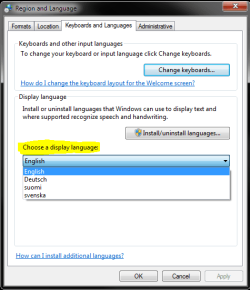
DK1, can't you see the list of available languages (see the image)?

display_language.PNG

Kari
 

My Computer

Computer type
Laptop
Computer Manufacturer/Model Number
HP ENVY 17-1150eg
OS
Windows 10 Pro x64 EN-GB
CPU
1.6 GHz Intel Core i7-720QM Processor
Memory
6 GB
Graphics Card(s)
ATI Mobility Radeon HD 5850 Graphics
Sound Card
Beats sound system with integrated subwoofer
Monitor(s) Displays
17" laptop display, 22" LED and 32" Full HD TV through HDMI
Screen Resolution
1600*900 (1), 1920*1080 (2&3)
Hard Drives
Internal: 2 x 500 GB SATA Hard Disk Drive 7200 rpm
External: 2TB for backups, 3TB USB3 network drive for media
Cooling
As Envy runs a bit warm, I have it on a Cooler Master pad
Keyboard
Logitech diNovo Media Desktop Laser (bluetooth)
Mouse
Logitech Performance Mouse MX
Internet Speed
50/10 Mbps VDSL
Antivirus
Windows Defender 4.3.9431.0
Browser
Maxthon 3.5.2., IE11
It just makes no sense why microsoft would not have LPs in all versions of it's OS. I mean seriously think about it where is the logic?
 

My Computer

Computer Manufacturer/Model Number
Custom
OS
Win7 64bit Ultimate
CPU
AMD Phenom II X6 1100T Black Edition Thuban 3.3GHz, 3.7GHz
Motherboard
Gigabyte GA-890FXA-UD5
Memory
CORSAIR DOMINATOR GT 8GB (2 x 4GB) 1866 DDR3
Graphics Card(s)
XFX HD-697A-CNDC Radeon HD6970 2GB 256-bit
Sound Card
Creative SoundBlaster X-Fi Platinum Fatal1ty Edition
Monitor(s) Displays
Dual 25 Inch Hanns-G HZ251
Screen Resolution
1920x1080 X 2
PSU
Corsair 850W Single Rail
Case
Thermaltake V9 BlacX w/ Dual HDD Docking Station
Cooling
Air lots and lots of air and copper...
Keyboard
Kensington (Low-Profile)
Mouse
Creative Fatal1ty
Internet Speed
15Gbit (15 Down 5 Up)
Other Info
XIGMATEK HDT-S1284F 120mm HYPRO Bearing CPU Cooler, LG Blu-Ray Burner.
It just makes no sense why microsoft would not have LPs in all versions of it's OS. I mean seriously think about it where is the logic?
I think they have to justify why they have so many different versions. Adding something to every "better" version they can reason why this version costs more than that version.

Commercial reasons, IMO.

Kari
 

My Computer

Computer type
Laptop
Computer Manufacturer/Model Number
HP ENVY 17-1150eg
OS
Windows 10 Pro x64 EN-GB
CPU
1.6 GHz Intel Core i7-720QM Processor
Memory
6 GB
Graphics Card(s)
ATI Mobility Radeon HD 5850 Graphics
Sound Card
Beats sound system with integrated subwoofer
Monitor(s) Displays
17" laptop display, 22" LED and 32" Full HD TV through HDMI
Screen Resolution
1600*900 (1), 1920*1080 (2&3)
Hard Drives
Internal: 2 x 500 GB SATA Hard Disk Drive 7200 rpm
External: 2TB for backups, 3TB USB3 network drive for media
Cooling
As Envy runs a bit warm, I have it on a Cooler Master pad
Keyboard
Logitech diNovo Media Desktop Laser (bluetooth)
Mouse
Logitech Performance Mouse MX
Internet Speed
50/10 Mbps VDSL
Antivirus
Windows Defender 4.3.9431.0
Browser
Maxthon 3.5.2., IE11
Kari, thank you for replying.

Exactly this list I can't see. The half of the window is blank. But after installing the german languagepack (with the short tutorial (command) above) i got some more options to the language settings like to install or uninstall languages. But the window keeps blank.

In the internet I have found a other way to activate the language.

After installing the Language dism.exe-command you have to open the regedit.

Goto:
HKEY_LOCAL_MACHINE\SYSTEM\ControlSet001\Control\Nls\Language

Change:

(Default) = 0407
InstallLanguage = 0407

The english Language has the key 0409 and the german the key 0407. So you can manually set the active language. By setting the Default and the InstallLanguage to 0407 you can activate (set active) the german language-pack.

After restarting the PC, the german language is the displayed language on the PC.

Greetings
 

My Computer

OS
Windows 7 Prof
DK1, can you see Deutsch on that list after the reg fix and reboot? I mean, can you now choose between English and Deutsch from that list? Is of no use to you (vielleicht?) but I'm interested to know.

Kari

EDIT: And welcome to the SevenForums!
 

My Computer

Computer type
Laptop
Computer Manufacturer/Model Number
HP ENVY 17-1150eg
OS
Windows 10 Pro x64 EN-GB
CPU
1.6 GHz Intel Core i7-720QM Processor
Memory
6 GB
Graphics Card(s)
ATI Mobility Radeon HD 5850 Graphics
Sound Card
Beats sound system with integrated subwoofer
Monitor(s) Displays
17" laptop display, 22" LED and 32" Full HD TV through HDMI
Screen Resolution
1600*900 (1), 1920*1080 (2&3)
Hard Drives
Internal: 2 x 500 GB SATA Hard Disk Drive 7200 rpm
External: 2TB for backups, 3TB USB3 network drive for media
Cooling
As Envy runs a bit warm, I have it on a Cooler Master pad
Keyboard
Logitech diNovo Media Desktop Laser (bluetooth)
Mouse
Logitech Performance Mouse MX
Internet Speed
50/10 Mbps VDSL
Antivirus
Windows Defender 4.3.9431.0
Browser
Maxthon 3.5.2., IE11
DK1, can you see Deutsch on that list after the reg fix and reboot? I mean, can you now choose between English and Deutsch from that list? Is of no use to you (vielleicht?) but I'm interested to know.

Kari

EDIT: And welcome to the SevenForums!

WOW - crazy thing. You know that before you add a language in win7 Prof you can't see the "Install or Uninstall Language" Link in the "Time, Language and Region"-Settings. But after installing you can see the link to install/uninstall a language, remember?

Now, after I edited the reg with regedit and after getting the german language running after reboot, the links are away again....why this???


To your question: I still see no list there in the window.
 

My Computer

OS
Windows 7 Prof
Kari, thank you for replying.

Exactly this list I can't see. The half of the window is blank. But after installing the german languagepack (with the short tutorial (command) above) i got some more options to the language settings like to install or uninstall languages. But the window keeps blank.

In the internet I have found a other way to activate the language.

After installing the Language dism.exe-command you have to open the regedit.

Goto:
HKEY_LOCAL_MACHINE\SYSTEM\ControlSet001\Control\Nls\Language

Change:

(Default) = 0407
InstallLanguage = 0407

The english Language has the key 0409 and the german the key 0407. So you can manually set the active language. By setting the Default and the InstallLanguage to 0407 you can activate (set active) the german language-pack.

After restarting the PC, the german language is the displayed language on the PC.

Greetings

Where I can see the language key. I tried to install finnish language pack with dism.exe-command and I got same result.
 

My Computer

OS
Windows 7
Where I can see the language key. I tried to install finnish language pack with dism.exe-command and I got same result.
Flag (Finland).JPG
Moi n0rm! Tervetuloa Seiska- foorumille. Mikä Win7 versio sulla on? Ja vähän tarkemmin mikä ongelma sulla kielipaketin kanssa on?

Flag (UK).JPG
Hi n0rm and welcome to the SevenForums. What version of Win7 do you have? And please be more specific, what is problem with language pack?

Kari
 

My Computer

Computer type
Laptop
Computer Manufacturer/Model Number
HP ENVY 17-1150eg
OS
Windows 10 Pro x64 EN-GB
CPU
1.6 GHz Intel Core i7-720QM Processor
Memory
6 GB
Graphics Card(s)
ATI Mobility Radeon HD 5850 Graphics
Sound Card
Beats sound system with integrated subwoofer
Monitor(s) Displays
17" laptop display, 22" LED and 32" Full HD TV through HDMI
Screen Resolution
1600*900 (1), 1920*1080 (2&3)
Hard Drives
Internal: 2 x 500 GB SATA Hard Disk Drive 7200 rpm
External: 2TB for backups, 3TB USB3 network drive for media
Cooling
As Envy runs a bit warm, I have it on a Cooler Master pad
Keyboard
Logitech diNovo Media Desktop Laser (bluetooth)
Mouse
Logitech Performance Mouse MX
Internet Speed
50/10 Mbps VDSL
Antivirus
Windows Defender 4.3.9431.0
Browser
Maxthon 3.5.2., IE11
Hey n0rm,

I have searched the registry and found sth.
When I goto HKEY_Local_Machine\System\CurrentControlSet\Control\MUI\UILanguages\ ... I have there a folder called "de-DE" (its for german). In this folder I have an entry LCID with the value 0x00000407.

As you see the last four digits of the value are in my case the german language. So I guess: go also to this entry and look up to your last four digits in your "fi-FI" (finnish?) folder. Use this digits in the folder where you have to change the Default and the Install Language entries.

If you have further question, don't hesitate to ask ;-)
And please wrote back if you got a solution or this helped.
 

My Computer

OS
Windows 7 Prof
Thanks for your answers. I found the finnish language value from HKEY_Local_Machine\System\CurrentControlSet\Control\MUI\UILanguages\ , and it was 040b. Then I follow DK1 instructions and now I got my Windows 7 prof. in finnish. :geek:
 

My Computer

OS
Windows 7
Back
Top