Windows 7 Prof x64 and HP OfficeJet J5780 printer

McSeven

New member
Member
VIP
Local time
10:49 AM
Messages
213
Can't get the system to find/recognize this HP printer. I tried using the Vista x64 driver with the compatibility and administrator selections.

Any ideas would be appreciated.
 

My Computer My Computer

At a glance

W7 Prof 64 biti7-3770kG.Skill Sniper 1866 16 GBEvga GTX 770
Computer type
PC/Desktop
Computer Manufacturer/Model Number
HomieJunker
OS
W7 Prof 64 bit
CPU
i7-3770k
Motherboard
Sabertooth Z77
Memory
G.Skill Sniper 1866 16 GB
Graphics Card(s)
Evga GTX 770
Sound Card
Sound Blaster Z
Monitor(s) Displays
Asus VG278HE
Screen Resolution
1920 x 1080
Hard Drives
4 Seagate Barracudas 250 GB
2 Intel® X25-M 160GB
PSU
Corsair H1000X
Case
Lian-Li A77B
Cooling
Phantek 120 dual fans
Keyboard
Corsair K70 RGB
Mouse
Logitech G502
Internet Speed
FiOS Quantum
Antivirus
Avira
Browser
Chrome
Hi McSeven, welcome to the Seven Forums.

Do this:
  • Disconnect your printer
  • Uninstall all printer drivers you have installed
  • Open Devices and Printers (Click Start, write devices to the search field and press Enter)
  • Click Add a printer
  • Click Add a local printer
  • Check that Use an existing port is selected, showing LPT1, click Next
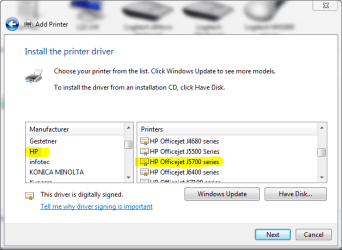
  • Choose HP from Manufacturer list and HP Officejet J5700 series from Printers list
    J5780.PNG
  • Click Next, follow the instructions given by setup
  • Connect the printer only when setup asks you to do it

It should work now.

Kari
 

My Computer My Computer

At a glance

Windows 10 Pro x64 EN-GB1.6 GHz Intel Core i7-720QM Processor6 GBATI Mobility Radeon HD 5850 Graphics
Computer type
Laptop
Computer Manufacturer/Model Number
HP ENVY 17-1150eg
OS
Windows 10 Pro x64 EN-GB
CPU
1.6 GHz Intel Core i7-720QM Processor
Memory
6 GB
Graphics Card(s)
ATI Mobility Radeon HD 5850 Graphics
Sound Card
Beats sound system with integrated subwoofer
Monitor(s) Displays
17" laptop display, 22" LED and 32" Full HD TV through HDMI
Screen Resolution
1600*900 (1), 1920*1080 (2&3)
Hard Drives
Internal: 2 x 500 GB SATA Hard Disk Drive 7200 rpm
External: 2TB for backups, 3TB USB3 network drive for media
Cooling
As Envy runs a bit warm, I have it on a Cooler Master pad
Keyboard
Logitech diNovo Media Desktop Laser (bluetooth)
Mouse
Logitech Performance Mouse MX
Internet Speed
50/10 Mbps VDSL
Antivirus
Windows Defender 4.3.9431.0
Browser
Maxthon 3.5.2., IE11
Thanks very much, it works!
 

My Computer My Computer

At a glance

W7 Prof 64 biti7-3770kG.Skill Sniper 1866 16 GBEvga GTX 770
Computer type
PC/Desktop
Computer Manufacturer/Model Number
HomieJunker
OS
W7 Prof 64 bit
CPU
i7-3770k
Motherboard
Sabertooth Z77
Memory
G.Skill Sniper 1866 16 GB
Graphics Card(s)
Evga GTX 770
Sound Card
Sound Blaster Z
Monitor(s) Displays
Asus VG278HE
Screen Resolution
1920 x 1080
Hard Drives
4 Seagate Barracudas 250 GB
2 Intel® X25-M 160GB
PSU
Corsair H1000X
Case
Lian-Li A77B
Cooling
Phantek 120 dual fans
Keyboard
Corsair K70 RGB
Mouse
Logitech G502
Internet Speed
FiOS Quantum
Antivirus
Avira
Browser
Chrome
I tired

I tried your method, but all I got was anohter basic driver. Any idea on how to get the full version of the j5780 hp AIO? I have a Compaq laptop with windows 7 x64.
 

My Computer My Computer

At a glance

Windows 7 x64
Computer type
Laptop
Computer Manufacturer/Model Number
COMPAQ
OS
Windows 7 x64
Antivirus
MCAFEE
Browser
CHROME

My Computer My Computer

At a glance

Windows 7 Ultimate 64-bit, Windows 8.1 64-bit...
Computer type
PC/Desktop
Computer Manufacturer/Model Number
Customs, Dell, Gateway, HP, Toshiba, Acer, ASUS
OS
Windows 7 Ultimate 64-bit, Windows 8.1 64-bit, Mac OS X 10.10, Linux Mint 17, Windows 10 Pro TP
Keyboard
Microsoft
Mouse
Microsoft
Back
Top