Solved Windows 7 Professional x64 can't get updates

RoccoD

New member
Local time
4:04 AM
Messages
10
Guys,

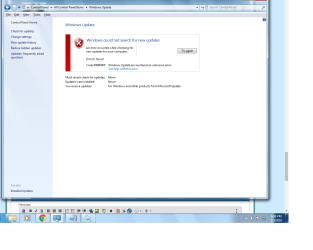
I've tried everything and I can't get this thing to update...attached is my cbs.log file and screenshot of the error. Please help. I want to avoid a new install at all costs. Also SURT just searches for hours with no results and SFC won't run either...gives me a "windows resource protection could not start the repair service".

Thanks

Rocco
 

Attachments

  • error_screen.png
    error_screen.png
    63.8 KB · Views: 4

My Computer My Computer

Computer type
PC/Desktop
OS
Windows 7 Professional x64
Hi RoccoD,

How long have you not been able to update.

Thats quite a catastrophic error showing in the log
TI found cbscore.dll at: C:\Windows\servicing\0.0.0.1

TOTALLY the wrong place, should be somthing like this

Loaded Servicing Stack v6.1.7601.23505 with Core: C:\Windows\winsxs\amd64_microsoft-windows-servicingstack_31bf3856ad364e35_6.1.7601.23505_none_681aa442f6fed7f0\cbscore.dll


can you run this tool,
http://www.sysnative.com/niemiro/apps/SFCFix.exe

It should not take longer than 30 mins if it does kill it.

Have you been making registry changes, i see youve got services on your taskbar
Or been hit by malware


Roy
 

My Computer My Computer

Computer type
PC/Desktop
Computer Manufacturer/Model Number
medionl/Aspire 6930G/acer x55a
OS
W7 home premium 32bit/W7HP 64bit/w10 tp insider ring
CPU
E5300 dual core
Motherboard
medion MS7366
Memory
3gb
Graphics Card(s)
Nvidia Geforce 7100 Nforce 630i
Monitor(s) Displays
avixc
Internet Speed
n (isp resticted to 72)
Antivirus
mse/pands
Browser
palemoon
Other Info
Belkin Fd7050 n USB using Railink RT2870 drivers, more upto date
Hi Roy

I ran the SCFix.exe file as administrator and the first time I ran it it scanned my registry etc. and gave the following notes as it scanned:

Stage 1 of 6 failed on server
Scanned the other stages ok with no errors

Failed to create zipfile with error 2 logfile

It detected no errors and created SFCFix.txt to my desktop.

I then re-ran it a second time to make sure the results were consistent and it didn't scan the second time around but quickly came back with no errors detected. Unfortunately it overwrote the .txt file. I attached it here.

Regarding the registry question...I was trying to disable and re-enable windows update installer to no benefit. I don't believe I was subjected to any malware either.

Rocco
 

Attachments

My Computer My Computer

Computer type
PC/Desktop
OS
Windows 7 Professional x64
Hi RoccoD,

was hoping for some backup info from that tool:mad:

The CBS log shows that its failling immediately on start-up

can you copy/paste or snip the entries here
C >> Windows >> winsxs ...
amd64_microsoft-windows-servicingstack_31bf3856ad364e35(????????)

Hopefully there shoud be at least 3 with entries (????????) like these
6.1.7601.23505

Do you have W7 SP1 install media

Roy
 

My Computer My Computer

Computer type
PC/Desktop
Computer Manufacturer/Model Number
medionl/Aspire 6930G/acer x55a
OS
W7 home premium 32bit/W7HP 64bit/w10 tp insider ring
CPU
E5300 dual core
Motherboard
medion MS7366
Memory
3gb
Graphics Card(s)
Nvidia Geforce 7100 Nforce 630i
Monitor(s) Displays
avixc
Internet Speed
n (isp resticted to 72)
Antivirus
mse/pands
Browser
palemoon
Other Info
Belkin Fd7050 n USB using Railink RT2870 drivers, more upto date
Forgot

HOW LONG have the updates been failing ...
 

My Computer My Computer

Computer type
PC/Desktop
Computer Manufacturer/Model Number
medionl/Aspire 6930G/acer x55a
OS
W7 home premium 32bit/W7HP 64bit/w10 tp insider ring
CPU
E5300 dual core
Motherboard
medion MS7366
Memory
3gb
Graphics Card(s)
Nvidia Geforce 7100 Nforce 630i
Monitor(s) Displays
avixc
Internet Speed
n (isp resticted to 72)
Antivirus
mse/pands
Browser
palemoon
Other Info
Belkin Fd7050 n USB using Railink RT2870 drivers, more upto date
Hi Roy,

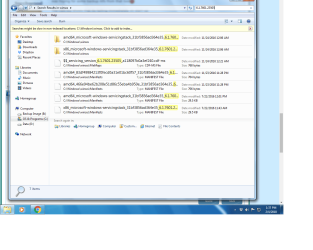
Attached is a screenshot when I search for 6.1.7601.23505 in the winsxs directory. The folders have a number of files in them so let me know how to proceed there.

The updates have been failing for at least a few months now...last one I remember was around October of last year??? I haven't been aggressively trying to diagnose it until now since I really didn't notice until recently that updates weren't occurring.

I have a Windows Repair disk, but would have to look for the original installation media...it's been a while. I believe with the product ID it's always available from the Microsoft website as a download?

Thanks

Rocco
 

Attachments

  • winsxs.png
    winsxs.png
    70.7 KB · Views: 1

My Computer My Computer

Computer type
PC/Desktop
OS
Windows 7 Professional x64
Hi RoccoD,

Those unfortunately look fine, something mut be redirecting updating to that non existant 0.0.0.1 folder, thats why i asked about malware.

1. Download Windows Repair (All-in-One) Portable to your desktop.
http://www.tweaking.com/files/setups/tweaking.com_windows_repair_aio.zip


2. Once the file is downloaded, right-click on the file on your desktop and choose Extract All...
3. Keep the defaults and click the Extract button.
4. A folder named tweaking.com_windows_repair_aio will be extracted to the desktop. Once the extraction is complete the folder will open.
5. Inside this folder, there is a folder named Tweaking.com - Windows Repair. Open this folder as well.
6. Double-click on Repair_Windows.exe to open. Note: Please make sure all of your programs are closed and anything you were working on is saved as we will be rebooting.
7. When the program opens, click the Reboot to Safe Mode button at the bottom of the screen. Answer Yes to allow.

8. Once rebooted into Safe Mode, open the program again. When the program opens, click the Repairs tab and click the Open Repairs button.

9. A backup of your registry will be made. After a few moments you will have many options from which you can choose.
10. Please click the Unselect All button and then click to enable only the following ones:

01 - Reset Registry Permissions
02 - Reset File Permissions
03 - Reset Service Permissions
04 - Register System Files
10 - Remove Policies Set By Infection
14 - Remove Temp Files
15 - Repair Proxy Settings
17 - Repair Windows Updates
21 - Repair MSI (Windows Installer)


11. Ensure the Restart check box is selected and click the Start Repairs button in the lower right of the screen. This may take some time to run so be patient.

once complete try updating, if it fails please post the tweaking log

Roy

is your product key for a Retail or OEM, (which Dell etc)
DO NOT POST IT - IF RETAIL

 

My Computer My Computer

Computer type
PC/Desktop
Computer Manufacturer/Model Number
medionl/Aspire 6930G/acer x55a
OS
W7 home premium 32bit/W7HP 64bit/w10 tp insider ring
CPU
E5300 dual core
Motherboard
medion MS7366
Memory
3gb
Graphics Card(s)
Nvidia Geforce 7100 Nforce 630i
Monitor(s) Displays
avixc
Internet Speed
n (isp resticted to 72)
Antivirus
mse/pands
Browser
palemoon
Other Info
Belkin Fd7050 n USB using Railink RT2870 drivers, more upto date
Thanks...I'll give it a go later when I'm in front of that machine.

Rocco
 

My Computer My Computer

Computer type
PC/Desktop
OS
Windows 7 Professional x64
Hi Roy,

Followed the procedure above and unfortunately no luck...I'm attaching all of the tweaking log files here.

Rocco
 

Attachments

My Computer My Computer

Computer type
PC/Desktop
OS
Windows 7 Professional x64
Hi RoccoD,

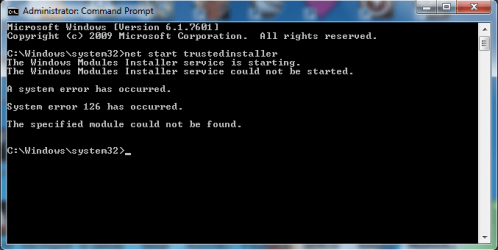
please open a Elevated command prompt - type

net start trustedinstaller

do you get error code 126??

if so follow this link
http://support.microsoft.com/kb/959077

If the above is correct and you dont feel comfortable adding registry sub keys, you could go for a repair install NO loss of personal data
Repair Install - Windows 7 Help Forums

BTW did you install/update Itunes in Sept/Oct - has been known to cause this


Roy
 

My Computer My Computer

Computer type
PC/Desktop
Computer Manufacturer/Model Number
medionl/Aspire 6930G/acer x55a
OS
W7 home premium 32bit/W7HP 64bit/w10 tp insider ring
CPU
E5300 dual core
Motherboard
medion MS7366
Memory
3gb
Graphics Card(s)
Nvidia Geforce 7100 Nforce 630i
Monitor(s) Displays
avixc
Internet Speed
n (isp resticted to 72)
Antivirus
mse/pands
Browser
palemoon
Other Info
Belkin Fd7050 n USB using Railink RT2870 drivers, more upto date
Hi Roy,

Yes it looks like I get that error. Screen shot attached. I didn't install iTunes on this machine. I will try the fix and let you know.

Thanks,

Rocco
 

Attachments

  • starttrustedinstaller.png
    starttrustedinstaller.png
    17.2 KB · Views: 20

My Computer My Computer

Computer type
PC/Desktop
OS
Windows 7 Professional x64
Hi Roy,

I performed the modification to the registry, rebooted, and successfully ran the trusted installer. Windows update was then able to download and install updates again...thanks for your help and patience!!!

Best regards,

Rocco
 

My Computer My Computer

Computer type
PC/Desktop
OS
Windows 7 Professional x64
Hi RoccoD

Thats great news

NOW make an image most here use Macrium free, saves a lot of hassle in the future.

please mark the thread closed

Happy surfing

Roy
 

My Computer My Computer

Computer type
PC/Desktop
Computer Manufacturer/Model Number
medionl/Aspire 6930G/acer x55a
OS
W7 home premium 32bit/W7HP 64bit/w10 tp insider ring
CPU
E5300 dual core
Motherboard
medion MS7366
Memory
3gb
Graphics Card(s)
Nvidia Geforce 7100 Nforce 630i
Monitor(s) Displays
avixc
Internet Speed
n (isp resticted to 72)
Antivirus
mse/pands
Browser
palemoon
Other Info
Belkin Fd7050 n USB using Railink RT2870 drivers, more upto date
Back
Top