Windows 7, scvhost.exe hogging up ram.

Teesee

New member
Local time
10:00 PM
Messages
3
Recently I was getting physical memory issues on Windows 7 32Bit since it only allows 3.5gb of ram but I have 6gbs. Where as scvhost.exe was hogging about 1,500,000KB's which is about 1.5GB's of memory most of the time which ate up a lot of physical memory.

I decided to reformat my computer to Windows 7 64bit which allowed me to fully use my 6gbs of ram. But scvhost.exe still hogs up around the same amount. I'm not sure if its normal or not, but I wanted to check because I've never really had this problem & I did notice my computer being a little slower than normal.
 

Attachments

  • Resource monitor.png
    Resource monitor.png
    30.4 KB · Views: 57

My Computer My Computer

OS
Windows 7 Ultimate X64
CPU
Intel Core i7 950 @ 3.07GHz
Motherboard
X58A-UD3R (Socket 1366)
Memory
6GB
Graphics Card(s)
NVIDIA GeForce GTS 250
Click the checkbox next to the problematic svchost.exe then go to CPU and expand the "Services" pane. There is something about about that svchost.exe process. I don't have a single one that shows up without "svchost.exe (Something here)"
 

My Computer My Computer

Computer type
PC/Desktop
Computer Manufacturer/Model Number
Alienware Aurora ALX R4
OS
Windows 10 Pro (x64)
CPU
Intel Core i7-3930K (3.2GHz - 4.5GHz)
Motherboard
Alienware Aurora-R4 x79
Memory
4x Samsung 4GB PC3-12800 DDR3 (16GB 1600MHz)
Graphics Card(s)
Nvidia Geforce GTX 690
Sound Card
SteelSeries Siberia Elite
Monitor(s) Displays
Dell UltraSharp U3011
Screen Resolution
2560x1600
Hard Drives
Samsung 850 Pro 256 GB, Seagate 1TB Desktop Hybrid HDD, 2x Western Digital 4TB Green HDD
PSU
875W Some Dell PSU <.<
Case
Alienware Aurora ALX
Cooling
Custom Liquid Cooling (EK CPU & GPU blocks) dual EK 480RAD
Keyboard
Logitech G710+ Mechanical
Mouse
Logitech G700s
Internet Speed
Verizon Fios (50 mbps average)
Other Info
Server: Intel NUC D54250WYK: i5-4250U, 16GB, 256 GB mSATA, Windows Server 2012 R2
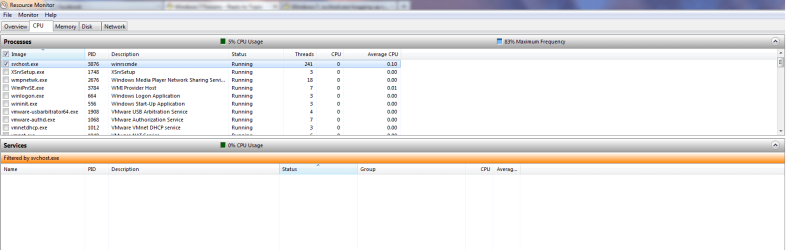
I did what you said & this is basically what said & this is basically what it looks like. Its not using as much physical memory, but its still hogging about 1GB of memory.
 

Attachments

  • CPU.png
    CPU.png
    29.1 KB · Views: 60

My Computer My Computer

OS
Windows 7 Ultimate X64
CPU
Intel Core i7 950 @ 3.07GHz
Motherboard
X58A-UD3R (Socket 1366)
Memory
6GB
Graphics Card(s)
NVIDIA GeForce GTS 250
I believe you have a piece of malware. A true svchost.exe would not have an empty service list (Plus the description is wrong too). Try scanning with Malwarebytes.
 

My Computer My Computer

Computer type
PC/Desktop
Computer Manufacturer/Model Number
Alienware Aurora ALX R4
OS
Windows 10 Pro (x64)
CPU
Intel Core i7-3930K (3.2GHz - 4.5GHz)
Motherboard
Alienware Aurora-R4 x79
Memory
4x Samsung 4GB PC3-12800 DDR3 (16GB 1600MHz)
Graphics Card(s)
Nvidia Geforce GTX 690
Sound Card
SteelSeries Siberia Elite
Monitor(s) Displays
Dell UltraSharp U3011
Screen Resolution
2560x1600
Hard Drives
Samsung 850 Pro 256 GB, Seagate 1TB Desktop Hybrid HDD, 2x Western Digital 4TB Green HDD
PSU
875W Some Dell PSU <.<
Case
Alienware Aurora ALX
Cooling
Custom Liquid Cooling (EK CPU & GPU blocks) dual EK 480RAD
Keyboard
Logitech G710+ Mechanical
Mouse
Logitech G700s
Internet Speed
Verizon Fios (50 mbps average)
Other Info
Server: Intel NUC D54250WYK: i5-4250U, 16GB, 256 GB mSATA, Windows Server 2012 R2
Even If this is a freshly installed windows7?
But I will scan anyways.

Edit: I ran a TDSSKiller, which seems to have taken care of the problem. Still I am unsure if it has since it usually starts eating up memory after the computers on for a while, but I do not see the svchost.exe *32 anymore.
 

My Computer My Computer

OS
Windows 7 Ultimate X64
CPU
Intel Core i7 950 @ 3.07GHz
Motherboard
X58A-UD3R (Socket 1366)
Memory
6GB
Graphics Card(s)
NVIDIA GeForce GTS 250
Malware can infect a newly installed system depending on where it roots its infection. If you forgot to scrub the System Reserved (that 100 MB) partition it could survive and infect the machine on boot.
 

My Computer My Computer

Computer type
PC/Desktop
Computer Manufacturer/Model Number
Alienware Aurora ALX R4
OS
Windows 10 Pro (x64)
CPU
Intel Core i7-3930K (3.2GHz - 4.5GHz)
Motherboard
Alienware Aurora-R4 x79
Memory
4x Samsung 4GB PC3-12800 DDR3 (16GB 1600MHz)
Graphics Card(s)
Nvidia Geforce GTX 690
Sound Card
SteelSeries Siberia Elite
Monitor(s) Displays
Dell UltraSharp U3011
Screen Resolution
2560x1600
Hard Drives
Samsung 850 Pro 256 GB, Seagate 1TB Desktop Hybrid HDD, 2x Western Digital 4TB Green HDD
PSU
875W Some Dell PSU <.<
Case
Alienware Aurora ALX
Cooling
Custom Liquid Cooling (EK CPU & GPU blocks) dual EK 480RAD
Keyboard
Logitech G710+ Mechanical
Mouse
Logitech G700s
Internet Speed
Verizon Fios (50 mbps average)
Other Info
Server: Intel NUC D54250WYK: i5-4250U, 16GB, 256 GB mSATA, Windows Server 2012 R2
Back
Top