If I try to do a search in any Windows Explorer screen, nothing happens. It does not matter what I am looking for, the driver or the folder. I can type the name of the file or even just use a wildcard like *.mp3 and after pressing enter, nothing happens.
If I try to search from the start button I get no results, but I do get an option to show more results, unlike an explorer windows.
If I hit the show more results option, the following error appears:
Windows search service is automatic and started.
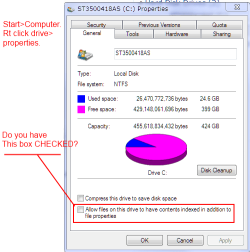
Indexing is on and I have verified that the C: and E: drives are indexed, I can not remove the data; appdata; appdata exclusions from the C:. If you modify either drive, all locations are checked for indexing.
under Advanced Options, I have already rebuilt the index from the troublshooting section and that did not help.
all file types are selected for processing.
I don't even get the option to choose unindexed locations.
I have tried multiple microsoft fixits and all of them say that they are not for my windows version, despite the fact that I have Win7 SP1.
There's a lot more that I have tried but it appears that I have already deleted the files... yeah, that's helpful.
Anyone able to shine some light on this? I can't even search for control panel items while I am in the control panel.
The query can be anything, even a direct file path. I just used the *.* to make the example of the error
If I try to search from the start button I get no results, but I do get an option to show more results, unlike an explorer windows.
If I hit the show more results option, the following error appears:
Window title is "search:query=*.*"
Error window body is "Windows cannot access the specified device, path or file. You may not have the proper permissions to access the item."
I am signed in as the true adminisitration (not some stupid pseudo admin) and UAC is disabled.
Windows search service is automatic and started.
Indexing is on and I have verified that the C: and E: drives are indexed, I can not remove the data; appdata; appdata exclusions from the C:. If you modify either drive, all locations are checked for indexing.
under Advanced Options, I have already rebuilt the index from the troublshooting section and that did not help.
all file types are selected for processing.
I don't even get the option to choose unindexed locations.
I have tried multiple microsoft fixits and all of them say that they are not for my windows version, despite the fact that I have Win7 SP1.
There's a lot more that I have tried but it appears that I have already deleted the files... yeah, that's helpful.
Anyone able to shine some light on this? I can't even search for control panel items while I am in the control panel.
The query can be anything, even a direct file path. I just used the *.* to make the example of the error
Last edited by a moderator:
My Computer
At a glance
Windows 7 Professional 64bitIntel i7-377032DB DDR3Nvidia GTX 680 X2 SLI
- Computer type
- PC/Desktop
- Computer Manufacturer/Model Number
- Customer Build
- OS
- Windows 7 Professional 64bit
- CPU
- Intel i7-3770
- Motherboard
- ASUS
- Memory
- 32DB DDR3
- Graphics Card(s)
- Nvidia GTX 680 X2 SLI
- Sound Card
- Onboard
- Monitor(s) Displays
- ASUS HDMI 3D
- Screen Resolution
- 1920x1080
- Hard Drives
- 1 TB via RAID
500 GB via ESATA
500 GB via USB 3.0
- PSU
- Forgot...
- Case
- Forgot...
- Cooling
- Liquid, forgot brand/model
- Keyboard
- Azio gaming keyboard
- Mouse
- R.A.t. 7
- Internet Speed
- Cable
- Antivirus
- MSE
- Browser
- Firefox