Windows 7 slowdown, what causes it?

cover

New member
Member
Local time
8:40 AM
Messages
40
I have a couple of work acquaintances that I don't share anything with electronically and remember them telling me not long ago of getting rid of their computers because their W7 computers had suddenly slowed to a crawl. They bought new and were happy.

The same thing has happened to me. Suddenly my W764 machine is crawling at a snail pace and basically unusable. Rebooting seems to help and occasionally one browser will run okay for a while and then bog down as if something caught up with it. I use IE, FF, and Chrome browsers. Also use Avast AV plus Malwarebytes, SuperAntispyware, and Spybot S&D for spy/malware. So far, nothing has been found. Its as if something is working the processor in overdrive.

Anyone else have similar recent experiences or know of a fix?

TIA
 

My Computer

Computer Manufacturer/Model Number
Dell
OS
Win 7 Pro 64
If the hard drive is nearly full it will slow the computer drastically. Have you run Windows Disc Cleaner & you could also run Ccleaner as well to get rid of accumulated browser history & other rubbish off the OS.
 

My Computer

Computer type
PC/Desktop
Computer Manufacturer/Model Number
Self built using existing case
OS
Windows 7 Home Premium 64 bit sp1
CPU
Intel i5 3570 3.4Ghz Ivy Bridge SKT 1155 quad core
Motherboard
Gigabyte Z77-HD3 SKT 1155 2xSata 3, 4x USB 3.0
Memory
G-Skill Rip Jaws 16Gb (8x2) DDR3 -1600 PC3 12800 CL 10 red
Graphics Card(s)
Gigabyte NVIDIA GT610 1Gb DDR3 810/1200 PCI-E 2.0 Silent
Sound Card
NVIDIA High Definition & Realtech High Definition Audio
Monitor(s) Displays
2 x Philips 226V4L 16:9 aspect ratio
Screen Resolution
1920 x 1080 HD
Hard Drives
Samsung 840 Pro 256gb SSD, SATA 3.
Hitachi Touro Portable 1tb, USB 3.0 HDD used for image b/ups.
PSU
Corsair VS450
Case
Codeng
Cooling
PSU fan & CPU fan
Keyboard
Logitech
Mouse
Logitech Wireless trackball M570
Internet Speed
Wireless 3G. 3mg down & 550kb up.
Antivirus
Bitdefender Internet Security 2020
Browser
Opera (Current Version) & Firefox
Other Info
MS Office 2013 Pro. Davis weather station software. MGE Nova 600 avr UPS.
Hi,
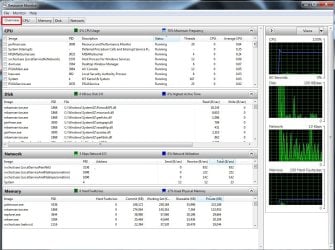
Use resource monitor by type that in the start menu search box
You should open to the overview section
Expand the windows to fill the screen and drag down each section like this
resource monitor overview.jpg

Also,
Use Clean boot,
Troubleshoot Application Conflicts by Performing a Clean Startup
Click Start and type in the search box,
msconfig
Click on the suggestion on top or hit the Enter key,
Go to the Startup section and take some screen shots for a complete list,
Go to the Services section and on the bottom left Check the box to Hide All Microsoft services,
Repeat the screen shots,
See the links above my signature on how to take and upload screen shots here,
Cheers.
 

My Computer

Computer type
PC/Desktop
Computer Manufacturer/Model Number
Custom assembled by me :}
OS
Win-7-Pro64bit 7-H-Prem-64bit
CPU
i7-5930K 2nd i9-9940x both water blocked VRM's too
Motherboard
ASUS SABERTOOTH X99 2nd ASUS x299 Apex
Memory
Trident-z 3200C14 2nd Trident-z 3600C16
Graphics Card(s)
EVGA 1080ti ftw3 2nd Titan Xp both water blocked
Sound Card
Built-in Realtek
Monitor(s) Displays
1-AOC G2460PG 24"G-Sync 144Hz/ 2nd 1-ASUS VG248QE 24" 144Hz
Screen Resolution
1920 x 1080 144Hz
Hard Drives
2-Samsung M.2 Evo & Evo Plus
2-Samsung 850 EVO 500GB SSD's/ 3-2.5 W.D. Black 1tb-&3-1tb/3-3.5 WD Black 1tb hdd's
PSU
EVGA SuperNOVA 1000-P2 2nd 1200-P2
Case
2-Corsair Obsidian Series 450D Black ATX Mid Tower
Cooling
Custom water loops
Keyboard
Logitech G710+/ 2nd Logitech G910
Mouse
2-RedDragon M901 Perdition 16400 dpi Gaming mouse = wired
Internet Speed
Comcast Ping 19ms 89.31mbps download speed 6.12mbps upload
Antivirus
Malwarebytes Pro/ Superantispyware Pro
Browser
FireFox & Pale moon
Other Info
2nd ASUS X299 Apex/Intel i9-9940x with Custom water loop/7H-Prem-x64/Corsair 450D case/Ram Trident-z 3600C16 4x8gb / Samsung970Evo plus 500gb SSD/Dual ssd EZ swap evo/PSU EVGA SuperNova 1200w-P2 80+Platinum/GPU Titan Xp /8-ML-140 on push-pull on 2-280GTX rads
If your hard drive is nearly full, then you should first delete anything that you can from it to free up some space, and you should then run DEFRAG on it. (If you run Defrag in Safe Mode, it will run faster.)

Is it slow when you are surfing the web, or is it always slow? If it is slow only when you are surfing the web, the reason for this is that a lot of websites run a lot of scripts in the background whenever you visit their websites. To fix this problem, you can install a browser extension in Firefox called "NoScript Security Suite". NoScript blocks all scripts except for those you have whitelisted, i.e. those which you have told it to allow.

When you first start browsing the web, you will find that browsing is a lot faster; unfortunately, you will also find that many sites don't work exactly right; the reason for this is that NoScript is blocking the scripts which that site is trying to run. Therefore, you will need to decide which scripts to allow and which to block. The way I do it is, I allow the minimum necessary for each site that I visit.

For example, if you're going to www.microsoft.com, you should allow Microsoft.com scripts to run. But you don't have to allow "googleapis.com" or other tracking scripts to run. Most websites will work correctly or at least adequately if you allow only that site's scripts to run.

Sometimes you will find that a site has multiple sets of scripts, such as Facebook. For example, facebook.com, fbcdn.com, etc. I allow only the minimum number necessary to run.

Some sites simply won't run unless you allow the objectionable scripts to run. For those sites, if I really want to visit them, I use the Opera browser, with ad blocking turned on. Either that, or I don't visit them.

If you will be patient, and careful about which scripts are allowed to run, you will find that Firefox with NoScript will allow you to surf the web at a fast speed. And you will be very gratified to see all of the junk that is being blocked by NoScript.
 

My Computer

Computer type
PC/Desktop
Computer Manufacturer/Model Number
Dell
OS
Linux Mint 18.2 xfce 64-bit (VMWare host) / Windows 8.1 Pro 32-bit (VMWare guest)
CPU
Haswell
Memory
4 GB
Monitor(s) Displays
Acer 23"
Screen Resolution
1920 x 1080
Hard Drives
Two hard drives, 1TB each: One for Linux, one for my data.
Keyboard
IBM Model M
Antivirus
Sophos (Linux), Trend Micro (Windows)
Browser
Firefox, Opera
Other Info
I use Samba to share my data drive with the other computers at my house and with my guest session in VMWare Workstation Player.
Back
Top