
Windows 7 Slowdowns and Mouse Cursor Hanging (USB related?)

Nitesco

New member
Member
Local time
4:28 PM
Messages
42
This has been happening for a few months now. Towards the end of last year, I would say.

There haven't been many performance issues until then. Where my PC wouldn't have any trouble loading certain programs, it now ends up hanging when launching things like iTunes or even just loading a video in Media Player Classic Home Cinema. Firefox Quantum tends to suck up a lot of my resources, as well. The worst effect of things like this is my mouse cursor freezing up, and this almost never happened before.

After some observation, having USB devices plugged in causes some issues at the moment, and I can't figure out why. But all I usually have plugged in are my Keyboard and Mouse. Sometimes I plug in my DualShock 4 and I the notice performance of my entire PC will just drop. And after unplugging it, programs that were hard-locking my PC and my mouse cursor load just fine afterwards.

I checked my Device Manager and clicked "Scan for hardware changes". I noticed the same sort of mouse lag, as Windows 7 was scanning for new hardware. But no sort of changes afterwards.


I've cleaned up temporary files, ran maintenance, used sfc /scannow, kept my drivers up to date, with no improvements. I've even checked the SMART status of my hard drives. No problems, anything to suggest a crash.


This is an odd issue that I can't pinpoint the source for, because there's so much that could be involved. But something about the USB acting the way it is stands out. Could this be a PSU issue? My Corsair CX 500 is several years old and isn't one of the best. In fact, it's in the second to worst tier on this PSU Tier List. If any component could use an upgrade, it's that.


Can anyone help out?
 

My Computer My Computer

At a glance

Windows 7 Ultimate x64Intel Core i5-3570 CPU @ 3.40GHzCorsair Vengeance Low Profile 16GBSapphire NITRO+ Radeon RX 480 4GB
Computer type
PC/Desktop
Computer Manufacturer/Model Number
Custom
OS
Windows 7 Ultimate x64
CPU
Intel Core i5-3570 CPU @ 3.40GHz
Motherboard
ASRock Z75 Pro3
Memory
Corsair Vengeance Low Profile 16GB
Graphics Card(s)
Sapphire NITRO+ Radeon RX 480 4GB
Screen Resolution
1920x1080
Hard Drives
Crucial MX500 SSD (C:)
Western Digital 1TB (D:)
Western Digital 1TB (E:)
Western Digital 1TB (F:)
PSU
Corsair CX 550M (550W)
Case
Zalman Z9
Cooling
ARCTIC Freezer 34 eSports DUO Edition
Keyboard
Corsair K70 LUX RGB Rapidfire
Mouse
Logitech G502 Proteus Spectrum
Internet Speed
150/150
Antivirus
ESET NOD32 Antivirus
Browser
Mozilla Firefox Quantum 67.1 (64-bit)
Hi Nitesco,

Welcome to SevenForums. Here's a few troubleshooting ideas to ponder.
Could be PSU.
Sounds more like a GPU (graphics processor unit) issue, excessive heat. Are your cooling fans running? If so do they increase in speed and correspondingly become louder? What kind of temps are you getting?
Open Hardware Monitor - Core temp, fan speed and voltages in a free ...

Stress test: HeavyLoad - Free Stress Test Tool for Your PC - JAM Software
Not free but free 30 day trial: AIDA64 Extreme | AIDA64

Is your power option set to Power Saver, this can cause mouse hang issues.
Not a fan of M$ security essentials (M$SE) and don't recommend it. Site tests AV products:
AV-Comparatives Independent Tests of Anti-Virus Software

After you boot into Windows, Bring up Task Manager, and let it run, minimized. When your slow down occurs, look to see what is stealing your CPU cycles. You might also consider downloading process explorer from Sysinternals.com which gives more info than Task Manager

Have you tried booting into safe mode
Start your computer in safe mode & see if you still experience your issue(s):
http://windows.microsoft.com/en-US/windows7/Start-your-computer-in-safe-mode

With that said, have you tried downloading and running Malwarebytes free? Couldn't hurt. Delete anything it finds. You can also use the premium trial version (real-time protection), compatible with M$SE.
 
Last edited:

My Computer My Computer

At a glance

Win 10 x64, Linux Lite, Win 7 x64, BlackArch,...
Computer type
PC/Desktop
Computer Manufacturer/Model Number
HP Desktop & Compaq Laptop
OS
Win 10 x64, Linux Lite, Win 7 x64, BlackArch, & Kali
Hard Drives
Samsung 850 Pro 256Gb,
Hitachi HDD 1Tb,
Crucial MX SSD 250Gb
Segate 3Tb USB 3.0 Ext. Backup HDD
Internet Speed
150Mbps dn, 20Mbps up
Antivirus
Avast Free, Malwarebytes Anti-Exploit & Anti-Ransomware
Browser
Firefox, Chrome, Opera, & VPN
Hi Nitesco,
Welcome to SevenForums!
Don't believe it has anything to do with you PSU.
Is your power option set to Power Saver, this can cause mouse hang issues.
Not a fan of M$ security essentials (M$SE) and don't recommend it. With that said, have you tried downloading and running Malwarebytes free? Couldn't hurt. Delete anything it finds. You can also use the premium trial version (real-time protection), compatible with M$SE.


My Power Options are set to Maximum Performance. Only power saver option I have enabled is my monitor turning off after 30 minutes. I've been running Malwarebytes Free at least once per week. No spyware found.


I have considered switching to another Anti-Virus. I've used NOD32 on Windows XP and liked how light it felt. Only reason that I haven't dropped MSE is that it's always done what I needed. But I'm open to suggestions (for a reason I'll get into below). Maybe I'll make another thread for that and get some more opinions.


After you boot into Windows, Bring up Task Manager, and let it run, minimized. When your slow down occurs, look to see what is stealing your CPU cycles. You might also consider downloading process explorer from Sysinternals.com which gives more info than Task Manager
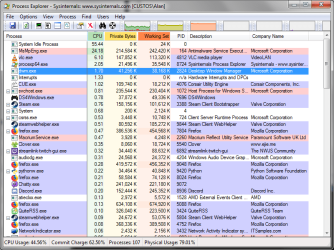
Process Explorer is extremely helpful. I can't believe I forgot to download and install Process Explorer when I first set up my PC. Anyway, I started it up, and one thing stood out: MsMpEng.exe, described as an "Antimalware Service Executable".


procexp64_2018-05-05_02-00-09.png


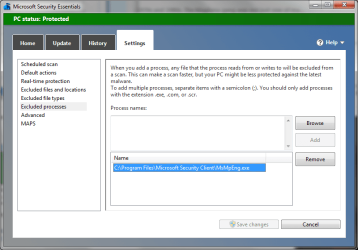
It seemed to be using a lot of CPU and memory, maybe way more than it should. Seems high memory usage is a common problem for it, going by Google results. So I followed Method II in this guide that was in the top results, adding C:\Program Files\Windows Defender and C:\Program Files\Microsoft Security Client\MsMpEng.exe to MSE's exclusions.

msseces_2018-05-05_09-41-47.png msseces_2018-05-05_09-41-51.png


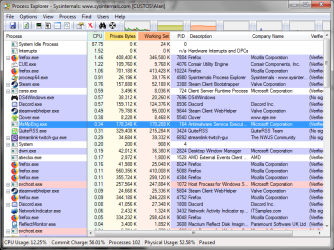
I let Process Explorer run minimized while using Windows 7 normally. Since then, MsMpEng.exe has had much less CPU and memory usage. And no noticeable slowdowns, no mouse cursor hanging or lag, no hard locks...fnr now. I'll continue to monitor this following a Restart and checking in Safe Mode, too. I wouldn't call this Solved quite yet, but there's definitely been progress made. Thanks for the help so far.


procexp64_2018-05-05_04-50-49.png


That said, what kind of Anti-Virus needs this for a solution to stop it from eating up so much CPU and Memory? I'm looking at alternatives right now.
 

My Computer My Computer

At a glance

Windows 7 Ultimate x64Intel Core i5-3570 CPU @ 3.40GHzCorsair Vengeance Low Profile 16GBSapphire NITRO+ Radeon RX 480 4GB
Computer type
PC/Desktop
Computer Manufacturer/Model Number
Custom
OS
Windows 7 Ultimate x64
CPU
Intel Core i5-3570 CPU @ 3.40GHz
Motherboard
ASRock Z75 Pro3
Memory
Corsair Vengeance Low Profile 16GB
Graphics Card(s)
Sapphire NITRO+ Radeon RX 480 4GB
Screen Resolution
1920x1080
Hard Drives
Crucial MX500 SSD (C:)
Western Digital 1TB (D:)
Western Digital 1TB (E:)
Western Digital 1TB (F:)
PSU
Corsair CX 550M (550W)
Case
Zalman Z9
Cooling
ARCTIC Freezer 34 eSports DUO Edition
Keyboard
Corsair K70 LUX RGB Rapidfire
Mouse
Logitech G502 Proteus Spectrum
Internet Speed
150/150
Antivirus
ESET NOD32 Antivirus
Browser
Mozilla Firefox Quantum 67.1 (64-bit)
Peruse the AV Comparatives I posted link to in post #2

As we age we are more prone to Brain-Fade, to which I can personally attest!

For malware protection, I run Avast Free, Malwarebytes free, Malwarebytes Anti-Exploit, and Malwarebytes Anti-Ransomware. Malwarebytes premium now includes anti-exploit and anti-ransomware.

Bitdefender Free is an excellent choice and has consistently received top ratings in all testing categories!
 

My Computer My Computer

At a glance

Win 10 x64, Linux Lite, Win 7 x64, BlackArch,...
Computer type
PC/Desktop
Computer Manufacturer/Model Number
HP Desktop & Compaq Laptop
OS
Win 10 x64, Linux Lite, Win 7 x64, BlackArch, & Kali
Hard Drives
Samsung 850 Pro 256Gb,
Hitachi HDD 1Tb,
Crucial MX SSD 250Gb
Segate 3Tb USB 3.0 Ext. Backup HDD
Internet Speed
150Mbps dn, 20Mbps up
Antivirus
Avast Free, Malwarebytes Anti-Exploit & Anti-Ransomware
Browser
Firefox, Chrome, Opera, & VPN
Sorry about responding so late. Busy with different things lately, like work.


So I switched to NOD32. It ended up finding 3 viruses that Microsoft Security Essentials couldn't catch. I'm done with MSE and will be getting a NOD32 license towards the end of this free trial. Though Windows Defender is still installed and still gets updates via Windows Update. Is there a way to turn off updates for that or just uninstall it entirely?


Performance has slightly improved since I dropped MSE. There's still mouse cursor hangs on occasion, especially if I don't do anything with my desktop for a while and then use the "Show Desktop" button on my Taskbar. Other things like opening a video in Media Player Classic Home Cinema (but not simply opening MPC-HC itself), opening iTunes, opening a folder tend to give me the same mouse cursor hang.


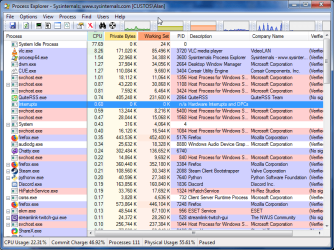
However, looking at Process Explorer, I'm thinking the CPU and RAM Hog this entire time has been Firefox Quantum. It's as fast as it should be, but it also seems quite bloated. To the point where it seems to be dragging down the overall PC performance just like the older Firefox did before.


procexp64_2018-05-15_07-46-01.png


I'll continue testing different things. Any suggestions would still help.
 

My Computer My Computer

At a glance

Windows 7 Ultimate x64Intel Core i5-3570 CPU @ 3.40GHzCorsair Vengeance Low Profile 16GBSapphire NITRO+ Radeon RX 480 4GB
Computer type
PC/Desktop
Computer Manufacturer/Model Number
Custom
OS
Windows 7 Ultimate x64
CPU
Intel Core i5-3570 CPU @ 3.40GHz
Motherboard
ASRock Z75 Pro3
Memory
Corsair Vengeance Low Profile 16GB
Graphics Card(s)
Sapphire NITRO+ Radeon RX 480 4GB
Screen Resolution
1920x1080
Hard Drives
Crucial MX500 SSD (C:)
Western Digital 1TB (D:)
Western Digital 1TB (E:)
Western Digital 1TB (F:)
PSU
Corsair CX 550M (550W)
Case
Zalman Z9
Cooling
ARCTIC Freezer 34 eSports DUO Edition
Keyboard
Corsair K70 LUX RGB Rapidfire
Mouse
Logitech G502 Proteus Spectrum
Internet Speed
150/150
Antivirus
ESET NOD32 Antivirus
Browser
Mozilla Firefox Quantum 67.1 (64-bit)
Looking at that list of things you have running, I can see several memory hogs that I would certainly shut down, if you don't require them to be running all the time.

I find this on my customer's PC's all the time. The system will be a lot faster with most of those things shut off.

So go down that list and ask yourself, "do I really need this thing running ALL THE TIME?", or "could I just run it when I really need it?".

I get the maximum efficiency out of my own PC, by only running what I absolutely MUST have running at any time.

The mouse and keyboard are fairly low priority items, and can be delayed when the CPU is busy with other programs.

Good Luck,
TechnoMage :cool:
 

My Computer My Computer

At a glance

Win 7 Pro, SP1, x86, Win-11/Pro/64AMD8GB CrucialVarious
Computer type
PC/Desktop
Computer Manufacturer/Model Number
Various
OS
Win 7 Pro, SP1, x86, Win-11/Pro/64
CPU
AMD
Motherboard
Various
Memory
8GB Crucial
Graphics Card(s)
Various
Sound Card
OnBoard
Monitor(s) Displays
Acer 21.5"
Hard Drives
Crucial SSD, 500 GB
PSU
OEM
Case
SFF Slim Line Case
Cooling
OEM
Keyboard
eMachines
Mouse
Logitech Wireless
Internet Speed
varies
Antivirus
Windows Defender/Super Anti-Spyware
Browser
Firefox
Agree with TechnoMage2016,

My recommended AV’s, malware scanner, adware scanner, pup scanners
Avast Free this is what I use, Anti-virus.
BitDefender Free Edition don’t use but highly recommend
Malwarebytes Premium (it’s a free 30-day trial) If you utilize the free trial, it includes MB anti-exploit & MB anti-ransomware & will remove the standalone versions that you can obtain and install through the below links.
Malwarebytes Free this is what I use, one of the best all-around scanners, period.
BitDefender free, don’t use, but highly recommend, there is also a paid version.
SuperAntiSpyware free, this is what I use, there is also a paid version that runs real-time.
ADWCleaner Malwarebytes recently purchased from Tools.lib, available on both websites
HitmanProx32 scan is free, and one time trial virus removal, you can use Revo Uninstaller
to remove it and trial cookies if it finds malware to remove, then you can use the trial again.
HitmanProx64 scan is free, and one time trial virus removal, you can use Revo Uninstaller to remove it and trial cookies if it finds malware to remove, then you can use the trial again.
Malwarebytes Anti-Exploit this is what I use, real-time exploit protection, drive-bys, ssl injection, etc.
Malwarebytes Anti-Ransomware this is what I use, real-time ransomware protection.
TDSSkiller this is what I use, rootkit scanner.
VirusTotal online multi-AV scanner. If you download the app, it adds entry to right-click context menu. You can right-click on the file you wish to scan, and a couple click sends the file to them for analysis
 

My Computer My Computer

At a glance

Win 10 x64, Linux Lite, Win 7 x64, BlackArch,...
Computer type
PC/Desktop
Computer Manufacturer/Model Number
HP Desktop & Compaq Laptop
OS
Win 10 x64, Linux Lite, Win 7 x64, BlackArch, & Kali
Hard Drives
Samsung 850 Pro 256Gb,
Hitachi HDD 1Tb,
Crucial MX SSD 250Gb
Segate 3Tb USB 3.0 Ext. Backup HDD
Internet Speed
150Mbps dn, 20Mbps up
Antivirus
Avast Free, Malwarebytes Anti-Exploit & Anti-Ransomware
Browser
Firefox, Chrome, Opera, & VPN
So I did some things recently that led to what might be a solution.


Switched to NOD32 entirely (Defender has been completely disabled), and I've got a 3-Year license currently active.


A week ago, I looked around and found this post on AMD's forums.
mouse and screen lag with radeon-crimson-17.7.2 | Community


A post by chzbrgla mentions monitoring processes. I was running something called CoreTemp to keep an eye on my CPU temperatures. Disabled that from Startup, and that led to slight improvements. But I'm not quite sure if that was actually the problem now, given a possible solution down below.


Because my Corsair K70 RGB Rapidfire is fairly recent (got it at the start of the year), I considered if that was part of the problem. I reduced the polling rate from 1000 to 500. Made only a slight difference. Ended up eventually returning the polling rate to 1000, since this didn't seem to be connected.


Since my PC seemed a bit "bloated", I Installed BleachBit and Wise Disk Cleaner. I wanted to try alternatives to CCleaner, maybe later than I should have, given that malware situation it had months back. BleachBit is nice and lightweight. I noticed Thumbs.db was taking up quite a bit of space, so I cleaned that along with what turned out to be a lot of Temp files (at least 2 GB).


I also took a peek at my Device Manager and found that my Intel HD Graphics under the Display Adapter section was enabled. So I disabled that, screen went black for a bit, then returned to normal. I'm not sure why it was enabled in the first place, since that's definitely not what I'm using as a primary GPU. This might be something I'll have to look into later in my BIOS.


Gave my PC a restart afterwards. Since then, the issues that I've experienced before have not occurred. I don't know if the problems have been fixed completely, but this is a vast improvement from the past months.


Improvements of note: Firefox Quantum no longer lags my whole PC after closing. The issues I've had with Media Player Classic Home Cinema and opening any sort of video (no matter the quality) have been eliminated, and videos seem to load faster now; this fits with disabling the Intel HD Graphics, I suppose. Even iTunes doesn't cause large system lag upon opening.


Overall...Something I did fixed these problems. I'm still trying to figure out what happened so I can prevent those things from happening again. More frequent cleaning with BleachBit/Wise Disk Cleaner, and defragmenting with the latter might help.


There is one weird quirk that still occurs that I've only noticed with Firefox. If I drag something from my location bar in Firefox onto my desktop or one of my folders, there is a very noticeable lag spike with my PC and Mouse (similar to what was occurring before). But nothing else now. Strange.
 

My Computer My Computer

At a glance

Windows 7 Ultimate x64Intel Core i5-3570 CPU @ 3.40GHzCorsair Vengeance Low Profile 16GBSapphire NITRO+ Radeon RX 480 4GB
Computer type
PC/Desktop
Computer Manufacturer/Model Number
Custom
OS
Windows 7 Ultimate x64
CPU
Intel Core i5-3570 CPU @ 3.40GHz
Motherboard
ASRock Z75 Pro3
Memory
Corsair Vengeance Low Profile 16GB
Graphics Card(s)
Sapphire NITRO+ Radeon RX 480 4GB
Screen Resolution
1920x1080
Hard Drives
Crucial MX500 SSD (C:)
Western Digital 1TB (D:)
Western Digital 1TB (E:)
Western Digital 1TB (F:)
PSU
Corsair CX 550M (550W)
Case
Zalman Z9
Cooling
ARCTIC Freezer 34 eSports DUO Edition
Keyboard
Corsair K70 LUX RGB Rapidfire
Mouse
Logitech G502 Proteus Spectrum
Internet Speed
150/150
Antivirus
ESET NOD32 Antivirus
Browser
Mozilla Firefox Quantum 67.1 (64-bit)
Agree with Snick, you may have a weak PS or have CPU over temperature.
Agree with TechnoMage2016. You have too many programs / services running on the background.

Mainly, on the back ground I have Antivirus (Download Free Antivirus for Windows 2018 | Avira ), Hardware monitor (Open Hardware Monitor - Core temp, fan speed and voltages in a free software gadget),
Firewall (Download ZoneAlarm 9.2.106.0 for Windows - OldVersion.com) and Skype (http://www.skype.com/go/getskype-full).

For malware I use SUPERAntiSpyware | Remove Malware | Remove Spyware - AntiMalware, AntiSpyware, AntiAdware! as Malwarebytes free runs on the background without protecting. If you do have Malwarebytes Premium, you don't need antivirus.
 

My Computers My Computers

  • At a glance

    Windows 7 HP 64i5 6600K - 800MHz to 4200MHz4+4G GSkill DDR4 3000IG - Intel 530
    Computer type
    PC/Desktop
    Computer Manufacturer/Model Number
    custom build
    OS
    Windows 7 HP 64
    CPU
    i5 6600K - 800MHz to 4200MHz
    Motherboard
    GA-Z170-HD3P
    Memory
    4+4G GSkill DDR4 3000
    Graphics Card(s)
    IG - Intel 530
    Monitor(s) Displays
    Samsung 226BW
    Screen Resolution
    1680x1050
    Hard Drives
    (1) -1 SM951 – 128GB M.2 AHCI PCIe SSD drive for Windows 7 and Lubuntu
    (2) -1 WD SATA 3 - 1T for Data
    (3) -1 WD SATA 3 - 1T for backup
    PSU
    Thermaltake 450W TR2 gold
    Keyboard
    Old and good Chicony mechanical keyboard
    Mouse
    Logitech mX performance - 9 buttons (had to disable some)
    Internet Speed
    500Mb/s
    Browser
    Firefox 64
    Other Info
    TinyWall firewall
  • At a glance

    Windows 7 Proi7-4500U 800MHz to 3.0GHz(4+4)G DDR3 1600IG intel 4400 + NVIDIA GeForce GT 745M
    Computer type
    Laptop
    System Manufacturer/Model Number
    Asus Q550LF
    OS
    Windows 7 Pro
    CPU
    i7-4500U 800MHz to 3.0GHz
    Motherboard
    Asus Q550LF
    Memory
    (4+4)G DDR3 1600
    Graphics Card(s)
    IG intel 4400 + NVIDIA GeForce GT 745M
    Sound Card
    Realtek
    Monitor(s) Displays
    LG Display LP156WF4-SPH1
    Screen Resolution
    1920 x 1080
    Hard Drives
    BX500 120G SSD for Windows and programs +
    1T HDD for data
    Internet Speed
    500 Mb/s
    Browser
    Firefox
    Other Info
    TinyWall firewall
Just a reminder.


When you are searching for the security programs that you desire; make sure all other security programs are removed. Not just turned off.

Security programs that are just turned off can interfere with active security programs.


Exception:
I have never had MBAM and MSE to have a problem running at the same time.


Jack
 

My Computer My Computer

At a glance

Windows 10 Pro. 64/ version 1709 Windows 7 Pr...Intel i7-6800K @ 4.3Corsair Platinum 16 gig @2400EVGA GTX 1070 OC
Computer type
PC/Desktop
Computer Manufacturer/Model Number
Home made Desktop
OS
Windows 10 Pro. 64/ version 1709 Windows 7 Pro/64
CPU
Intel i7-6800K @ 4.3
Motherboard
ASUS X-99 Deluxe II
Memory
Corsair Platinum 16 gig @2400
Graphics Card(s)
EVGA GTX 1070 OC
Monitor(s) Displays
Asus 27" LED LCD/VE278Q
Screen Resolution
1920-1080 or 1280-720 HDMI
Hard Drives
INTEL SSD 730-240 Gb Sata 3.0/
PSU
EVGA Platium 1200W
Case
Phanteks Luxe Tempered Glass 8 fans/ one radiator
Cooling
XSPC/ Water Cooled CPU
Keyboard
Das 4 Professional
Mouse
Logitech M705/MX Anywhere 2-S
Internet Speed
100 mbits
Antivirus
Microsoft Security Essentials/ Malwarebytes Premium 3.0/ SAS
Browser
I.E. 11 default/Firefox/ ISP Time Warner Cable/Spectrum
Other Info
LG BluRay Burner/
Sound system-KLipsch-THX/
Icy Dock ssd Hot Swap bays.

My Computers My Computers

  • At a glance

    Windows 7 HP 64i5 6600K - 800MHz to 4200MHz4+4G GSkill DDR4 3000IG - Intel 530
    Computer type
    PC/Desktop
    Computer Manufacturer/Model Number
    custom build
    OS
    Windows 7 HP 64
    CPU
    i5 6600K - 800MHz to 4200MHz
    Motherboard
    GA-Z170-HD3P
    Memory
    4+4G GSkill DDR4 3000
    Graphics Card(s)
    IG - Intel 530
    Monitor(s) Displays
    Samsung 226BW
    Screen Resolution
    1680x1050
    Hard Drives
    (1) -1 SM951 – 128GB M.2 AHCI PCIe SSD drive for Windows 7 and Lubuntu
    (2) -1 WD SATA 3 - 1T for Data
    (3) -1 WD SATA 3 - 1T for backup
    PSU
    Thermaltake 450W TR2 gold
    Keyboard
    Old and good Chicony mechanical keyboard
    Mouse
    Logitech mX performance - 9 buttons (had to disable some)
    Internet Speed
    500Mb/s
    Browser
    Firefox 64
    Other Info
    TinyWall firewall
  • At a glance

    Windows 7 Proi7-4500U 800MHz to 3.0GHz(4+4)G DDR3 1600IG intel 4400 + NVIDIA GeForce GT 745M
    Computer type
    Laptop
    System Manufacturer/Model Number
    Asus Q550LF
    OS
    Windows 7 Pro
    CPU
    i7-4500U 800MHz to 3.0GHz
    Motherboard
    Asus Q550LF
    Memory
    (4+4)G DDR3 1600
    Graphics Card(s)
    IG intel 4400 + NVIDIA GeForce GT 745M
    Sound Card
    Realtek
    Monitor(s) Displays
    LG Display LP156WF4-SPH1
    Screen Resolution
    1920 x 1080
    Hard Drives
    BX500 120G SSD for Windows and programs +
    1T HDD for data
    Internet Speed
    500 Mb/s
    Browser
    Firefox
    Other Info
    TinyWall firewall
Something new I've found out as the issues started occurring again after my last post.


I noticed my desktop icons would sometimes refresh for no reason. Found that it might be related to the Icon Cache. Ended up deleting IconCache.db, then restarting my PC to let Windows 7 rebuild the Icon Cache.


Much better performance afterwards. Maybe the Icon Cache was corrupted and it led to more issues. But I'm not sure how it got corrupted in the first place. It's something that I'd like to try to prevent from this point.


I'll keep monitoring afterwards to see if that really was the fix.
 

My Computer My Computer

At a glance

Windows 7 Ultimate x64Intel Core i5-3570 CPU @ 3.40GHzCorsair Vengeance Low Profile 16GBSapphire NITRO+ Radeon RX 480 4GB
Computer type
PC/Desktop
Computer Manufacturer/Model Number
Custom
OS
Windows 7 Ultimate x64
CPU
Intel Core i5-3570 CPU @ 3.40GHz
Motherboard
ASRock Z75 Pro3
Memory
Corsair Vengeance Low Profile 16GB
Graphics Card(s)
Sapphire NITRO+ Radeon RX 480 4GB
Screen Resolution
1920x1080
Hard Drives
Crucial MX500 SSD (C:)
Western Digital 1TB (D:)
Western Digital 1TB (E:)
Western Digital 1TB (F:)
PSU
Corsair CX 550M (550W)
Case
Zalman Z9
Cooling
ARCTIC Freezer 34 eSports DUO Edition
Keyboard
Corsair K70 LUX RGB Rapidfire
Mouse
Logitech G502 Proteus Spectrum
Internet Speed
150/150
Antivirus
ESET NOD32 Antivirus
Browser
Mozilla Firefox Quantum 67.1 (64-bit)
Back
Top