Windows 7 soundcard problems

ejv

New member
Local time
1:03 AM
Messages
5
A novice and first post.Please be gentle.:D
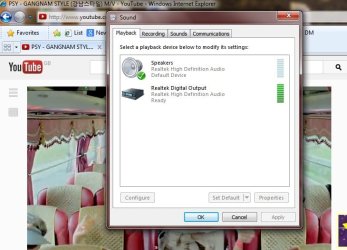
My laptop gets muted when I play Youtube, as the audio gets diverted to HD Realtek , instead of the default "speakers".Though the Realtek's LED shows,no sound comes out the speakers.This knocks off my Windows Media Player as well.Often, I could fix it by switching back the default device to speakers,using the "Set Default" button shown in the attached image.Recently, this doesn't work and I have to restart the computer to fix it.:eek:
Could someone help in fixing it for good?
Thanks in advance
 

Attachments
  • Soundcard.jpg
    Soundcard.jpg
    53.2 KB · Views: 12

My Computer

OS
Windows 7 64 bit
Hi ejv,

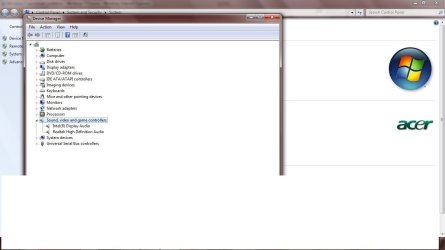
The 'audio drivers' may need to be updated. Please check 'Device Manager' to see if any 'yellow mark / question mark' is visible besides any item listed on the page. If yes, please share its details. Also expand the category: 'Sound, Video & Game Controllers'; and share the details of 'audio device' installed in the computer; will try to look for apt drivers, if needed.

In the mean while, you may run the following Microsoft Fixit to see if that helps: Automatically diagnose and fix Windows audio playback problems

Hope this helps. Do reply with the findings.
 

My Computer

OS
Windows 7 64bit
Thank you.Screenshot attached.ran "FIXIT".No problems found.
 

Attachments

  • Device manager.jpg
    Device manager.jpg
    55.8 KB · Views: 11

My Computer

OS
Windows 7 64 bit
Welcome to the Forums :)

We can`t do anything without knowing exactly what model your pc is.

Do you have an HDMI out ?
 

My Computer

Computer type
PC/Desktop
Computer Manufacturer/Model Number
Skylake Special #666
OS
Windows 10 Pro x64
CPU
Intel Core i7 6700K
Motherboard
Asus Sabertooth Z170 Mark 1
Memory
GSkill TridentZ RGB 16GB 3600 16-16-16-36
Graphics Card(s)
EVGA GTX 980 Ti SC x2
Sound Card
Realtek High Definition
Monitor(s) Displays
AOC G2460PG
Screen Resolution
1920 x 1080 144Hz
Hard Drives
Samsung 860 Pro 256GB, Seagate Barracuda 4TB x2
PSU
EVGA 1000 P2, EVGA White Custom Braided Cables
Case
Corsair Vengeance C70 Gunmetal Black
Cooling
Corsair H100i v2, Corsair ML120 x2, Thermal Grizzly Kryonaut
Keyboard
Logitech G910 Orion Spectrum
Mouse
Logitech G700s
Internet Speed
Verizon Fios Quantum Gateway 75/75
Antivirus
Windows Defender, Malwarebytes Free 3.8.3
Browser
Chrome
Other Info
Corsair SP120 x4, LG Blu-ray Drive, Durabrand HT-395 100 Watt Dolby Digital Amp, Corsair H2100 Wireless 7.1 Headset
ACER Aspire 4820T.
i3-350M Processor. 2.26 GHz,3 MB, L3 cache.3 GB DDR3 memory.Windows 7 Home Premium 64 bit.
Has HDMI output.
 

My Computer

OS
Windows 7 64 bit

My Computer

OS
Windows 7 64bit
Thanks Saurabh.
Just a query( as I'm not a computer buff:o), should I reinstall the Realtek software, before I upate the driver?Or does the driver include the software as well:confused:
 

My Computer

OS
Windows 7 64 bit
Hi ejv,

You may uninstall 'Sound drivers' from the 'Device Manager'. Installing the 'Audio driver' is likely to update the 'software/application' along with the drivers. I have limited knowledge about this product; as using an 'OEM', you may want to double-check the information with the 'computer manufacturer' also.
 

My Computer

OS
Windows 7 64bit
Thank you all.
I downloaded the audio driver zip folder from Acer and ran the .exe file which updated my existing software and apparently has fixed the problem.
I was bit wary to uninstall the software altogether and start from the scratch.
Thanks again.Much appreciated:D
 

My Computer

OS
Windows 7 64 bit
Hi ejv,

The 'software utility' is generally listed along with the 'driver download' for any specific device.
Glad that the issue is fixed. Thank you for confirming.


My Computer

OS
Windows 7 64bit
Back
Top