Windows 7 SP1 Error 800736B3

mmorkert

New member
Local time
3:27 PM
Messages
5
Hello,

I've been pulling my hair out trying to install SP1 for win7 for some time and have had no luck or useful support from Microsoft on the issue.

I've run the CheckSUR multiple times. I've posted the log below.
I've run the sfc program and when it finishes is says "Windows Resource Protection did not find any integrity violations." I've posted the CBS log below.
I've uninstalled AVG and tried to run the update, same error.
I've run all the fixes that could be connected to the error. No Help.
I've downloaded the SP1 package as a standalone installation, same error.
I've tried to run a repair installation from the Win 7 disk, no improvement.

So here I am asking if anyone has an answer for me. I have some software that will only run with SP1 installed so I need to figure this out and I would rather not do a fresh install if possible.

Thanks in advance for any help you can provide!
 

Attachments

My Computer My Computer

Computer type
PC/Desktop
Computer Manufacturer/Model Number
Dell
OS
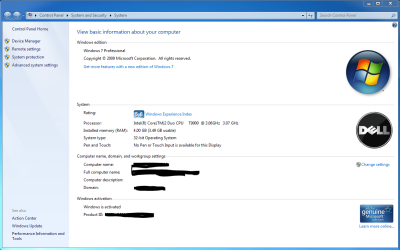
Win 7 Professional 32 bit
CPU
Intel Core 2 Duo T9900
Motherboard
Dell
Memory
4 GB
Graphics Card(s)
nVidia FX 770M
Hard Drives
150 GB
Antivirus
AVG
Browser
Chrome, Firefox

My Computer My Computer

Computer type
PC/Desktop
Computer Manufacturer/Model Number
Home made Desktop
OS
Windows 10 Pro. 64/ version 1709 Windows 7 Pro/64
CPU
Intel i7-6800K @ 4.3
Motherboard
ASUS X-99 Deluxe II
Memory
Corsair Platinum 16 gig @2400
Graphics Card(s)
EVGA GTX 1070 OC
Monitor(s) Displays
Asus 27" LED LCD/VE278Q
Screen Resolution
1920-1080 or 1280-720 HDMI
Hard Drives
INTEL SSD 730-240 Gb Sata 3.0/
PSU
EVGA Platium 1200W
Case
Phanteks Luxe Tempered Glass 8 fans/ one radiator
Cooling
XSPC/ Water Cooled CPU
Keyboard
Das 4 Professional
Mouse
Logitech M705/MX Anywhere 2-S
Internet Speed
100 mbits
Antivirus
Microsoft Security Essentials/ Malwarebytes Premium 3.0/ SAS
Browser
I.E. 11 default/Firefox/ ISP Time Warner Cable/Spectrum
Other Info
LG BluRay Burner/
Sound system-KLipsch-THX/
Icy Dock ssd Hot Swap bays.
Clipped Screenshot.
 

Attachments

  • Capture.PNG
    Capture.PNG
    57.9 KB · Views: 3

My Computer My Computer

Computer type
PC/Desktop
Computer Manufacturer/Model Number
Dell
OS
Win 7 Professional 32 bit
CPU
Intel Core 2 Duo T9900
Motherboard
Dell
Memory
4 GB
Graphics Card(s)
nVidia FX 770M
Hard Drives
150 GB
Antivirus
AVG
Browser
Chrome, Firefox
Thanks for following instructions. So far I don't see anything but I'm not a expert but I do know one.

**Have you run and received all Windows Updates except SP-1??

***Are you using any registry clenaing tools?***
***Are you using any IOBits products?**

Do this tutorial by Brink and let us know if their are any problems.
http://www.sevenforums.com/tutorials/1538-sfc-scannow-command-system-file-checker.html

Do this tutorial by Brink and post the results here.
If I don't see anything I will hunt down some help.

http://www.sevenforums.com/windows-...ne-activation-issue-posting-instructions.html

***
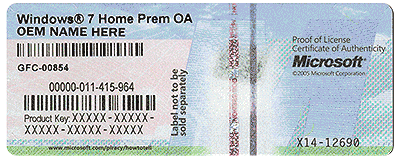
By chance would this be a Upgrade to Windows 7 Pro??***
 
Last edited:

My Computer My Computer

Computer type
PC/Desktop
Computer Manufacturer/Model Number
Home made Desktop
OS
Windows 10 Pro. 64/ version 1709 Windows 7 Pro/64
CPU
Intel i7-6800K @ 4.3
Motherboard
ASUS X-99 Deluxe II
Memory
Corsair Platinum 16 gig @2400
Graphics Card(s)
EVGA GTX 1070 OC
Monitor(s) Displays
Asus 27" LED LCD/VE278Q
Screen Resolution
1920-1080 or 1280-720 HDMI
Hard Drives
INTEL SSD 730-240 Gb Sata 3.0/
PSU
EVGA Platium 1200W
Case
Phanteks Luxe Tempered Glass 8 fans/ one radiator
Cooling
XSPC/ Water Cooled CPU
Keyboard
Das 4 Professional
Mouse
Logitech M705/MX Anywhere 2-S
Internet Speed
100 mbits
Antivirus
Microsoft Security Essentials/ Malwarebytes Premium 3.0/ SAS
Browser
I.E. 11 default/Firefox/ ISP Time Warner Cable/Spectrum
Other Info
LG BluRay Burner/
Sound system-KLipsch-THX/
Icy Dock ssd Hot Swap bays.
Here's the error sequence from the CBS background (SFC and CheckSUR are clear)
Code:
2015-04-17 05:16:16, Info                  CBS    Appl: Package: Microsoft-Windows-IIS-WebServer-Package~31bf3856ad364e35~x86~~6.1.7601.17514, Update: IIS-HttpErrors, Applicable: NeedsParent, Disposition: Staged
2015-04-17 05:16:16, Info                  CBS    Plan: Package: Microsoft-Windows-IIS-WebServer-Package~31bf3856ad364e35~x86~~6.1.7601.17514, Update: IIS-HttpErrors, current: Absent, pending: Default, start: Absent, applicable: Staged, targeted: Staged, limit: Staged, selected: Default
2015-04-17 05:16:16, Error                 CSI    [EMAIL="00000011@2015/4/17:12:16:16.148"]00000011@2015/4/17:12:16:16.148[/EMAIL] (F) d:\win7sp1_gdr\base\wcp\componentstore\csd_core.cpp(616): Error STATUS_SXS_ASSEMBLY_NOT_FOUND originated in function CCSDirect::GetDeploymentClosureStatus expression: (null)
[gle=0x80004005]
2015-04-17 05:16:17, Error                 CSI    00000012 (F) HRESULT_FROM_WIN32(ERROR_SXS_ASSEMBLY_NOT_FOUND) #695646# from Windows::ServicingAPI::CCSITransactionAnalysis_ICSIInventory::GetDeploymentInformation(flags = 0, class = ICSIINVENTORY_GET_DEPLOYMENT_INFORMATION_CLASS_CLOSURE (1), information = {dwFlags=00000000})
[gle=0x800736b3]
2015-04-17 05:16:17, Info                  CBS    Failed to call GetDeploymentInformation on deployment: x86_microsoft-windows-w..essmodel-deployment_31bf3856ad364e35_6.1.7601.17514_none_c2791dfd801ab969 [HRESULT = 0x800736b3 - ERROR_SXS_ASSEMBLY_NOT_FOUND]
2015-04-17 05:16:17, Info                  CBS    Failed to get component state. [HRESULT = 0x800736b3 - ERROR_SXS_ASSEMBLY_NOT_FOUND]
2015-04-17 05:16:17, Info                  CBS    Failed to get current state of the deployment [HRESULT = 0x800736b3 - ERROR_SXS_ASSEMBLY_NOT_FOUND]
2015-04-17 05:16:17, Info                  CBS    Failed to get Transaction State for package: Microsoft-Windows-IIS-WebServer-Package~31bf3856ad364e35~x86~~6.1.7601.17514, update: IIS-HttpRedirect [HRESULT = 0x800736b3 - ERROR_SXS_ASSEMBLY_NOT_FOUND]
2015-04-17 05:16:17, Info                  CBS    Failed to get current state. [HRESULT = 0x800736b3 - ERROR_SXS_ASSEMBLY_NOT_FOUND]
2015-04-17 05:16:17, Info                  CBS    Failed to populate updates for package: Microsoft-Windows-IIS-WebServer-Package~31bf3856ad364e35~x86~~6.1.7601.17514 [HRESULT = 0x800736b3 - ERROR_SXS_ASSEMBLY_NOT_FOUND]
2015-04-17 05:16:17, Info                  CBS    Failed to add child package to the strategy [HRESULT = 0x800736b3 - ERROR_SXS_ASSEMBLY_NOT_FOUND]
2015-04-17 05:16:17, Info                  CBS    Failed to add package: Package_for_KB976932~31bf3856ad364e35~x86~~6.1.1.17514 [HRESULT = 0x800736b3 - ERROR_SXS_ASSEMBLY_NOT_FOUND]
2015-04-17 05:16:17, Info                  CBS    Failed to prepare starting packages [HRESULT = 0x800736b3 - ERROR_SXS_ASSEMBLY_NOT_FOUND]
2015-04-17 05:16:17, Error                 CBS    Failed to process single phase execution. [HRESULT = 0x800736b3 - ERROR_SXS_ASSEMBLY_NOT_FOUND]

I think this means that the installer is corrupt.
However, you say that you are getting the same error attempting to install from the standalone update?
 

My Computer My Computer

Computer type
Laptop
Computer Manufacturer/Model Number
Asus K52F or Lenovo B51-80
OS
Win 7 x64 Home Premium (and x86 VirtualBox VM)/Win10
CPU
i3 370M/i7 6500U
Motherboard
Asus/Lenovo
Memory
8GB - finally :)/8GB
Graphics Card(s)
it's an i3, dude!/dual Intel&nVidia
Sound Card
onboard
Monitor(s) Displays
15.6" built-in
Screen Resolution
1366x768/1920x1080
Hard Drives
750GB Seagate internal
Sundry external drives attached to other computers on the local network
1TB SSD on the Lenovo
PSU
n/a
Internet Speed
as much as I can get - usually on a dongle/phone, so <1MB/s
Antivirus
MSE/Defender
Browser
IE11/12/Edge/Chrome/FF(if I must)
Speaking of a Expert. Good day Noel. Thanks for dropping by.

Would a Repair Install repair such a problem?
 

My Computer My Computer

Computer type
PC/Desktop
Computer Manufacturer/Model Number
Home made Desktop
OS
Windows 10 Pro. 64/ version 1709 Windows 7 Pro/64
CPU
Intel i7-6800K @ 4.3
Motherboard
ASUS X-99 Deluxe II
Memory
Corsair Platinum 16 gig @2400
Graphics Card(s)
EVGA GTX 1070 OC
Monitor(s) Displays
Asus 27" LED LCD/VE278Q
Screen Resolution
1920-1080 or 1280-720 HDMI
Hard Drives
INTEL SSD 730-240 Gb Sata 3.0/
PSU
EVGA Platium 1200W
Case
Phanteks Luxe Tempered Glass 8 fans/ one radiator
Cooling
XSPC/ Water Cooled CPU
Keyboard
Das 4 Professional
Mouse
Logitech M705/MX Anywhere 2-S
Internet Speed
100 mbits
Antivirus
Microsoft Security Essentials/ Malwarebytes Premium 3.0/ SAS
Browser
I.E. 11 default/Firefox/ ISP Time Warner Cable/Spectrum
Other Info
LG BluRay Burner/
Sound system-KLipsch-THX/
Icy Dock ssd Hot Swap bays.
Sure. If the media are available. :)
 

My Computer My Computer

Computer type
Laptop
Computer Manufacturer/Model Number
Asus K52F or Lenovo B51-80
OS
Win 7 x64 Home Premium (and x86 VirtualBox VM)/Win10
CPU
i3 370M/i7 6500U
Motherboard
Asus/Lenovo
Memory
8GB - finally :)/8GB
Graphics Card(s)
it's an i3, dude!/dual Intel&nVidia
Sound Card
onboard
Monitor(s) Displays
15.6" built-in
Screen Resolution
1366x768/1920x1080
Hard Drives
750GB Seagate internal
Sundry external drives attached to other computers on the local network
1TB SSD on the Lenovo
PSU
n/a
Internet Speed
as much as I can get - usually on a dongle/phone, so <1MB/s
Antivirus
MSE/Defender
Browser
IE11/12/Edge/Chrome/FF(if I must)
Thanks for all of the replies.

I have tried to run a repair installation from the Win 7 disk to fix any errors but that is also unsuccessful. I'll try again and post the error message I get when I do that.
 

My Computer My Computer

Computer type
PC/Desktop
Computer Manufacturer/Model Number
Dell
OS
Win 7 Professional 32 bit
CPU
Intel Core 2 Duo T9900
Motherboard
Dell
Memory
4 GB
Graphics Card(s)
nVidia FX 770M
Hard Drives
150 GB
Antivirus
AVG
Browser
Chrome, Firefox
Here's the error sequence from the CBS background (SFC and CheckSUR are clear)
Code:
2015-04-17 05:16:16, Info                  CBS    Appl: Package: Microsoft-Windows-IIS-WebServer-Package~31bf3856ad364e35~x86~~6.1.7601.17514, Update: IIS-HttpErrors, Applicable: NeedsParent, Disposition: Staged
2015-04-17 05:16:16, Info                  CBS    Plan: Package: Microsoft-Windows-IIS-WebServer-Package~31bf3856ad364e35~x86~~6.1.7601.17514, Update: IIS-HttpErrors, current: Absent, pending: Default, start: Absent, applicable: Staged, targeted: Staged, limit: Staged, selected: Default
2015-04-17 05:16:16, Error                 CSI    [EMAIL="00000011@2015/4/17:12:16:16.148"]00000011@2015/4/17:12:16:16.148[/EMAIL] (F) d:\win7sp1_gdr\base\wcp\componentstore\csd_core.cpp(616): Error STATUS_SXS_ASSEMBLY_NOT_FOUND originated in function CCSDirect::GetDeploymentClosureStatus expression: (null)
[gle=0x80004005]
2015-04-17 05:16:17, Error                 CSI    00000012 (F) HRESULT_FROM_WIN32(ERROR_SXS_ASSEMBLY_NOT_FOUND) #695646# from Windows::ServicingAPI::CCSITransactionAnalysis_ICSIInventory::GetDeploymentInformation(flags = 0, class = ICSIINVENTORY_GET_DEPLOYMENT_INFORMATION_CLASS_CLOSURE (1), information = {dwFlags=00000000})
[gle=0x800736b3]
2015-04-17 05:16:17, Info                  CBS    Failed to call GetDeploymentInformation on deployment: x86_microsoft-windows-w..essmodel-deployment_31bf3856ad364e35_6.1.7601.17514_none_c2791dfd801ab969 [HRESULT = 0x800736b3 - ERROR_SXS_ASSEMBLY_NOT_FOUND]
2015-04-17 05:16:17, Info                  CBS    Failed to get component state. [HRESULT = 0x800736b3 - ERROR_SXS_ASSEMBLY_NOT_FOUND]
2015-04-17 05:16:17, Info                  CBS    Failed to get current state of the deployment [HRESULT = 0x800736b3 - ERROR_SXS_ASSEMBLY_NOT_FOUND]
2015-04-17 05:16:17, Info                  CBS    Failed to get Transaction State for package: Microsoft-Windows-IIS-WebServer-Package~31bf3856ad364e35~x86~~6.1.7601.17514, update: IIS-HttpRedirect [HRESULT = 0x800736b3 - ERROR_SXS_ASSEMBLY_NOT_FOUND]
2015-04-17 05:16:17, Info                  CBS    Failed to get current state. [HRESULT = 0x800736b3 - ERROR_SXS_ASSEMBLY_NOT_FOUND]
2015-04-17 05:16:17, Info                  CBS    Failed to populate updates for package: Microsoft-Windows-IIS-WebServer-Package~31bf3856ad364e35~x86~~6.1.7601.17514 [HRESULT = 0x800736b3 - ERROR_SXS_ASSEMBLY_NOT_FOUND]
2015-04-17 05:16:17, Info                  CBS    Failed to add child package to the strategy [HRESULT = 0x800736b3 - ERROR_SXS_ASSEMBLY_NOT_FOUND]
2015-04-17 05:16:17, Info                  CBS    Failed to add package: Package_for_KB976932~31bf3856ad364e35~x86~~6.1.1.17514 [HRESULT = 0x800736b3 - ERROR_SXS_ASSEMBLY_NOT_FOUND]
2015-04-17 05:16:17, Info                  CBS    Failed to prepare starting packages [HRESULT = 0x800736b3 - ERROR_SXS_ASSEMBLY_NOT_FOUND]
2015-04-17 05:16:17, Error                 CBS    Failed to process single phase execution. [HRESULT = 0x800736b3 - ERROR_SXS_ASSEMBLY_NOT_FOUND]

I think this means that the installer is corrupt.
However, you say that you are getting the same error attempting to install from the standalone update?

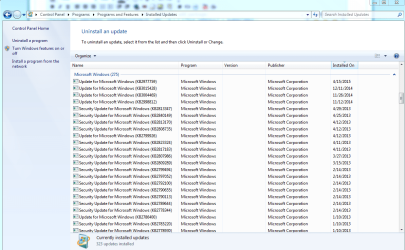
Yes. No luck from standalone download. If I try to update through Windows Update, it won't finish downloading the update. It has installed all of the updates since SP1 with no issues. The last updates were installed on 4/15/15. SP1 install just keeps failing.

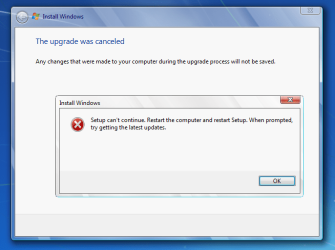
I tried a repair install again and no success. It doesn't provide an error code to show or reference, it just states that the installation failed.
 

Attachments

  • Capture2.PNG
    Capture2.PNG
    47.5 KB · Views: 2

My Computer My Computer

Computer type
PC/Desktop
Computer Manufacturer/Model Number
Dell
OS
Win 7 Professional 32 bit
CPU
Intel Core 2 Duo T9900
Motherboard
Dell
Memory
4 GB
Graphics Card(s)
nVidia FX 770M
Hard Drives
150 GB
Antivirus
AVG
Browser
Chrome, Firefox

My Computer My Computer

Computer type
PC/Desktop
Computer Manufacturer/Model Number
Home made Desktop
OS
Windows 10 Pro. 64/ version 1709 Windows 7 Pro/64
CPU
Intel i7-6800K @ 4.3
Motherboard
ASUS X-99 Deluxe II
Memory
Corsair Platinum 16 gig @2400
Graphics Card(s)
EVGA GTX 1070 OC
Monitor(s) Displays
Asus 27" LED LCD/VE278Q
Screen Resolution
1920-1080 or 1280-720 HDMI
Hard Drives
INTEL SSD 730-240 Gb Sata 3.0/
PSU
EVGA Platium 1200W
Case
Phanteks Luxe Tempered Glass 8 fans/ one radiator
Cooling
XSPC/ Water Cooled CPU
Keyboard
Das 4 Professional
Mouse
Logitech M705/MX Anywhere 2-S
Internet Speed
100 mbits
Antivirus
Microsoft Security Essentials/ Malwarebytes Premium 3.0/ SAS
Browser
I.E. 11 default/Firefox/ ISP Time Warner Cable/Spectrum
Other Info
LG BluRay Burner/
Sound system-KLipsch-THX/
Icy Dock ssd Hot Swap bays.
Yes I have completed the repair install exactly as outlined in the linked post. I have the proper windows 7 DVD and I have the product code.

Unfortunately, when I run the repair install, the updates download and then I get the error below. The error occurs somewhere between step 13 and 14 of the guide you posted by Brink.

Any other thoughts? Does it put any information in the CBS log after a failed repair install that might be useful to look at?
 

Attachments

  • Capture3.PNG
    Capture3.PNG
    31.5 KB · Views: 7

My Computer My Computer

Computer type
PC/Desktop
Computer Manufacturer/Model Number
Dell
OS
Win 7 Professional 32 bit
CPU
Intel Core 2 Duo T9900
Motherboard
Dell
Memory
4 GB
Graphics Card(s)
nVidia FX 770M
Hard Drives
150 GB
Antivirus
AVG
Browser
Chrome, Firefox
Back
Top