
Hi dear,
I am windows 7 home premium user with 1 Tb hard disk (1 partition).
Earlier day, while my pc was shutting down. Unfortunately I disconnect the electricity line. So my pc couldn't shut down correctly.
After 2 hours, I was trying to start my pc. But after boot screen a message was shown with 2 options.
1st option: The message may be for running "windows 7 startup repair" recommently.
2nd option: For running windows normally
While I was trying to run windows normally. It seemed a black screen & began to restart my pc. I was trying to run windows normally for many times but I was failed.
Then I had to run "windows 7 startup repair". While starting "windows 7 startup repair" it showed a loading window & noted "No changes will be made to your personal files or information"
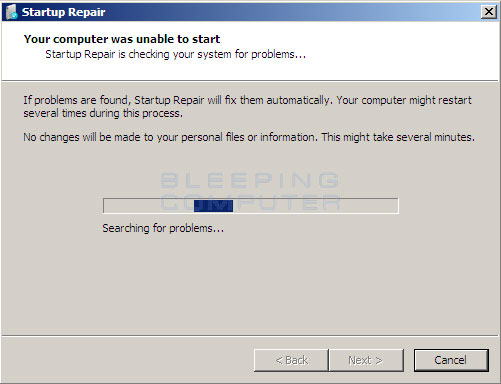
After finishing the repair, windows restart must be needed noted in the repair window.
I conformed to restart my pc.
After restarting my pc, I saw there was not problem in startup. But there is not existence of my user account named "Mother". So I had to run my pc in administrator mode but I didn't know administrator password. Then I run my pc in safe mode.
After running my pc, I saw there is no files without windows 7 x64. The pc was arranged newly.
My pc had 1 partition named "local drive:c" (Windows is usually install in drive c.)
So I had to save my personal files in drive C & lost those after running "windows 7 startup repair".
Last of all, my problem is:
1. "windows 7 startup repair" delete my personal files in drive c forever...
Need: How can I recover my files that was in my drive C.
Hint: After running windows 7 in safe mode, I found my drive "C" is used about 7 Gb. But I used 500 GB before my problem caution.
{I am not good at English. So I may not able to explain my problem. If you need any information to solve my problem, please comment.}
Thanks...
I am windows 7 home premium user with 1 Tb hard disk (1 partition).
Earlier day, while my pc was shutting down. Unfortunately I disconnect the electricity line. So my pc couldn't shut down correctly.
After 2 hours, I was trying to start my pc. But after boot screen a message was shown with 2 options.
1st option: The message may be for running "windows 7 startup repair" recommently.
2nd option: For running windows normally
While I was trying to run windows normally. It seemed a black screen & began to restart my pc. I was trying to run windows normally for many times but I was failed.
Then I had to run "windows 7 startup repair". While starting "windows 7 startup repair" it showed a loading window & noted "No changes will be made to your personal files or information"
After finishing the repair, windows restart must be needed noted in the repair window.
I conformed to restart my pc.
After restarting my pc, I saw there was not problem in startup. But there is not existence of my user account named "Mother". So I had to run my pc in administrator mode but I didn't know administrator password. Then I run my pc in safe mode.
After running my pc, I saw there is no files without windows 7 x64. The pc was arranged newly.
My pc had 1 partition named "local drive:c" (Windows is usually install in drive c.)
So I had to save my personal files in drive C & lost those after running "windows 7 startup repair".
Last of all, my problem is:
1. "windows 7 startup repair" delete my personal files in drive c forever...
Need: How can I recover my files that was in my drive C.
Hint: After running windows 7 in safe mode, I found my drive "C" is used about 7 Gb. But I used 500 GB before my problem caution.
{I am not good at English. So I may not able to explain my problem. If you need any information to solve my problem, please comment.}
Thanks...
My Computer
At a glance
windows 7 home premium x64windows 78 Gbnvidia gt 680
- Computer type
- Laptop
- Computer Manufacturer/Model Number
- Asus
- OS
- windows 7 home premium x64
- CPU
- windows 7
- Motherboard
- asus
- Memory
- 8 Gb
- Graphics Card(s)
- nvidia gt 680
- Hard Drives
- 1 tb
- Antivirus
- norton 360
- Browser
- google chrome


