Solved Windows 7 Stuck on Shutting Down Screen

d4rkm4n

New member
Local time
9:33 PM
Messages
16

My Computer My Computer

At a glance

Windows 7 Ultimate x64i58GBNvidia 620M
Computer type
Laptop
Computer Manufacturer/Model Number
Samsung
OS
Windows 7 Ultimate x64
CPU
i5
Memory
8GB
Graphics Card(s)
Nvidia 620M
Antivirus
Malwarebytes
Browser
Chorme
Anyone can assist me on this?
 

My Computer My Computer

At a glance

Windows 7 Ultimate x64i58GBNvidia 620M
Computer type
Laptop
Computer Manufacturer/Model Number
Samsung
OS
Windows 7 Ultimate x64
CPU
i5
Memory
8GB
Graphics Card(s)
Nvidia 620M
Antivirus
Malwarebytes
Browser
Chorme
When it enters the Shut Down mode, do you see a black screen that has 2 buttons on it, one saying "Force shut down" & the other saying "Cancel". If this is the case select the "Cancel" button & when the desktop resumes, Right Click on the Task bar & select Start Task Manager, click on the Applications tab & see what is still open. You can also click on the other tabs that might give you a clue as to what is holding back Shut Down.
 

My Computer My Computer

At a glance

Windows 7 Home Premium 64 bit sp1Intel i5 3570 3.4Ghz Ivy Bridge SKT 1155 quad...G-Skill Rip Jaws 16Gb (8x2) DDR3 -1600 PC3 12...Gigabyte NVIDIA GT610 1Gb DDR3 810/1200 PCI-E...
Computer type
PC/Desktop
Computer Manufacturer/Model Number
Self built using existing case
OS
Windows 7 Home Premium 64 bit sp1
CPU
Intel i5 3570 3.4Ghz Ivy Bridge SKT 1155 quad core
Motherboard
Gigabyte Z77-HD3 SKT 1155 2xSata 3, 4x USB 3.0
Memory
G-Skill Rip Jaws 16Gb (8x2) DDR3 -1600 PC3 12800 CL 10 red
Graphics Card(s)
Gigabyte NVIDIA GT610 1Gb DDR3 810/1200 PCI-E 2.0 Silent
Sound Card
NVIDIA High Definition & Realtech High Definition Audio
Monitor(s) Displays
2 x Philips 226V4L 16:9 aspect ratio
Screen Resolution
1920 x 1080 HD
Hard Drives
Samsung 840 Pro 256gb SSD, SATA 3.
Hitachi Touro Portable 1tb, USB 3.0 HDD used for image b/ups.
PSU
Corsair VS450
Case
Codeng
Cooling
PSU fan & CPU fan
Keyboard
Logitech
Mouse
Logitech Wireless trackball M570
Internet Speed
Wireless 3G. 3mg down & 550kb up.
Antivirus
Bitdefender Internet Security 2020
Browser
Opera (Current Version) & Firefox
Other Info
MS Office 2013 Pro. Davis weather station software. MGE Nova 600 avr UPS.
When it enters the Shut Down mode, do you see a black screen that has 2 buttons on it, one saying "Force shut down" & the other saying "Cancel". If this is the case select the "Cancel" button & when the desktop resumes, Right Click on the Task bar & select Start Task Manager, click on the Applications tab & see what is still open. You can also click on the other tabs that might give you a clue as to what is holding back Shut Down.

I dont get any black screen, just direct to this but its stuck there like forever.

screenshot.9.jpg
 

My Computer My Computer

At a glance

Windows 7 Ultimate x64i58GBNvidia 620M
Computer type
Laptop
Computer Manufacturer/Model Number
Samsung
OS
Windows 7 Ultimate x64
CPU
i5
Memory
8GB
Graphics Card(s)
Nvidia 620M
Antivirus
Malwarebytes
Browser
Chorme
When you get the Shutting Down screen as above, have you tried hitting "Ctrl, Alt, Delete" at the same time? Then follow Ranger4 instructions above. That will give you a clue hopefully. Let us know what happens.
 

My Computer My Computer

At a glance

Windows 7 Home Premium 32-Bit - Build 7600 SP1Intel Core i3-2120 3.30GhzKingston 4 GB DDR3 1333 mhzAMD Radeon HD6670
Computer type
PC/Desktop
Computer Manufacturer/Model Number
Custom Build
OS
Windows 7 Home Premium 32-Bit - Build 7600 SP1
CPU
Intel Core i3-2120 3.30Ghz
Motherboard
Asus P8Z68-V LX Intel Z68 Socket H2 ATX
Memory
Kingston 4 GB DDR3 1333 mhz
Graphics Card(s)
AMD Radeon HD6670
Sound Card
Sound Blaster Audigy SE 24-Bit
Monitor(s) Displays
Asus VE228
Screen Resolution
1440 X 900
Hard Drives
OCZ Vertex 3 120 GB Sata 3 SSD ==
Kingston SH103/S3 120 G Hyper X 120 GB SSD ==
Western Digital 500 GB Caviar Green 7200 RPM ==
PSU
Corsair CX600M == 600 Watt
Case
NZXT Apollo - Silver with Clear Side Panel
Cooling
Three 120 mm Fans
Keyboard
Microsoft Natural 4000
Mouse
Microsoft Custom Optical 3000
Internet Speed
AT&T Fiber Optic Wireless Network
Antivirus
Microsoft Security Essentials
Browser
Chrome
Other Info
120 mm Blue LED Fan -- Three Blue LED Lazer Light Sticks
When you get the Shutting Down screen as above, have you tried hitting "Ctrl, Alt, Delete" at the same time? Then follow Ranger4 instructions above. That will give you a clue hopefully. Let us know what happens.

Thanks.

I tried "Ctrl, Alt, Delete" and "Ctrl, Shift, Esc", both doesnt work.
 

My Computer My Computer

At a glance

Windows 7 Ultimate x64i58GBNvidia 620M
Computer type
Laptop
Computer Manufacturer/Model Number
Samsung
OS
Windows 7 Ultimate x64
CPU
i5
Memory
8GB
Graphics Card(s)
Nvidia 620M
Antivirus
Malwarebytes
Browser
Chorme
When you get the Shutting Down screen as above, have you tried hitting "Ctrl, Alt, Delete" at the same time? Then follow Ranger4 instructions above. That will give you a clue hopefully. Let us know what happens.

Thanks.

I tried "Ctrl, Alt, Delete" and "Ctrl, Shift, Esc", both doesnt work.

When you decide to shut down, make sure all open programs etc. are closed & then Right Click on the Task Bar, as I mentioned in Post #3 & see if any programs are still running. If so you will now know which one or ones that have not closed & you can then find out why.
 

My Computer My Computer

At a glance

Windows 7 Home Premium 64 bit sp1Intel i5 3570 3.4Ghz Ivy Bridge SKT 1155 quad...G-Skill Rip Jaws 16Gb (8x2) DDR3 -1600 PC3 12...Gigabyte NVIDIA GT610 1Gb DDR3 810/1200 PCI-E...
Computer type
PC/Desktop
Computer Manufacturer/Model Number
Self built using existing case
OS
Windows 7 Home Premium 64 bit sp1
CPU
Intel i5 3570 3.4Ghz Ivy Bridge SKT 1155 quad core
Motherboard
Gigabyte Z77-HD3 SKT 1155 2xSata 3, 4x USB 3.0
Memory
G-Skill Rip Jaws 16Gb (8x2) DDR3 -1600 PC3 12800 CL 10 red
Graphics Card(s)
Gigabyte NVIDIA GT610 1Gb DDR3 810/1200 PCI-E 2.0 Silent
Sound Card
NVIDIA High Definition & Realtech High Definition Audio
Monitor(s) Displays
2 x Philips 226V4L 16:9 aspect ratio
Screen Resolution
1920 x 1080 HD
Hard Drives
Samsung 840 Pro 256gb SSD, SATA 3.
Hitachi Touro Portable 1tb, USB 3.0 HDD used for image b/ups.
PSU
Corsair VS450
Case
Codeng
Cooling
PSU fan & CPU fan
Keyboard
Logitech
Mouse
Logitech Wireless trackball M570
Internet Speed
Wireless 3G. 3mg down & 550kb up.
Antivirus
Bitdefender Internet Security 2020
Browser
Opera (Current Version) & Firefox
Other Info
MS Office 2013 Pro. Davis weather station software. MGE Nova 600 avr UPS.
When you decide to shut down, make sure all open programs etc. are closed & then Right Click on the Task Bar, as I mentioned in Post #3 & see if any programs are still running. If so you will now know which one or ones that have not closed & you can then find out why.
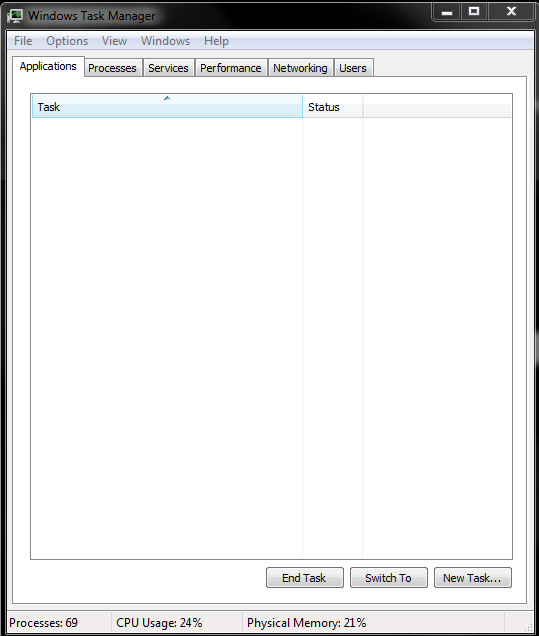
I checked right before I shutdown. There is nothing on task manager.

bun6R96.png
 

My Computer My Computer

At a glance

Windows 7 Ultimate x64i58GBNvidia 620M
Computer type
Laptop
Computer Manufacturer/Model Number
Samsung
OS
Windows 7 Ultimate x64
CPU
i5
Memory
8GB
Graphics Card(s)
Nvidia 620M
Antivirus
Malwarebytes
Browser
Chorme
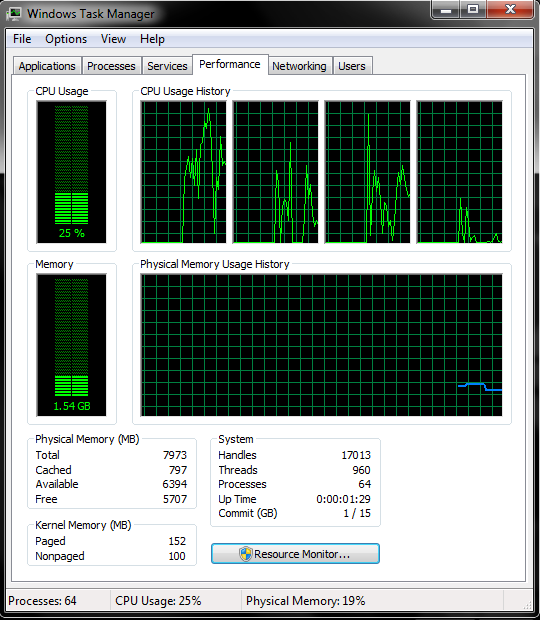
Try this now. Do the same thing you just did except click on the Performance Tab. If everything is closed, there should be very little CPU usage.
 

Attachments

  • Capture.PNG
    Capture.PNG
    38.6 KB · Views: 14

My Computer My Computer

At a glance

Windows 7 Home Premium 32-Bit - Build 7600 SP1Intel Core i3-2120 3.30GhzKingston 4 GB DDR3 1333 mhzAMD Radeon HD6670
Computer type
PC/Desktop
Computer Manufacturer/Model Number
Custom Build
OS
Windows 7 Home Premium 32-Bit - Build 7600 SP1
CPU
Intel Core i3-2120 3.30Ghz
Motherboard
Asus P8Z68-V LX Intel Z68 Socket H2 ATX
Memory
Kingston 4 GB DDR3 1333 mhz
Graphics Card(s)
AMD Radeon HD6670
Sound Card
Sound Blaster Audigy SE 24-Bit
Monitor(s) Displays
Asus VE228
Screen Resolution
1440 X 900
Hard Drives
OCZ Vertex 3 120 GB Sata 3 SSD ==
Kingston SH103/S3 120 G Hyper X 120 GB SSD ==
Western Digital 500 GB Caviar Green 7200 RPM ==
PSU
Corsair CX600M == 600 Watt
Case
NZXT Apollo - Silver with Clear Side Panel
Cooling
Three 120 mm Fans
Keyboard
Microsoft Natural 4000
Mouse
Microsoft Custom Optical 3000
Internet Speed
AT&T Fiber Optic Wireless Network
Antivirus
Microsoft Security Essentials
Browser
Chrome
Other Info
120 mm Blue LED Fan -- Three Blue LED Lazer Light Sticks
Startup:
f5q1EOK.png


Before shutting down:
q8P5T4S.png
 

My Computer My Computer

At a glance

Windows 7 Ultimate x64i58GBNvidia 620M
Computer type
Laptop
Computer Manufacturer/Model Number
Samsung
OS
Windows 7 Ultimate x64
CPU
i5
Memory
8GB
Graphics Card(s)
Nvidia 620M
Antivirus
Malwarebytes
Browser
Chorme
Btw, I just found out that my laptop only stuck on shutting down if I'm playing games from Steam.

I got two games installed:
-Dota
-Rocket League

If I just open Steam but not playing games, it will shutdown normally but if I play the games, it will stuck on shutting down screen.

Steam were closed in both cases before the I shutdown the laptop.

There is no different processes between both cases after steam were closed.

It was OK before, not sure what happen.
 

My Computer My Computer

At a glance

Windows 7 Ultimate x64i58GBNvidia 620M
Computer type
Laptop
Computer Manufacturer/Model Number
Samsung
OS
Windows 7 Ultimate x64
CPU
i5
Memory
8GB
Graphics Card(s)
Nvidia 620M
Antivirus
Malwarebytes
Browser
Chorme
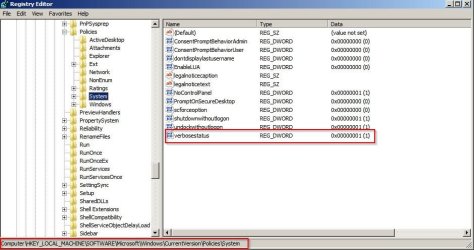
Suggest: Enable Verbose Status Messages when shutting down:

HKEY_LOCAL_MACHINE \ SOFTWARE \ Microsoft \ Windows \ CurrentVersion \ Policies \ System

Create a new New DWORD Value verbosestatus. Give it a value 1. This will enable Verbose Status Messages. To disable these messages give it a value 0 or simply delete the created key. Exit Registry.

Verbose.jpg

Then when you shutdown you might see what part is taking some time.

Also enable fast shutdown tweaks including Option 2 Step 5

http://www.sevenforums.com/tutorials/717-shut-down-speed-up.html
 
Last edited:

My Computer My Computer

At a glance

Microsoft Windows 7 Home Premium 64-bit 7601 ...AMD C-60 APU with Radeon(tm) HD Graphics4.00 GBAMD Radeon HD 6290 Graphics
Computer type
Laptop
Computer Manufacturer/Model Number
ASUS
OS
Microsoft Windows 7 Home Premium 64-bit 7601 Multiprocessor Free Service Pack 1
CPU
AMD C-60 APU with Radeon(tm) HD Graphics
Motherboard
ASUSTeK COMPUTER INC. X501U
Memory
4.00 GB
Graphics Card(s)
AMD Radeon HD 6290 Graphics
Sound Card
(1) AMD High Definition Audio Device (2) Realtek High Defi
Screen Resolution
1366 x 768 x 32 bits (4294967296 colors) @ 60 Hz
Hard Drives
Hitachi HTS545050A7E380 SATA Disk Device
Antivirus
Comodo CIS & FW, SecureAplus App Whitelisting, Threatfire
Browser
Cyberfox 64bit, Opera 64bit, Airfox
Other Info
Spy-The-Spy, HitmanPro.Alert, Norton Connect Safe, MJRegWatcher, BitDefender TrafficLight, Voodoo Shield, Zemana AntiMalware
Suggest: Enable Verbose Status Messages when shutting down:

HKEY_LOCAL_MACHINE \ SOFTWARE \ Microsoft \ Windows \ CurrentVersion \ Policies \ System

Create a new New DWORD Value verbosestatus. Give it a value 1. This will enable Verbose Status Messages. To disable these messages give it a value 0 or simply delete the created key. Exit Registry.


Then when you shutdown you might see what part is taking some time.

Also enable fast shutdown tweaks including Option 2 Step 5

http://www.sevenforums.com/tutorials/717-shut-down-speed-up.html
Tried the regedit, it showing stopping services for like 1 second then still stuck on shutting down..

Done the tweaks too.
 

My Computer My Computer

At a glance

Windows 7 Ultimate x64i58GBNvidia 620M
Computer type
Laptop
Computer Manufacturer/Model Number
Samsung
OS
Windows 7 Ultimate x64
CPU
i5
Memory
8GB
Graphics Card(s)
Nvidia 620M
Antivirus
Malwarebytes
Browser
Chorme
If your system specs are correct,
Unless your running Malwarebytes PRO, you do not have a true anti-virus.

Suggest you run a scan with Malwarebytes, (enable rootkit detection)
Then run
ESET on-line scan.

Malware tends to phone home on system shutdown.

Roy
 

My Computer My Computer

At a glance

W7 home premium 32bit/W7HP 64bit/w10 tp insid...E5300 dual core3gbNvidia Geforce 7100 Nforce 630i
Computer type
PC/Desktop
Computer Manufacturer/Model Number
medionl/Aspire 6930G/acer x55a
OS
W7 home premium 32bit/W7HP 64bit/w10 tp insider ring
CPU
E5300 dual core
Motherboard
medion MS7366
Memory
3gb
Graphics Card(s)
Nvidia Geforce 7100 Nforce 630i
Monitor(s) Displays
avixc
Internet Speed
n (isp resticted to 72)
Antivirus
mse/pands
Browser
palemoon
Other Info
Belkin Fd7050 n USB using Railink RT2870 drivers, more upto date
If your system specs are correct,
Unless your running Malwarebytes PRO, you do not have a true anti-virus.

Suggest you run a scan with Malwarebytes, (enable rootkit detection)
Then run
ESET on-line scan.

Malware tends to phone home on system shutdown.

Roy

Actually, I tried to run MBAM with rootkit detection but keep getting this error:

"Error: malwarebytes was unable to load the anti-rootkit driver. Error code:20026"

Any idea?
 

My Computer My Computer

At a glance

Windows 7 Ultimate x64i58GBNvidia 620M
Computer type
Laptop
Computer Manufacturer/Model Number
Samsung
OS
Windows 7 Ultimate x64
CPU
i5
Memory
8GB
Graphics Card(s)
Nvidia 620M
Antivirus
Malwarebytes
Browser
Chorme
Btw, I ran the MalwareBytes Anti-Rootkit and nothing came up clean.

EDIT:
ESET Online Scan also show up clean.
 
Last edited:

My Computer My Computer

At a glance

Windows 7 Ultimate x64i58GBNvidia 620M
Computer type
Laptop
Computer Manufacturer/Model Number
Samsung
OS
Windows 7 Ultimate x64
CPU
i5
Memory
8GB
Graphics Card(s)
Nvidia 620M
Antivirus
Malwarebytes
Browser
Chorme
Please help me d4rkm4n; you have got me confused.

1. In your system spec your Windows 7 is Ultimate.
2. In your picture (post #4) it shows Windows 7 Enterprise.
3. I don't see anything in your thread about W-10.

Therefore I'm not understanding how this helped.


https://www.reddit.com/r/Windows10/c..._to_the_sleep/
 

My Computer My Computer

At a glance

Windows 10 Pro. 64/ version 1709 Windows 7 Pr...Intel i7-6800K @ 4.3Corsair Platinum 16 gig @2400EVGA GTX 1070 OC
Computer type
PC/Desktop
Computer Manufacturer/Model Number
Home made Desktop
OS
Windows 10 Pro. 64/ version 1709 Windows 7 Pro/64
CPU
Intel i7-6800K @ 4.3
Motherboard
ASUS X-99 Deluxe II
Memory
Corsair Platinum 16 gig @2400
Graphics Card(s)
EVGA GTX 1070 OC
Monitor(s) Displays
Asus 27" LED LCD/VE278Q
Screen Resolution
1920-1080 or 1280-720 HDMI
Hard Drives
INTEL SSD 730-240 Gb Sata 3.0/
PSU
EVGA Platium 1200W
Case
Phanteks Luxe Tempered Glass 8 fans/ one radiator
Cooling
XSPC/ Water Cooled CPU
Keyboard
Das 4 Professional
Mouse
Logitech M705/MX Anywhere 2-S
Internet Speed
100 mbits
Antivirus
Microsoft Security Essentials/ Malwarebytes Premium 3.0/ SAS
Browser
I.E. 11 default/Firefox/ ISP Time Warner Cable/Spectrum
Other Info
LG BluRay Burner/
Sound system-KLipsch-THX/
Icy Dock ssd Hot Swap bays.
Please help me d4rkm4n; you have got me confused.

1. In your system spec your Windows 7 is Ultimate.
2. In your picture (post #4) it shows Windows 7 Enterprise.
3. I don't see anything in your thread about W-10.

Therefore I'm not understanding how this helped.


https://www.reddit.com/r/Windows10/c..._to_the_sleep/
Sorry for that.

1. My early system is Windows 7 Ultimate when this problem occurs.
2. In the shutdown picture is from internet, since I cant SS from Shutting Down screen.
3. I upgraded to Win 10 with the hope the problem will be gone but its not, its been a week. I love my windows 7 but still, the keyword Window 10 pointed me to that thread.

Hope that clears all.
 

My Computer My Computer

At a glance

Windows 7 Ultimate x64i58GBNvidia 620M
Computer type
Laptop
Computer Manufacturer/Model Number
Samsung
OS
Windows 7 Ultimate x64
CPU
i5
Memory
8GB
Graphics Card(s)
Nvidia 620M
Antivirus
Malwarebytes
Browser
Chorme
Back
Top