Windows 7 Suspension/Hibernation Doubt

carapau

New member
Local time
10:31 AM
Messages
12
Location
Home
First of all, I didn't know in which section to open this thread, so I did it on this one, if it's not on the right one, sorry , and second I don't know if someone ever asked this here on this forum, I tried to make a brief search through google and such, but didn't got any positive results, maybe because English isn't my mother language and am not searching the right keywords...

SO, this is it: Is there any way or tweak to change the computer behavior on Suspension/Hibernation? I mean, I wanted it to wake only if I pressed the Power Button, not by tapping a key on keyboard or moving with the mouse.
And why I want this? Well mainly because I suspend my computer more often than shut down, and sometimes it wakes up alone in the middle of the night when I'm asleep and I have to get up to turn it down, I think its the mouse that is too sensitive and does that, and the second reason is, my mom, when he gets to my room , touches something, there, the computer wakes as well..
So, is there anyway to tweak it?
THanks !
 

My Computer My Computer

OS
Windows 7 Professional x86
lol, bump
 

My Computer My Computer

OS
Windows 7 Professional x86
One way you should be able to do this:

Open a Command Prompt (CMD) window and run this command (may need to Run as administrator)
Powercfg -devicequery wake_armed

If you see your mouse listed you can run a command to disable it's wake ability

The syntax is device specific, but here is a command I used for an MS mouse
Powercfg -devicedisablewake "Microsoft USB Wireless Mouse (IntelliPoint)"

You will need to replace the device in red in my example with the exact text you see in your wake_armed list for a mouse

You can disable wake ability for any device...
If you need help with your specific devices, copy the output from the wake_armed command and post it in your reply
 
Last edited:

My Computer My Computer

Computer type
PC/Desktop
Computer Manufacturer/Model Number
home built
OS
Multi-Boot W7_Pro_x64 W8.1_Pro_x64 W10_Pro_x64 +Linux_VMs +Chromium_VM
CPU
AMD Athlon II x4 620
Motherboard
Gigabyte GA-MA785G-UD3H
Memory
6GB GSkill DDR2 800
Graphics Card(s)
AMD 4670 GPU + AMD 4200 IGP
Sound Card
on board Realtek ALC889A
Monitor(s) Displays
RCA 40" LCD TV, Insignia 32" LCD TV, HP 15" LCD monitor
Screen Resolution
1680 x 1050
Hard Drives
OCZ Vertex 3 120GB,
Samsung F3 1TB (3),
Several others - WD, Seagate, Hitachi, ...
PSU
Corsair 500 W
Case
Rosewill mid tower
Cooling
CM 90mm rifle
Keyboard
Gyration wireless, Logitech wireless, Dell USB wired
Mouse
Gyration wireless, Logitech wireless, V7 USB wired
Internet Speed
Spectrum - 100Mbps D / 10Mbps U
Antivirus
Avast, MBAM3, EMET, WinPatrol
Browser
Pale Moon, Firefox, IE
Other Info
2 multi-boot PC's
Mainly HTPC/Office/Gen purpose (no gaming).
Trendnet USB KVM.
LG DVD burner/Blue Ray Player.
Tray system for removable SATA backup drives.

Not currently OCd, under-volted.
I use Hybrid sleep, rarely re-boot or shutdown.

Hauppauge HD-PVR, Avermedia PCIe TV Tuner, Hauppauge PCI TV Tuner.
One way you should be able to do this:

Another way:

Right click your mouse in Device Manager, select Properties from context menu, select / unselect Allow this device to wake the computer according to what you want to. Notice that you need to do this separately for every mouse you want to enable / disable, for instance in case of laptops also for the TouchPad.

2013-07-24_111209.PNG

Tutorial: http://www.sevenforums.com/tutorials/122027-devices-allow-prevent-wake-up-computer.html

Kari
 

My Computer My Computer

Computer type
Laptop
Computer Manufacturer/Model Number
HP ENVY 17-1150eg
OS
Windows 10 Pro x64 EN-GB
CPU
1.6 GHz Intel Core i7-720QM Processor
Memory
6 GB
Graphics Card(s)
ATI Mobility Radeon HD 5850 Graphics
Sound Card
Beats sound system with integrated subwoofer
Monitor(s) Displays
17" laptop display, 22" LED and 32" Full HD TV through HDMI
Screen Resolution
1600*900 (1), 1920*1080 (2&3)
Hard Drives
Internal: 2 x 500 GB SATA Hard Disk Drive 7200 rpm
External: 2TB for backups, 3TB USB3 network drive for media
Cooling
As Envy runs a bit warm, I have it on a Cooler Master pad
Keyboard
Logitech diNovo Media Desktop Laser (bluetooth)
Mouse
Logitech Performance Mouse MX
Internet Speed
50/10 Mbps VDSL
Antivirus
Windows Defender 4.3.9431.0
Browser
Maxthon 3.5.2., IE11
Thing is, when I run that command, neither mouse or keyboard appears on the list, only modem/ethernet controler. Nor on where you said Kari...
 

My Computer My Computer

OS
Windows 7 Professional x86
Thing is, when I run that command, neither mouse or keyboard appears on the list, only modem/ethernet controler. Nor on where you said Kari...
I have never ever heard about a Windows 7 installation where both mouse and keyboard are working but neither can be found in Device Manager.

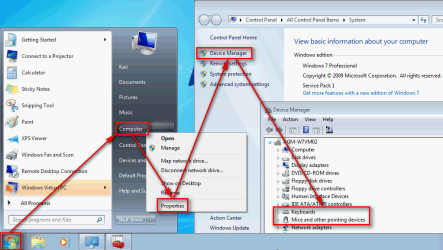
Please open the Device Manager, make a screenshot of it and post here. Before continuing we need to fix this very strange and basically impossible issue, no mice and keyboards in Device Manager.

To open the Device Manager:
  • Click Start
  • Right click Computer, select Properties. This opens the System window
  • Click Device Manager on the left pane:
    2013-07-26_163401.PNG
  • Now click the small arrowhead to the left of titles Keyboards and Mice and other pointing devices to expand those to show all installed keyboards and mice and make the screenshot
How to make and post screenshots on Seven Forums:
Kari
 
Last edited:

My Computer My Computer

Computer type
Laptop
Computer Manufacturer/Model Number
HP ENVY 17-1150eg
OS
Windows 10 Pro x64 EN-GB
CPU
1.6 GHz Intel Core i7-720QM Processor
Memory
6 GB
Graphics Card(s)
ATI Mobility Radeon HD 5850 Graphics
Sound Card
Beats sound system with integrated subwoofer
Monitor(s) Displays
17" laptop display, 22" LED and 32" Full HD TV through HDMI
Screen Resolution
1600*900 (1), 1920*1080 (2&3)
Hard Drives
Internal: 2 x 500 GB SATA Hard Disk Drive 7200 rpm
External: 2TB for backups, 3TB USB3 network drive for media
Cooling
As Envy runs a bit warm, I have it on a Cooler Master pad
Keyboard
Logitech diNovo Media Desktop Laser (bluetooth)
Mouse
Logitech Performance Mouse MX
Internet Speed
50/10 Mbps VDSL
Antivirus
Windows Defender 4.3.9431.0
Browser
Maxthon 3.5.2., IE11
Thing is, they do show up on device manager, but when I click properties, the last tab "power management" isn't there, same for command prompt, here's a screenshot:
1nNBUQW4.png
 

Attachments

  • 1nNBUQW4.png
    1nNBUQW4.png
    53.9 KB · Views: 3

My Computer My Computer

OS
Windows 7 Professional x86
Do you logon Windows with a Standard account (not an Admin account)?
If you do, can you logon with an Admin account and see if the Power Management tab is displayed?
 

My Computer My Computer

Computer type
PC/Desktop
Computer Manufacturer/Model Number
home built
OS
Multi-Boot W7_Pro_x64 W8.1_Pro_x64 W10_Pro_x64 +Linux_VMs +Chromium_VM
CPU
AMD Athlon II x4 620
Motherboard
Gigabyte GA-MA785G-UD3H
Memory
6GB GSkill DDR2 800
Graphics Card(s)
AMD 4670 GPU + AMD 4200 IGP
Sound Card
on board Realtek ALC889A
Monitor(s) Displays
RCA 40" LCD TV, Insignia 32" LCD TV, HP 15" LCD monitor
Screen Resolution
1680 x 1050
Hard Drives
OCZ Vertex 3 120GB,
Samsung F3 1TB (3),
Several others - WD, Seagate, Hitachi, ...
PSU
Corsair 500 W
Case
Rosewill mid tower
Cooling
CM 90mm rifle
Keyboard
Gyration wireless, Logitech wireless, Dell USB wired
Mouse
Gyration wireless, Logitech wireless, V7 USB wired
Internet Speed
Spectrum - 100Mbps D / 10Mbps U
Antivirus
Avast, MBAM3, EMET, WinPatrol
Browser
Pale Moon, Firefox, IE
Other Info
2 multi-boot PC's
Mainly HTPC/Office/Gen purpose (no gaming).
Trendnet USB KVM.
LG DVD burner/Blue Ray Player.
Tray system for removable SATA backup drives.

Not currently OCd, under-volted.
I use Hybrid sleep, rarely re-boot or shutdown.

Hauppauge HD-PVR, Avermedia PCIe TV Tuner, Hauppauge PCI TV Tuner.
Last edited:

My Computer My Computer

Computer type
PC/Desktop
Computer Manufacturer/Model Number
home built
OS
Multi-Boot W7_Pro_x64 W8.1_Pro_x64 W10_Pro_x64 +Linux_VMs +Chromium_VM
CPU
AMD Athlon II x4 620
Motherboard
Gigabyte GA-MA785G-UD3H
Memory
6GB GSkill DDR2 800
Graphics Card(s)
AMD 4670 GPU + AMD 4200 IGP
Sound Card
on board Realtek ALC889A
Monitor(s) Displays
RCA 40" LCD TV, Insignia 32" LCD TV, HP 15" LCD monitor
Screen Resolution
1680 x 1050
Hard Drives
OCZ Vertex 3 120GB,
Samsung F3 1TB (3),
Several others - WD, Seagate, Hitachi, ...
PSU
Corsair 500 W
Case
Rosewill mid tower
Cooling
CM 90mm rifle
Keyboard
Gyration wireless, Logitech wireless, Dell USB wired
Mouse
Gyration wireless, Logitech wireless, V7 USB wired
Internet Speed
Spectrum - 100Mbps D / 10Mbps U
Antivirus
Avast, MBAM3, EMET, WinPatrol
Browser
Pale Moon, Firefox, IE
Other Info
2 multi-boot PC's
Mainly HTPC/Office/Gen purpose (no gaming).
Trendnet USB KVM.
LG DVD burner/Blue Ray Player.
Tray system for removable SATA backup drives.

Not currently OCd, under-volted.
I use Hybrid sleep, rarely re-boot or shutdown.

Hauppauge HD-PVR, Avermedia PCIe TV Tuner, Hauppauge PCI TV Tuner.
Actually I dont have any usb mouse/keyboard, so that means with a PS/2 I can't disable it? Meh, too bad :rolleyes:

PS: and yes, I'm with admin account on the computer
 

My Computer My Computer

OS
Windows 7 Professional x86
Yea, looks like your keyboard and mouse don't support disabling wakeup.
You can find a USB Keyboard and mouse that aren't very expensive, especially if you keep an eye on Sales.

You can look at the options available for your Network adapter in Device Manager.
See if you can disable allow waking from sleep.
You may also want to look in BIOS setup for a setting like "Wake on LAN".
It's probably in a Power Management section of the BIOS settings.
If you do have Wake on LAN enabled, disable it.

The Network adapter may be what is causing your PC to wakeup in the middle of the night.
 

My Computer My Computer

Computer type
PC/Desktop
Computer Manufacturer/Model Number
home built
OS
Multi-Boot W7_Pro_x64 W8.1_Pro_x64 W10_Pro_x64 +Linux_VMs +Chromium_VM
CPU
AMD Athlon II x4 620
Motherboard
Gigabyte GA-MA785G-UD3H
Memory
6GB GSkill DDR2 800
Graphics Card(s)
AMD 4670 GPU + AMD 4200 IGP
Sound Card
on board Realtek ALC889A
Monitor(s) Displays
RCA 40" LCD TV, Insignia 32" LCD TV, HP 15" LCD monitor
Screen Resolution
1680 x 1050
Hard Drives
OCZ Vertex 3 120GB,
Samsung F3 1TB (3),
Several others - WD, Seagate, Hitachi, ...
PSU
Corsair 500 W
Case
Rosewill mid tower
Cooling
CM 90mm rifle
Keyboard
Gyration wireless, Logitech wireless, Dell USB wired
Mouse
Gyration wireless, Logitech wireless, V7 USB wired
Internet Speed
Spectrum - 100Mbps D / 10Mbps U
Antivirus
Avast, MBAM3, EMET, WinPatrol
Browser
Pale Moon, Firefox, IE
Other Info
2 multi-boot PC's
Mainly HTPC/Office/Gen purpose (no gaming).
Trendnet USB KVM.
LG DVD burner/Blue Ray Player.
Tray system for removable SATA backup drives.

Not currently OCd, under-volted.
I use Hybrid sleep, rarely re-boot or shutdown.

Hauppauge HD-PVR, Avermedia PCIe TV Tuner, Hauppauge PCI TV Tuner.
Back
Top